בחר שפה

Accident Affidavit Fillable PDF – Download & Complete Online

  1. מדינה ארה"ב
  2. שפה אנגלית
  3. מַחלָקָה Legal
  4. פעילות Legal Documents
Accident Affidavit Fillable PDF – Download & Complete Online

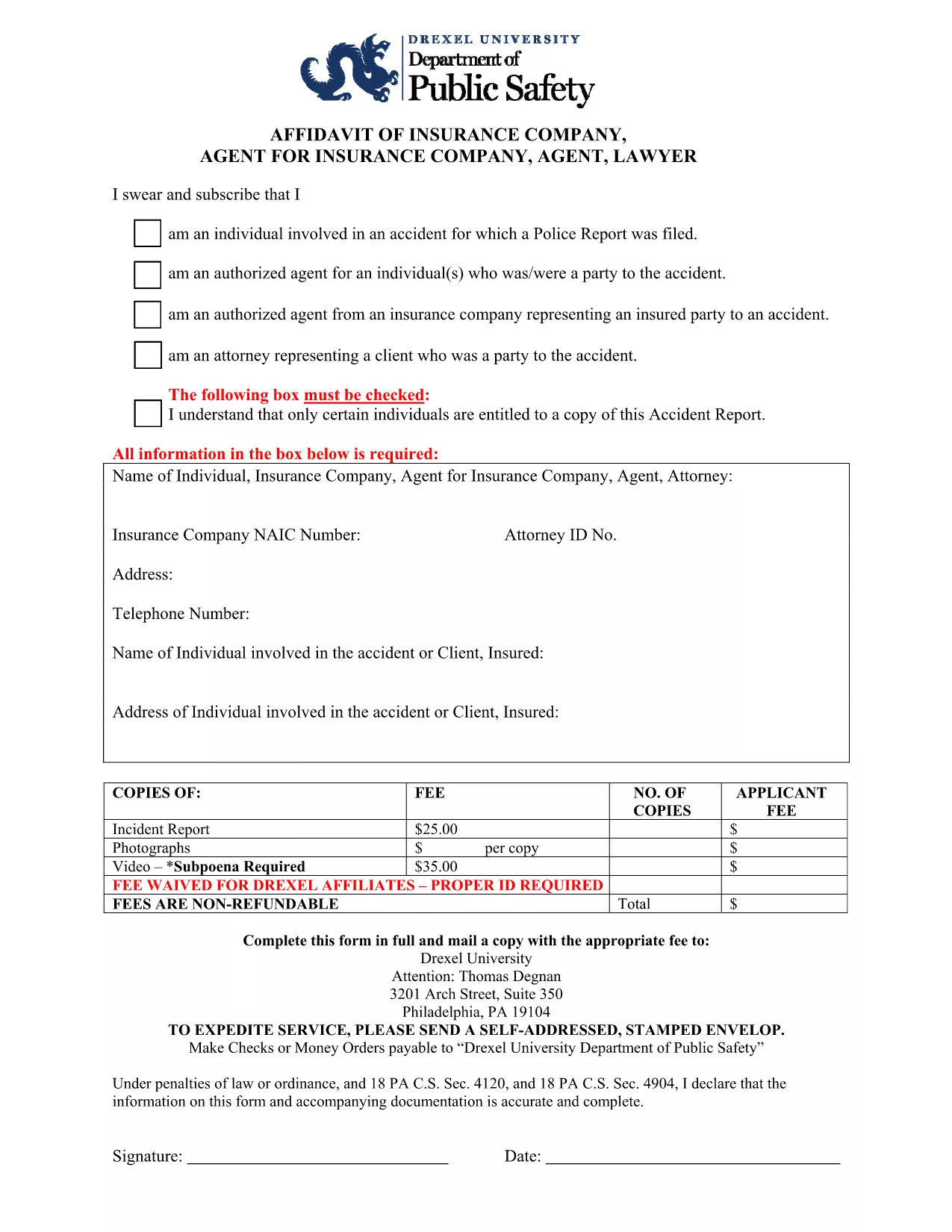
An accident affidavit is a sworn written statement that details the facts surrounding a vehicle or personal injury incident. Courts, insurance companies, and legal representatives rely on this document to establish liability, verify damages, and support claim settlements.

Our fillable Accident Affidavit PDF eliminates the hassle of printing, scanning, or hand‑writing. Powered by Formize’s PDF Filler app, you can fill, sign, and download the completed form directly from your browser – all while keeping your data secure.

What Is an Accident Affidavit?

The affidavit captures essential information such as the date, time, location of the accident, parties involved, vehicle details, witness statements, and a narrative of how the incident occurred. Because it is a legal document, the information must be accurate and signed under oath.

Why Choose Our Fillable PDF Form?

  • Instant download – Get the PDF with one click.
  • Online filling – No PDF editor needed; the Formize filler loads automatically.
  • Auto‑save – Your progress is saved in the browser, preventing data loss.
  • e‑Signature ready – Sign with a mouse, touch screen, or stylus.
  • Compliance‑ready – Meets most state requirements for sworn statements.

How to Complete the Accident Affidavit in Seconds

Follow the simple steps below. The process takes less than five minutes for most users.

Common Mistakes to Avoid

Even a small error can delay your claim. Make sure to:

  • Enter the exact date and time of the accident.
  • Provide full legal names and contact information for all parties.
  • Describe the incident objectively—avoid opinion or speculation.
  • Include every witness, even if they only saw a portion of the event.
  • Sign and date the form before saving or exporting.

Where to Submit Your Completed Affidavit

After saving the filled PDF, you can:

  • Upload it to your insurance claim portal.
  • Send it to your attorney for legal review.
  • File it with the appropriate court or law enforcement agency.

Always keep a copy for your records.

שאלות נפוצות
  • What is the difference between an accident report and an accident affidavit?

    An accident report records factual details for internal or regulatory use, while an affidavit is a sworn statement that can be used as legal evidence in court or insurance claims.

  • Do I need a notary for the accident affidavit?

    Many jurisdictions accept a signed affidavit without notarization, but some courts or insurers may require a notary. Check the specific requirements of the agency requesting the form.

  • Can I edit the PDF after I’ve saved it?

    Yes. Open the saved PDF in any PDF viewer that supports form fields, or re‑open it with the Formize filler to make adjustments before final submission.

  • Is my information safe when I use Formize’s filler?

    Formize uses SSL encryption and processes all data locally in your browser, so your personal details never leave your device unless you choose to upload or share the file.

  • What if I make a mistake while filling the form?

    You can simply delete the incorrect entry and type the correct information. If you have already saved the PDF, open it again with the filler to correct any errors.

  • How long does it take to complete the affidavit?

    For most users, entering the required details and signing takes under five minutes.

  • Do I need to include photos of the accident?

    Photos are not part of the affidavit itself, but attaching them to your claim or court filing can strengthen your case.

איך ל

כיצד למלא את accident affidavit בחינם, באינטרנט ב-5 שלבים פשוטים:

  1. 1
    Click the Fillable Form Button
    On this page, click the “Fill out this form” button. The Formize PDF Filler app will open instantly in a new tab.
  2. 2
    Enter Your Information
    Type directly into each highlighted field—date, location, parties, vehicle details, and the incident description.
  3. 3
    Add Your Signature
    Use your mouse, finger, or stylus to sign the affidavit in the designated signature box.
  4. 4
    Review and Save
    Double‑check all entries for accuracy, then click “Save” to download the completed PDF to your device.
  5. 5
    Submit to the Required Party
    Email, upload, or print the saved PDF and deliver it to your insurance company, attorney, or court as instructed.
Formize אפליקציית מילוי PDF
על אודות

תבנית accident affidavit

עם סט התכונות המסורתי לצפייה ומילוי של מסמך PDF, בשילוב עם היתרונות של אפליקציית אינטרנט ופריסה רספונסיבית, תוכל להשלים את accident affidavit בתוך דקות.

תכונות

מילוי PDF

הדרך הקלה ביותר למלא טפסי PDF באינטרנט

  • מלא במהירות את accident affidavit
    מחפש דרך למלא במהירות את accident affidavit באינטרנט? עם מילוי טופס ה-PDF המקוון שלנו בחינם, תדע כיצד לערוך ולמלא את מסמך ה-PDF הזה תוך פחות מדקה.
  • עורך PDF מקוון קל לשימוש
    נמאס לך להדפיס קבצי PDF כדי שתוכל לערוך אותם, לפני סריקה מחדש ושליחה חזרה? ערוך מסמכי PDF בחינם באינטרנט. השתמש בעורך ה-PDF המקוון שלנו כדי לחסוך בזמן ובנייר.
  • כלים מעולים, כל הפלטפורמות
    תוהה כיצד למלא את accident affidavit ב-Mac, או אולי איך להשתמש בחומר מילוי PDF בחינם? כלי ה-PDF המקוונים שלנו פועלים בכל הפלטפורמות.
  • אחסון קבצים מאובטח
    קבצי "accident affidavit" שהושלמו מאוחסנים במסד נתונים מאובטח המנוהל על ידי אירוח Amazon Cloud. אתה יכול למחוק את הקבצים שלך מהמערכת שלנו בכל עת. בכל מקרה, קבצים אלו נמחקים אוטומטית לאחר 24 שעות.
  • צ'אט עם accident affidavit
    צ'אט עם "accident affidavit" ב-Chatize שהוא עוזר לקורא PDF בחינם. שאל שאלות וקבל תשובות מ-"accident affidavit". פשוט לחץ על הלחצן צ'אט עם מסמך למעלה.

מחק הפעלת מילוי

למחוק את הפעלת המילוי שנבחרה? במקרה זה, ההתקדמות שלך במילוי הטופס תאבד.

מחק סשן עריכה

למחוק את סשן העריכה שנבחר? במקרה זה, ההתקדמות שלך ביצירה ועריכה של הטופס תאבד.