
בחר שפה

RI 20-97 – Military Earnings Request Form (Fillable PDF)

  1. מדינה ארה"ב
  2. שפה אנגלית
  3. מַחלָקָה משרד ניהול כוח אדם
  4. מִגזָר טפסי פרישה וביטוח
RI 20-97 – Military Earnings Request Form (Fillable PDF)

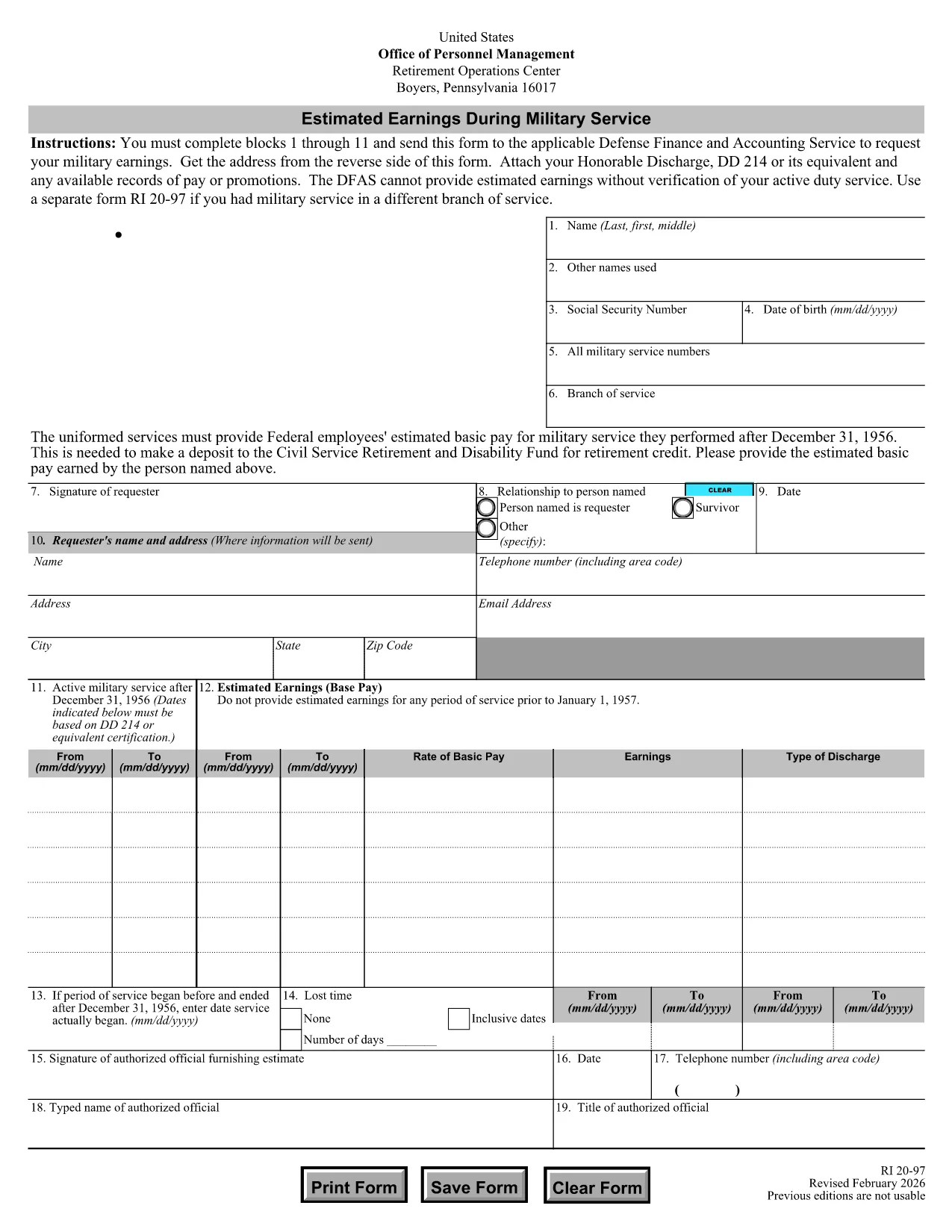
The RI 20-97 is the U.S. Office of Personnel Management (OPM) form used to request an estimate of your military earnings for retirement credit. Federal employees who have served in the armed forces use this form to ensure their service pay is counted toward their civil service pension.

What Is the RI 20-97 Form?

This official PDF, provided by OPM, captures personal details, service dates, pay grade, and any special pay received. Once completed, the form is sent to the Defense Finance and Accounting Service (DFAS) for calculation.

How to Complete the RI 20-97 Online with Formize

Instead of downloading, printing, and scanning, you can fill out the form directly on our site:

  1. Click the "Fill out this form" button below.
  2. The Formize PDF Filler app loads the fillable RI 20-97 template.
  3. Enter your information in each field (blocks 1‑11).
  4. Upload supporting documents such as your DD‑214.
  5. Review, e‑sign, and submit the form securely.

Common Mistakes & Tips for a Successful Submission

  • Missing DD‑214: The form will be rejected if you don’t attach a copy of your discharge papers.
  • Incorrect Service Dates: Double‑check start and end dates; even a one‑day error can delay processing.
  • Skipping Optional Fields: Fill in all optional fields when applicable; they help DFAS calculate a more accurate estimate.
  • Signature Errors: Both electronic and wet signatures are accepted – make sure the signature field is not left blank.

Supporting Documents You’ll Need

Prepare these items before you start:

  • DD‑214 or official military service record
  • Pay statements or promotion orders (if available)
  • Any previous RI 20‑97 submissions for reference

Where to Send Your Completed Form

After you finish the online fill, the Formize app will give you two options:

  • Download a PDF copy to mail to DFAS
  • Securely upload the completed form directly to DFAS through the provided portal link

Following these steps ensures your military earnings are counted toward your federal retirement benefits.

שאלות נפוצות
  • Who needs to fill out the RI 20-97 form?

    Any current or former federal employee who served in the U.S. military and wants their service earnings counted toward their civil service retirement credit.

  • Can I use a wet signature on the RI 20-97?

    Yes. Both electronic and wet signatures are accepted. If you print the form, sign it, and mail it, DFAS will process it without issue.

  • What if I don’t have my DD‑214?

    The DD‑214 is required for verification. If it’s lost, request a replacement from the National Archives before submitting the RI 20‑97.

  • How long does DFAS take to calculate my earnings?

    Processing typically takes 2‑4 weeks after receipt of a complete, correctly signed RI 20‑97 with all supporting documents.

  • Is the Formize filler secure?

    Yes. Formize uses SSL encryption and complies with federal data‑privacy standards, ensuring your personal and military information is protected.

  • Do I need to fill out every field?

    All mandatory fields (blocks 1‑11) must be completed. Optional fields should be filled when applicable to improve accuracy.

  • Can I submit the form directly to DFAS from Formize?

    After completing the form, you can either download a PDF to mail or use the secure upload link provided by Formize to send it directly to DFAS.

  • What is the difference between the RI 20‑97 and the RI‑20‑97‑2023 version?

    The content is the same; the year in the file name reflects the most recent revision. All versions are accepted by DFAS as long as they are the official OPM form.

איך ל

כיצד למלא את RI 20-97 בחינם, באינטרנט ב-5 שלבים פשוטים:

  1. 1
    Open the Fillable Form
    Click the "Fill out this form" button on the page. The Formize PDF Filler will load the RI 20-97 template instantly.
  2. 2
    Enter Your Information
    Complete fields 1 through 11 with accurate personal and service details. Use dropdowns and date pickers for consistency.
  3. 3
    Attach Supporting Documents
    Upload your DD‑214 and any pay records using the attachment area. The system validates file types before you proceed.
  4. 4
    Review and Sign
    Double‑check every entry, then add an electronic signature or upload a scanned wet signature as required.
  5. 5
    Submit or Download
    Choose to submit directly to DFAS through the secure portal, or download the completed PDF to mail it yourself.
Formize אפליקציית מילוי PDF
על אודות

טפסי משרד לניהול כוח אדם (OPM).

RI 20-97 הוא אחד מהטפסים הרשמיים המשמשים את המשרד לניהול כוח אדם של ארצות הברית, שהוא סוכנות עצמאית של הממשל הפדרלי האחראי לניהול כוח העבודה בשירות המדינה ולהטבות לעובדים הפדרליים. ה-OPM קובע מדיניות ותקנות הקשורות לתעסוקה פדרלית, מנהל תוכניות כוח אדם שונות ומספק שירותים לעובדים פדרליים, לגמלאים ולמועמדים לעבודה.

להלן כמה דוגמאות לטפסי משרד לניהול כוח אדם:

טופס סטנדרטי 86 (SF-86) : טופס זה משמש לתהליך חקירת הרקע עבור אנשים המבקשים אישור ביטחוני. הוא אוסף מידע אישי, תעסוקתי, חינוך ופיננסי מקיף, כמו גם פרטים על אנשי קשר ופעילויות זרים.

טופס סטנדרטי 2809 (SF-2809) : טופס זה משמש להרשמה לתוכנית הטבות הבריאות של העובדים הפדרלי (FEHB), המספקת כיסוי ביטוח בריאות לעובדים פדרליים, לגמלאים ולבני משפחתם הזכאים.

טופס סטנדרטי 2817 (SF-2817): טופס זה משמש להגשת בקשה להמשך כיסוי במסגרת התוכנית הפדרלית לביטוח שיניים וראייה לעובדים (FEDVIP) לאחר פרישה או פרידה מהשירות הפדרלי.

טופס סטנדרטי 3107 (SF-3107) : טופס זה משמש להגשת בקשה להטבות פרישה במסגרת מערכת הפנסיה של שירות המדינה (CSRS).

טופס סטנדרטי 2801 (SF-2801) : טופס זה משמש להגשת בקשה להטבות פרישה במסגרת מערכת הפנסיה של העובדים הפדרלית (FERS).

טופס סטנדרטי 15 (SF-15) : טופס זה משמש להגשת בקשה להעדפה של ותיקים בתעסוקה פדרלית. זה מוגש על ידי ותיקים או בני משפחתם הזכאים המחפשים הזדמנויות תעסוקה בממשל הפדרלי.

דוגמאות אלה מייצגות כמה צורות OPM נפוצות המשמשות בהקשר של תעסוקה פדרליות והטבות לעובדים. עם זאת, ל-OPM יש מגוון צורות אחרות הקשורות לתוכניות כוח אדם שונות, פרישה, ביטוח והיבטים אחרים של תעסוקה פדרלית. הטפסים הספציפיים הנדרשים עשויים להשתנות בהתאם לאופי העסקה, התוכנית או ההטבה המבוקשת. מומלץ להתייעץ באתר הרשמי של משרד ניהול כוח אדם בארה"ב (www.opm.gov) או לבקש הדרכה מה-OPM או אנשי משאבי אנוש רלוונטיים כדי לקבל מדויק ומעודכן- מידע עדכני בנוגע לטפסי OPM הספציפיים הרלוונטיים לתעסוקה הפדרלית שלך או לצרכים הקשורים להטבות.

תכונות

מילוי PDF

הדרך הקלה ביותר למלא טפסי PDF באינטרנט

  • מלא במהירות את RI 20-97
    מחפש דרך למלא במהירות את RI 20-97 באינטרנט? עם מילוי טופס ה-PDF המקוון שלנו בחינם, תדע כיצד לערוך ולמלא את מסמך ה-PDF הזה תוך פחות מדקה.
  • עורך PDF מקוון קל לשימוש
    נמאס לך להדפיס קבצי PDF כדי שתוכל לערוך אותם, לפני סריקה מחדש ושליחה חזרה? ערוך מסמכי PDF בחינם באינטרנט. השתמש בעורך ה-PDF המקוון שלנו כדי לחסוך בזמן ובנייר.
  • כלים מעולים, כל הפלטפורמות
    תוהה כיצד למלא את RI 20-97 ב-Mac, או אולי איך להשתמש בחומר מילוי PDF בחינם? כלי ה-PDF המקוונים שלנו פועלים בכל הפלטפורמות.
  • אחסון קבצים מאובטח
    קבצי "RI 20-97" שהושלמו מאוחסנים במסד נתונים מאובטח המנוהל על ידי אירוח Amazon Cloud. אתה יכול למחוק את הקבצים שלך מהמערכת שלנו בכל עת. בכל מקרה, קבצים אלו נמחקים אוטומטית לאחר 24 שעות.
  • צ'אט עם RI 20-97
    צ'אט עם "RI 20-97" ב-Chatize שהוא עוזר לקורא PDF בחינם. שאל שאלות וקבל תשובות מ-"RI 20-97". פשוט לחץ על הלחצן צ'אט עם מסמך למעלה.

מחק הפעלת מילוי

למחוק את הפעלת המילוי שנבחרה? במקרה זה, ההתקדמות שלך במילוי הטופס תאבד.

מחק סשן עריכה

למחוק את סשן העריכה שנבחר? במקרה זה, ההתקדמות שלך ביצירה ועריכה של הטופס תאבד.