
בחר שפה

RI 25‑41 Fillable PDF – Initial Certification of Full‑Time School Attendance

  1. מדינה ארה"ב
  2. שפה אנגלית
  3. מַחלָקָה משרד ניהול כוח אדם
  4. מִגזָר טפסי פרישה וביטוח
RI 25‑41 Fillable PDF – Initial Certification of Full‑Time School Attendance

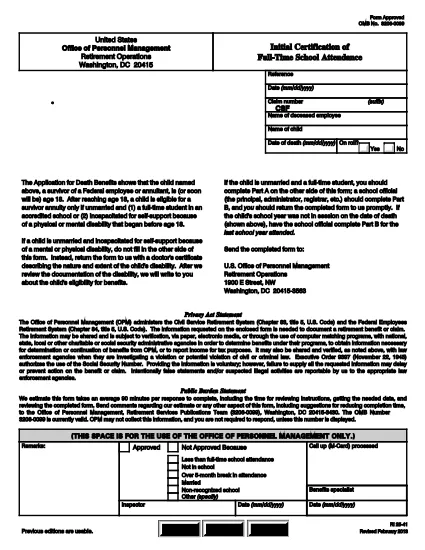
The RI 25‑41 is the federal “Initial Certification of Full‑Time School Attendance” used by the Office of Personnel Management (OPM) to verify a student’s eligibility for federal education benefits. This form is required for each school year and must be completed by both the payee (the student’s parent or guardian) and an official of the educational institution.

What Is the RI 25‑41 Form?

RI 25‑41 collects detailed information about the student’s enrollment, the school’s accreditation, and the anticipated dates of attendance. Part A is filled out by the payee, while Part B is completed by a school official. The form must be signed and returned to OPM before benefits are paid.

How to Fill Out RI 25‑41 Online with Formize

Instead of printing, scanning, or editing the PDF in a separate program, you can fill the form directly on our site. Follow the simple steps below:

  1. Click the “Fill out this form” button on the page.
  2. Wait a few seconds while the Formize PDF Filler app loads the fillable RI 25‑41 document.
  3. Enter your information in each field. Use the TAB key to jump between fields.
  4. When all required fields are completed, click Save & Download to get a copy of the completed PDF.
  5. Print the signed copy (if a signature is required) and submit it to OPM as instructed.

Key Sections & Common Mistakes to Avoid

  • Part A – Payee Information: Double‑check the Social Security Number and date of birth; a typo will delay processing.
  • Part B – School Official: Ensure the official’s title and phone number are current; OPM may contact them for verification.
  • Attendance Dates: Use the exact start and end dates of the academic term. Do not leave blanks.
  • Signatures: Electronic signatures are accepted only if the PDF is printed, signed, and scanned back. The online filler does not replace a handwritten signature where required.
  • Attachments: If the school requires additional documentation (e.g., enrollment verification), attach those files before downloading the final PDF.

Where to Submit the Completed Form

After saving the completed RI 25‑41, mail or fax the signed PDF to the address listed on the OPM website. For most federal employees, the preferred method is to upload the PDF to the OPM portal under “Retirement & Insurance Forms.”

Need a printable version? Use the direct download link below.

שאלות נפוצות
  • Can I submit the RI 25‑41 electronically?

    Yes. After completing the form in the Formize filler, you can download the PDF and upload it to the OPM portal. If a signature is required, print, sign, and scan the document before uploading.

  • Who can fill out Part B of the form?

    Part B must be completed by an authorized official of the educational institution, such as the registrar or dean.

  • What happens if I make a mistake on the form?

    Incorrect or missing information can delay benefit payments. Review all entries carefully and correct any errors before submitting.

  • Do I need to attach proof of enrollment?

    OPM may request additional enrollment verification. Attach any required documents before downloading the final PDF.

  • Is the RI 25‑41 form still valid for 2024‑2025 school years?

    Yes. The RI 25‑41 form is the current version for all upcoming school years unless OPM announces a revision.

  • How long does it take for OPM to process the form?

    Processing typically takes 10‑14 business days after receipt of a complete and signed form.

איך ל

כיצד למלא את RI 25-41 בחינם, באינטרנט ב-4 שלבים פשוטים:

  1. 1
    Open the Fillable Form
    Click the “Fill out this form” button on this page. The Formize PDF Filler will open the RI 25‑41 document automatically.
  2. 2
    Enter Your Information
    Type directly into each field. Use TAB to move to the next field. All required fields are marked with an asterisk.
  3. 3
    Save and Download
    When you’re finished, click “Save & Download” to get a copy of the completed PDF. Print and sign if a handwritten signature is required.
  4. 4
    Submit to OPM
    Mail, fax, or upload the signed PDF to the OPM portal as instructed in the form’s instructions.
Formize אפליקציית מילוי PDF
על אודות

טפסי משרד לניהול כוח אדם (OPM).

RI 25-41 הוא אחד מהטפסים הרשמיים המשמשים את המשרד לניהול כוח אדם של ארצות הברית, שהוא סוכנות עצמאית של הממשל הפדרלי האחראי לניהול כוח העבודה בשירות המדינה ולהטבות לעובדים הפדרליים. ה-OPM קובע מדיניות ותקנות הקשורות לתעסוקה פדרלית, מנהל תוכניות כוח אדם שונות ומספק שירותים לעובדים פדרליים, לגמלאים ולמועמדים לעבודה.

להלן כמה דוגמאות לטפסי משרד לניהול כוח אדם:

טופס סטנדרטי 86 (SF-86) : טופס זה משמש לתהליך חקירת הרקע עבור אנשים המבקשים אישור ביטחוני. הוא אוסף מידע אישי, תעסוקתי, חינוך ופיננסי מקיף, כמו גם פרטים על אנשי קשר ופעילויות זרים.

טופס סטנדרטי 2809 (SF-2809) : טופס זה משמש להרשמה לתוכנית הטבות הבריאות של העובדים הפדרלי (FEHB), המספקת כיסוי ביטוח בריאות לעובדים פדרליים, לגמלאים ולבני משפחתם הזכאים.

טופס סטנדרטי 2817 (SF-2817): טופס זה משמש להגשת בקשה להמשך כיסוי במסגרת התוכנית הפדרלית לביטוח שיניים וראייה לעובדים (FEDVIP) לאחר פרישה או פרידה מהשירות הפדרלי.

טופס סטנדרטי 3107 (SF-3107) : טופס זה משמש להגשת בקשה להטבות פרישה במסגרת מערכת הפנסיה של שירות המדינה (CSRS).

טופס סטנדרטי 2801 (SF-2801) : טופס זה משמש להגשת בקשה להטבות פרישה במסגרת מערכת הפנסיה של העובדים הפדרלית (FERS).

טופס סטנדרטי 15 (SF-15) : טופס זה משמש להגשת בקשה להעדפה של ותיקים בתעסוקה פדרלית. זה מוגש על ידי ותיקים או בני משפחתם הזכאים המחפשים הזדמנויות תעסוקה בממשל הפדרלי.

דוגמאות אלה מייצגות כמה צורות OPM נפוצות המשמשות בהקשר של תעסוקה פדרליות והטבות לעובדים. עם זאת, ל-OPM יש מגוון צורות אחרות הקשורות לתוכניות כוח אדם שונות, פרישה, ביטוח והיבטים אחרים של תעסוקה פדרלית. הטפסים הספציפיים הנדרשים עשויים להשתנות בהתאם לאופי העסקה, התוכנית או ההטבה המבוקשת. מומלץ להתייעץ באתר הרשמי של משרד ניהול כוח אדם בארה"ב (www.opm.gov) או לבקש הדרכה מה-OPM או אנשי משאבי אנוש רלוונטיים כדי לקבל מדויק ומעודכן- מידע עדכני בנוגע לטפסי OPM הספציפיים הרלוונטיים לתעסוקה הפדרלית שלך או לצרכים הקשורים להטבות.

תכונות

מילוי PDF

הדרך הקלה ביותר למלא טפסי PDF באינטרנט

  • מלא במהירות את RI 25-41
    מחפש דרך למלא במהירות את RI 25-41 באינטרנט? עם מילוי טופס ה-PDF המקוון שלנו בחינם, תדע כיצד לערוך ולמלא את מסמך ה-PDF הזה תוך פחות מדקה.
  • עורך PDF מקוון קל לשימוש
    נמאס לך להדפיס קבצי PDF כדי שתוכל לערוך אותם, לפני סריקה מחדש ושליחה חזרה? ערוך מסמכי PDF בחינם באינטרנט. השתמש בעורך ה-PDF המקוון שלנו כדי לחסוך בזמן ובנייר.
  • כלים מעולים, כל הפלטפורמות
    תוהה כיצד למלא את RI 25-41 ב-Mac, או אולי איך להשתמש בחומר מילוי PDF בחינם? כלי ה-PDF המקוונים שלנו פועלים בכל הפלטפורמות.
  • אחסון קבצים מאובטח
    קבצי "RI 25-41" שהושלמו מאוחסנים במסד נתונים מאובטח המנוהל על ידי אירוח Amazon Cloud. אתה יכול למחוק את הקבצים שלך מהמערכת שלנו בכל עת. בכל מקרה, קבצים אלו נמחקים אוטומטית לאחר 24 שעות.
  • צ'אט עם RI 25-41
    צ'אט עם "RI 25-41" ב-Chatize שהוא עוזר לקורא PDF בחינם. שאל שאלות וקבל תשובות מ-"RI 25-41". פשוט לחץ על הלחצן צ'אט עם מסמך למעלה.

מחק הפעלת מילוי

למחוק את הפעלת המילוי שנבחרה? במקרה זה, ההתקדמות שלך במילוי הטופס תאבד.

מחק סשן עריכה

למחוק את סשן העריכה שנבחר? במקרה זה, ההתקדמות שלך ביצירה ועריכה של הטופס תאבד.