בחר שפה

SF‑15 Application for 10‑Point Veteran’s Preference – Fillable PDF

  1. שפה אנגלית
  2. מדינה ארה"ב
  3. מַחלָקָה משרד ניהול כוח אדם
  4. פעילות Employment
SF‑15 Application for 10‑Point Veteran’s Preference – Fillable PDF

SF‑15 Application for 10‑Point Veteran’s Preference – Fillable PDF

What Is the SF‑15 Form?

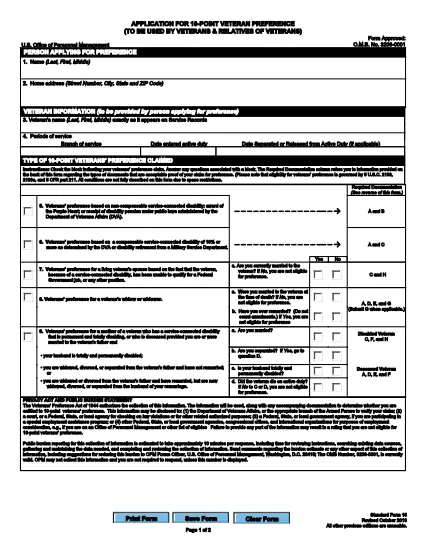
The SF‑15, Application for 10‑Point Veteran’s Preference, is an official United States Office of Personnel Management (OPM) form used by federal agencies to grant eligible veterans a ten‑point hiring advantage. It is required for any federal job application where the veteran preference is claimed.

How to Complete the SF‑15 Online

With Formize you can fill out the SF‑15 directly in your browser – no extra software needed. Follow these simple steps:

  • Click the Fill out this form button on the page.
  • Wait a few seconds while the Formize PDF Filler loads the fillable version of the SF‑15.
  • Enter your information in the highlighted fields, using the tab key to move quickly between sections.
  • When you finish, click Save to download the completed PDF or Submit if your agency accepts electronic submissions.

Common Mistakes to Avoid

  • Leaving required fields blank – the form will not validate until every mandatory box is completed.
  • Using non‑black ink or fancy fonts – stick to standard fonts and black text for readability.
  • Entering incorrect dates – double‑check your service dates; errors can delay processing.
  • Uploading a scanned copy instead of the fillable version – the fillable PDF ensures data is captured correctly.

Download & Secure Your Completed Form

After you save the filled PDF, store it in a secure location. Federal agencies often require a PDF attachment with your electronic job application, so keep a copy handy for future submissions.

Related Government Application Resources

Need more forms? Explore other OPM PDFs such as the SF‑50 (Notification of Personnel Action) or the SF‑86 (Security Clearance Questionnaire). All are available as fillable PDFs through Formize.

שאלות נפוצות
  • What is the purpose of the SF‑15 form?

    The SF‑15 is used to claim a ten‑point preference for eligible veterans when applying for federal civilian positions.

  • Can I edit the SF‑15 after I have saved it?

    Yes. Open the saved PDF in Formize’s online editor to make changes, or edit it in any standard PDF editor that supports fillable fields.

  • Do I need Adobe Acrobat to fill out the SF‑15?

    No. Formize provides a browser‑based fillable PDF, so you can complete the form without installing any software.

  • Is the SF‑15 accepted for all federal agencies?

    Most federal agencies that consider veteran preference require the SF‑15. Always check the specific job announcement for any additional forms.

  • What should I do if a field won’t accept my input?

    Make sure you are using plain text (no special characters) and that the field is not marked as read‑only. If the problem persists, reload the form in Formize.

  • How do I securely share the completed SF‑15 with an agency?

    Save the completed PDF, then attach it to your online job application or upload it via the agency’s secure portal. Keep a copy for your records.

  • Can I print the filled SF‑15?

    Absolutely. After saving, open the PDF in any viewer and print it using standard printer settings.

איך ל

כיצד למלא את SF-15 בחינם, באינטרנט ב-3 שלבים פשוטים:

  1. 1
    Click the Fill‑out Button
    Press the “Fill out this form” button on the page to launch the Formize PDF Filler.
  2. 2
    Load the Fillable PDF
    The fillable version of the SF‑15 will appear within a few seconds. No download or extra software is required.
  3. 3
    Enter Your Information and Save
    Complete each highlighted field, then click “Save” to download the completed PDF or “Submit” if your agency accepts direct electronic submission.
Formize אפליקציית מילוי PDF
על אודות

טפסי משרד לניהול כוח אדם (OPM).

SF-15 הוא אחד מהטפסים הרשמיים המשמשים את המשרד לניהול כוח אדם של ארצות הברית, שהוא סוכנות עצמאית של הממשל הפדרלי האחראי לניהול כוח העבודה בשירות המדינה ולהטבות לעובדים הפדרליים. ה-OPM קובע מדיניות ותקנות הקשורות לתעסוקה פדרלית, מנהל תוכניות כוח אדם שונות ומספק שירותים לעובדים פדרליים, לגמלאים ולמועמדים לעבודה.

להלן כמה דוגמאות לטפסי משרד לניהול כוח אדם:

טופס סטנדרטי 86 (SF-86) : טופס זה משמש לתהליך חקירת הרקע עבור אנשים המבקשים אישור ביטחוני. הוא אוסף מידע אישי, תעסוקתי, חינוך ופיננסי מקיף, כמו גם פרטים על אנשי קשר ופעילויות זרים.

טופס סטנדרטי 2809 (SF-2809) : טופס זה משמש להרשמה לתוכנית הטבות הבריאות של העובדים הפדרלי (FEHB), המספקת כיסוי ביטוח בריאות לעובדים פדרליים, לגמלאים ולבני משפחתם הזכאים.

טופס סטנדרטי 2817 (SF-2817): טופס זה משמש להגשת בקשה להמשך כיסוי במסגרת התוכנית הפדרלית לביטוח שיניים וראייה לעובדים (FEDVIP) לאחר פרישה או פרידה מהשירות הפדרלי.

טופס סטנדרטי 3107 (SF-3107) : טופס זה משמש להגשת בקשה להטבות פרישה במסגרת מערכת הפנסיה של שירות המדינה (CSRS).

טופס סטנדרטי 2801 (SF-2801) : טופס זה משמש להגשת בקשה להטבות פרישה במסגרת מערכת הפנסיה של העובדים הפדרלית (FERS).

טופס סטנדרטי 15 (SF-15) : טופס זה משמש להגשת בקשה להעדפה של ותיקים בתעסוקה פדרלית. זה מוגש על ידי ותיקים או בני משפחתם הזכאים המחפשים הזדמנויות תעסוקה בממשל הפדרלי.

דוגמאות אלה מייצגות כמה צורות OPM נפוצות המשמשות בהקשר של תעסוקה פדרליות והטבות לעובדים. עם זאת, ל-OPM יש מגוון צורות אחרות הקשורות לתוכניות כוח אדם שונות, פרישה, ביטוח והיבטים אחרים של תעסוקה פדרלית. הטפסים הספציפיים הנדרשים עשויים להשתנות בהתאם לאופי העסקה, התוכנית או ההטבה המבוקשת. מומלץ להתייעץ באתר הרשמי של משרד ניהול כוח אדם בארה"ב (www.opm.gov) או לבקש הדרכה מה-OPM או אנשי משאבי אנוש רלוונטיים כדי לקבל מדויק ומעודכן- מידע עדכני בנוגע לטפסי OPM הספציפיים הרלוונטיים לתעסוקה הפדרלית שלך או לצרכים הקשורים להטבות.

תכונות

מילוי PDF

הדרך הקלה ביותר למלא טפסי PDF באינטרנט

  • מלא במהירות את SF-15
    מחפש דרך למלא במהירות את SF-15 באינטרנט? עם מילוי טופס ה-PDF המקוון שלנו בחינם, תדע כיצד לערוך ולמלא את מסמך ה-PDF הזה תוך פחות מדקה.
  • עורך PDF מקוון קל לשימוש
    נמאס לך להדפיס קבצי PDF כדי שתוכל לערוך אותם, לפני סריקה מחדש ושליחה חזרה? ערוך מסמכי PDF בחינם באינטרנט. השתמש בעורך ה-PDF המקוון שלנו כדי לחסוך בזמן ובנייר.
  • כלים מעולים, כל הפלטפורמות
    תוהה כיצד למלא את SF-15 ב-Mac, או אולי איך להשתמש בחומר מילוי PDF בחינם? כלי ה-PDF המקוונים שלנו פועלים בכל הפלטפורמות.
  • אחסון קבצים מאובטח
    קבצי "SF-15" שהושלמו מאוחסנים במסד נתונים מאובטח המנוהל על ידי אירוח Amazon Cloud. אתה יכול למחוק את הקבצים שלך מהמערכת שלנו בכל עת. בכל מקרה, קבצים אלו נמחקים אוטומטית לאחר 24 שעות.
  • צ'אט עם SF-15
    צ'אט עם "SF-15" ב-Chatize שהוא עוזר לקורא PDF בחינם. שאל שאלות וקבל תשובות מ-"SF-15". פשוט לחץ על הלחצן צ'אט עם מסמך למעלה.

מחק הפעלת מילוי

למחוק את הפעלת המילוי שנבחרה? במקרה זה, ההתקדמות שלך במילוי הטופס תאבד.

מחק סשן עריכה

למחוק את סשן העריכה שנבחר? במקרה זה, ההתקדמות שלך ביצירה ועריכה של הטופס תאבד.