בחר שפה

SSA‑8 Lump‑Sum Death Payment Form (Fillable PDF)

  1. שפה אנגלית
  2. מדינה ארה"ב
  3. פעילות Benefits
  4. מַחלָקָה Social Security Administration
למלא טופס זה
SSA‑8 Lump‑Sum Death Payment Form (Fillable PDF)

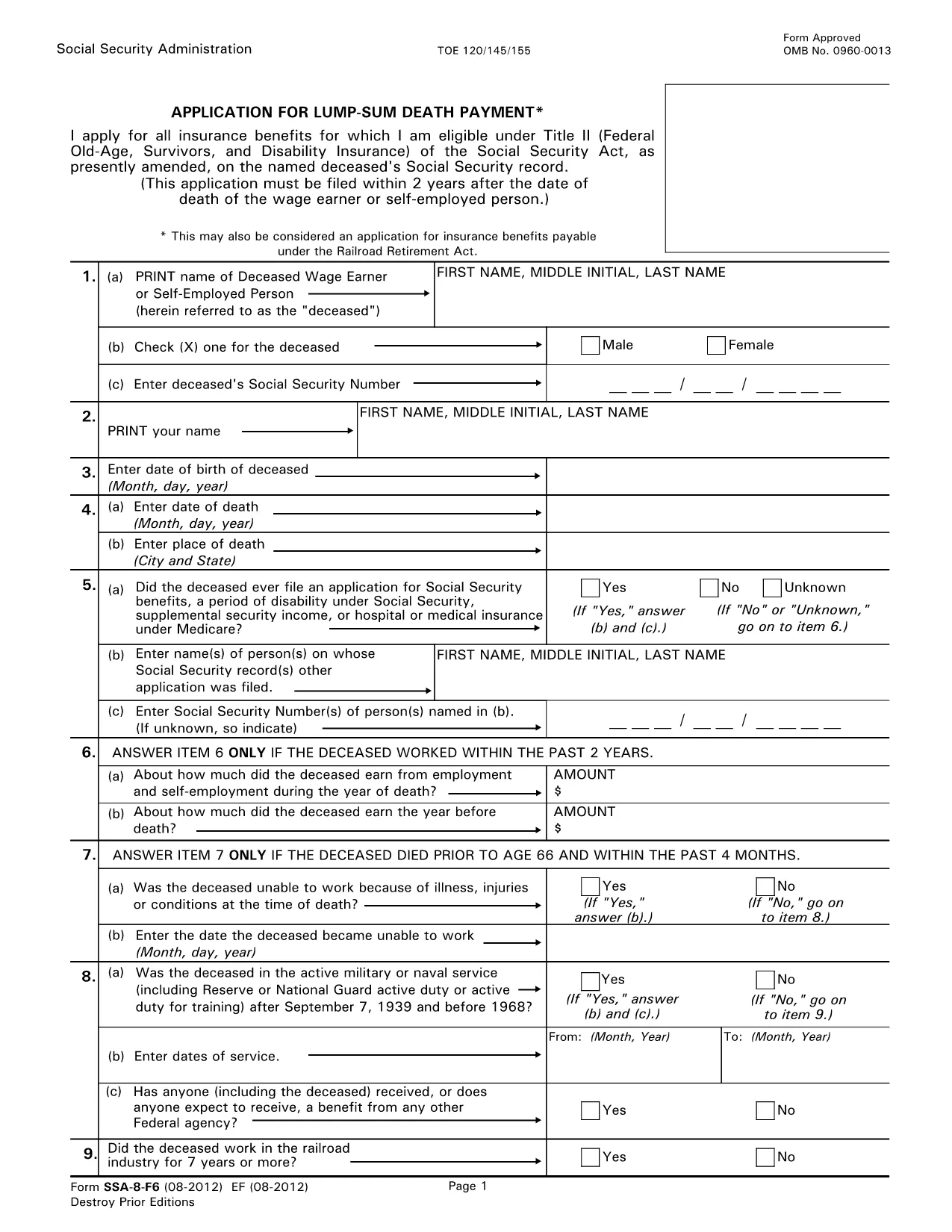
The SSA‑8 is the official Social Security Administration (SSA) application for a lump‑sum death payment to surviving family members. This form is required when a beneficiary wants a one‑time cash payment after the death of a qualified worker.

What Is the SSA‑8 Form?

The SSA‑8 collects personal details about the deceased, the claimant, and the type of payment being requested. It is used by the SSA to verify eligibility and calculate the amount owed.

How to Fill Out the SSA‑8 Online with Formize

Instead of downloading, printing, and scanning, you can complete the form directly on our site. Click the "Fill out this form" button, wait for the Formize PDF Filler to load, and start typing. All fields are interactive, and the app saves your progress automatically.

Key Sections & Required Information

  • Section 1: Deceased’s Social Security number and date of death.
  • Section 2: Claimant’s relationship to the deceased and contact details.
  • Section 3: Payment options – direct deposit or paper check.
  • Section 4: Signature and date.

Common Mistakes to Avoid

  • Leaving the Social Security number blank or entering it with dashes.
  • Providing an outdated address – the SSA will mail any correspondence there.
  • Missing the claimant’s signature; an unsigned form is rejected.
  • Choosing the wrong payment method (e.g., selecting direct deposit without providing bank details).

Where to Submit the Completed Form

After you finish, download the completed PDF and bring it to your local Social Security office or mail it to the address listed on the form. You can locate the nearest office at SSA.gov/locator.

שאלות נפוצות
  • Who is eligible for a lump‑sum death payment?

    Surviving spouses, children, and certain dependent parents of a deceased worker who earned enough Social Security credits are eligible.

  • Can I submit the SSA‑8 electronically?

    The SSA does not accept fully electronic submissions. You must download the completed PDF and bring or mail it to a Social Security office.

  • How long does it take to receive the payment?

    Processing usually takes 4‑6 weeks after the SSA receives a correctly completed form.

  • Do I need a notarized signature?

    No notarization is required. A handwritten or electronic signature is sufficient as long as it is legible.

  • What if I make a mistake after submitting?

    Contact your local Social Security office immediately. They can provide a corrected form or advise on next steps.

  • Is there a fee to use Formize PDF Filler?

    No, Formize provides the filler for free on this page.

  • Can I save my progress and finish later?

    Yes. The Formize app autosaves locally in your browser, allowing you to return later before downloading the final PDF.

איך ל

כיצד למלא את SSA-8 form בחינם, באינטרנט ב-5 שלבים פשוטים:

  1. 1
    Click the Fill‑out Button
    On this page, click the "Fill out this form" button to launch the Formize PDF Filler.
  2. 2
    Wait for the Filler to Load
    The online filler loads in a few seconds. All fields become editable directly in your browser.
  3. 3
    Complete Each Section
    Enter the required information exactly as it appears on the SSA‑8. Use the tab key to move between fields.
  4. 4
    Review and Sign
    Double‑check every entry, add your digital signature, and click "Save" to generate the final PDF.
  5. 5
    Download or Print
    Download the completed form or print it for in‑person submission at your local Social Security office.
Formize אפליקציית מילוי PDF
על אודות

תבנית SSA-8 form

עם סט התכונות המסורתי לצפייה ומילוי של מסמך PDF, בשילוב עם היתרונות של אפליקציית אינטרנט ופריסה רספונסיבית, תוכל להשלים את SSA-8 form בתוך דקות.

תכונות

מילוי PDF

הדרך הקלה ביותר למלא טפסי PDF באינטרנט

  • מלא במהירות את SSA-8 form
    מחפש דרך למלא במהירות את SSA-8 form באינטרנט? עם מילוי טופס ה-PDF המקוון שלנו בחינם, תדע כיצד לערוך ולמלא את מסמך ה-PDF הזה תוך פחות מדקה.
  • עורך PDF מקוון קל לשימוש
    נמאס לך להדפיס קבצי PDF כדי שתוכל לערוך אותם, לפני סריקה מחדש ושליחה חזרה? ערוך מסמכי PDF בחינם באינטרנט. השתמש בעורך ה-PDF המקוון שלנו כדי לחסוך בזמן ובנייר.
  • כלים מעולים, כל הפלטפורמות
    תוהה כיצד למלא את SSA-8 form ב-Mac, או אולי איך להשתמש בחומר מילוי PDF בחינם? כלי ה-PDF המקוונים שלנו פועלים בכל הפלטפורמות.
  • אחסון קבצים מאובטח
    קבצי "SSA-8 form" שהושלמו מאוחסנים במסד נתונים מאובטח המנוהל על ידי אירוח Amazon Cloud. אתה יכול למחוק את הקבצים שלך מהמערכת שלנו בכל עת. בכל מקרה, קבצים אלו נמחקים אוטומטית לאחר 24 שעות.
  • צ'אט עם SSA-8 form
    צ'אט עם "SSA-8 form" ב-Chatize שהוא עוזר לקורא PDF בחינם. שאל שאלות וקבל תשובות מ-"SSA-8 form". פשוט לחץ על הלחצן צ'אט עם מסמך למעלה.

מחק הפעלת מילוי

למחוק את הפעלת המילוי שנבחרה? במקרה זה, ההתקדמות שלך במילוי הטופס תאבד.

מחק סשן עריכה

למחוק את סשן העריכה שנבחר? במקרה זה, ההתקדמות שלך ביצירה ועריכה של הטופס תאבד.