
בחר שפה

SSA‑4‑INST – Reporting Responsibilities for Child’s Insurance Benefits

  1. שפה אנגלית
  2. מדינה ארה"ב
  3. פעילות ביטוח לאומי
למלא טופס זה
SSA‑4‑INST – Reporting Responsibilities for Child’s Insurance Benefits

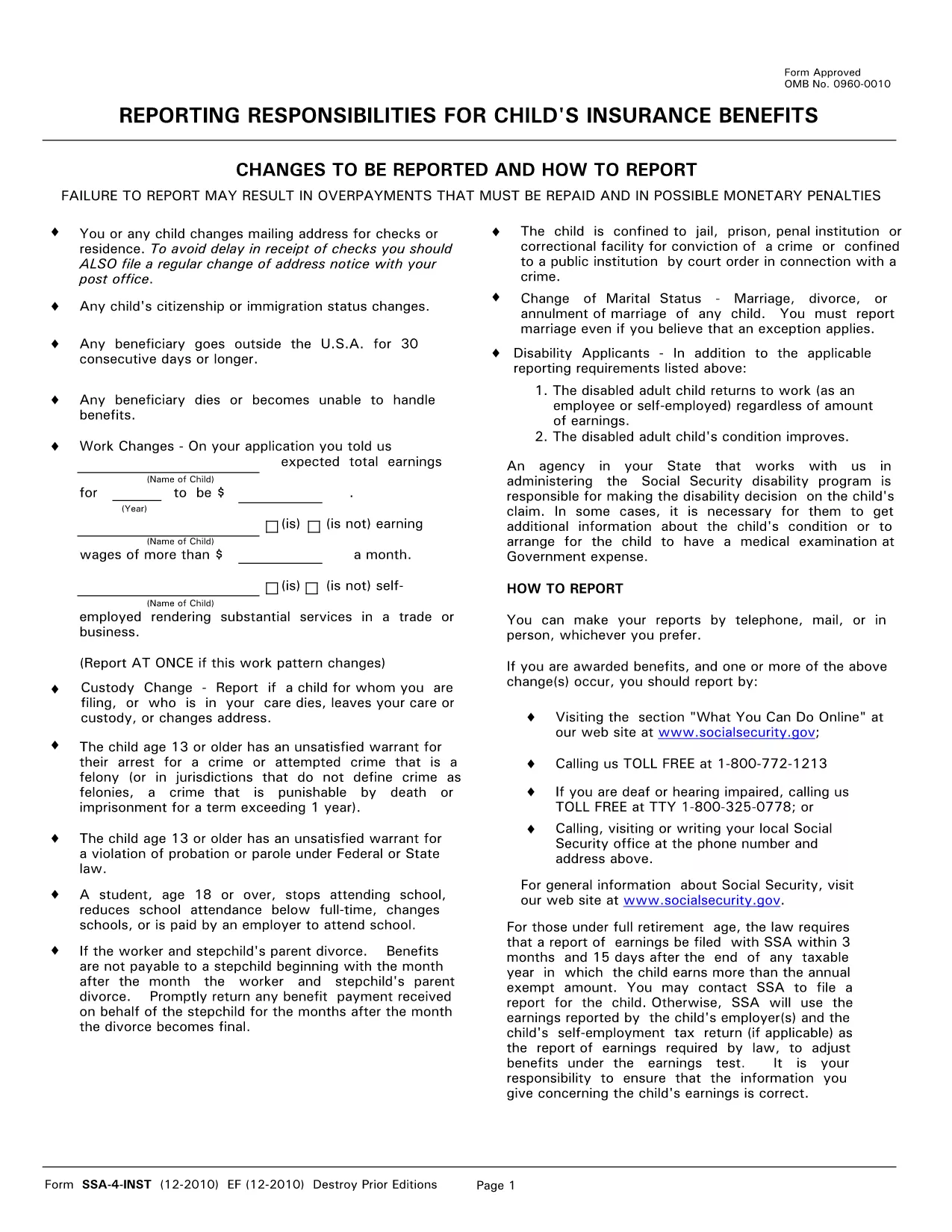
The SSA‑4‑INST is the Social Security Administration’s official form used to report changes that affect a child's insurance benefits. Whether you need to update an address, report earnings, or note a custody change, this form ensures the SSA has the most accurate information.

What Is the SSA‑4‑INST Form?

The form, titled “Reporting Responsibilities for Child’s Insurance Benefits,” collects details about a child’s earnings, residence, citizenship, and any other circumstances that could impact benefit payments. It is required for anyone who receives Social Security benefits on behalf of a child.

How to Fill Out the SSA‑4‑INST Online

Instead of printing, downloading, and editing the PDF, simply click the "Fill out this form" button on this page. The Formize PDF Filler app will load instantly, allowing you to complete the form directly in your browser.

Common Mistakes & Tips for a Successful Submission

  • Illegible handwriting: Using the online filler eliminates this risk.
  • Missing fields: The filler highlights required fields in real‑time.
  • Incorrect earnings amount: Double‑check the child’s total earnings for the reported year.
  • Out‑of‑date address: Update any mailing address changes immediately to avoid payment delays.

When and Where to Submit the Completed Form

After you finish, download the completed PDF and mail it to the address listed on the form, or upload it securely through your SSA online portal. Keep a copy for your records.

שאלות נפוצות
  • Do I need to print the SSA‑4‑INST after filling it online?

    No. You can download the completed PDF and either mail it or upload it directly to the SSA portal.

  • How often must I report changes using SSA‑4‑INST?

    Report any change that could affect benefits as soon as possible—typically within 30 days of the change.

  • What if I make a mistake after submitting?

    Submit a corrected SSA‑4‑INST with the updated information. Mark the form as "Corrected" in the top right corner.

  • Is there a fee to use the Formize PDF Filler?

    No. The filler is free for all users accessing the form on Formize.com.

  • Can I save my progress and finish later?

    Yes. The filler allows you to save a draft locally and resume editing at any time.

  • What types of changes must be reported?

    Changes to address, earnings, citizenship/immigration status, custody, school attendance, and any situation that could affect benefit eligibility.

  • Is the SSA‑4‑INST the same as the SSA‑4‑CH?

    No. The SSA‑4‑INST is specifically for reporting changes affecting a child’s insurance benefits, while the SSA‑4‑CH is used for other child‑related benefit updates.

איך ל

כיצד למלא את SSA-4-INST בחינם, באינטרנט ב-4 שלבים פשוטים:

  1. 1
    Open the Fillable Form
    Click the "Fill out this form" button on the page. The Formize PDF Filler app loads in seconds.
  2. 2
    Enter Your Information
    Complete each section—child’s name, earnings, address, and any changes—using the on‑screen fields.
  3. 3
    Validate and Save
    The filler checks for required fields and formatting. When everything looks correct, click "Save" to download the completed PDF.
  4. 4
    Submit to SSA
    Mail the saved PDF to the address on the form or upload it through the SSA online portal.
Formize אפליקציית מילוי PDF
על אודות

טפסי ביטוח לאומי

SSA-4-INST הוא אחד מטפסי הביטוח הלאומי שהם מסמכים המשמשים להגשת בקשה להטבות ושירותים שונים הניתנים על ידי הרשות לביטוח לאומי של ארצות הברית (SSA). ה-SSA היא סוכנות פדרלית המנהלת תוכניות שנועדו לספק סיוע כספי לאנשים ומשפחות זכאים, כולל הטבות פרישה, הטבות נכות, הטבות לשאירים והכנסה משלימה לביטחון (SSI).

כמה צורות נפוצות של ביטוח לאומי כוללות:

בקשה להטבות ביטוח לאומי: טופס זה משמש להגשת בקשה להטבות פרישה על סמך היסטוריית העבודה והרווחים של אדם.

בקשת קצבאות נכות בביטוח לאומי: טופס זה משמש להגשת בקשה לקבלת קצבאות נכות אם לאדם יש מצב פיזי או נפשי המונע ממנו לעבוד.

בקשה להטבות שאירים בביטוח לאומי: טופס זה משמש להגשת בקשה להטבות שאירים אם בן/בת זוגו או הורה של אדם נפטר והם זכאים להטבות שאירים.

בקשת הרשמה ל-Medicare: טופס זה משמש להרשמה ל-Medicare, תוכנית ביטוח הבריאות הפדרלית עבור אנשים מעל גיל 65 ובעלי מוגבלויות או מצבים רפואיים מסוימים.

טופס שינוי כתובת: טופס זה משמש לעדכון כתובת של אדם עם ה-SSA.

טופס בקשה לרישום רווחים: טופס זה משמש לבקשת עותק של רשומת הרווחים של אדם, המשמש לחישוב קצבאות הביטוח הלאומי.

ניתן למלא טפסים אלה באופן מקוון, בדואר או באופן אישי במשרד ביטוח לאומי מקומי. חשוב לעיין בקפידה ולמלא את כל הטפסים הדרושים כדי להבטיח טיפול בזמן ומדויק של קצבאות הביטוח הלאומי.

תכונות

מילוי PDF

הדרך הקלה ביותר למלא טפסי PDF באינטרנט

  • מלא במהירות את SSA-4-INST
    מחפש דרך למלא במהירות את SSA-4-INST באינטרנט? עם מילוי טופס ה-PDF המקוון שלנו בחינם, תדע כיצד לערוך ולמלא את מסמך ה-PDF הזה תוך פחות מדקה.
  • עורך PDF מקוון קל לשימוש
    נמאס לך להדפיס קבצי PDF כדי שתוכל לערוך אותם, לפני סריקה מחדש ושליחה חזרה? ערוך מסמכי PDF בחינם באינטרנט. השתמש בעורך ה-PDF המקוון שלנו כדי לחסוך בזמן ובנייר.
  • כלים מעולים, כל הפלטפורמות
    תוהה כיצד למלא את SSA-4-INST ב-Mac, או אולי איך להשתמש בחומר מילוי PDF בחינם? כלי ה-PDF המקוונים שלנו פועלים בכל הפלטפורמות.
  • אחסון קבצים מאובטח
    קבצי "SSA-4-INST" שהושלמו מאוחסנים במסד נתונים מאובטח המנוהל על ידי אירוח Amazon Cloud. אתה יכול למחוק את הקבצים שלך מהמערכת שלנו בכל עת. בכל מקרה, קבצים אלו נמחקים אוטומטית לאחר 24 שעות.
  • צ'אט עם SSA-4-INST
    צ'אט עם "SSA-4-INST" ב-Chatize שהוא עוזר לקורא PDF בחינם. שאל שאלות וקבל תשובות מ-"SSA-4-INST". פשוט לחץ על הלחצן צ'אט עם מסמך למעלה.

מחק הפעלת מילוי

למחוק את הפעלת המילוי שנבחרה? במקרה זה, ההתקדמות שלך במילוי הטופס תאבד.

מחק סשן עריכה

למחוק את סשן העריכה שנבחר? במקרה זה, ההתקדמות שלך ביצירה ועריכה של הטופס תאבד.