
בחר שפה

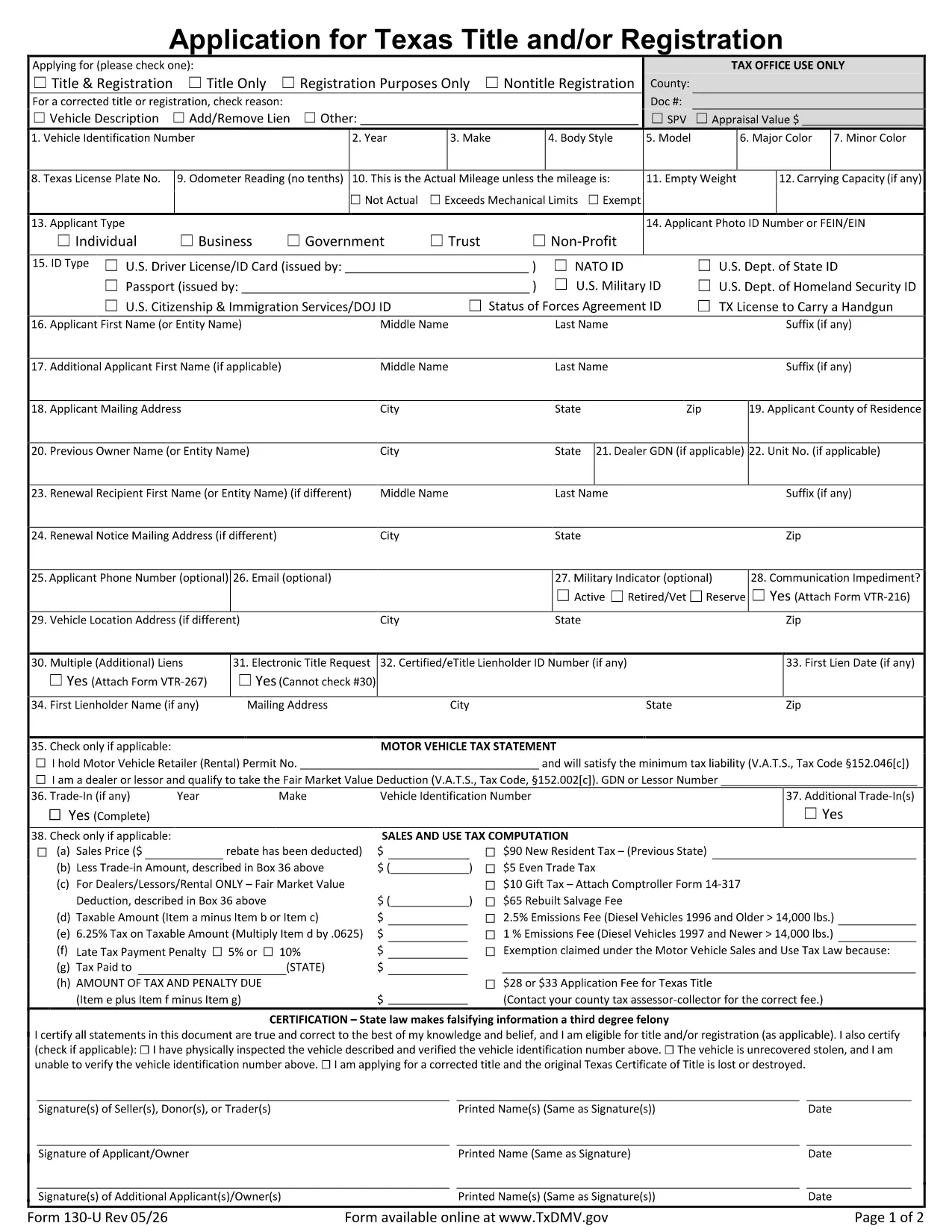
Application for Texas Title and Registration (Form 130‑U)

  1. שפה אנגלית
  2. מדינה ארה"ב
  3. מַחלָקָה Texas Department of Motor Vehicles
  4. פעילות רישום רכב
Application for Texas Title and Registration (Form 130‑U)

The Texas Application for Title and Registration (Form 130‑U) is the official document you need to obtain a new title, transfer ownership, or register a vehicle in Texas. Instead of printing, printing, and hand‑writing, you can now fill the form online with Formize’s free PDF filler – fast, secure, and completely digital.

Why Use the Fillable PDF Form

Our fillable version retains the exact layout required by the Texas Department of Motor Vehicles (TxDMV) while allowing you to type directly into each field. Benefits include:

  • Eliminate messy handwriting and illegible entries.
  • Save time – the form loads instantly in your browser.
  • Automatic field validation reduces errors.
  • Easy saving and printing for submission.

Step‑by‑Step Guide to Complete the Form

Follow the simple steps below to finish your application in minutes.

  • Step 1: Click the "Fill out this form" button on the page.
  • Step 2: Wait for the Formize PDF Filler app to load (usually a few seconds).
  • Step 3: Enter your personal, vehicle, and ownership details in the highlighted fields.
  • Step 4: Review the completed form for accuracy.
  • Step 5: Download the finished PDF or print it directly for submission.

Common Mistakes to Avoid

Even with a digital form, a few errors can delay processing:

  • Leaving the VIN or Odometer reading blank.
  • Providing an outdated address – the TxDMV requires a current mailing address.
  • Forgetting to attach required signatures.
  • Using the wrong form version; always use Form 130‑U for title and registration.

Where to Submit Your Application

After completing the form, you can submit it in one of three ways:

  • Mail it to your county tax assessor‑collector’s office.
  • Bring the printed form to a local TxDMV regional office.
  • Some counties accept scanned PDFs via email – check with your local office.

Frequently Asked Questions

Answers to the most common questions are listed below (see the FAQ section for more details).

שאלות נפוצות
  • What is Form 130‑U used for?

    Form 130‑U is the official Texas application to obtain a new title, transfer ownership, or register a vehicle with the TxDMV.

  • Can I submit the form electronically?

    Most counties require a printed copy, but some accept a scanned PDF via email. Check with your local tax assessor‑collector.

  • Do I need a notary for this form?

    A notary is not required for Form 130‑U unless your county specifically requests it.

  • How long does it take to process the application?

    Processing times vary by county, typically 7‑14 business days after the form is received.

  • What fees are associated with the title application?

    Fees depend on vehicle type, age, and county; they are payable to the tax assessor‑collector at the time of submission.

  • Is the fillable PDF compatible with mobile devices?

    Yes, Formize’s PDF filler works on most modern smartphones and tablets.

  • What should I do if I make a mistake after saving?

    Open the saved PDF in Formize again, edit the incorrect fields, and re‑save the document.

  • Do I need to attach any additional documents?

    Typically you must include proof of ownership (e.g., bill of sale) and a valid photo ID.

איך ל

כיצד למלא את Texas title application בחינם, באינטרנט ב-4 שלבים פשוטים:

  1. 1
    Click the Fill Button
    Press the "Fill out this form" button on the page to launch Formize’s PDF filler.
  2. 2
    Wait for the Filler to Load
    The Formize PDF Filler app loads in a few seconds – you’ll see a toolbar and editable fields.
  3. 3
    Enter Your Information
    Type directly into each highlighted field: owner details, vehicle information, and signatures.
  4. 4
    Review and Save
    Double‑check all entries, then click "Save" to download the completed PDF or print it for submission.
Formize אפליקציית מילוי PDF
על אודות

טפסי רישום רכב

אם אתה מחזיק או שוכר רכב מנועי, נגרר או סירה, עליך לעמוד בהתחייבויות מסוימות כדי לשמור על הרכב שלך רשום חוקי ובטוח.

Texas title application הוא אחד מטפסי רישום רכב שהם מסמכים המשמשים לרישום רכב מנועי במדינה או ברשות המחוז הרלוונטית. טפסים אלה נדרשים בדרך כלל כאשר אדם רוכש רכב חדש או משומש או כאשר הוא עובר למדינה או למחוז חדש עם רכב.

הדרישות והטפסים המדויקים הדרושים לרישום רכב יכולים להשתנות לפי מיקום, אך בדרך כלל, התהליך כולל מסירת מידע על הרכב, הבעלים וכל שעבוד על הרכב.

לאחר הגשת טפסי הרישום והאגרות, תנפיק המדינה או הרשות המחוזית תעודת רישום או לוחית רישוי לבעל הרכב. רישום זה מאפשר להפעיל את הרכב כחוק בכבישים ציבוריים ובכבישים מהירים.

תכונות

מילוי PDF

הדרך הקלה ביותר למלא טפסי PDF באינטרנט

  • מלא במהירות את Texas title application
    מחפש דרך למלא במהירות את Texas title application באינטרנט? עם מילוי טופס ה-PDF המקוון שלנו בחינם, תדע כיצד לערוך ולמלא את מסמך ה-PDF הזה תוך פחות מדקה.
  • עורך PDF מקוון קל לשימוש
    נמאס לך להדפיס קבצי PDF כדי שתוכל לערוך אותם, לפני סריקה מחדש ושליחה חזרה? ערוך מסמכי PDF בחינם באינטרנט. השתמש בעורך ה-PDF המקוון שלנו כדי לחסוך בזמן ובנייר.
  • כלים מעולים, כל הפלטפורמות
    תוהה כיצד למלא את Texas title application ב-Mac, או אולי איך להשתמש בחומר מילוי PDF בחינם? כלי ה-PDF המקוונים שלנו פועלים בכל הפלטפורמות.
  • אחסון קבצים מאובטח
    קבצי "Texas title application" שהושלמו מאוחסנים במסד נתונים מאובטח המנוהל על ידי אירוח Amazon Cloud. אתה יכול למחוק את הקבצים שלך מהמערכת שלנו בכל עת. בכל מקרה, קבצים אלו נמחקים אוטומטית לאחר 24 שעות.
  • צ'אט עם Texas title application
    צ'אט עם "Texas title application" ב-Chatize שהוא עוזר לקורא PDF בחינם. שאל שאלות וקבל תשובות מ-"Texas title application". פשוט לחץ על הלחצן צ'אט עם מסמך למעלה.

מחק הפעלת מילוי

למחוק את הפעלת המילוי שנבחרה? במקרה זה, ההתקדמות שלך במילוי הטופס תאבד.

מחק סשן עריכה

למחוק את סשן העריכה שנבחר? במקרה זה, ההתקדמות שלך ביצירה ועריכה של הטופס תאבד.