בחר שפה

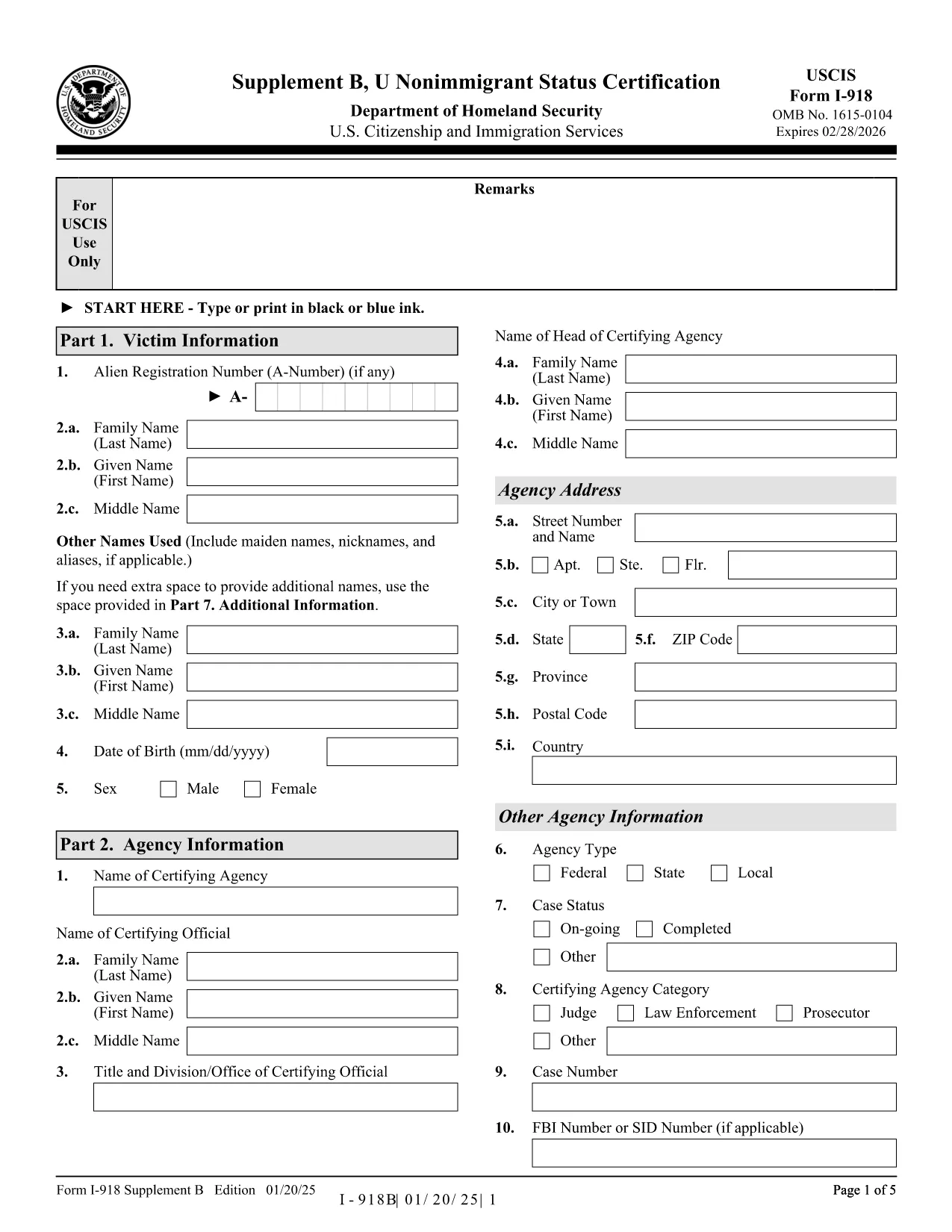
I-918 Supplement B – U Nonimmigrant Status Certification (Fillable PDF)

  1. מדינה ארה"ב
  2. שפה אנגלית
  3. מַחלָקָה שירותי אזרחות והגירה של ארה"ב
I-918 Supplement B – U Nonimmigrant Status Certification (Fillable PDF)

The Form I-918 Supplement B (U Nonimmigrant Status Certification) is used by a designated certifying official to confirm that a victim of a qualifying crime is eligible for U‑visa status. This form is a crucial part of the U‑visa petition (Form I-918) and must be completed accurately before submission to USCIS.

What Is Form I-918 Supplement B?

This supplement collects detailed information about the victim, the crime, and the law‑enforcement agency’s certification that the victim has been helpful, is willing to cooperate, and suffers substantial physical or mental abuse. The form is signed by a certifying official from a law‑enforcement agency, a prosecutor, or an authorized non‑governmental organization.

How to Complete the Fillable I-918 Supplement B Online

Instead of downloading, printing, and scanning, you can fill the form directly in your browser:

  1. Click the "Fill out this form" button on this page.
  2. The Formize PDF Filler app will load the official I-918 Supplement B PDF.
  3. Enter all required information in the highlighted fields. The filler automatically saves your progress.
  4. When you reach the signature field, use the built‑in e‑signature tool or print, sign, and scan the final page.
  5. Download the completed PDF and attach it to your Form I-918 petition package.

Common Mistakes to Avoid When Filling the Form

  • Leaving optional fields blank when the instructions require "N/A".
  • Using an incorrect date format (MM/DD/YYYY) – USCIS rejects inconsistent dates.
  • Failing to include the victim’s full legal name exactly as it appears on other immigration documents.
  • Not providing the certifying official’s title and agency contact information.
  • Submitting a scanned signature that is unreadable or cropped.

Where to Submit the Certified Form

After completing the fillable PDF, attach it to your Form I-918 packet and mail it to the USCIS lockbox address listed in the official instructions. If you are filing with an immigration attorney, give them the completed PDF for final review.

Download the Official PDF

For reference or offline use, you can also download the official, unfilled PDF directly from USCIS:

Download I-918 Supplement B (PDF)

Using Formize’s fillable version saves time, reduces errors, and ensures the document is USCIS‑compliant.

שאלות נפוצות
  • Who can sign Form I-918 Supplement B?

    A designated certifying official – such as a law‑enforcement officer, prosecutor, or authorized non‑governmental organization – must sign and certify the victim’s eligibility.

  • Can I submit a partially completed Supplement B?

    No. USCIS will reject the petition if any required field is missing or left incomplete.

  • Do I need to attach supporting documents to Supplement B?

    Only attach the supplementary evidence required by the main Form I-918 (e.g., police reports, medical records). The certification itself does not need extra attachments.

  • Is an electronic signature accepted?

    USCIS accepts electronic signatures on the fillable PDF as long as they are clear and legible. For added assurance, many users print, sign, and scan the signature page.

  • What if the certifying official’s information changes after signing?

    The official must provide an updated, signed Supplement B. Do not amend a previously signed form.

  • How long does it take USCIS to process the certification?

    The certification is reviewed as part of the overall I-918 petition. Processing times vary, but the certification itself does not add separate processing time.

  • Can I fill out the form on a mobile device?

    Yes. The Formize PDF Filler works on most modern smartphones and tablets, but a desktop provides a clearer view for detailed fields.

  • Is there a fee to download the fillable PDF?

    No. The fillable version is free on Formize. USCIS does not charge a fee for the Supplement B itself; the fee is attached to Form I-918.

איך ל

כיצד למלא את I-918 Supplement B בחינם, באינטרנט ב-5 שלבים פשוטים:

  1. 1
    Open the Fillable Form
    Click the "Fill out this form" button on this page to launch the Formize PDF Filler.
  2. 2
    Enter All Required Information
    Fill each highlighted field with accurate data. The filler auto‑saves as you type.
  3. 3
    Add the Certifying Official’s Signature
    Use the built‑in e‑signature tool, or print, sign, and re‑upload the signed page.
  4. 4
    Download the Completed PDF
    When the form is complete, click "Download" to save the certified PDF to your computer.
  5. 5
    Attach to Your I-918 Petition
    Include the completed Supplement B with Form I-918 and mail the packet to the USCIS lockbox address.
Formize אפליקציית מילוי PDF
על אודות

תבנית I-918 Supplement B

עם סט התכונות המסורתי לצפייה ומילוי של מסמך PDF, בשילוב עם היתרונות של אפליקציית אינטרנט ופריסה רספונסיבית, תוכל להשלים את I-918 Supplement B בתוך דקות.

תכונות

מילוי PDF

הדרך הקלה ביותר למלא טפסי PDF באינטרנט

  • מלא במהירות את I-918 Supplement B
    מחפש דרך למלא במהירות את I-918 Supplement B באינטרנט? עם מילוי טופס ה-PDF המקוון שלנו בחינם, תדע כיצד לערוך ולמלא את מסמך ה-PDF הזה תוך פחות מדקה.
  • עורך PDF מקוון קל לשימוש
    נמאס לך להדפיס קבצי PDF כדי שתוכל לערוך אותם, לפני סריקה מחדש ושליחה חזרה? ערוך מסמכי PDF בחינם באינטרנט. השתמש בעורך ה-PDF המקוון שלנו כדי לחסוך בזמן ובנייר.
  • כלים מעולים, כל הפלטפורמות
    תוהה כיצד למלא את I-918 Supplement B ב-Mac, או אולי איך להשתמש בחומר מילוי PDF בחינם? כלי ה-PDF המקוונים שלנו פועלים בכל הפלטפורמות.
  • אחסון קבצים מאובטח
    קבצי "I-918 Supplement B" שהושלמו מאוחסנים במסד נתונים מאובטח המנוהל על ידי אירוח Amazon Cloud. אתה יכול למחוק את הקבצים שלך מהמערכת שלנו בכל עת. בכל מקרה, קבצים אלו נמחקים אוטומטית לאחר 24 שעות.
  • צ'אט עם I-918 Supplement B
    צ'אט עם "I-918 Supplement B" ב-Chatize שהוא עוזר לקורא PDF בחינם. שאל שאלות וקבל תשובות מ-"I-918 Supplement B". פשוט לחץ על הלחצן צ'אט עם מסמך למעלה.

מחק הפעלת מילוי

למחוק את הפעלת המילוי שנבחרה? במקרה זה, ההתקדמות שלך במילוי הטופס תאבד.

מחק סשן עריכה

למחוק את סשן העריכה שנבחר? במקרה זה, ההתקדמות שלך ביצירה ועריכה של הטופס תאבד.