
בחר שפה

Missouri Form 4601 – Fillable PDF for Military Personalized License Plates

  1. שפה אנגלית
  2. מדינה ארה"ב
  3. פעילות רישום רכב
  4. מדינה מיזורי
Missouri Form 4601 – Fillable PDF for Military Personalized License Plates

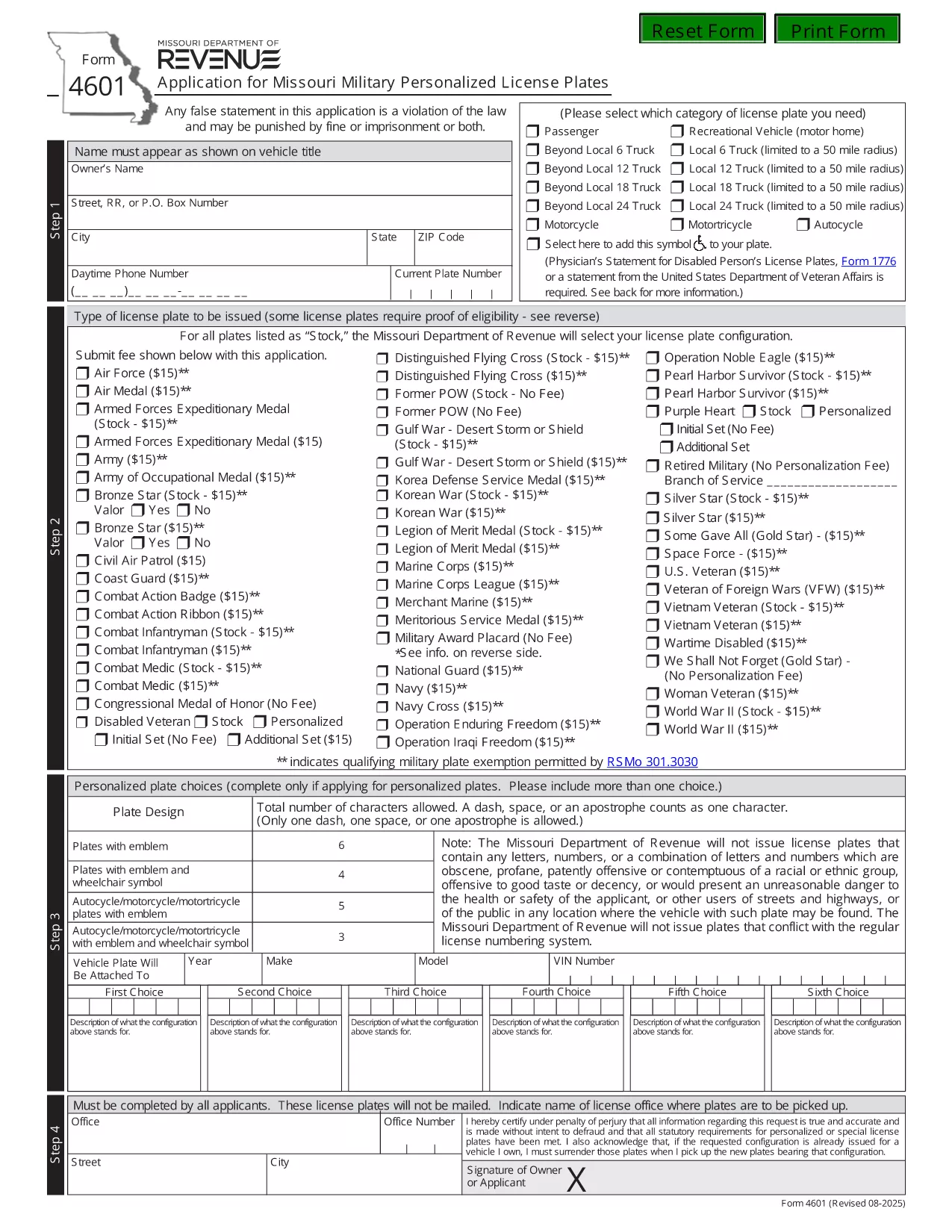
Form 4601 is the official Application for Missouri Military Personalized License Plates issued by the Missouri Department of Revenue. This fillable PDF lets eligible veterans, active‑duty service members, and qualified family members request a custom military‑themed plate for their vehicle.

What Is Form 4601?

Form 4601 collects personal information, vehicle details, and proof of military service. The form is required for any of the following plate designs:

  • U.S. Army, Navy, Air Force, Marine Corps, Coast Guard
  • Veterans of specific campaigns or decorations
  • Active‑duty personnel requesting a temporary plate

How to Complete the Fillable Form 4601 Online

With Formize’s PDF Filler you can fill out the form directly in your browser—no download, print, or third‑party editor needed.

  1. Click the "Fill out this form" button on this page.
  2. Wait a few seconds while the Formize PDF Filler loads the fillable version of Form 4601.
  3. Enter your information in each highlighted field. The filler automatically validates dates, ZIP codes, and required fields.
  4. Upload a scanned copy of your discharge papers or award certificate when prompted.
  5. Review the completed form, then click Submit to download the filled PDF or to email it directly to the Missouri Department of Revenue.

Common Mistakes to Avoid

  • Leaving the "Signature" field blank—use the electronic signature tool provided.
  • Entering an incorrect VIN; double‑check the 17‑character vehicle identification number.
  • Submitting an outdated or non‑honorable discharge document.
  • Choosing a plate configuration longer than six characters (or five with an emblem).

Where to Submit Your Application

After completing the fillable PDF, mail it with the $15 application fee to:

Motor Vehicle Bureau
301 West High Street – Room 370
PO Box 569
Jefferson City, MO 65105‑0569

Or bring the printed form to any Missouri license office. The Department will process the request within 6‑8 weeks.

Download the Official PDF

If you prefer the original, non‑fillable version, you can download it directly from the Missouri Department of Revenue:

Download Form 4601 (PDF)

Using Formize’s fillable version saves time, reduces errors, and keeps a digital copy for your records.

שאלות נפוצות
  • Who is eligible to use Form 4601?

    Veterans with an honorable discharge, active‑duty service members, and surviving spouses of eligible veterans may apply for a military personalized plate.

  • Is there a fee to submit Form 4601?

    Yes, a $15 application fee is required for each military plate request. The fee is paid to the Missouri Department of Revenue when you mail the form.

  • Can I submit Form 4601 electronically?

    The Missouri Department of Revenue currently requires a printed, signed PDF with the fee. However, you can fill it out online using Formize, then print and mail it.

  • How long does it take to receive the plates?

    Processing typically takes 6‑8 weeks after the Department receives your completed form and payment.

  • What proof of service do I need to attach?

    Attach a copy of your DD‑214, discharge certificate, or the official award documentation that qualifies you for the specific military plate.

  • What if my desired plate configuration is unavailable?

    You may submit up to three alternative configurations on the same form. If none are available, you can request a refund of the $15 fee.

  • Do I need to renew the military plate each year?

    Yes. Renewal requires the same $15 fee and a current proof of service if your status has changed.

איך ל

כיצד למלא את Form 4601 בחינם, באינטרנט ב-3 שלבים פשוטים:

  1. 1
    Open the Fillable Form
    Click the "Fill out this form" button on the page. The Formize PDF Filler will open the fillable version of Form 4601 in your browser.
  2. 2
    Enter Your Information
    Complete each highlighted field—personal details, vehicle info, and military service proof. Use the upload button for your discharge documents.
  3. 3
    Validate and Submit
    Review the completed form for any errors. Click the Submit button to download the finished PDF or to email it directly to the Missouri Department of Revenue.
Formize אפליקציית מילוי PDF
על אודות

טפסי רישום רכב

אם אתה מחזיק או שוכר רכב מנועי, נגרר או סירה, עליך לעמוד בהתחייבויות מסוימות כדי לשמור על הרכב שלך רשום חוקי ובטוח.

Form 4601 הוא אחד מטפסי רישום רכב שהם מסמכים המשמשים לרישום רכב מנועי במדינה או ברשות המחוז הרלוונטית. טפסים אלה נדרשים בדרך כלל כאשר אדם רוכש רכב חדש או משומש או כאשר הוא עובר למדינה או למחוז חדש עם רכב.

הדרישות והטפסים המדויקים הדרושים לרישום רכב יכולים להשתנות לפי מיקום, אך בדרך כלל, התהליך כולל מסירת מידע על הרכב, הבעלים וכל שעבוד על הרכב.

לאחר הגשת טפסי הרישום והאגרות, תנפיק המדינה או הרשות המחוזית תעודת רישום או לוחית רישוי לבעל הרכב. רישום זה מאפשר להפעיל את הרכב כחוק בכבישים ציבוריים ובכבישים מהירים.

תכונות

מילוי PDF

הדרך הקלה ביותר למלא טפסי PDF באינטרנט

  • מלא במהירות את Form 4601
    מחפש דרך למלא במהירות את Form 4601 באינטרנט? עם מילוי טופס ה-PDF המקוון שלנו בחינם, תדע כיצד לערוך ולמלא את מסמך ה-PDF הזה תוך פחות מדקה.
  • עורך PDF מקוון קל לשימוש
    נמאס לך להדפיס קבצי PDF כדי שתוכל לערוך אותם, לפני סריקה מחדש ושליחה חזרה? ערוך מסמכי PDF בחינם באינטרנט. השתמש בעורך ה-PDF המקוון שלנו כדי לחסוך בזמן ובנייר.
  • כלים מעולים, כל הפלטפורמות
    תוהה כיצד למלא את Form 4601 ב-Mac, או אולי איך להשתמש בחומר מילוי PDF בחינם? כלי ה-PDF המקוונים שלנו פועלים בכל הפלטפורמות.
  • אחסון קבצים מאובטח
    קבצי "Form 4601" שהושלמו מאוחסנים במסד נתונים מאובטח המנוהל על ידי אירוח Amazon Cloud. אתה יכול למחוק את הקבצים שלך מהמערכת שלנו בכל עת. בכל מקרה, קבצים אלו נמחקים אוטומטית לאחר 24 שעות.
  • צ'אט עם Form 4601
    צ'אט עם "Form 4601" ב-Chatize שהוא עוזר לקורא PDF בחינם. שאל שאלות וקבל תשובות מ-"Form 4601". פשוט לחץ על הלחצן צ'אט עם מסמך למעלה.

מחק הפעלת מילוי

למחוק את הפעלת המילוי שנבחרה? במקרה זה, ההתקדמות שלך במילוי הטופס תאבד.

מחק סשן עריכה

למחוק את סשן העריכה שנבחר? במקרה זה, ההתקדמות שלך ביצירה ועריכה של הטופס תאבד.