
בחר שפה

MV-82D Duplicate Title Form – Fill Online for Free

  1. מדינה ארה"ב
  2. שפה אנגלית
  3. פעילות רישום רכב
  4. מדינה ניו יורק
MV-82D Duplicate Title Form – Fill Online for Free

What Is the MV-82D Form?

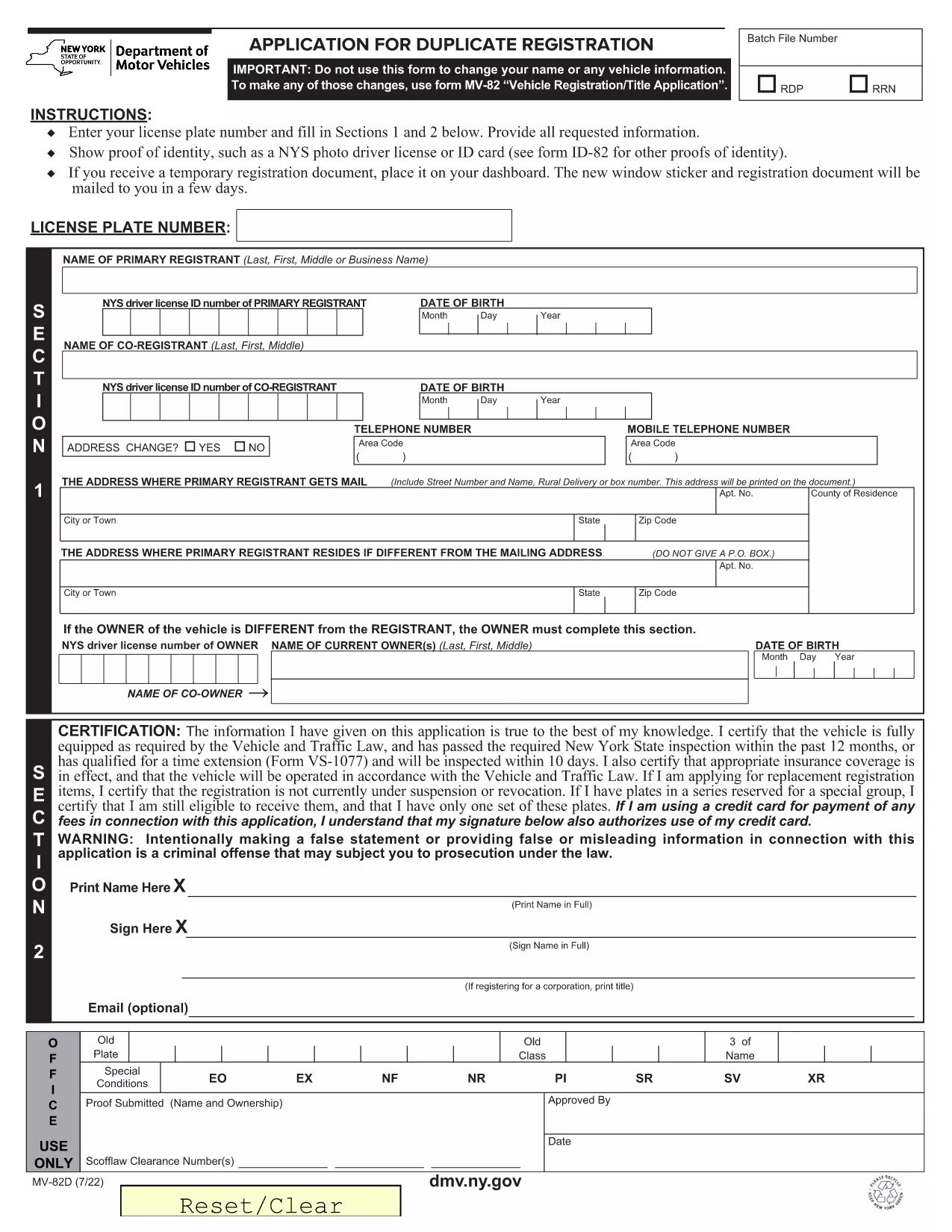
The MV-82D is the New York State Department of Motor Vehicles (DMV) application used to request a duplicate vehicle title. It is required when the original title is lost, damaged, or stolen. The form captures vehicle information, owner details, and the reason for the duplicate request.

How to Complete the MV-82D Online

With Formize you can fill out the MV-82D directly in your browser—no PDF editor needed. Follow these simple steps:

  1. Click the "Fill out this form" button on this page.
  2. Wait a few seconds while the Formize PDF Filler app loads the fillable version of the MV-82D.
  3. Enter the required information in each field. The form automatically validates dates, VIN numbers, and fee amounts.
  4. Review your answers, then click Submit to download the completed PDF.

After downloading, you can print the document and take it to your local DMV office or mail it with the required payment.

Common Mistakes to Avoid

  • Incorrect VIN: Double‑check the Vehicle Identification Number; a single digit error will cause the DMV to reject the form.
  • Missing Signature: The owner’s signature is mandatory. Use the digital signature tool in Formize or sign after printing.
  • Wrong Fee Amount: The duplicate title fee changes periodically. Verify the current fee on the NY DMV website before submitting.
  • Out‑of‑date Address: Ensure your mailing address matches the one on file with the DMV.

Where to Submit Your Completed Form

Once you have the filled‑out MV-82D PDF, you can:

  • Visit any NY DMV office in person.
  • Mail the form with a check or money order for the duplicate title fee to the address listed on the form.
  • Use the NY DMV online portal (if you have a MyDMV account) to upload the PDF.

Download the Official PDF

If you prefer the original, non‑fillable PDF, you can download it directly from the NY DMV:

Download MV-82D – Duplicate Title Form (PDF)

שאלות נפוצות
  • What is the MV-82D used for?

    The MV-82D is the application for obtaining a duplicate vehicle title in New York State when the original title is lost, stolen, or damaged.

  • Can I submit the MV-82D electronically?

    Yes. After filling it out with Formize, you can upload the completed PDF through the NY DMV online portal or email it if your local office accepts electronic submissions.

  • How much does a duplicate title cost?

    The fee varies; check the current duplicate title fee on the NY DMV website before submitting your payment.

  • Do I need a notarized signature on the MV-82D?

    No notarization is required for a duplicate title, but the owner’s signature must be present and legible.

  • What documents should I attach with the MV-82D?

    Include a copy of your driver's license or ID, proof of ownership (if requested), and the payment method (check or money order).

  • Is the Formize filler compatible with mobile devices?

    Yes, Formize works on most modern smartphones and tablets, allowing you to complete the MV-82D on the go.

איך ל

כיצד למלא את MV-82D בחינם, באינטרנט ב-4 שלבים פשוטים:

  1. 1
    Click the Fill‑out Button
    Press the "Fill out this form" button on the page to launch the Formize PDF Filler.
  2. 2
    Wait for the Filler to Load
    The app loads the MV-82D as a fillable document in a few seconds—no download required.
  3. 3
    Enter Your Information
    Complete each field. Formize validates entries in real time, reducing errors.
  4. 4
    Download or Print
    When finished, click "Submit" to download the completed PDF. Print it for DMV submission.
Formize אפליקציית מילוי PDF
על אודות

טפסי רישום רכב

MV-82D הוא אחד מטפסי רישום כלי רכב שהם מסמכים המשמשים לרישום רכב מנועי ברשות הממשלתית הרלוונטית, בדרך כלל המחלקה לכלי רכב (DMV) או סוכנות מקבילה. טפסים אלו נדרשים כאשר אדם רוכש רכב חדש או משומש, מעביר בעלות על רכב או עובר לתחום שיפוט חדש עם רכב.

טפסי רישום הרכב הספציפיים עשויים להשתנות לפי תחום שיפוט, אך בדרך כלל הם דורשים את המידע הבא:

מידע על רכב: זה כולל פרטים על הרכב, כגון יצרן, דגם, שנה, מספר זיהוי רכב (VIN) וקריאה של מד מרחק.

פרטי בעלים: הטופס ידרוש מידע על בעל הרכב, כולל שמו, כתובתו, פרטי הקשר ומספר רישיון הנהיגה שלו.

הוכחת בעלות: בהתאם לנסיבות, ייתכן שתידרש הוכחת בעלות, כגון תעודת בעלות, שטר מכירה או תעודת מקור של היצרן (עבור רכבים חדשים).

מידע ביטוחי: בדרך כלל נדרשת הוכחה של כיסוי ביטוח תקף לרכב. זה עשוי לכלול מסירת מספר פוליסת הביטוח, תאריכי הכיסוי ופרטי חברת הביטוח.

תשלום עמלות: רישום רכב כרוך בתשלום של עמלות שונות, כגון דמי רישום, מיסים ואולי חיובים אחרים ספציפיים לתחום השיפוט.

בנוסף לדרישות הבסיסיות הללו, בחלק מתחומי השיפוט עשויים להיות טפסים נוספים או דרישות תיעוד נוספות. לדוגמה, ייתכן שיהיה צורך בתוצאות בדיקות פליטות, בדיקות בטיחות או הוכחת תושבות באזורים מסוימים.

לאחר מילוי והגשת טפסי רישום הרכב, תנפיק הרשות הממשלתית תעודת רישום, לוחיות רישוי ומדבקות רישום. ממסמכים אלו עולה כי הרכב רשום כחוק ומורשה להפעלה בכבישים ציבוריים.

חשוב לציין שדרישות רישום הרכב עשויות להשתנות באופן משמעותי לפי תחום שיפוט. לכן, מומלץ להיוועץ ב-DMV המקומי או בסוכנות המקבילה לגבי הטפסים והנהלים הספציפיים החלים על מיקומך.

תכונות

מילוי PDF

הדרך הקלה ביותר למלא טפסי PDF באינטרנט

  • מלא במהירות את MV-82D
    מחפש דרך למלא במהירות את MV-82D באינטרנט? עם מילוי טופס ה-PDF המקוון שלנו בחינם, תדע כיצד לערוך ולמלא את מסמך ה-PDF הזה תוך פחות מדקה.
  • עורך PDF מקוון קל לשימוש
    נמאס לך להדפיס קבצי PDF כדי שתוכל לערוך אותם, לפני סריקה מחדש ושליחה חזרה? ערוך מסמכי PDF בחינם באינטרנט. השתמש בעורך ה-PDF המקוון שלנו כדי לחסוך בזמן ובנייר.
  • כלים מעולים, כל הפלטפורמות
    תוהה כיצד למלא את MV-82D ב-Mac, או אולי איך להשתמש בחומר מילוי PDF בחינם? כלי ה-PDF המקוונים שלנו פועלים בכל הפלטפורמות.
  • אחסון קבצים מאובטח
    קבצי "MV-82D" שהושלמו מאוחסנים במסד נתונים מאובטח המנוהל על ידי אירוח Amazon Cloud. אתה יכול למחוק את הקבצים שלך מהמערכת שלנו בכל עת. בכל מקרה, קבצים אלו נמחקים אוטומטית לאחר 24 שעות.
  • צ'אט עם MV-82D
    צ'אט עם "MV-82D" ב-Chatize שהוא עוזר לקורא PDF בחינם. שאל שאלות וקבל תשובות מ-"MV-82D". פשוט לחץ על הלחצן צ'אט עם מסמך למעלה.

מחק הפעלת מילוי

למחוק את הפעלת המילוי שנבחרה? במקרה זה, ההתקדמות שלך במילוי הטופס תאבד.

מחק סשן עריכה

למחוק את סשן העריכה שנבחר? במקרה זה, ההתקדמות שלך ביצירה ועריכה של הטופס תאבד.