
בחר שפה

MVR‑37A Fillable PDF – North Carolina Disability Parking Placard Application

  1. שפה אנגלית
  2. מדינה ארה"ב
  3. פעילות רישום רכב
  4. מדינה צפון קרוליינה
MVR‑37A Fillable PDF – North Carolina Disability Parking Placard Application

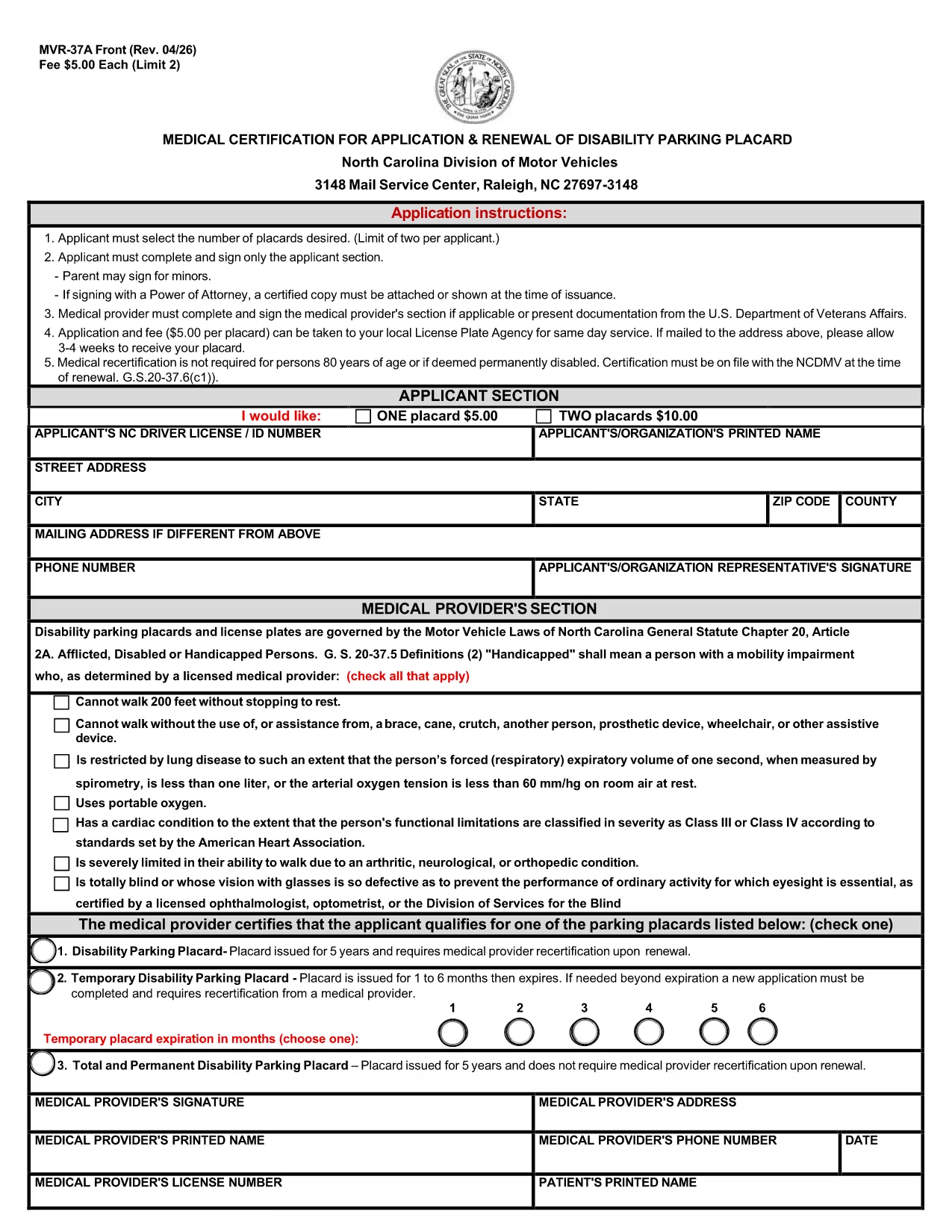
The MVR‑37A is the official medical certification required by the North Carolina Division of Motor Vehicles (DMV) to apply for or renew a disability parking placard. This fillable PDF lets you complete the entire application online, eliminating the need for printing, scanning, or hand‑writing.

What Is the MVR‑37A Form?

The form collects personal details, vehicle information, and a medical provider’s certification that you meet the state’s eligibility criteria. It is used for three types of placards:

  • Standard Disability Parking Placard
  • Temporary Disability Parking Placard
  • Total and Permanent Disability Placard

Who Needs a Disability Parking Placard in NC?

Anyone who has a qualifying medical condition that limits mobility may apply. Typical qualifying conditions include, but are not limited to, loss of limb function, severe arthritis, spinal cord injury, and certain cardiovascular or respiratory disorders.

Step‑by‑Step Guide to Fill the Form Online

Instead of downloading and opening the PDF in a separate editor, simply click the "Fill out this form" button on the page. The Formize PDF Filler app will load instantly, allowing you to:

  1. Select the number of placards you need (maximum two per applicant).
  2. Enter your personal and contact information.
  3. Provide your NC driver’s license or ID number.
  4. Have your medical provider complete the certification section.
  5. Electronically sign the applicant and provider sections.
  6. Save, download, or directly email the completed form to the DMV.

Common Mistakes to Avoid

  • Leaving the provider section blank: The DMV will reject any form without a completed medical certification.
  • Incorrect placard count: Only two placards are allowed per applicant; ordering more will cause delays.
  • Missing signature: Both the applicant and the medical provider must sign electronically.
  • Wrong address format: Use the exact mailing address as it appears on official documents.

Where to Submit Your Application

After completing the form, you can:

  • Mail the PDF to the NC DMV address listed on the form.
  • Submit it in person at your local DMV office.
  • Upload it through the NC DMV’s online portal if you have an account.

The processing time is typically 4‑6 weeks. Include the appropriate fee ($5 per placard) with a check or money order payable to the "North Carolina Division of Motor Vehicles."

שאלות נפוצות
  • How many disability parking placards can I request?

    A maximum of two placards per applicant is allowed. Each placard costs $5.

  • Do I need a medical provider’s signature?

    Yes. The form is invalid without a completed and signed medical certification section.

  • Can I fill out the MVR‑37A online without printing?

    Absolutely. Use the Formize PDF Filler on this page to complete, sign, and save the form electronically.

  • What is the processing time after I submit the form?

    The North Carolina DMV typically processes applications within 4‑6 weeks.

  • What if I lose my placard after it’s issued?

    Report the loss to the NC DMV immediately and submit a new MVR‑37A form with a $5 replacement fee.

  • Is there a fee for a temporary disability placard?

    Yes, the same $5 fee applies for a temporary placard, which is valid for up to 90 days.

  • Can a parent sign the form for a minor?

    A parent or legal guardian may sign on behalf of a minor applicant and must indicate their relationship on the form.

איך ל

כיצד למלא את MVR-37A בחינם, באינטרנט ב-5 שלבים פשוטים:

  1. 1
    Open the Fillable Form
    Click the "Fill out this form" button on the page. The Formize PDF Filler will open in a new tab.
  2. 2
    Wait for the Formize App to Load
    Allow a few seconds for the online editor to initialize. No download is required.
  3. 3
    Complete All Required Fields
    Enter your personal details, select the number of placards, and have your medical provider fill out the certification section.
  4. 4
    Add Electronic Signatures
    Use your mouse, trackpad, or touchscreen to sign the applicant and provider sections.
  5. 5
    Save and Submit
    Click "Save" to download the completed PDF, then mail or upload it to the NC DMV as instructed on the form.
Formize אפליקציית מילוי PDF
על אודות

טפסי רישום רכב

אם אתה מחזיק או שוכר רכב מנועי, נגרר או סירה, עליך לעמוד בהתחייבויות מסוימות כדי לשמור על הרכב שלך רשום חוקי ובטוח.

MVR-37A הוא אחד מטפסי רישום רכב שהם מסמכים המשמשים לרישום רכב מנועי במדינה או ברשות המחוז הרלוונטית. טפסים אלה נדרשים בדרך כלל כאשר אדם רוכש רכב חדש או משומש או כאשר הוא עובר למדינה או למחוז חדש עם רכב.

הדרישות והטפסים המדויקים הדרושים לרישום רכב יכולים להשתנות לפי מיקום, אך בדרך כלל, התהליך כולל מסירת מידע על הרכב, הבעלים וכל שעבוד על הרכב.

לאחר הגשת טפסי הרישום והאגרות, תנפיק המדינה או הרשות המחוזית תעודת רישום או לוחית רישוי לבעל הרכב. רישום זה מאפשר להפעיל את הרכב כחוק בכבישים ציבוריים ובכבישים מהירים.

תכונות

מילוי PDF

הדרך הקלה ביותר למלא טפסי PDF באינטרנט

  • מלא במהירות את MVR-37A
    מחפש דרך למלא במהירות את MVR-37A באינטרנט? עם מילוי טופס ה-PDF המקוון שלנו בחינם, תדע כיצד לערוך ולמלא את מסמך ה-PDF הזה תוך פחות מדקה.
  • עורך PDF מקוון קל לשימוש
    נמאס לך להדפיס קבצי PDF כדי שתוכל לערוך אותם, לפני סריקה מחדש ושליחה חזרה? ערוך מסמכי PDF בחינם באינטרנט. השתמש בעורך ה-PDF המקוון שלנו כדי לחסוך בזמן ובנייר.
  • כלים מעולים, כל הפלטפורמות
    תוהה כיצד למלא את MVR-37A ב-Mac, או אולי איך להשתמש בחומר מילוי PDF בחינם? כלי ה-PDF המקוונים שלנו פועלים בכל הפלטפורמות.
  • אחסון קבצים מאובטח
    קבצי "MVR-37A" שהושלמו מאוחסנים במסד נתונים מאובטח המנוהל על ידי אירוח Amazon Cloud. אתה יכול למחוק את הקבצים שלך מהמערכת שלנו בכל עת. בכל מקרה, קבצים אלו נמחקים אוטומטית לאחר 24 שעות.
  • צ'אט עם MVR-37A
    צ'אט עם "MVR-37A" ב-Chatize שהוא עוזר לקורא PDF בחינם. שאל שאלות וקבל תשובות מ-"MVR-37A". פשוט לחץ על הלחצן צ'אט עם מסמך למעלה.

מחק הפעלת מילוי

למחוק את הפעלת המילוי שנבחרה? במקרה זה, ההתקדמות שלך במילוי הטופס תאבד.

מחק סשן עריכה

למחוק את סשן העריכה שנבחר? במקרה זה, ההתקדמות שלך ביצירה ועריכה של הטופס תאבד.