
בחר שפה

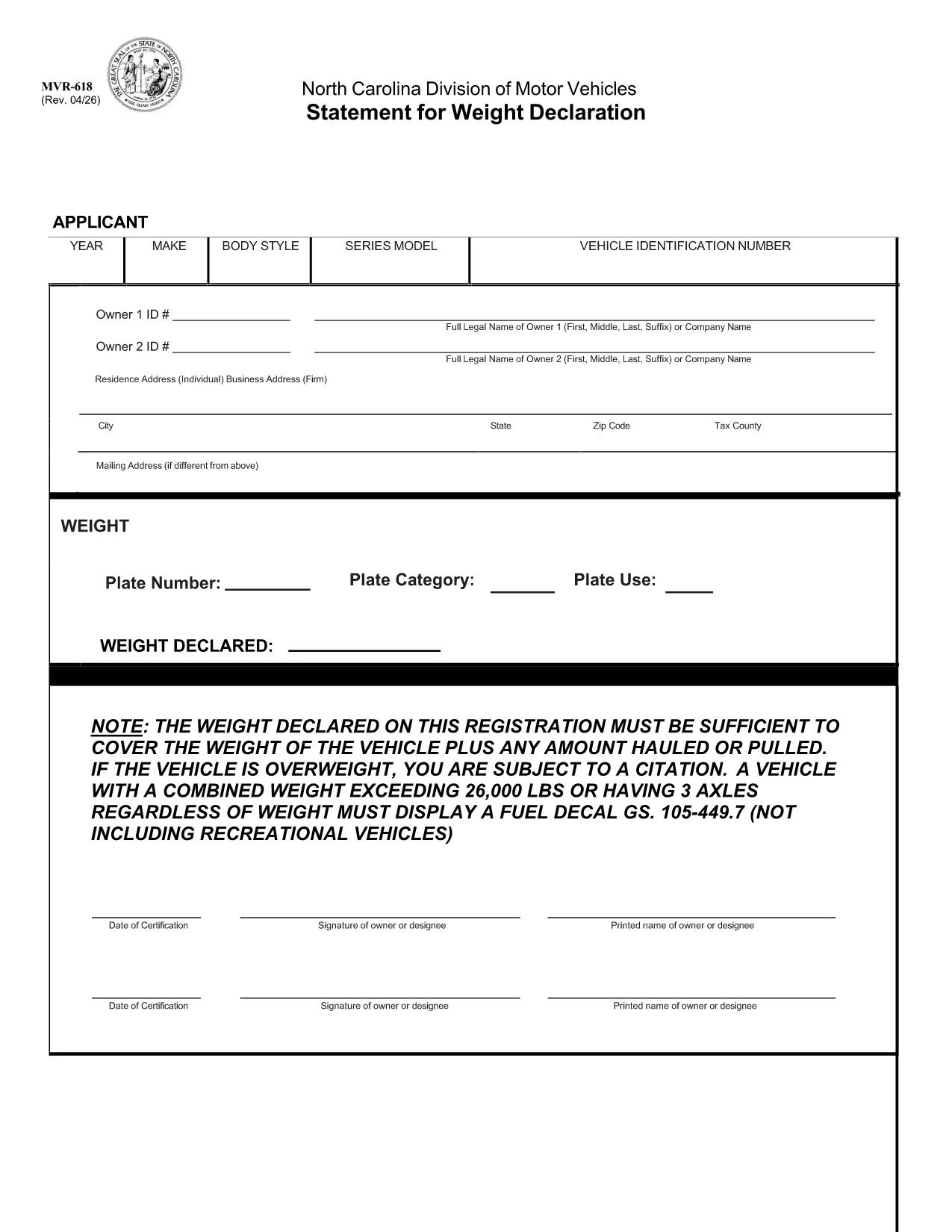
MVR-618 Fillable PDF – North Carolina Weight Declaration Form

  1. שפה אנגלית
  2. מדינה ארה"ב
  3. פעילות רישום רכב
  4. מדינה צפון קרוליינה
MVR-618 Fillable PDF – North Carolina Weight Declaration Form

The MVR-618 is the North Carolina Division of Motor Vehicles (NCDMV) “Statement for Weight Declaration.” It is required whenever you register a vehicle that carries a load, pulls a trailer, or exceeds certain weight thresholds. The form ensures the declared weight covers the vehicle plus any hauled or pulled cargo, helping you stay compliant and avoid citations.

What is Form MVR-618?

Form MVR-618 captures the total weight of your vehicle and any additional load. North Carolina law mandates that the declared weight must be sufficient for the vehicle’s own weight plus any cargo. Vehicles over 26,000 lbs or with three axles must display a fuel decal (GS 105‑449.7). The form is part of the standard vehicle registration packet and is used by the Department of Motor Vehicles to verify compliance.

How to Fill Out MVR-618 Online

Instead of printing, printing, and scanning, you can complete the form instantly in your browser using Formize’s Fillable PDF tool. Follow the quick steps below:

  • Click the “Fill out this form” button on this page.
  • The Formize PDF Filler loads – no download required.
  • Enter the requested information (vehicle weight, cargo weight, axle count, etc.).
  • Review the data, then click **Submit** to generate a completed PDF.
  • Save or print the finished document for your records.

Common Mistakes & Tips

Even a small error can lead to a citation. Keep these tips in mind:

  • Double‑check the total weight. Add vehicle weight and cargo weight accurately.
  • Include all axles. Remember that three‑axle vehicles need a fuel decal regardless of weight.
  • Use pounds (lbs) only. The form does not accept kilograms.
  • Signature required. The online filler adds a digital signature field – sign before saving.
  • Keep a copy. Store the completed PDF in your vehicle records folder.

Download & Save the PDF

If you prefer a hard copy, the original fillable PDF is available for download below. The file is the official NCDOT version, fully compatible with Formize.

Download MVR-618 (Official PDF)

Whether you use the online filler or the printable PDF, Formize makes completing MVR-618 fast, accurate, and hassle‑free.

שאלות נפוצות
  • Do I need to print the MVR-618 after filling it online?

    Printing is optional. You can keep the digital PDF for your records, but many DMV offices still require a printed copy. Use the “Print” button in the Formize filler if you need one.

  • What happens if my declared weight is too low?

    If the declared weight does not cover the vehicle plus any load, the DMV may issue a citation and you could be required to re‑register with a corrected weight declaration.

  • Can I edit the form after I’ve downloaded it?

    Once you download the completed PDF, it is locked for editing. If you need to make changes, return to the online filler, adjust the fields, and download a new version.

  • Is the Formize filler secure?

    Yes. Formize uses SSL encryption for data transmission, and the completed PDF is stored only in your browser session unless you choose to download it.

  • Do I need a fuel decal if my vehicle is under 26,000 lbs but has three axles?

    Yes. North Carolina law requires a fuel decal for any vehicle with three axles, regardless of total weight.

  • What if I lose the completed MVR-618?

    You can re‑fill the form online at any time using the same vehicle information. Keep a digital copy saved on your computer or cloud storage for easy access.

איך ל

כיצד למלא את MVR-618 בחינם, באינטרנט ב-4 שלבים פשוטים:

  1. 1
    Open the Fillable Form
    Click the “Fill out this form” button on this page. The Formize PDF Filler loads directly in your browser – no software download needed.
  2. 2
    Enter Required Information
    Fill in the vehicle’s gross weight, cargo weight, axle count, and any other fields shown. All entries are saved automatically.
  3. 3
    Review and Sign
    Check the completed values for accuracy, then use the digital signature field to sign the form.
  4. 4
    Save or Print
    Click “Download” to save the completed PDF to your device, or select “Print” to obtain a hard copy for your records.
Formize אפליקציית מילוי PDF
על אודות

טפסי רישום רכב

אם אתה מחזיק או שוכר רכב מנועי, נגרר או סירה, עליך לעמוד בהתחייבויות מסוימות כדי לשמור על הרכב שלך רשום חוקי ובטוח.

MVR-618 הוא אחד מטפסי רישום רכב שהם מסמכים המשמשים לרישום רכב מנועי במדינה או ברשות המחוז הרלוונטית. טפסים אלה נדרשים בדרך כלל כאשר אדם רוכש רכב חדש או משומש או כאשר הוא עובר למדינה או למחוז חדש עם רכב.

הדרישות והטפסים המדויקים הדרושים לרישום רכב יכולים להשתנות לפי מיקום, אך בדרך כלל, התהליך כולל מסירת מידע על הרכב, הבעלים וכל שעבוד על הרכב.

לאחר הגשת טפסי הרישום והאגרות, תנפיק המדינה או הרשות המחוזית תעודת רישום או לוחית רישוי לבעל הרכב. רישום זה מאפשר להפעיל את הרכב כחוק בכבישים ציבוריים ובכבישים מהירים.

תכונות

מילוי PDF

הדרך הקלה ביותר למלא טפסי PDF באינטרנט

  • מלא במהירות את MVR-618
    מחפש דרך למלא במהירות את MVR-618 באינטרנט? עם מילוי טופס ה-PDF המקוון שלנו בחינם, תדע כיצד לערוך ולמלא את מסמך ה-PDF הזה תוך פחות מדקה.
  • עורך PDF מקוון קל לשימוש
    נמאס לך להדפיס קבצי PDF כדי שתוכל לערוך אותם, לפני סריקה מחדש ושליחה חזרה? ערוך מסמכי PDF בחינם באינטרנט. השתמש בעורך ה-PDF המקוון שלנו כדי לחסוך בזמן ובנייר.
  • כלים מעולים, כל הפלטפורמות
    תוהה כיצד למלא את MVR-618 ב-Mac, או אולי איך להשתמש בחומר מילוי PDF בחינם? כלי ה-PDF המקוונים שלנו פועלים בכל הפלטפורמות.
  • אחסון קבצים מאובטח
    קבצי "MVR-618" שהושלמו מאוחסנים במסד נתונים מאובטח המנוהל על ידי אירוח Amazon Cloud. אתה יכול למחוק את הקבצים שלך מהמערכת שלנו בכל עת. בכל מקרה, קבצים אלו נמחקים אוטומטית לאחר 24 שעות.
  • צ'אט עם MVR-618
    צ'אט עם "MVR-618" ב-Chatize שהוא עוזר לקורא PDF בחינם. שאל שאלות וקבל תשובות מ-"MVR-618". פשוט לחץ על הלחצן צ'אט עם מסמך למעלה.

מחק הפעלת מילוי

למחוק את הפעלת המילוי שנבחרה? במקרה זה, ההתקדמות שלך במילוי הטופס תאבד.

מחק סשן עריכה

למחוק את סשן העריכה שנבחר? במקרה זה, ההתקדמות שלך ביצירה ועריכה של הטופס תאבד.