
hamburger-menu icon
भाषा का चयन करें

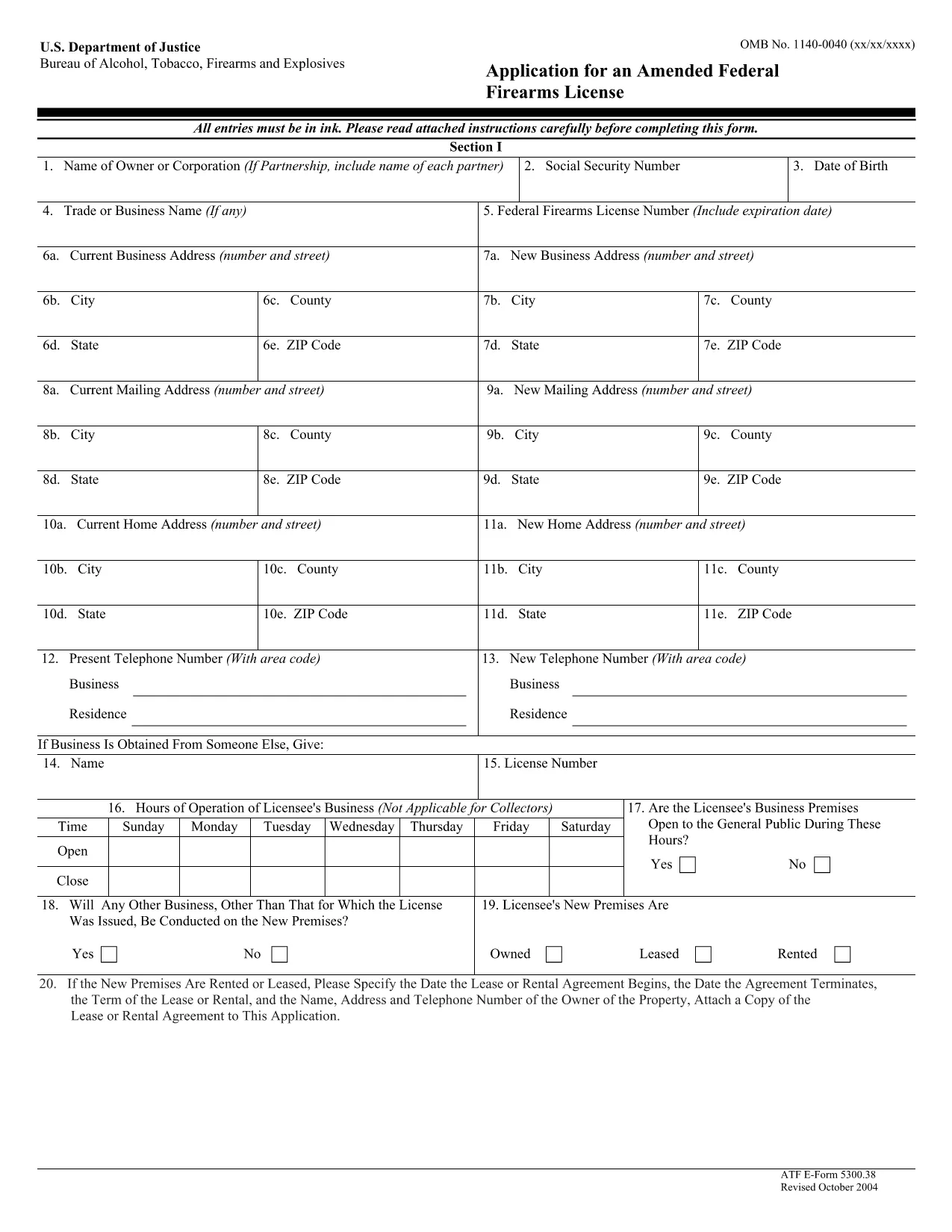
The ATF Form 5300.38 is the official application used to request an amendment to an existing Federal Firearms License (FFL). Whether you need to add a new class of firearms, change your business address, or update other license details, this form is required by the Bureau of Alcohol, Tobacco, Firearms and Explosives (ATF).

Formize.com offers a 100% fillable, searchable PDF version of the ATF Form 5300.38. You can either download the PDF to complete it offline or use our integrated online PDF filler to fill it out instantly in your browser—no extra software needed.

What is ATF Form 5300.38?

This form is titled “Application for an Amended Federal Firearms License” and is governed by 18 U.S.C. Chapter 44. It is used by existing FFL holders to request any change to their license that does not require a completely new application.

How to Fill Out the Form Online

Follow the simple steps below to complete the form securely with Formize’s PDF Filler:

  • Click the “Fill out this form” button on this page.
  • Wait a few seconds while the Formize PDF Filler loads the fillable ATF Form 5300.38.
  • Enter your information directly into each field. The filler validates dates, phone numbers, and required fields in real time.
  • Review the completed form, sign electronically if required, and click “Download” or “Print”.
  • Mail the signed form to the ATF Federal Firearms Licensing Center as instructed.

Common Mistakes to Avoid

Even a small error can delay processing. Keep these tips in mind:

  • Incorrect ATF Number: Double‑check your current FFL number.
  • Missing Signatures: All required signatures must be original or an accepted electronic signature.
  • Out‑of‑Date Addresses: Use the exact mailing address listed on your current license.
  • Incomplete Attachments: If you’re adding a new class, include the appropriate supplemental pages.

Where to Submit Your Application

After completing the form, mail it to:

Chief, Federal Firearms Licensing Center
2600 Century Parkway NE
Atlanta, GA 30345
United States

Use certified mail or a reputable courier to ensure delivery tracking.

Download the Official PDF

If you prefer to fill out the form offline, click the download button below to get the official ATF Form 5300.38 PDF directly from the government source.

Download ATF Form 5300.38 PDF

सामान्य प्रश्न
  • Is the ATF Form 5300.38 available as a fillable PDF?

    Yes. Formize provides a fully fillable PDF version that you can complete online or download for offline use.

  • Do I need a digital signature for this form?

    The ATF accepts electronic signatures for most sections, but the final signature line often requires a wet ink signature. Check the instructions on the form.

  • How long does it take for the ATF to process an amendment?

    Processing times vary, but most amended license requests are reviewed within 4‑6 weeks after receipt.

  • Can I submit the form electronically?

    The ATF still requires a hard‑copy submission by mail. You can, however, fill out the form electronically and print it for mailing.

  • What should I do if I make a mistake after printing?

    Cross out the error with a single line, initial the change, and complete the rest of the form. For major errors, it’s best to start a new copy.

  • Is there a fee for filing an amendment?

    Generally, there is no additional fee for amending an existing FFL unless the amendment adds a new class of firearms, which may incur a fee.

  • Where can I find the official ATF instructions for Form 5300.38?

    The official instruction sheet is included as the first page of the PDF linked above or can be accessed on the ATF website.

  • Do I need to attach any supporting documents?

    Depending on the amendment, you may need to attach a copy of your current license, a new business location map, or other relevant documentation.

कैसे करें

ATF Form 5300.38 को मुफ़्त में, ऑनलाइन 5 आसान स्टेप्स में कैसे भरें:

  1. 1
    Click the Fill‑out Button
    Press the “Fill out this form” button on this page to launch the Formize PDF Filler.
  2. 2
    Wait for the Filler to Load
    The fillable ATF Form 5300.38 will appear in your browser within a few seconds.
  3. 3
    Enter Your Information
    Complete each field. The tool validates entries and highlights required sections.
  4. 4
    Review and Sign
    Check the completed form for accuracy, add an electronic signature if allowed, and save.
  5. 5
    Download or Print
    Download the finished PDF or print it to mail to the ATF Federal Firearms Licensing Center.
पीडीएफ फिलर एप तैयार करें
के बारे में

शराब, तंबाकू, आग्नेयास्त्र और विस्फोटक (एटीएफ) रूपों का ब्यूरो

ATF Form 5300.38 आधिकारिक रूपों में से एक है जिसका उपयोग संयुक्त राज्य अमेरिका के न्याय विभाग के भीतर एक संघीय कानून प्रवर्तन एजेंसी एटीएफ द्वारा किया जाता है। एटीएफ शराब, तंबाकू, आग्नेयास्त्रों और विस्फोटकों से संबंधित संघीय कानूनों और विनियमों को लागू करने के लिए जिम्मेदार है। इन फॉर्मों का उपयोग विभिन्न उद्देश्यों के लिए किया जाता है, जिसमें इन उद्योगों में शामिल व्यवसायों और व्यक्तियों का पंजीकरण, लाइसेंसिंग और विनियमन शामिल है। यहां एटीएफ फॉर्म के कुछ उदाहरण दिए गए हैं:

एटीएफ फॉर्म 4473: इस फॉर्म का उपयोग पृष्ठभूमि की जांच प्रक्रिया के लिए किया जाता है जब कोई व्यक्ति संघीय लाइसेंस प्राप्त आग्नेयास्त्र डीलर से बंदूक खरीदता है। यह क्रेता की पहचान, पृष्ठभूमि और आग्नेयास्त्र रखने की पात्रता के बारे में जानकारी एकत्र करता है।

एटीएफ फॉर्म 1: इस फॉर्म का उपयोग बंदूक बनाने और पंजीकरण के लिए आवेदन करने के लिए किया जाता है। इसका उपयोग आमतौर पर उन व्यक्तियों के लिए किया जाता है जो व्यक्तिगत उपयोग के लिए बन्दूक का निर्माण करना चाहते हैं या मौजूदा बन्दूक को एक अलग कॉन्फ़िगरेशन में परिवर्तित करना चाहते हैं।

एटीएफ फॉर्म 4: इस फॉर्म का उपयोग एक व्यक्ति या संस्था से दूसरे व्यक्ति को बंदूक के हस्तांतरण और पंजीकरण के लिए किया जाता है। इसका उपयोग आमतौर पर किसी निजी पार्टी से बन्दूक खरीदने या किसी ट्रस्ट या निगम को बन्दूक हस्तांतरित करने की प्रक्रिया में किया जाता है।

एटीएफ फॉर्म 6: इस फॉर्म का उपयोग आग्नेयास्त्रों, गोला-बारूद और एटीएफ द्वारा विनियमित कुछ अन्य वस्तुओं के आयात के लिए किया जाता है। यह उन व्यक्तियों या व्यवसायों के लिए आवश्यक है जो संयुक्त राज्य अमेरिका में ऐसी वस्तुओं का आयात करना चाहते हैं।

एटीएफ फॉर्म 7: इस फॉर्म का उपयोग संघीय आग्नेयास्त्र लाइसेंस (एफएफएल) के आवेदन और नवीनीकरण के लिए किया जाता है। यह आग्नेयास्त्रों के निर्माण, व्यापार या आयात के व्यवसाय में लगे व्यक्तियों या व्यवसायों के लिए आवश्यक है।

ATF फॉर्म 5320.20: इस फॉर्म का उपयोग आग्नेयास्त्रों के परिवहन की अधिसूचना और अनुमोदन के लिए किया जाता है या राज्य स्तर पर विनाशकारी उपकरण।

ATF फॉर्म 5400.13: इस फॉर्म का उपयोग पंजीकरण और रिपोर्टिंग के लिए किया जाता है विस्फोटक सामग्री और उपकरण.

ये शराब, तंबाकू, आग्नेयास्त्रों और विस्फोटकों को नियंत्रित करने वाले संघीय कानूनों के विनियमन और प्रवर्तन से संबंधित विभिन्न उद्देश्यों के लिए उपयोग किए जाने वाले एटीएफ फॉर्म के कुछ उदाहरण हैं। आवश्यक विशिष्ट प्रपत्र आयोजित की जा रही विशेष गतिविधि या लेनदेन और लागू होने वाले नियमों पर निर्भर करते हैं। अल्कोहल, तंबाकू, आग्नेयास्त्र और विस्फोटक ब्यूरो की आधिकारिक वेबसाइट (www.atf.gov) से परामर्श करना या सटीक और अद्यतन जानकारी के लिए पेशेवर मार्गदर्शन लेना महत्वपूर्ण है। आपकी स्थिति के लिए प्रासंगिक विशिष्ट एटीएफ प्रपत्रों के संबंध में।

विशेषताएं

पीडीएफ भराव

पीडीएफ फॉर्म ऑनलाइन भरने का सबसे आसान तरीका

  • जल्दी से ATF Form 5300.38 भरें
    ATF Form 5300.38 को जल्दी से ऑनलाइन भरने का कोई तरीका खोज रहे हैं? हमारे ऑनलाइन नि:शुल्क पीडीएफ फॉर्म फिलर के साथ, आप एक मिनट से भी कम समय में इस पीडीएफ दस्तावेज़ को संपादित करने और भरने का तरीका जानेंगे।
  • ऑनलाइन पीडीएफ संपादक का उपयोग करना आसान है
    पीडीएफ फाइलों को प्रिंट करने से तंग आ गए हैं ताकि आप उन्हें फिर से स्कैन करने और उन्हें वापस भेजने से पहले संपादित कर सकें? PDF दस्तावेज़ों को निःशुल्क ऑनलाइन संपादित करें। समय और कागज बचाने के लिए हमारे ऑनलाइन पीडीएफ संपादक का प्रयोग करें।
  • महान उपकरण, सभी प्लेटफार्म
    आश्चर्य है कि मैक पर ATF Form 5300.38 कैसे भरें, या शायद पीडीएफ फिलर का मुफ्त में उपयोग कैसे करें? हमारे ऑनलाइन पीडीएफ टूल सभी प्लेटफॉर्म पर काम करते हैं।
  • सुरक्षित फ़ाइल भंडारण
    पूर्ण की गई "ATF Form 5300.38" फ़ाइलें Amazon क्लाउड होस्टिंग द्वारा प्रबंधित एक सुरक्षित डेटाबेस में संग्रहीत की जाती हैं। आप कभी भी अपनी फाइलों को हमारे सिस्टम से हटा सकते हैं। किसी भी स्थिति में, ये फ़ाइलें 24 घंटे के बाद स्वतः हटा दी जाती हैं।
  • {कीवर्ड} से चैट करें
    Chatize पर "ATF Form 5300.38" के साथ चैट करें, जो एक निःशुल्क पीडीएफ रीडर सहायक है। प्रश्न पूछें और "ATF Form 5300.38" से उत्तर प्राप्त करें। बस ऊपर दस्तावेज़ के साथ चैट करें बटन पर क्लिक करें।

फ़िलिंग सत्र मिटाएँ

चयनित फ़िलिंग सत्र को मिटाएँ? इस स्थिति में, फ़ॉर्म को पूरा करने में आपकी प्रगति खो जाएगी।

संपादन सत्र हटाएँ

चयनित संपादन सत्र हटाएँ? इस स्थिति में, फ़ॉर्म बनाने और संपादित करने में आपकी प्रगति नष्ट हो जाएगी।