
hamburger-menu icon
भाषा का चयन करें

Whether you are applying for a new Federal Firearms License (FFL) or need to add a responsible person to an existing license, the ATF’s Form 5310.12 and Form 5310.16 are essential. Formize provides a secure, fillable PDF that lets you complete both forms directly in your browser – no extra software required.

What Is ATF Form 5310.12?

Form 5310.12 is the official application used to request any type of FFL (Dealer, Manufacturer, Importer, etc.). It collects business information, background details, and the specific license class you are seeking.

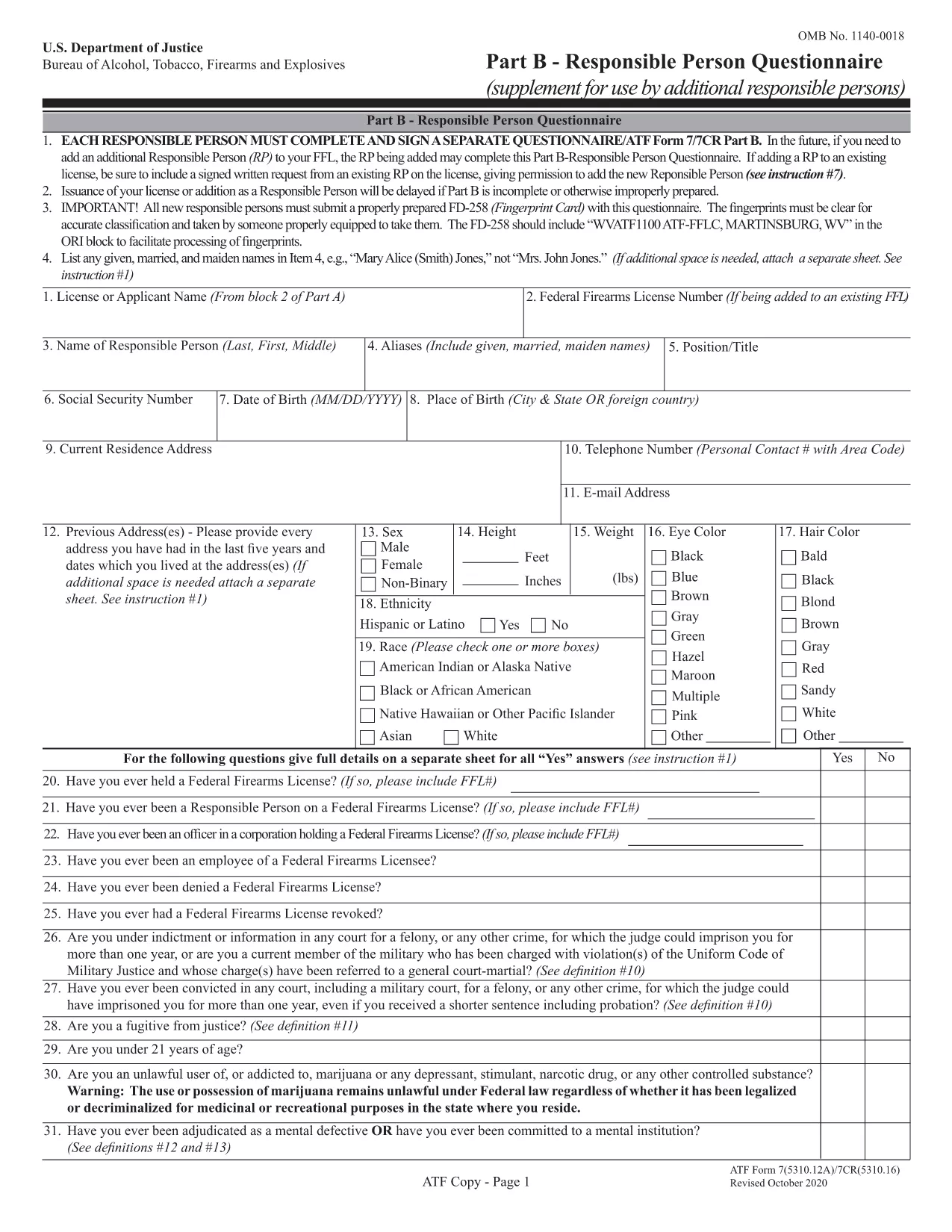
Understanding Form 5310.16 – Responsible Person Questionnaire

Form 5310.16 (also known as Part B) is a questionnaire that must be completed by every responsible person added to an FFL. It includes personal background questions, fingerprint instructions, and a photo requirement.

How to Fill Out the Forms Online with Formize

Follow the simple steps below to fill the PDF without leaving the page.

  • Click the "Fill out this form" button on the page.
  • Wait a few seconds while the Formize PDF Filler app loads.
  • Enter your information directly into the fillable fields.
  • Use the Save button to download a completed copy or Print it for mailing.
  • Mail the printed form to the ATF address shown on the form instructions.

Common Mistakes to Avoid

  • Leaving required fields blank – the filler highlights empty mandatory sections.
  • Using an outdated form version – our PDF is the latest revision (effective 2022).
  • Submitting the wrong mailing address – double‑check the address on the form’s last page.
  • Forgetting the fingerprint card for Form 5310.16 – attach it before mailing.

Where to Submit Your Completed Forms

After completing the forms, mail them to the ATF’s Federal Firearms Licensing Center (FFLC) at the address printed on the last page of each form. For expedited processing, consider using certified mail with tracking.

Need more help? Review the ATF’s official instructions linked on each form or consult a qualified firearms attorney.

सामान्य प्रश्न
  • Do I need to fill out both Form 5310.12 and 5310.16?

    Form 5310.12 is required for a new FFL. Form 5310.16 is only needed when adding or updating a responsible person on an existing FFL.

  • Can I submit the forms electronically?

    The ATF currently requires a hard‑copy submission for these forms. Use the online filler to complete them, then print and mail.

  • Is the PDF fillable on mobile devices?

    Yes. The Formize filler works on most modern smartphones and tablets, though a larger screen makes data entry easier.

  • What address should I use for mailing?

    The correct mailing address is printed on the last page of each form. For Form 5310.12, use the Federal Firearms Licensing Center address; for Form 5310.16, use the ATF address shown in the questionnaire instructions.

  • How long does it take the ATF to process my application?

    Processing times vary, but most FFL applications are reviewed within 60‑90 days after receipt.

  • Do I need a fingerprint card for Form 5310.16?

    Yes. Every responsible person must submit a fingerprint card (FD‑258) along with the completed questionnaire.

  • What if I make a mistake after mailing?

    Contact the ATF’s Federal Firearms Licensing Center immediately. They may allow a corrected form to be resubmitted before final approval.

कैसे करें

ATF Form 5310.12 को मुफ़्त में, ऑनलाइन 5 आसान स्टेप्स में कैसे भरें:

  1. 1
    Click the Fill Out Button
    Press the "Fill out this form" button on the page to launch the Formize PDF Filler.
  2. 2
    Wait for the Filler to Load
    A short loading screen appears while the secure fillable PDF is prepared.
  3. 3
    Enter Your Information
    Type directly into each highlighted field. Use the navigation tabs to jump between sections.
  4. 4
    Save or Print Your Completed Form
    When finished, click "Save" to download a copy or "Print" to produce a hard‑copy for mailing.
  5. 5
    Mail to the ATF
    Attach any required fingerprint cards or photos and mail the form to the address shown on the last page.
पीडीएफ फिलर एप तैयार करें
के बारे में

शराब, तंबाकू, आग्नेयास्त्र और विस्फोटक (एटीएफ) रूपों का ब्यूरो

ATF Form 5310.12 आधिकारिक रूपों में से एक है जिसका उपयोग संयुक्त राज्य अमेरिका के न्याय विभाग के भीतर एक संघीय कानून प्रवर्तन एजेंसी एटीएफ द्वारा किया जाता है। एटीएफ शराब, तंबाकू, आग्नेयास्त्रों और विस्फोटकों से संबंधित संघीय कानूनों और विनियमों को लागू करने के लिए जिम्मेदार है। इन फॉर्मों का उपयोग विभिन्न उद्देश्यों के लिए किया जाता है, जिसमें इन उद्योगों में शामिल व्यवसायों और व्यक्तियों का पंजीकरण, लाइसेंसिंग और विनियमन शामिल है। यहां एटीएफ फॉर्म के कुछ उदाहरण दिए गए हैं:

एटीएफ फॉर्म 4473: इस फॉर्म का उपयोग पृष्ठभूमि की जांच प्रक्रिया के लिए किया जाता है जब कोई व्यक्ति संघीय लाइसेंस प्राप्त आग्नेयास्त्र डीलर से बंदूक खरीदता है। यह क्रेता की पहचान, पृष्ठभूमि और आग्नेयास्त्र रखने की पात्रता के बारे में जानकारी एकत्र करता है।

एटीएफ फॉर्म 1: इस फॉर्म का उपयोग बंदूक बनाने और पंजीकरण के लिए आवेदन करने के लिए किया जाता है। इसका उपयोग आमतौर पर उन व्यक्तियों के लिए किया जाता है जो व्यक्तिगत उपयोग के लिए बन्दूक का निर्माण करना चाहते हैं या मौजूदा बन्दूक को एक अलग कॉन्फ़िगरेशन में परिवर्तित करना चाहते हैं।

एटीएफ फॉर्म 4: इस फॉर्म का उपयोग एक व्यक्ति या संस्था से दूसरे व्यक्ति को बंदूक के हस्तांतरण और पंजीकरण के लिए किया जाता है। इसका उपयोग आमतौर पर किसी निजी पार्टी से बन्दूक खरीदने या किसी ट्रस्ट या निगम को बन्दूक हस्तांतरित करने की प्रक्रिया में किया जाता है।

एटीएफ फॉर्म 6: इस फॉर्म का उपयोग आग्नेयास्त्रों, गोला-बारूद और एटीएफ द्वारा विनियमित कुछ अन्य वस्तुओं के आयात के लिए किया जाता है। यह उन व्यक्तियों या व्यवसायों के लिए आवश्यक है जो संयुक्त राज्य अमेरिका में ऐसी वस्तुओं का आयात करना चाहते हैं।

एटीएफ फॉर्म 7: इस फॉर्म का उपयोग संघीय आग्नेयास्त्र लाइसेंस (एफएफएल) के आवेदन और नवीनीकरण के लिए किया जाता है। यह आग्नेयास्त्रों के निर्माण, व्यापार या आयात के व्यवसाय में लगे व्यक्तियों या व्यवसायों के लिए आवश्यक है।

ATF फॉर्म 5320.20: इस फॉर्म का उपयोग आग्नेयास्त्रों के परिवहन की अधिसूचना और अनुमोदन के लिए किया जाता है या राज्य स्तर पर विनाशकारी उपकरण।

ATF फॉर्म 5400.13: इस फॉर्म का उपयोग पंजीकरण और रिपोर्टिंग के लिए किया जाता है विस्फोटक सामग्री और उपकरण.

ये शराब, तंबाकू, आग्नेयास्त्रों और विस्फोटकों को नियंत्रित करने वाले संघीय कानूनों के विनियमन और प्रवर्तन से संबंधित विभिन्न उद्देश्यों के लिए उपयोग किए जाने वाले एटीएफ फॉर्म के कुछ उदाहरण हैं। आवश्यक विशिष्ट प्रपत्र आयोजित की जा रही विशेष गतिविधि या लेनदेन और लागू होने वाले नियमों पर निर्भर करते हैं। अल्कोहल, तंबाकू, आग्नेयास्त्र और विस्फोटक ब्यूरो की आधिकारिक वेबसाइट (www.atf.gov) से परामर्श करना या सटीक और अद्यतन जानकारी के लिए पेशेवर मार्गदर्शन लेना महत्वपूर्ण है। आपकी स्थिति के लिए प्रासंगिक विशिष्ट एटीएफ प्रपत्रों के संबंध में।

विशेषताएं

पीडीएफ भराव

पीडीएफ फॉर्म ऑनलाइन भरने का सबसे आसान तरीका

  • जल्दी से ATF Form 5310.12 भरें
    ATF Form 5310.12 को जल्दी से ऑनलाइन भरने का कोई तरीका खोज रहे हैं? हमारे ऑनलाइन नि:शुल्क पीडीएफ फॉर्म फिलर के साथ, आप एक मिनट से भी कम समय में इस पीडीएफ दस्तावेज़ को संपादित करने और भरने का तरीका जानेंगे।
  • ऑनलाइन पीडीएफ संपादक का उपयोग करना आसान है
    पीडीएफ फाइलों को प्रिंट करने से तंग आ गए हैं ताकि आप उन्हें फिर से स्कैन करने और उन्हें वापस भेजने से पहले संपादित कर सकें? PDF दस्तावेज़ों को निःशुल्क ऑनलाइन संपादित करें। समय और कागज बचाने के लिए हमारे ऑनलाइन पीडीएफ संपादक का प्रयोग करें।
  • महान उपकरण, सभी प्लेटफार्म
    आश्चर्य है कि मैक पर ATF Form 5310.12 कैसे भरें, या शायद पीडीएफ फिलर का मुफ्त में उपयोग कैसे करें? हमारे ऑनलाइन पीडीएफ टूल सभी प्लेटफॉर्म पर काम करते हैं।
  • सुरक्षित फ़ाइल भंडारण
    पूर्ण की गई "ATF Form 5310.12" फ़ाइलें Amazon क्लाउड होस्टिंग द्वारा प्रबंधित एक सुरक्षित डेटाबेस में संग्रहीत की जाती हैं। आप कभी भी अपनी फाइलों को हमारे सिस्टम से हटा सकते हैं। किसी भी स्थिति में, ये फ़ाइलें 24 घंटे के बाद स्वतः हटा दी जाती हैं।
  • {कीवर्ड} से चैट करें
    Chatize पर "ATF Form 5310.12" के साथ चैट करें, जो एक निःशुल्क पीडीएफ रीडर सहायक है। प्रश्न पूछें और "ATF Form 5310.12" से उत्तर प्राप्त करें। बस ऊपर दस्तावेज़ के साथ चैट करें बटन पर क्लिक करें।

फ़िलिंग सत्र मिटाएँ

चयनित फ़िलिंग सत्र को मिटाएँ? इस स्थिति में, फ़ॉर्म को पूरा करने में आपकी प्रगति खो जाएगी।

संपादन सत्र हटाएँ

चयनित संपादन सत्र हटाएँ? इस स्थिति में, फ़ॉर्म बनाने और संपादित करने में आपकी प्रगति नष्ट हो जाएगी।