
hamburger-menu icon
भाषा का चयन करें

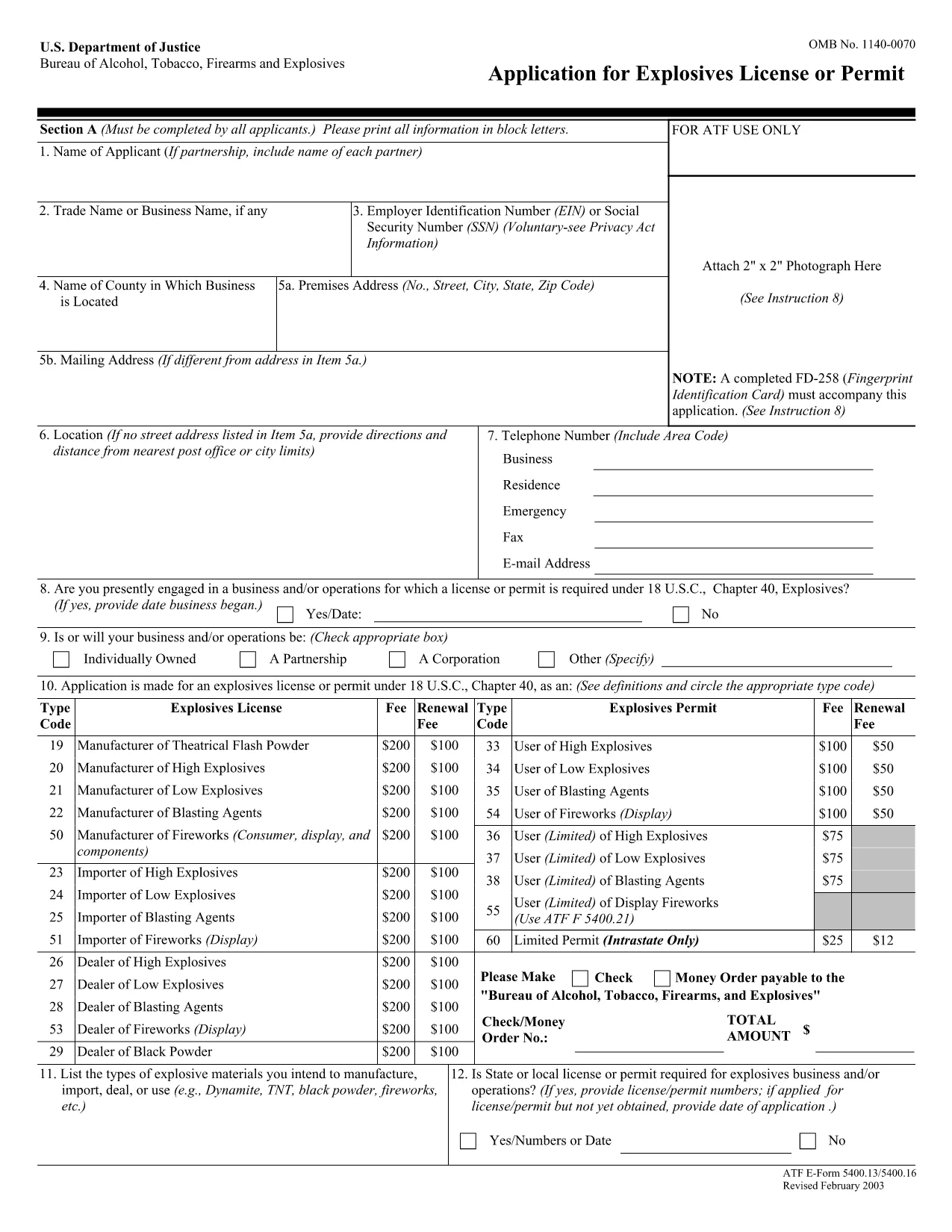
The ATF Form 5400.13 (Responsible Person Questionnaire) and its companion Form 5400.16 are required for anyone applying for an explosives license or permit. These forms collect detailed information about each responsible person associated with the business, ensuring compliance with the Bureau of Alcohol, Tobacco, Firearms and Explosives (ATF) regulations.

What Is ATF Form 5400.13/5400.16?

Form 5400.13 gathers personal, business, and background data for each responsible person, while Form 5400.16 provides additional certification and signature fields. Together, they form the core of the ATF’s Responsible Person Questionnaire, a mandatory part of every explosives license or permit application.

How to Complete the Form Online with Formize

  • Step 1: Click the "Fill out this form" button on this page.
  • Step 2: Wait a few seconds while the Formize PDF Filler app loads the fillable PDF.
  • Step 3: Enter the requested information in each field. The interface saves your progress automatically.
  • Step 4: When all sections are complete, download the finished PDF or submit it directly to the ATF portal.

Common Mistakes & Tips for a Successful Submission

Don’t leave any required fields blank. The ATF will reject applications with missing data. Use the "Add another responsible person" button if you have more than one individual to report.

Use legal names only. Include maiden names, previous married names, and any aliases exactly as they appear on official documents.

Double‑check dates. Ensure birth dates, licensing dates, and expiration dates follow the MM/DD/YYYY format.

Where to Send the Completed Form

After you download the completed PDF, mail or fax it to the ATF National Services Center, Federal Explosives Licensing Center, P.O. Box 6200‑18, Portland, OR 97228‑6200. Refer to the ATF instructions for any additional submission requirements.

Need a printable version? Use the download link below to get the original PDF.

सामान्य प्रश्न
  • Who must complete ATF Form 5400.13/5400.16?

    Every individual who will act as a responsible person for an explosives business – owners, partners, officers, and key employees – must complete the questionnaire.

  • Can I submit a paper copy instead of the fillable PDF?

    Yes, a printed version is accepted, but using the fillable PDF reduces errors and speeds up processing.

  • What if I have more than three responsible persons?

    Use the "Add another responsible person" button in the online filler, or attach additional sheets if you print the form.

  • How long is the form valid after I submit it?

    The information is valid for the duration of the license or permit. Any changes (e.g., new responsible person) must be reported to the ATF promptly.

  • Do I need a digital signature?

    A typed name in the signature field is acceptable for the online version. For paper submissions, sign with a pen.

  • Is there a filing fee associated with this questionnaire?

    The questionnaire itself has no fee, but it is part of the overall explosives license application, which may have associated fees.

  • What should I do if I make a mistake after saving?

    Open the saved PDF in the Formize filler again, correct the error, and re‑download the updated file.

  • Where can I find the official ATF instructions?

    The ATF publishes detailed guidance on its website under the Explosives Licensing section; a link is included on the form’s cover page.

कैसे करें

ATF Form 5400.13 को मुफ़्त में, ऑनलाइन 4 आसान स्टेप्स में कैसे भरें:

  1. 1
    Click the Fill‑out Button
    Press the "Fill out this form" button on the page to launch the Formize PDF Filler.
  2. 2
    Wait for the Filler to Load
    A few seconds later the fillable PDF appears in the browser. No download or extra software is needed.
  3. 3
    Enter All Required Information
    Complete each field for every responsible person. The app auto‑saves as you type.
  4. 4
    Download or Submit
    When finished, click "Download PDF" to save a copy or follow ATF instructions to submit the form.
पीडीएफ फिलर एप तैयार करें
के बारे में

शराब, तंबाकू, आग्नेयास्त्र और विस्फोटक (एटीएफ) रूपों का ब्यूरो

ATF Form 5400.13 आधिकारिक रूपों में से एक है जिसका उपयोग संयुक्त राज्य अमेरिका के न्याय विभाग के भीतर एक संघीय कानून प्रवर्तन एजेंसी एटीएफ द्वारा किया जाता है। एटीएफ शराब, तंबाकू, आग्नेयास्त्रों और विस्फोटकों से संबंधित संघीय कानूनों और विनियमों को लागू करने के लिए जिम्मेदार है। इन फॉर्मों का उपयोग विभिन्न उद्देश्यों के लिए किया जाता है, जिसमें इन उद्योगों में शामिल व्यवसायों और व्यक्तियों का पंजीकरण, लाइसेंसिंग और विनियमन शामिल है। यहां एटीएफ फॉर्म के कुछ उदाहरण दिए गए हैं:

एटीएफ फॉर्म 4473: इस फॉर्म का उपयोग पृष्ठभूमि की जांच प्रक्रिया के लिए किया जाता है जब कोई व्यक्ति संघीय लाइसेंस प्राप्त आग्नेयास्त्र डीलर से बंदूक खरीदता है। यह क्रेता की पहचान, पृष्ठभूमि और आग्नेयास्त्र रखने की पात्रता के बारे में जानकारी एकत्र करता है।

एटीएफ फॉर्म 1: इस फॉर्म का उपयोग बंदूक बनाने और पंजीकरण के लिए आवेदन करने के लिए किया जाता है। इसका उपयोग आमतौर पर उन व्यक्तियों के लिए किया जाता है जो व्यक्तिगत उपयोग के लिए बन्दूक का निर्माण करना चाहते हैं या मौजूदा बन्दूक को एक अलग कॉन्फ़िगरेशन में परिवर्तित करना चाहते हैं।

एटीएफ फॉर्म 4: इस फॉर्म का उपयोग एक व्यक्ति या संस्था से दूसरे व्यक्ति को बंदूक के हस्तांतरण और पंजीकरण के लिए किया जाता है। इसका उपयोग आमतौर पर किसी निजी पार्टी से बन्दूक खरीदने या किसी ट्रस्ट या निगम को बन्दूक हस्तांतरित करने की प्रक्रिया में किया जाता है।

एटीएफ फॉर्म 6: इस फॉर्म का उपयोग आग्नेयास्त्रों, गोला-बारूद और एटीएफ द्वारा विनियमित कुछ अन्य वस्तुओं के आयात के लिए किया जाता है। यह उन व्यक्तियों या व्यवसायों के लिए आवश्यक है जो संयुक्त राज्य अमेरिका में ऐसी वस्तुओं का आयात करना चाहते हैं।

एटीएफ फॉर्म 7: इस फॉर्म का उपयोग संघीय आग्नेयास्त्र लाइसेंस (एफएफएल) के आवेदन और नवीनीकरण के लिए किया जाता है। यह आग्नेयास्त्रों के निर्माण, व्यापार या आयात के व्यवसाय में लगे व्यक्तियों या व्यवसायों के लिए आवश्यक है।

ATF फॉर्म 5320.20: इस फॉर्म का उपयोग आग्नेयास्त्रों के परिवहन की अधिसूचना और अनुमोदन के लिए किया जाता है या राज्य स्तर पर विनाशकारी उपकरण।

ATF फॉर्म 5400.13: इस फॉर्म का उपयोग पंजीकरण और रिपोर्टिंग के लिए किया जाता है विस्फोटक सामग्री और उपकरण.

ये शराब, तंबाकू, आग्नेयास्त्रों और विस्फोटकों को नियंत्रित करने वाले संघीय कानूनों के विनियमन और प्रवर्तन से संबंधित विभिन्न उद्देश्यों के लिए उपयोग किए जाने वाले एटीएफ फॉर्म के कुछ उदाहरण हैं। आवश्यक विशिष्ट प्रपत्र आयोजित की जा रही विशेष गतिविधि या लेनदेन और लागू होने वाले नियमों पर निर्भर करते हैं। अल्कोहल, तंबाकू, आग्नेयास्त्र और विस्फोटक ब्यूरो की आधिकारिक वेबसाइट (www.atf.gov) से परामर्श करना या सटीक और अद्यतन जानकारी के लिए पेशेवर मार्गदर्शन लेना महत्वपूर्ण है। आपकी स्थिति के लिए प्रासंगिक विशिष्ट एटीएफ प्रपत्रों के संबंध में।

विशेषताएं

पीडीएफ भराव

पीडीएफ फॉर्म ऑनलाइन भरने का सबसे आसान तरीका

  • जल्दी से ATF Form 5400.13 भरें
    ATF Form 5400.13 को जल्दी से ऑनलाइन भरने का कोई तरीका खोज रहे हैं? हमारे ऑनलाइन नि:शुल्क पीडीएफ फॉर्म फिलर के साथ, आप एक मिनट से भी कम समय में इस पीडीएफ दस्तावेज़ को संपादित करने और भरने का तरीका जानेंगे।
  • ऑनलाइन पीडीएफ संपादक का उपयोग करना आसान है
    पीडीएफ फाइलों को प्रिंट करने से तंग आ गए हैं ताकि आप उन्हें फिर से स्कैन करने और उन्हें वापस भेजने से पहले संपादित कर सकें? PDF दस्तावेज़ों को निःशुल्क ऑनलाइन संपादित करें। समय और कागज बचाने के लिए हमारे ऑनलाइन पीडीएफ संपादक का प्रयोग करें।
  • महान उपकरण, सभी प्लेटफार्म
    आश्चर्य है कि मैक पर ATF Form 5400.13 कैसे भरें, या शायद पीडीएफ फिलर का मुफ्त में उपयोग कैसे करें? हमारे ऑनलाइन पीडीएफ टूल सभी प्लेटफॉर्म पर काम करते हैं।
  • सुरक्षित फ़ाइल भंडारण
    पूर्ण की गई "ATF Form 5400.13" फ़ाइलें Amazon क्लाउड होस्टिंग द्वारा प्रबंधित एक सुरक्षित डेटाबेस में संग्रहीत की जाती हैं। आप कभी भी अपनी फाइलों को हमारे सिस्टम से हटा सकते हैं। किसी भी स्थिति में, ये फ़ाइलें 24 घंटे के बाद स्वतः हटा दी जाती हैं।
  • {कीवर्ड} से चैट करें
    Chatize पर "ATF Form 5400.13" के साथ चैट करें, जो एक निःशुल्क पीडीएफ रीडर सहायक है। प्रश्न पूछें और "ATF Form 5400.13" से उत्तर प्राप्त करें। बस ऊपर दस्तावेज़ के साथ चैट करें बटन पर क्लिक करें।

फ़िलिंग सत्र मिटाएँ

चयनित फ़िलिंग सत्र को मिटाएँ? इस स्थिति में, फ़ॉर्म को पूरा करने में आपकी प्रगति खो जाएगी।

संपादन सत्र हटाएँ

चयनित संपादन सत्र हटाएँ? इस स्थिति में, फ़ॉर्म बनाने और संपादित करने में आपकी प्रगति नष्ट हो जाएगी।