hamburger-menu icon
भाषा का चयन करें

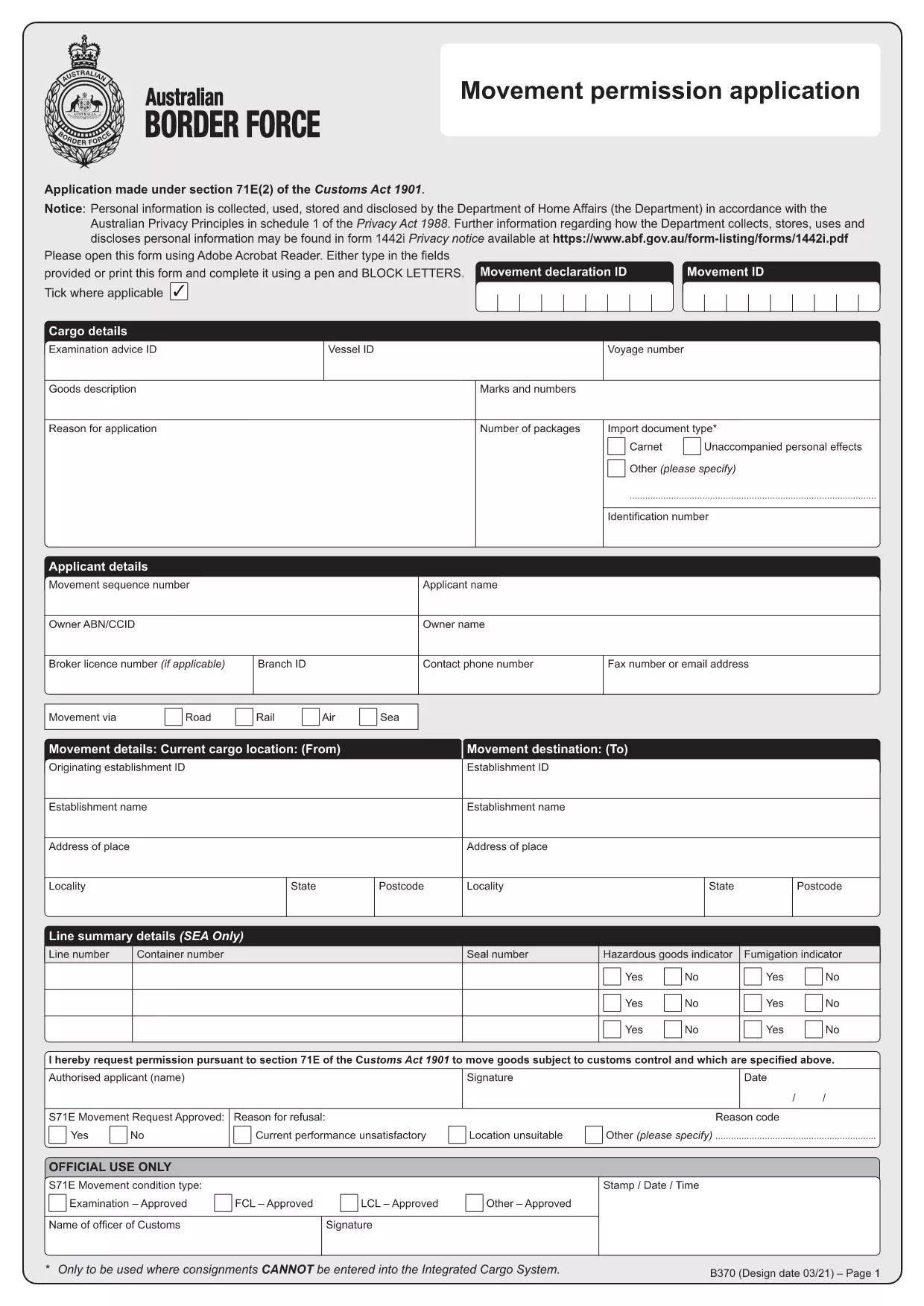
Form B360 – Fillable PDF for Movement Permission

  1. देश ऑस्ट्रेलिया
  2. भाषा अंग्रेज़ी
  3. गतिविधि Customs
  4. विभाग Australian Border Force
फार्म को भरो
Form B360 – Fillable PDF for Movement Permission

What is Form B360?

Form B360 is the official Australian Border Force (ABF) application used to request a movement permission under section 71E(2) of the Customs Act 1901. It allows importers, exporters, and freight forwarders to obtain approval for the transport of goods across state or international borders.

Key Features of the Fillable PDF

  • All fields are interactive – no printing required.
  • Built‑in validation to reduce errors.
  • Save your progress and return later.
  • Export a completed PDF ready for electronic submission.

How to Complete Form B360 Online

Using Formize’s PDF Filler, you can fill out Form B360 directly in your browser. Follow the simple steps below.

Common Mistakes to Avoid

  • Leaving mandatory fields blank – the filler will highlight them.
  • Using an outdated version of the form – always start from the latest PDF provided.
  • Uploading a scanned image instead of a fillable PDF – the online filler works only with interactive PDFs.
सामान्य प्रश्न
  • Do I need Adobe Acrobat to fill Form B360?

    No. Formize’s online filler works in any modern browser, so you don’t need Acrobat installed.

  • Can I edit the form after I’ve saved it?

    Yes. The saved PDF remains fully fillable, allowing you to reopen it in Formize or any compatible PDF editor.

  • Is the PDF version on this page the latest?

    We host the most recent version supplied by the Australian Border Force. The link is regularly checked for updates.

  • What if I make a mistake while filling the form?

    The filler highlights errors in real time. You can correct them before saving or submitting.

  • How do I submit the completed Form B360?

    After completing the form, use the “Submit” button to email the PDF directly to the ABF, or download it and attach it to your own email.

कैसे करें

Form B360 को मुफ़्त में, ऑनलाइन 4 आसान स्टेप्स में कैसे भरें:

  1. 1
    Click the Fill Out Button
    On this page, click the bright “Fill out this form” button to launch the Formize PDF Filler.
  2. 2
    Wait for the Filler to Load
    The web app loads the fillable PDF in a secure window. This only takes a few seconds.
  3. 3
    Enter Your Information
    Complete each field. Required fields are marked with a red asterisk and will be validated automatically.
  4. 4
    Save or Submit
    When finished, click “Save” to download a completed copy or “Submit” to email it directly to the Australian Border Force.
पीडीएफ फिलर एप तैयार करें
के बारे में

Form B360 टेम्पलेट

एक पीडीएफ दस्तावेज़ को देखने और भरने के लिए सुविधाओं के पारंपरिक सेट के साथ, एक वेब एप्लिकेशन और उत्तरदायी लेआउट के लाभों के साथ, आप Form B360 को मिनटों में पूरा कर सकते हैं।

विशेषताएं

पीडीएफ भराव

पीडीएफ फॉर्म ऑनलाइन भरने का सबसे आसान तरीका

  • जल्दी से Form B360 भरें
    Form B360 को जल्दी से ऑनलाइन भरने का कोई तरीका खोज रहे हैं? हमारे ऑनलाइन नि:शुल्क पीडीएफ फॉर्म फिलर के साथ, आप एक मिनट से भी कम समय में इस पीडीएफ दस्तावेज़ को संपादित करने और भरने का तरीका जानेंगे।
  • ऑनलाइन पीडीएफ संपादक का उपयोग करना आसान है
    पीडीएफ फाइलों को प्रिंट करने से तंग आ गए हैं ताकि आप उन्हें फिर से स्कैन करने और उन्हें वापस भेजने से पहले संपादित कर सकें? PDF दस्तावेज़ों को निःशुल्क ऑनलाइन संपादित करें। समय और कागज बचाने के लिए हमारे ऑनलाइन पीडीएफ संपादक का प्रयोग करें।
  • महान उपकरण, सभी प्लेटफार्म
    आश्चर्य है कि मैक पर Form B360 कैसे भरें, या शायद पीडीएफ फिलर का मुफ्त में उपयोग कैसे करें? हमारे ऑनलाइन पीडीएफ टूल सभी प्लेटफॉर्म पर काम करते हैं।
  • सुरक्षित फ़ाइल भंडारण
    पूर्ण की गई "Form B360" फ़ाइलें Amazon क्लाउड होस्टिंग द्वारा प्रबंधित एक सुरक्षित डेटाबेस में संग्रहीत की जाती हैं। आप कभी भी अपनी फाइलों को हमारे सिस्टम से हटा सकते हैं। किसी भी स्थिति में, ये फ़ाइलें 24 घंटे के बाद स्वतः हटा दी जाती हैं।
  • {कीवर्ड} से चैट करें
    Chatize पर "Form B360" के साथ चैट करें, जो एक निःशुल्क पीडीएफ रीडर सहायक है। प्रश्न पूछें और "Form B360" से उत्तर प्राप्त करें। बस ऊपर दस्तावेज़ के साथ चैट करें बटन पर क्लिक करें।

फ़िलिंग सत्र मिटाएँ

चयनित फ़िलिंग सत्र को मिटाएँ? इस स्थिति में, फ़ॉर्म को पूरा करने में आपकी प्रगति खो जाएगी।

संपादन सत्र हटाएँ

चयनित संपादन सत्र हटाएँ? इस स्थिति में, फ़ॉर्म बनाने और संपादित करने में आपकी प्रगति नष्ट हो जाएगी।