hamburger-menu icon
भाषा का चयन करें

Education Department Application Form – Fill Online

  1. देश ऑस्ट्रेलिया
  2. भाषा अंग्रेज़ी
  3. विभाग Department of Education
  4. गतिविधि School Enrolment
फार्म को भरो
Education Department Application Form – Fill Online

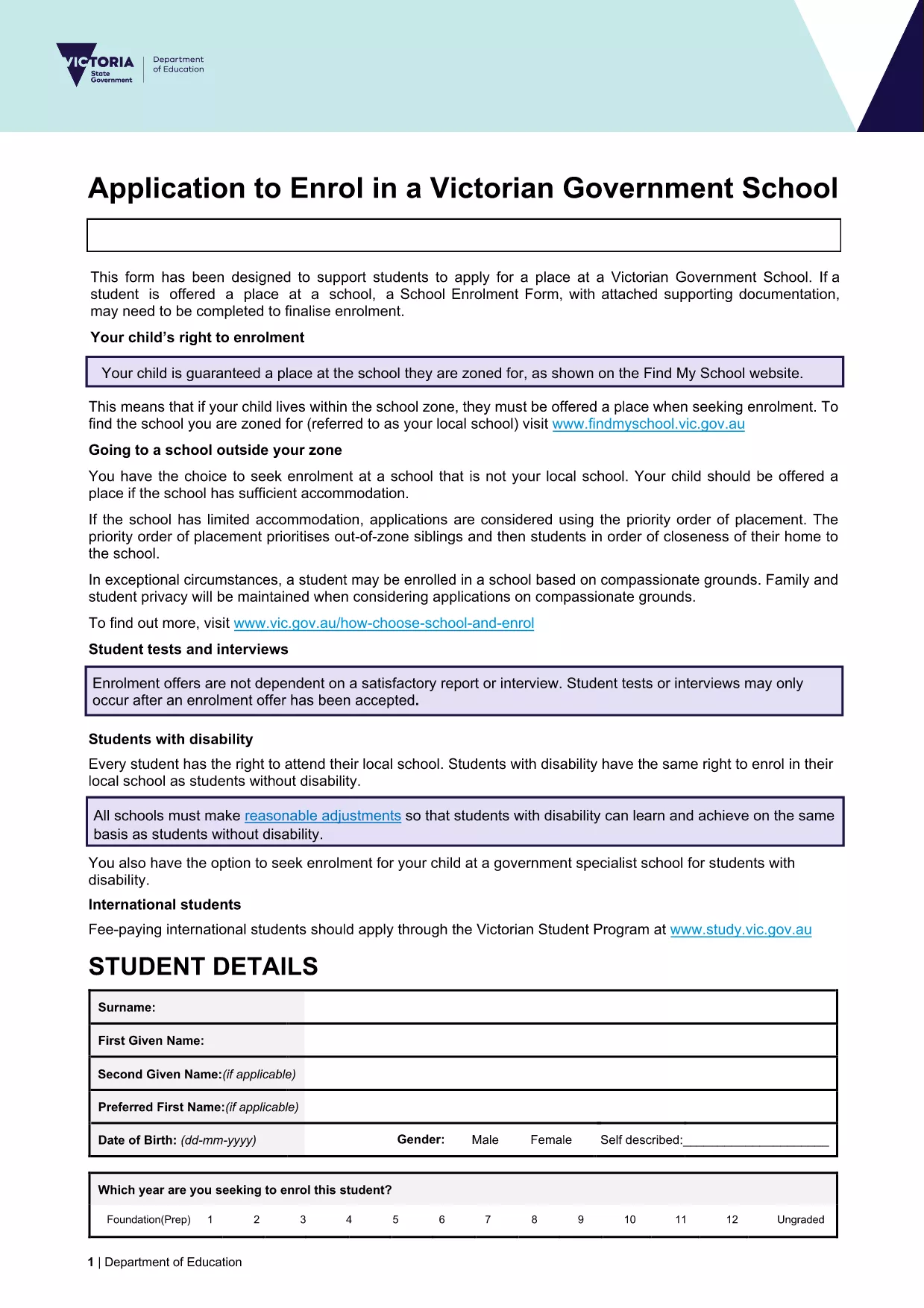
Looking for a fast, secure way to submit your education department application? Our online Formize PDF Filler lets you open the official enrolment form as a fillable PDF directly in your browser. No software download, no printing, and no hassle.

What you get: the exact same document used by the Victorian Department of Education, fully interactive, auto‑saving, and ready for electronic submission.

Simply click the Fill out this form button below, wait a moment for the Formize PDF Filler to load, and start entering your information. When you’re done, you can download a completed PDF or submit it straight to the school’s intake system.

Our solution is compliant with government standards, keeps your data encrypted, and works on any device – desktop, tablet, or mobile.

सामान्य प्रश्न
  • Do I need to install any software to use the form?

    No. The Formize PDF Filler runs entirely in your web browser – just click the button and start filling.

  • Is my personal data safe?

    Yes. All data is processed locally in your browser and encrypted during any download. Formize does not store your information.

  • Can I print the completed form?

    Absolutely. After you finish, download the filled PDF and print it like any standard document.

  • What if I make a mistake?

    You can edit any field at any time before saving. Simply click the field again and correct the entry.

  • Is this the same form used by Victorian schools?

    Yes. The PDF is the official "Application to enrol in a Victorian Government school" provided by the Department of Education.

  • Can I submit the form directly to the school?

    Most schools accept a completed PDF via email or their online portal. Check the school's enrolment guidelines for exact submission steps.

कैसे करें

education department application form को मुफ़्त में, ऑनलाइन 5 आसान स्टेप्स में कैसे भरें:

  1. 1
    Open the Fillable Form
    Click the **Fill out this form** button on the page. The Formize PDF Filler will launch in a new tab.
  2. 2
    Wait for the Loader
    Give the app a few seconds to load the PDF. You’ll see the form appear with interactive fields.
  3. 3
    Enter Your Information
    Type directly into each field. Use the tab key or click to move between sections.
  4. 4
    Review & Validate
    Check all entries for accuracy. The filler highlights required fields that are missing.
  5. 5
    Save or Submit
    When finished, click **Download Completed PDF** to save a copy, or follow your school’s instructions to submit electronically.
पीडीएफ फिलर एप तैयार करें
के बारे में

education department application form टेम्पलेट

एक पीडीएफ दस्तावेज़ को देखने और भरने के लिए सुविधाओं के पारंपरिक सेट के साथ, एक वेब एप्लिकेशन और उत्तरदायी लेआउट के लाभों के साथ, आप education department application form को मिनटों में पूरा कर सकते हैं।

विशेषताएं

पीडीएफ भराव

पीडीएफ फॉर्म ऑनलाइन भरने का सबसे आसान तरीका

  • जल्दी से education department application form भरें
    education department application form को जल्दी से ऑनलाइन भरने का कोई तरीका खोज रहे हैं? हमारे ऑनलाइन नि:शुल्क पीडीएफ फॉर्म फिलर के साथ, आप एक मिनट से भी कम समय में इस पीडीएफ दस्तावेज़ को संपादित करने और भरने का तरीका जानेंगे।
  • ऑनलाइन पीडीएफ संपादक का उपयोग करना आसान है
    पीडीएफ फाइलों को प्रिंट करने से तंग आ गए हैं ताकि आप उन्हें फिर से स्कैन करने और उन्हें वापस भेजने से पहले संपादित कर सकें? PDF दस्तावेज़ों को निःशुल्क ऑनलाइन संपादित करें। समय और कागज बचाने के लिए हमारे ऑनलाइन पीडीएफ संपादक का प्रयोग करें।
  • महान उपकरण, सभी प्लेटफार्म
    आश्चर्य है कि मैक पर education department application form कैसे भरें, या शायद पीडीएफ फिलर का मुफ्त में उपयोग कैसे करें? हमारे ऑनलाइन पीडीएफ टूल सभी प्लेटफॉर्म पर काम करते हैं।
  • सुरक्षित फ़ाइल भंडारण
    पूर्ण की गई "education department application form" फ़ाइलें Amazon क्लाउड होस्टिंग द्वारा प्रबंधित एक सुरक्षित डेटाबेस में संग्रहीत की जाती हैं। आप कभी भी अपनी फाइलों को हमारे सिस्टम से हटा सकते हैं। किसी भी स्थिति में, ये फ़ाइलें 24 घंटे के बाद स्वतः हटा दी जाती हैं।
  • {कीवर्ड} से चैट करें
    Chatize पर "education department application form" के साथ चैट करें, जो एक निःशुल्क पीडीएफ रीडर सहायक है। प्रश्न पूछें और "education department application form" से उत्तर प्राप्त करें। बस ऊपर दस्तावेज़ के साथ चैट करें बटन पर क्लिक करें।

फ़िलिंग सत्र मिटाएँ

चयनित फ़िलिंग सत्र को मिटाएँ? इस स्थिति में, फ़ॉर्म को पूरा करने में आपकी प्रगति खो जाएगी।

संपादन सत्र हटाएँ

चयनित संपादन सत्र हटाएँ? इस स्थिति में, फ़ॉर्म बनाने और संपादित करने में आपकी प्रगति नष्ट हो जाएगी।