
hamburger-menu icon
भाषा का चयन करें

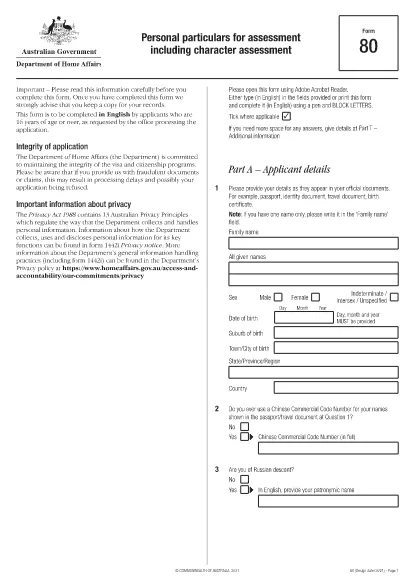
Fillable Form VSA 80 – Personal Particulars for Australian Visa

  1. भाषा अंग्रेज़ी
  2. देश ऑस्ट्रेलिया
  3. विभाग गृह मामले और न्याय विभाग
  4. गतिविधि वीजा
फार्म को भरो
Fillable Form VSA 80 – Personal Particulars for Australian Visa

Form VSA 80 (also known as Form 80) is the Australian government’s standard questionnaire that collects personal, employment and character details from visa applicants aged 16 years and older. The information you provide helps the Department of Home Affairs assess your eligibility and character for the visa you are applying for.

What is Form VSA 80?

This is a mandatory form for most temporary and permanent visa subclasses. It asks for details such as:

  • Full name, date of birth and contact information
  • Passport and travel history
  • Employment, education and family background
  • Criminal and health declarations

How to Complete the Fillable Form VSA 80 Online

Instead of downloading the PDF and editing it in a separate editor, simply click the "Fill out this form" button on this page. The Formize PDF Filler app will load directly in your browser, allowing you to type, select and save without any extra software.

Common Mistakes to Avoid

  • Leaving fields blank – every question marked with an asterisk (*) is required.
  • Using nicknames – provide the legal name as it appears on your passport.
  • Incorrect dates – double‑check day/month/year order.
  • Omitting travel history – even short trips in the last 10 years must be listed.

Where to Submit Your Completed Form

Once you have saved the completed Form VSA 80, upload the PDF as part of your online visa application through ImmiAccount. If you are submitting a paper application, include the printed form with the rest of your documents.

Download the Official PDF

If you prefer to keep a local copy, you can download the official, government‑issued PDF directly from the Department of Home Affairs.

सामान्य प्रश्न
  • Who must fill out Form VSA 80?

    All visa applicants aged 16 years or older who are asked to provide a Form 80 by the Department of Home Affairs must complete it.

  • Can I edit the form after I have saved it?

    Yes. Open the saved PDF in the Formize PDF Filler, make any changes, and re‑save the document.

  • Is there a fee to download or use the fillable form?

    No. The Form VSA 80 PDF is provided free of charge by the Australian government and by Formize.

  • Do I need to submit the original paper form?

    If you are applying online, an electronic PDF is sufficient. For paper applications, print the completed form and include it with your documents.

  • What should I do if I make a mistake?

    Correct the error in the Formize PDF Filler and save the updated version. Do not cross out or hand‑write changes on a printed copy.

  • How long should I keep a copy of the completed Form VSA 80?

    Keep a copy for at least five years, as the Department may request it for future visa or character assessments.

  • Can I use a non‑English version of the form?

    Form VSA 80 must be completed in English. If you need translation assistance, you may attach a certified translation alongside the original.

कैसे करें

Form VSA 80 को मुफ़्त में, ऑनलाइन 5 आसान स्टेप्स में कैसे भरें:

  1. 1
    Click the Fill Out Button
    Press the "Fill out this form" button on this page. The Formize PDF Filler loads instantly in your browser.
  2. 2
    Enter Your Details
    Complete each section of the Form VSA 80. Required fields are marked with an asterisk (*).
  3. 3
    Save or Download
    When finished, click "Save" to store the file in your Formize account or download a copy to your device.
  4. 4
    Attach to Your Visa Application
    Upload the saved PDF to your ImmiAccount visa application, or print and include it with a paper submission.
  5. 5
    Keep a Copy for Your Records
    Always retain a saved copy of the completed Form VSA 80 for future reference.
पीडीएफ फिलर एप तैयार करें
के बारे में

वीज़ा फॉर्म

Form VSA 80 वीज़ा रूपों में से एक है जो ऐसे दस्तावेज़ हैं जिनका उपयोग किसी विदेशी देश में प्रवेश करने के लिए वीज़ा के लिए आवेदन करने के लिए किया जाता है। वीजा एक दस्तावेज है जो एक विदेशी नागरिक को एक निर्दिष्ट अवधि के लिए किसी विदेशी देश में प्रवेश करने, रहने और कभी-कभी काम करने की अनुमति देता है। वीजा प्राप्त करने के लिए सटीक रूप और आवश्यकताएं देश और वीजा के प्रकार के अनुसार भिन्न होती हैं।

वीज़ा फॉर्म में आम तौर पर व्यक्तिगत जानकारी जैसे नाम, जन्म तिथि और पासपोर्ट जानकारी के साथ-साथ यात्रा के उद्देश्य और लंबाई, इच्छित गंतव्य और क्या आवेदक को पहले वीजा देने से मना कर दिया गया है या किसी देश से निर्वासित किया गया है, के बारे में जानकारी की आवश्यकता होती है। प्रपत्रों में पासपोर्ट, फोटोग्राफ और वित्तीय सहायता के प्रमाण जैसे सहायक दस्तावेजों की भी आवश्यकता हो सकती है।

संयुक्त राज्य अमेरिका में, सबसे आम वीज़ा फॉर्म DS-160 और DS-260 फॉर्म हैं। DS-160 फॉर्म का उपयोग गैर-आप्रवासी वीजा के लिए आवेदन करने के लिए किया जाता है, जबकि DS-260 फॉर्म का उपयोग अप्रवासी वीजा के लिए आवेदन करने के लिए किया जाता है। इन रूपों में आवेदक के व्यक्तिगत और यात्रा इतिहास के साथ-साथ पासपोर्ट, यात्रा यात्रा कार्यक्रम और वित्तीय रिकॉर्ड जैसे सहायक दस्तावेज़ों के बारे में विस्तृत जानकारी की आवश्यकता होती है।

अन्य देशों में अलग-अलग वीज़ा फॉर्म और आवश्यकताएं हो सकती हैं, लेकिन मूल प्रक्रिया में आमतौर पर वीज़ा आवेदन पूरा करना, सहायक दस्तावेज प्रदान करना और अमेरिकी दूतावास या वाणिज्य दूतावास में एक कांसुलर अधिकारी के साथ साक्षात्कार में भाग लेना शामिल है। यह ध्यान रखना महत्वपूर्ण है कि वीज़ा आवेदन प्रक्रिया जटिल और समय लेने वाली हो सकती है, और यह अनुशंसा की जाती है कि वीज़ा चाहने वाले व्यक्ति किसी अप्रवास वकील या अन्य योग्य पेशेवर से परामर्श करें ताकि यह सुनिश्चित हो सके कि सभी आवश्यक फॉर्म और आवश्यकताएं पूरी हो गई हैं।

विशेषताएं

पीडीएफ भराव

पीडीएफ फॉर्म ऑनलाइन भरने का सबसे आसान तरीका

  • जल्दी से Form VSA 80 भरें
    Form VSA 80 को जल्दी से ऑनलाइन भरने का कोई तरीका खोज रहे हैं? हमारे ऑनलाइन नि:शुल्क पीडीएफ फॉर्म फिलर के साथ, आप एक मिनट से भी कम समय में इस पीडीएफ दस्तावेज़ को संपादित करने और भरने का तरीका जानेंगे।
  • ऑनलाइन पीडीएफ संपादक का उपयोग करना आसान है
    पीडीएफ फाइलों को प्रिंट करने से तंग आ गए हैं ताकि आप उन्हें फिर से स्कैन करने और उन्हें वापस भेजने से पहले संपादित कर सकें? PDF दस्तावेज़ों को निःशुल्क ऑनलाइन संपादित करें। समय और कागज बचाने के लिए हमारे ऑनलाइन पीडीएफ संपादक का प्रयोग करें।
  • महान उपकरण, सभी प्लेटफार्म
    आश्चर्य है कि मैक पर Form VSA 80 कैसे भरें, या शायद पीडीएफ फिलर का मुफ्त में उपयोग कैसे करें? हमारे ऑनलाइन पीडीएफ टूल सभी प्लेटफॉर्म पर काम करते हैं।
  • सुरक्षित फ़ाइल भंडारण
    पूर्ण की गई "Form VSA 80" फ़ाइलें Amazon क्लाउड होस्टिंग द्वारा प्रबंधित एक सुरक्षित डेटाबेस में संग्रहीत की जाती हैं। आप कभी भी अपनी फाइलों को हमारे सिस्टम से हटा सकते हैं। किसी भी स्थिति में, ये फ़ाइलें 24 घंटे के बाद स्वतः हटा दी जाती हैं।
  • {कीवर्ड} से चैट करें
    Chatize पर "Form VSA 80" के साथ चैट करें, जो एक निःशुल्क पीडीएफ रीडर सहायक है। प्रश्न पूछें और "Form VSA 80" से उत्तर प्राप्त करें। बस ऊपर दस्तावेज़ के साथ चैट करें बटन पर क्लिक करें।

फ़िलिंग सत्र मिटाएँ

चयनित फ़िलिंग सत्र को मिटाएँ? इस स्थिति में, फ़ॉर्म को पूरा करने में आपकी प्रगति खो जाएगी।

संपादन सत्र हटाएँ

चयनित संपादन सत्र हटाएँ? इस स्थिति में, फ़ॉर्म बनाने और संपादित करने में आपकी प्रगति नष्ट हो जाएगी।