hamburger-menu icon
भाषा का चयन करें

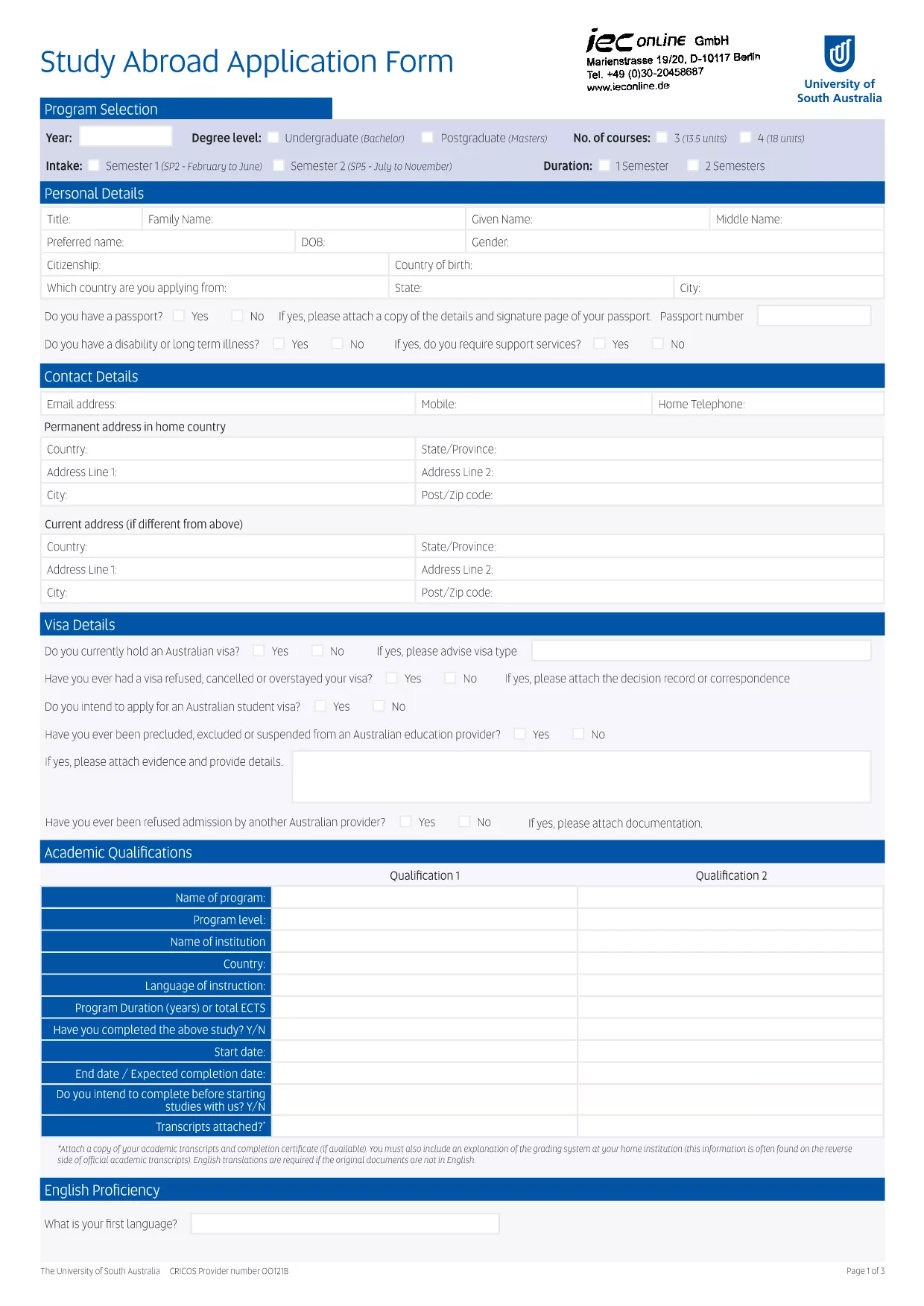
UniSA Application Form (Fillable PDF)

  1. भाषा अंग्रेज़ी
  2. देश ऑस्ट्रेलिया
  3. गतिविधि शिक्षा
  4. विभाग University
फार्म को भरो
UniSA Application Form (Fillable PDF)

Looking for the official University of South Australia (UniSA) application form? You’ve come to the right place. Our fillable PDF lets you complete the entire application directly in your browser—no Adobe Acrobat or other editor required.

Simply click the **Fill out this form** button, wait for the Formize PDF Filler to load, and start entering your details. All fields are interactive, auto‑saving your progress as you go.

Key benefits:

  • Instant download of the latest UniSA application form.
  • Fully searchable, fillable fields that match the official paper version.
  • Save, print, or email your completed form directly from the browser.
  • Secure processing – your data never leaves the Formize platform unless you choose to export it.

Before you begin, review the sections below to ensure a smooth experience and avoid common pitfalls.

सामान्य प्रश्न
  • Do I need Adobe Acrobat to fill out the UniSA application form?

    No. The form is fully fillable within the browser using Formize’s PDF Filler – no additional software required.

  • Can I save my progress and return later?

    Yes. The filler automatically saves your entries locally. You can close the window and reopen the form to continue.

  • What file format will I receive after completing the form?

    You will download a standard PDF that mirrors the official UniSA application, ready for printing or electronic submission.

  • Is the information I enter secure?

    All data stays on your device unless you choose to export or email it. Formize does not store your personal information.

  • Where do I send the completed UniSA application?

    Follow the submission instructions on the UniSA admissions portal. Typically you can upload the PDF or email it to the address provided in the form.

  • What if I make a mistake after downloading the PDF?

    You can reopen the fillable version, correct the error, and download a new PDF. The original file remains unchanged.

कैसे करें

UniSA application form को मुफ़्त में, ऑनलाइन 4 आसान स्टेप्स में कैसे भरें:

  1. 1
    Open the Fillable Form
    Click the **Fill out this form** button on the page. The Formize PDF Filler app will load in a new window.
  2. 2
    Enter Your Information
    Complete each field—personal details, course preferences, English proficiency, etc. The form auto‑saves as you type.
  3. 3
    Validate & Review
    Use the built‑in validation to check for missing or incorrectly formatted data. Review every section before submitting.
  4. 4
    Download or Email
    When finished, click **Download PDF** to save a copy or **Email** it directly to the UniSA admissions office.
पीडीएफ फिलर एप तैयार करें
के बारे में

UniSA application form टेम्पलेट

एक पीडीएफ दस्तावेज़ को देखने और भरने के लिए सुविधाओं के पारंपरिक सेट के साथ, एक वेब एप्लिकेशन और उत्तरदायी लेआउट के लाभों के साथ, आप UniSA application form को मिनटों में पूरा कर सकते हैं।

विशेषताएं

पीडीएफ भराव

पीडीएफ फॉर्म ऑनलाइन भरने का सबसे आसान तरीका

  • जल्दी से UniSA application form भरें
    UniSA application form को जल्दी से ऑनलाइन भरने का कोई तरीका खोज रहे हैं? हमारे ऑनलाइन नि:शुल्क पीडीएफ फॉर्म फिलर के साथ, आप एक मिनट से भी कम समय में इस पीडीएफ दस्तावेज़ को संपादित करने और भरने का तरीका जानेंगे।
  • ऑनलाइन पीडीएफ संपादक का उपयोग करना आसान है
    पीडीएफ फाइलों को प्रिंट करने से तंग आ गए हैं ताकि आप उन्हें फिर से स्कैन करने और उन्हें वापस भेजने से पहले संपादित कर सकें? PDF दस्तावेज़ों को निःशुल्क ऑनलाइन संपादित करें। समय और कागज बचाने के लिए हमारे ऑनलाइन पीडीएफ संपादक का प्रयोग करें।
  • महान उपकरण, सभी प्लेटफार्म
    आश्चर्य है कि मैक पर UniSA application form कैसे भरें, या शायद पीडीएफ फिलर का मुफ्त में उपयोग कैसे करें? हमारे ऑनलाइन पीडीएफ टूल सभी प्लेटफॉर्म पर काम करते हैं।
  • सुरक्षित फ़ाइल भंडारण
    पूर्ण की गई "UniSA application form" फ़ाइलें Amazon क्लाउड होस्टिंग द्वारा प्रबंधित एक सुरक्षित डेटाबेस में संग्रहीत की जाती हैं। आप कभी भी अपनी फाइलों को हमारे सिस्टम से हटा सकते हैं। किसी भी स्थिति में, ये फ़ाइलें 24 घंटे के बाद स्वतः हटा दी जाती हैं।
  • {कीवर्ड} से चैट करें
    Chatize पर "UniSA application form" के साथ चैट करें, जो एक निःशुल्क पीडीएफ रीडर सहायक है। प्रश्न पूछें और "UniSA application form" से उत्तर प्राप्त करें। बस ऊपर दस्तावेज़ के साथ चैट करें बटन पर क्लिक करें।

फ़िलिंग सत्र मिटाएँ

चयनित फ़िलिंग सत्र को मिटाएँ? इस स्थिति में, फ़ॉर्म को पूरा करने में आपकी प्रगति खो जाएगी।

संपादन सत्र हटाएँ

चयनित संपादन सत्र हटाएँ? इस स्थिति में, फ़ॉर्म बनाने और संपादित करने में आपकी प्रगति नष्ट हो जाएगी।