hamburger-menu icon
भाषा का चयन करें

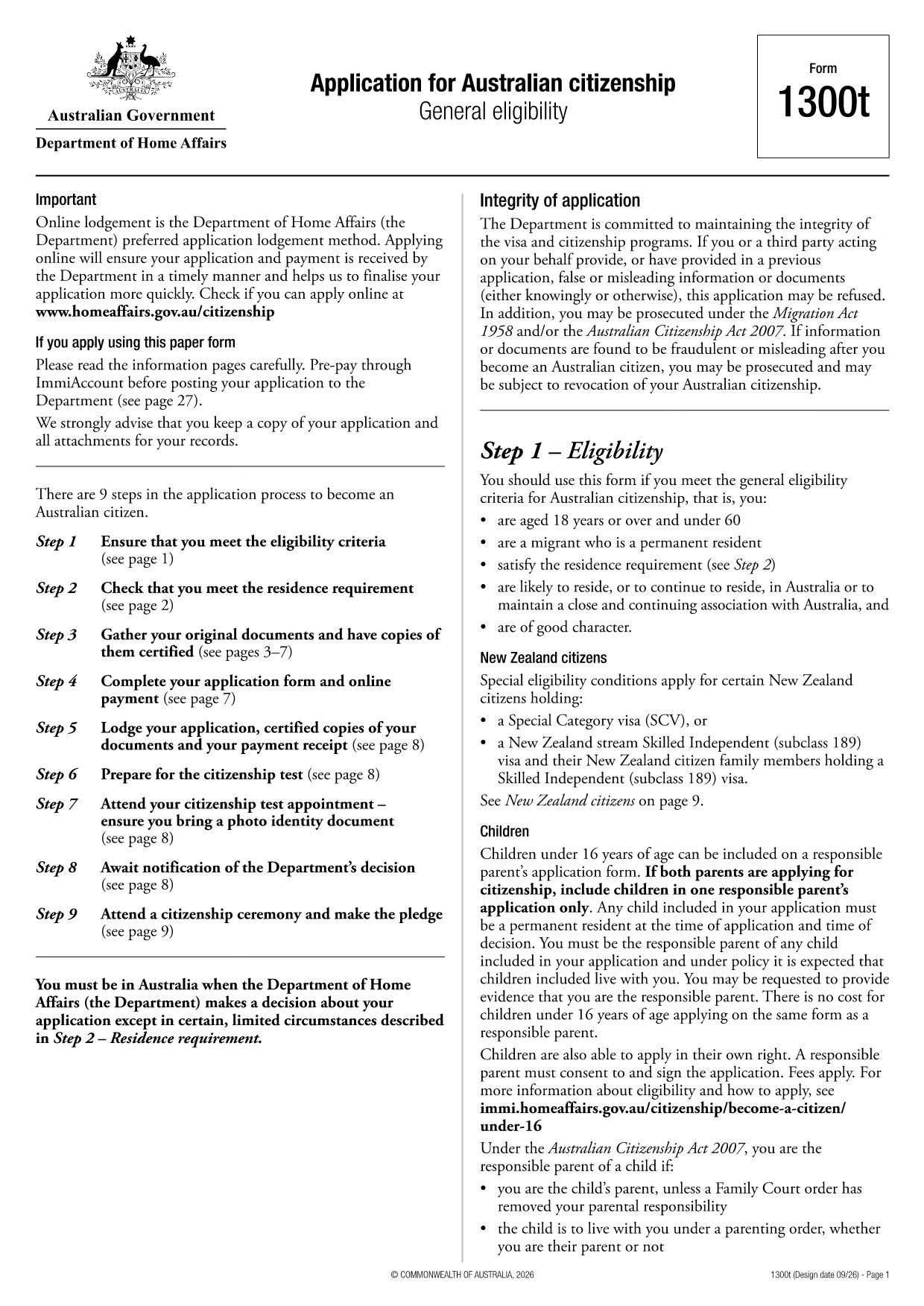
Application Form How to Write – Australian Citizenship (Form 1300T)

  1. देश ऑस्ट्रेलिया
  2. भाषा अंग्रेज़ी
  3. गतिविधि अप्रवासन
  4. विभाग Home Affairs
फार्म को भरो
Application Form How to Write – Australian Citizenship (Form 1300T)

Looking for a clear, easy way to write and complete your Australian citizenship application? The Form 1300T is the official document used by the Department of Home Affairs to assess general eligibility for citizenship. With Formize’s fillable PDF, you can complete the form directly in your browser—no extra software required.

What Is Form 1300T?

Form 1300T is the Application for Australian citizenship – General eligibility. It collects personal details, residency history, and supporting information to confirm you meet the citizenship criteria.

Eligibility Checklist Before You Start

  • Be a permanent resident for at least 12 months.
  • Have lived in Australia for at least 4 years total.
  • Be of good character and meet the language requirement.
  • Have a valid Australian passport (if applicable).

Step‑by‑Step Guide to Fill the Form Online

Follow these simple steps to complete the form using the Formize PDF Filler:

  1. Click the "Fill out this form" button on the page.
  2. Wait a few seconds while the Formize PDF Filler app loads the fillable version of Form 1300T.
  3. Enter your information in each highlighted field. The filler automatically validates dates and numeric entries.
  4. Use the Save button to keep a copy on your device, or continue directly to Submit if you are ready.
  5. Review the completed form, ensure all required fields are marked, then click Download PDF to obtain the final, signed version.

Common Mistakes to Avoid

  • Leaving required fields blank – the filler will highlight missing items.
  • Entering dates in the wrong format (DD/MM/YYYY). Use the calendar picker provided.
  • Forgetting to sign the form. The electronic signature field is at the end of the document.
  • Uploading an outdated version of the form. Always use the latest PDF from the Department of Home Affairs.

Where to Submit Your Completed Application

After downloading the signed PDF, you can either:

  • Upload it through your ImmiAccount portal.
  • Mail a printed copy to the address listed on the form.

Keep a copy for your records and note the transaction reference number for future enquiries.

सामान्य प्रश्न
  • What is Form 1300T used for?

    Form 1300T is the official application to assess general eligibility for Australian citizenship.

  • Can I fill Form 1300T online?

    Yes. With Formize’s fillable PDF you can complete the form directly in your browser without any extra software.

  • Do I need to print the form after filling it?

    You can submit the downloaded PDF digitally via ImmiAccount, or print it if you prefer to mail a hard copy.

  • How long does the citizenship application process take?

    Processing times vary, but most eligible applicants receive a decision within 6‑12 months after submission.

  • What documents must I attach with the form?

    You’ll need proof of identity, residency documents, a passport‑style photo, and any supporting evidence of good character.

  • Can I save my progress and return later?

    Yes. Use the "Save" button in the Formize filler to download a draft copy, then reopen it later to continue.

  • Is there a fee to submit Form 1300T?

    A citizenship application fee applies and is paid through ImmiAccount when you lodge the form.

  • What if I make a mistake after submission?

    Contact the Department of Home Affairs with your transaction reference number. Minor errors can often be corrected without a new application.

कैसे करें

application form how to write को मुफ़्त में, ऑनलाइन 5 आसान स्टेप्स में कैसे भरें:

  1. 1
    Open the Fillable Form
    Click the "Fill out this form" button on the page. The Formize PDF Filler will open the 1300T form in a new tab.
  2. 2
    Enter Your Details
    Type your information into each highlighted field. Use the built‑in date picker for all date entries.
  3. 3
    Validate & Review
    The filler automatically checks required fields. Review the entire document for completeness before proceeding.
  4. 4
    Sign & Download
    Add your electronic signature in the designated area, then click "Download PDF" to save the completed form.
  5. 5
    Submit to Home Affairs
    Upload the signed PDF via ImmiAccount or mail it to the address on the form, keeping the receipt for your records.
पीडीएफ फिलर एप तैयार करें
के बारे में

application form how to write टेम्पलेट

एक पीडीएफ दस्तावेज़ को देखने और भरने के लिए सुविधाओं के पारंपरिक सेट के साथ, एक वेब एप्लिकेशन और उत्तरदायी लेआउट के लाभों के साथ, आप application form how to write को मिनटों में पूरा कर सकते हैं।

विशेषताएं

पीडीएफ भराव

पीडीएफ फॉर्म ऑनलाइन भरने का सबसे आसान तरीका

  • जल्दी से application form how to write भरें
    application form how to write को जल्दी से ऑनलाइन भरने का कोई तरीका खोज रहे हैं? हमारे ऑनलाइन नि:शुल्क पीडीएफ फॉर्म फिलर के साथ, आप एक मिनट से भी कम समय में इस पीडीएफ दस्तावेज़ को संपादित करने और भरने का तरीका जानेंगे।
  • ऑनलाइन पीडीएफ संपादक का उपयोग करना आसान है
    पीडीएफ फाइलों को प्रिंट करने से तंग आ गए हैं ताकि आप उन्हें फिर से स्कैन करने और उन्हें वापस भेजने से पहले संपादित कर सकें? PDF दस्तावेज़ों को निःशुल्क ऑनलाइन संपादित करें। समय और कागज बचाने के लिए हमारे ऑनलाइन पीडीएफ संपादक का प्रयोग करें।
  • महान उपकरण, सभी प्लेटफार्म
    आश्चर्य है कि मैक पर application form how to write कैसे भरें, या शायद पीडीएफ फिलर का मुफ्त में उपयोग कैसे करें? हमारे ऑनलाइन पीडीएफ टूल सभी प्लेटफॉर्म पर काम करते हैं।
  • सुरक्षित फ़ाइल भंडारण
    पूर्ण की गई "application form how to write" फ़ाइलें Amazon क्लाउड होस्टिंग द्वारा प्रबंधित एक सुरक्षित डेटाबेस में संग्रहीत की जाती हैं। आप कभी भी अपनी फाइलों को हमारे सिस्टम से हटा सकते हैं। किसी भी स्थिति में, ये फ़ाइलें 24 घंटे के बाद स्वतः हटा दी जाती हैं।
  • {कीवर्ड} से चैट करें
    Chatize पर "application form how to write" के साथ चैट करें, जो एक निःशुल्क पीडीएफ रीडर सहायक है। प्रश्न पूछें और "application form how to write" से उत्तर प्राप्त करें। बस ऊपर दस्तावेज़ के साथ चैट करें बटन पर क्लिक करें।

फ़िलिंग सत्र मिटाएँ

चयनित फ़िलिंग सत्र को मिटाएँ? इस स्थिति में, फ़ॉर्म को पूरा करने में आपकी प्रगति खो जाएगी।

संपादन सत्र हटाएँ

चयनित संपादन सत्र हटाएँ? इस स्थिति में, फ़ॉर्म बनाने और संपादित करने में आपकी प्रगति नष्ट हो जाएगी।