
hamburger-menu icon
भाषा का चयन करें

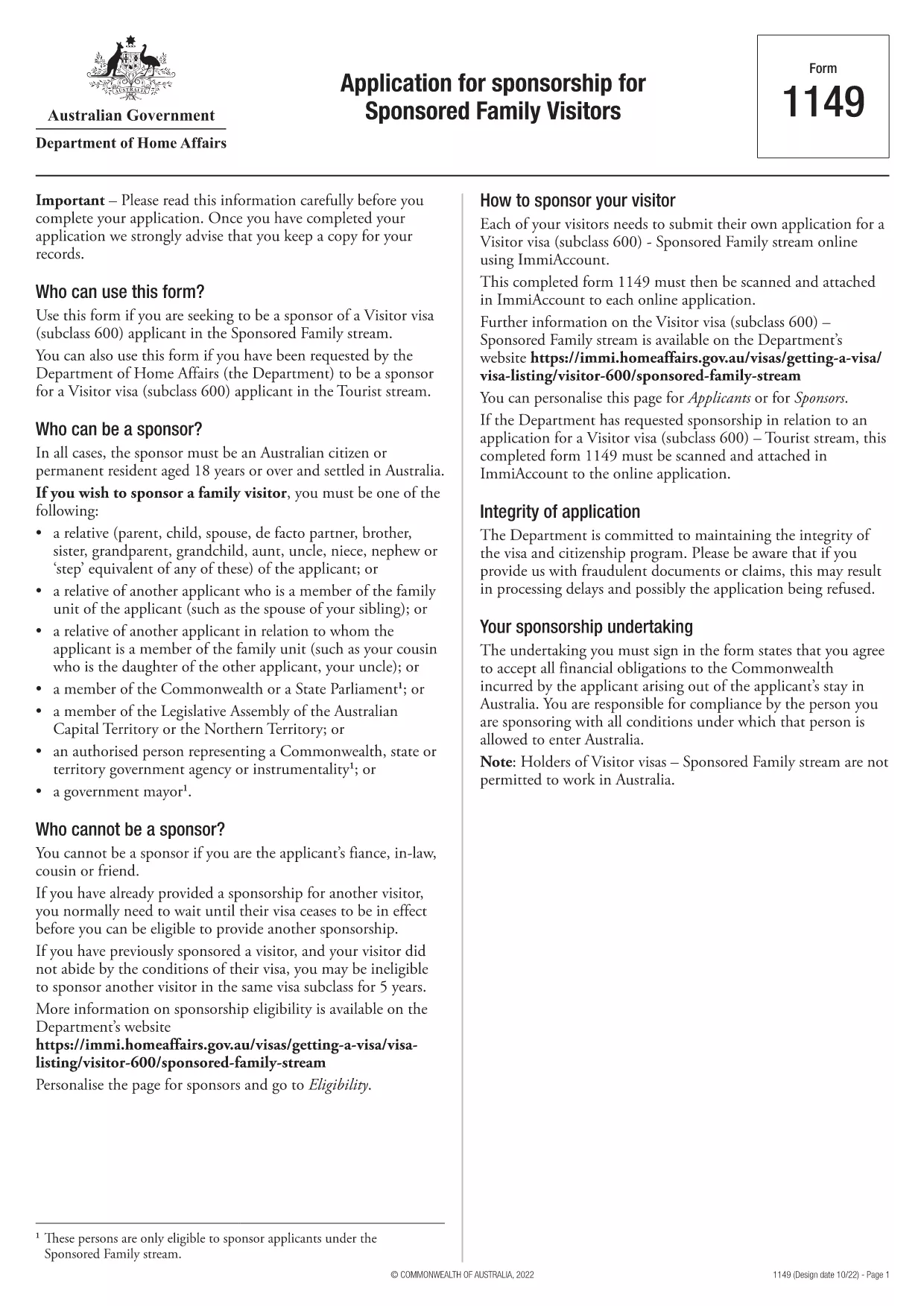
Form 1149 – Application for Sponsorship of a Family Visitor (Visitor Visa 600)

  1. देश ऑस्ट्रेलिया
  2. भाषा अंग्रेज़ी
  3. गतिविधि शामिल हों या परिवार लाओ
फार्म को भरो
Form 1149 – Application for Sponsorship of a Family Visitor (Visitor Visa 600)

Form 1149 is the official Application for Sponsorship for Sponsored Family Visitors used by Australian citizens or permanent residents who wish to sponsor a relative, a member of the Commonwealth, or a state parliamentarian for a Visitor visa (subclass 600). The form outlines the sponsor’s obligations, eligibility criteria, and any security bond requirements.

Traditionally the form is a static PDF that must be printed, handwritten, and mailed. With Formize you can complete the same form entirely online – just click Fill out this form and let our secure PDF filler do the work.

What Is Form 1149?

Form 1149 collects detailed information about the sponsor (name, address, citizenship status), the invited visitor (relationship, passport details, travel dates), and the financial support the sponsor will provide. It also asks about any previous sponsorships and the sponsor’s ability to meet the visa conditions.

Who Needs to Complete This Form?

  • Australian citizens or permanent residents sponsoring a family member for a Visitor visa (subclass 600).
  • Members of the Commonwealth or state parliament who are inviting a guest for official duties.
  • Anyone required to provide a security bond for the visitor’s stay.

How to Fill Form 1149 Online with Formize

Follow these simple steps to complete the form without printing:

  1. Click the Fill out this form button on this page.
  2. Wait a few seconds while the Formize PDF Filler loads the fillable version of Form 1149.
  3. Enter all required details in the highlighted fields. The filler validates dates, passport numbers, and numeric entries in real‑time.
  4. Review the summary page, correct any highlighted errors, and click Submit to download the completed PDF.
  5. Print the signed PDF (if a physical signature is required) and attach it to your visa application package.

Common Mistakes to Avoid

  • Incorrect passport numbers: Double‑check each digit; a single typo can delay processing.
  • Missing sponsor’s financial details: Provide clear evidence of income or savings to satisfy the bond requirement.
  • Leaving optional fields blank: If a field asks for “previous sponsorships”, answer “None” rather than leaving it empty.
  • Using an outdated version: Always use the latest PDF – the link on this page points to the current 2024 version.

Where to Submit the Completed Form

After filling and printing the form, include it with the Visitor visa (subclass 600) application packet and submit to the Department of Home Affairs either online via ImmiAccount or by post to the address indicated in the visa instructions.

Using Formize’s online filler saves time, reduces errors, and ensures you are working with the most up‑to‑date version of Form 1149.

सामान्य प्रश्न
  • Who can act as a sponsor on Form 1149?

    Only Australian citizens or permanent residents may sponsor a family visitor for a subclass 600 visa. Commonwealth or state parliament members may also sponsor for official visits.

  • Do I need to provide a security bond?

    A bond is required if the sponsor cannot demonstrate sufficient financial capacity. The amount is determined by the Department of Home Affairs based on the visitor’s length of stay and circumstances.

  • Can I submit the form electronically?

    Yes. Fill the form online with Formize, download the completed PDF, and attach it to your ImmiAccount submission. Some cases may still require a printed, signed copy.

  • How long is Form 1149 valid?

    The form does not have an expiry date, but you should use the latest version available on the Department of Home Affairs website.

  • What common errors cause delays?

    Incorrect passport numbers, missing financial information, and leaving optional fields blank are the most frequent reasons for processing delays.

  • Is there a fee to use Formize’s PDF filler?

    Formize offers a free basic filler for most government forms, including Form 1149. Premium features are optional and not required for this form.

  • Do I need to sign the PDF digitally?

    A digital signature is accepted for most online submissions. If you submit a paper application, print the PDF and sign it with a pen.

कैसे करें

Form 1149 को मुफ़्त में, ऑनलाइन 5 आसान स्टेप्स में कैसे भरें:

  1. 1
    Open the Fillable Form
    Click the "Fill out this form" button on this page. The Formize PDF Filler will open in a new tab.
  2. 2
    Enter Your Details
    Fill each highlighted field with accurate information. The tool validates entries in real time.
  3. 3
    Review and Correct Errors
    Check the summary page for any highlighted errors, correct them, and confirm the data.
  4. 4
    Download the Completed PDF
    Click "Submit" to download the fully completed PDF. Print and sign if a physical signature is required.
  5. 5
    Attach to Your Visa Application
    Include the signed PDF with your Visitor visa (subclass 600) application and submit to the Department of Home Affairs.
पीडीएफ फिलर एप तैयार करें
के बारे में

शामिल हों या पारिवारिक प्रपत्र लाएँ

Form 1149 उन आवेदन प्रपत्रों में से एक है जिसका उपयोग व्यक्ति किसी दूसरे देश में अपने परिवार के सदस्यों के आप्रवासन या पुनर्मिलन को प्रायोजित करने और सुविधा प्रदान करने के लिए करते हैं। ये फॉर्म अक्सर परिवार-आधारित आव्रजन कार्यक्रमों या नीतियों से जुड़े होते हैं जो उन व्यक्तियों को अनुमति देते हैं जो पहले से ही किसी विशेष देश में रह रहे हैं, वे अपने परिवार के सदस्यों को अपने साथ लाने की अनुमति देते हैं। विशिष्ट रूप देश और उसकी आप्रवासन प्रणाली के आधार पर भिन्न हो सकते हैं, लेकिन यहां कुछ सामान्य उदाहरण दिए गए हैं:

परिवार प्रायोजन आवेदन पत्र: यह उन व्यक्तियों द्वारा उपयोग किया जाने वाला मुख्य प्रपत्र है जो आप्रवासन के लिए अपने परिवार के सदस्यों को प्रायोजित करना चाहते हैं। यह प्रायोजक (पहले से ही देश में रहने वाला व्यक्ति) और प्रायोजित किए जा रहे परिवार के सदस्यों के बारे में जानकारी एकत्र करता है, जिसमें उनके संबंध, व्यक्तिगत विवरण और सहायक दस्तावेज़ शामिल हैं।

आश्रित वीज़ा आवेदन पत्र: कुछ आव्रजन प्रणालियों में, जो व्यक्ति पहले से ही किसी देश में रह रहे हैं, वे अपने तत्काल परिवार के सदस्यों, जैसे कि पति-पत्नी, बच्चों या माता-पिता को लाने के लिए आश्रित वीज़ा के लिए आवेदन कर सकते हैं। आश्रित वीज़ा आवेदन पत्र प्रायोजक, आश्रित परिवार के सदस्यों, उनके रिश्ते और सहायक दस्तावेज़ के बारे में जानकारी एकत्र करता है।

समर्थन का शपथ पत्र: कुछ देशों में, प्रायोजकों को समर्थन का एक शपथ पत्र जमा करने की आवश्यकता हो सकती है, जो प्रायोजित परिवार के सदस्यों के लिए उनकी वित्तीय जिम्मेदारी की पुष्टि करने वाला एक कानूनी दस्तावेज है। इस दस्तावेज़ में अक्सर प्रायोजक की आय, संपत्ति और परिवार के सदस्यों को वित्तीय रूप से समर्थन देने की क्षमता के बारे में विवरण शामिल होता है।

मेडिकल जांच फॉर्म: आप्रवासन के लिए प्रायोजित किए जा रहे परिवार के सदस्यों को यह सुनिश्चित करने के लिए मेडिकल जांच से गुजरना पड़ सकता है कि वे गंतव्य देश की स्वास्थ्य आवश्यकताओं को पूरा करते हैं। चिकित्सा परीक्षण प्रपत्र आवश्यक स्वास्थ्य जानकारी और परीक्षण परिणाम एकत्र करते हैं।

रिलेशनशिप डॉक्यूमेंटेशन फॉर्म: प्रायोजक और प्रायोजित किए जा रहे परिवार के सदस्यों के बीच पारिवारिक संबंध को साबित करने के लिए, विभिन्न दस्तावेजों की आवश्यकता हो सकती है। इनमें जन्म प्रमाण पत्र, विवाह प्रमाण पत्र, गोद लेने के कागजात, या पारिवारिक रिश्ते के अन्य सहायक साक्ष्य शामिल हो सकते हैं।

यह ध्यान रखना महत्वपूर्ण है कि विशिष्ट रूप और आवश्यकताएं देश और उसके आव्रजन कानूनों और नीतियों के आधार पर काफी भिन्न हो सकती हैं। किसी विशेष देश में परिवार के सदस्यों को प्रायोजित करने या लाने के लिए आवश्यक प्रपत्रों और प्रक्रियाओं के बारे में सटीक और अद्यतन जानकारी प्राप्त करने के लिए आप्रवासन प्राधिकरण की आधिकारिक वेबसाइट से परामर्श करना या कानूनी सलाह लेना उचित है।

विशेषताएं

पीडीएफ भराव

पीडीएफ फॉर्म ऑनलाइन भरने का सबसे आसान तरीका

  • जल्दी से Form 1149 भरें
    Form 1149 को जल्दी से ऑनलाइन भरने का कोई तरीका खोज रहे हैं? हमारे ऑनलाइन नि:शुल्क पीडीएफ फॉर्म फिलर के साथ, आप एक मिनट से भी कम समय में इस पीडीएफ दस्तावेज़ को संपादित करने और भरने का तरीका जानेंगे।
  • ऑनलाइन पीडीएफ संपादक का उपयोग करना आसान है
    पीडीएफ फाइलों को प्रिंट करने से तंग आ गए हैं ताकि आप उन्हें फिर से स्कैन करने और उन्हें वापस भेजने से पहले संपादित कर सकें? PDF दस्तावेज़ों को निःशुल्क ऑनलाइन संपादित करें। समय और कागज बचाने के लिए हमारे ऑनलाइन पीडीएफ संपादक का प्रयोग करें।
  • महान उपकरण, सभी प्लेटफार्म
    आश्चर्य है कि मैक पर Form 1149 कैसे भरें, या शायद पीडीएफ फिलर का मुफ्त में उपयोग कैसे करें? हमारे ऑनलाइन पीडीएफ टूल सभी प्लेटफॉर्म पर काम करते हैं।
  • सुरक्षित फ़ाइल भंडारण
    पूर्ण की गई "Form 1149" फ़ाइलें Amazon क्लाउड होस्टिंग द्वारा प्रबंधित एक सुरक्षित डेटाबेस में संग्रहीत की जाती हैं। आप कभी भी अपनी फाइलों को हमारे सिस्टम से हटा सकते हैं। किसी भी स्थिति में, ये फ़ाइलें 24 घंटे के बाद स्वतः हटा दी जाती हैं।
  • {कीवर्ड} से चैट करें
    Chatize पर "Form 1149" के साथ चैट करें, जो एक निःशुल्क पीडीएफ रीडर सहायक है। प्रश्न पूछें और "Form 1149" से उत्तर प्राप्त करें। बस ऊपर दस्तावेज़ के साथ चैट करें बटन पर क्लिक करें।

फ़िलिंग सत्र मिटाएँ

चयनित फ़िलिंग सत्र को मिटाएँ? इस स्थिति में, फ़ॉर्म को पूरा करने में आपकी प्रगति खो जाएगी।

संपादन सत्र हटाएँ

चयनित संपादन सत्र हटाएँ? इस स्थिति में, फ़ॉर्म बनाने और संपादित करने में आपकी प्रगति नष्ट हो जाएगी।