
hamburger-menu icon
भाषा का चयन करें

LTOPF Application Form – Fillable PDF Ready for Immediate Use

  1. भाषा अंग्रेज़ी
  2. देश ऑस्ट्रेलिया
  3. विभाग Transport for NSW
  4. गतिविधि वाहन पंजीकरण
फार्म को भरो
LTOPF Application Form – Fillable PDF Ready for Immediate Use

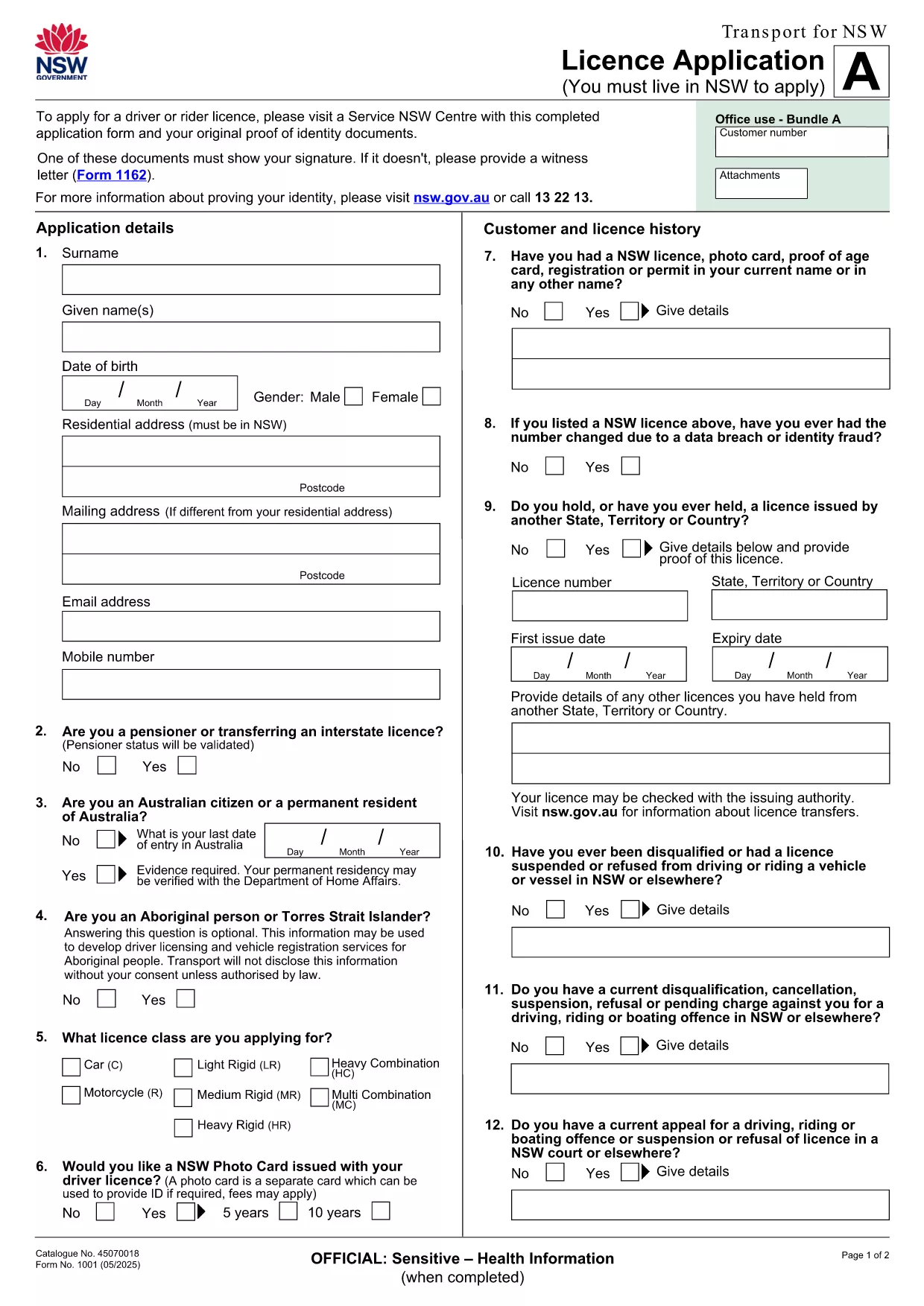
The LTOPF application form is required for certain transport‑related licences in New South Wales. Instead of printing, printing‑then‑scanning, or hand‑writing, you can now complete the official form directly in your browser using our secure Formize PDF Filler app.

Our fillable PDF mirrors the exact layout of the original Transport for NSW licence application, ensuring every field aligns with government requirements. The PDF linked below is the official document provided by Transport for NSW, so you can trust its authenticity.

What Is the LTOPF Application Form?

The LTOPF (Licence Transfer or Permission Form) is used when you need to transfer a licence, update personal details, or apply for a new transport licence. It includes sections for personal identification, licence history, and supporting documentation.

How to Fill the Form Online with Formize

Follow these simple steps to complete the form without leaving your browser:

  • Click the "Fill out this form" button on this page.
  • Wait a few seconds while the Formize PDF Filler loads the official licence‑application PDF.
  • Enter your information in each fillable field – the interface validates dates, numbers, and required fields automatically.
  • Attach scanned copies of your identity documents directly in the designated upload sections.
  • When you’re finished, click "Submit" to download a completed PDF that you can email or print.

Common Mistakes & Tips for a Successful Submission

  • Missing signature: Every page that requires a signature must have one. Use the "Draw Signature" tool in Formize.
  • Incorrect document format: Upload only PDF, JPG, or PNG files for identity proof.
  • Skipping mandatory fields: Required fields are highlighted in red until they are filled.
  • Using an outdated version: This page always links to the latest Transport for NSW licence‑application PDF, so you won’t need to search for updates.

Where to Submit the Completed LTOPF Form

After downloading the completed PDF, you can submit it via the official Transport for NSW online portal, email it to the address listed on the form, or deliver a printed copy to your nearest Service Centre.

Need more guidance? Review the official instructions on the Transport for NSW website or contact their help line for specific queries about licence transfers.

सामान्य प्रश्न
  • Is the LTOPF form free to download?

    Yes. The official licence‑application PDF provided by Transport for NSW is free to download and complete.

  • Can I edit the form on a mobile device?

    Absolutely. The Formize PDF Filler works on all modern browsers, including iOS and Android, allowing you to fill the form on phones or tablets.

  • Do I need Adobe Acrobat to fill the form?

    No. The form is fully editable within the Formize online filler, so you don’t need any additional software.

  • What if I make a mistake after submitting?

    Download a fresh copy of the PDF, correct the error, and re‑submit. The online filler validates entries to reduce mistakes.

  • How long does the Formize PDF Filler take to load?

    The PDF loads in under 5 seconds on a typical broadband connection.

  • Do I need to print the form after completing it online?

    Only if the receiving agency requires a hard copy. Otherwise, you can email the completed PDF directly.

  • Is my personal data safe when using Formize?

    Yes. All data is processed locally in your browser and never stored on our servers unless you choose to download the file.

कैसे करें

LTOPF application form को मुफ़्त में, ऑनलाइन 5 आसान स्टेप्स में कैसे भरें:

  1. 1
    Open the Fillable Form
    Click the "Fill out this form" button on the page. The Formize PDF Filler loads the official licence‑application PDF automatically.
  2. 2
    Enter Your Details
    Complete each highlighted field. Use the built‑in validation to ensure dates, numbers, and required fields are correct.
  3. 3
    Upload Supporting Documents
    Attach scans of your identity proof, signature, or any additional paperwork in the designated upload sections.
  4. 4
    Review & Submit
    Double‑check all entries, then click "Submit" to generate a completed PDF you can download, email, or print.
  5. 5
    Send the Form
    Follow the submission instructions on the last page of the PDF—online portal, email, or Service Centre.
पीडीएफ फिलर एप तैयार करें
के बारे में

वाहन पंजीकरण प्रपत्र

LTOPF application form वाहन पंजीकरण फॉर्मों में से एक है जो संबंधित सरकारी प्राधिकरण, आमतौर पर मोटर वाहन विभाग (डीएमवी) या समकक्ष एजेंसी के साथ मोटर वाहन को पंजीकृत करने के लिए उपयोग किए जाने वाले दस्तावेज हैं। इन फॉर्मों की आवश्यकता तब होती है जब कोई व्यक्ति नया या प्रयुक्त वाहन खरीदता है, वाहन का स्वामित्व स्थानांतरित करता है, या वाहन के साथ नए क्षेत्राधिकार में जाता है।

विशिष्ट वाहन पंजीकरण फॉर्म क्षेत्राधिकार के अनुसार भिन्न हो सकते हैं, लेकिन उन्हें आम तौर पर निम्नलिखित जानकारी की आवश्यकता होती है:

वाहन जानकारी: इसमें वाहन के बारे में विवरण शामिल हैं, जैसे मेक, मॉडल, वर्ष, वाहन पहचान संख्या (वीआईएन), और ओडोमीटर रीडिंग।

मालिक की जानकारी: फॉर्म में वाहन के मालिक के बारे में जानकारी की आवश्यकता होगी, जिसमें उनका नाम, पता, संपर्क जानकारी और ड्राइवर का लाइसेंस नंबर शामिल है।

स्वामित्व का प्रमाण: परिस्थितियों के आधार पर, स्वामित्व के प्रमाण की आवश्यकता हो सकती है, जैसे शीर्षक प्रमाण पत्र, बिक्री का बिल, या निर्माता का मूल प्रमाण पत्र (नए वाहनों के लिए)।

बीमा जानकारी: वैध वाहन बीमा कवरेज का प्रमाण आम तौर पर आवश्यक होता है। इसमें बीमा पॉलिसी नंबर, कवरेज की तारीखें और बीमा कंपनी का विवरण प्रदान करना शामिल हो सकता है।

फीस का भुगतान: वाहन पंजीकरण में विभिन्न शुल्कों का भुगतान शामिल है, जैसे पंजीकरण शुल्क, कर और संभवतः क्षेत्राधिकार के लिए विशिष्ट अन्य शुल्क।

इन बुनियादी आवश्यकताओं के अलावा, कुछ न्यायालयों में अतिरिक्त फॉर्म या दस्तावेज़ीकरण आवश्यकताएँ हो सकती हैं। उदाहरण के लिए, कुछ क्षेत्रों में उत्सर्जन परीक्षण के परिणाम, सुरक्षा निरीक्षण या निवास का प्रमाण आवश्यक हो सकता है।

एक बार वाहन पंजीकरण फॉर्म पूरा हो जाने और जमा हो जाने के बाद, सरकारी प्राधिकरण एक पंजीकरण प्रमाणपत्र, लाइसेंस प्लेट और पंजीकरण स्टिकर जारी करेगा। ये दस्तावेज़ दर्शाते हैं कि वाहन कानूनी रूप से पंजीकृत है और सार्वजनिक सड़कों पर संचालन के लिए अधिकृत है।

यह ध्यान रखना महत्वपूर्ण है कि वाहन पंजीकरण आवश्यकताएँ क्षेत्राधिकार के अनुसार काफी भिन्न हो सकती हैं। इसलिए, आपके स्थान पर लागू विशिष्ट रूपों और प्रक्रियाओं के लिए स्थानीय डीएमवी या समकक्ष एजेंसी से परामर्श करने की अनुशंसा की जाती है।

विशेषताएं

पीडीएफ भराव

पीडीएफ फॉर्म ऑनलाइन भरने का सबसे आसान तरीका

  • जल्दी से LTOPF application form भरें
    LTOPF application form को जल्दी से ऑनलाइन भरने का कोई तरीका खोज रहे हैं? हमारे ऑनलाइन नि:शुल्क पीडीएफ फॉर्म फिलर के साथ, आप एक मिनट से भी कम समय में इस पीडीएफ दस्तावेज़ को संपादित करने और भरने का तरीका जानेंगे।
  • ऑनलाइन पीडीएफ संपादक का उपयोग करना आसान है
    पीडीएफ फाइलों को प्रिंट करने से तंग आ गए हैं ताकि आप उन्हें फिर से स्कैन करने और उन्हें वापस भेजने से पहले संपादित कर सकें? PDF दस्तावेज़ों को निःशुल्क ऑनलाइन संपादित करें। समय और कागज बचाने के लिए हमारे ऑनलाइन पीडीएफ संपादक का प्रयोग करें।
  • महान उपकरण, सभी प्लेटफार्म
    आश्चर्य है कि मैक पर LTOPF application form कैसे भरें, या शायद पीडीएफ फिलर का मुफ्त में उपयोग कैसे करें? हमारे ऑनलाइन पीडीएफ टूल सभी प्लेटफॉर्म पर काम करते हैं।
  • सुरक्षित फ़ाइल भंडारण
    पूर्ण की गई "LTOPF application form" फ़ाइलें Amazon क्लाउड होस्टिंग द्वारा प्रबंधित एक सुरक्षित डेटाबेस में संग्रहीत की जाती हैं। आप कभी भी अपनी फाइलों को हमारे सिस्टम से हटा सकते हैं। किसी भी स्थिति में, ये फ़ाइलें 24 घंटे के बाद स्वतः हटा दी जाती हैं।
  • {कीवर्ड} से चैट करें
    Chatize पर "LTOPF application form" के साथ चैट करें, जो एक निःशुल्क पीडीएफ रीडर सहायक है। प्रश्न पूछें और "LTOPF application form" से उत्तर प्राप्त करें। बस ऊपर दस्तावेज़ के साथ चैट करें बटन पर क्लिक करें।

फ़िलिंग सत्र मिटाएँ

चयनित फ़िलिंग सत्र को मिटाएँ? इस स्थिति में, फ़ॉर्म को पूरा करने में आपकी प्रगति खो जाएगी।

संपादन सत्र हटाएँ

चयनित संपादन सत्र हटाएँ? इस स्थिति में, फ़ॉर्म बनाने और संपादित करने में आपकी प्रगति नष्ट हो जाएगी।