
hamburger-menu icon
भाषा का चयन करें

RDMV135 Transfer of Registration Form (Fillable PDF)

  1. भाषा अंग्रेज़ी
  2. देश ऑस्ट्रेलिया
  3. विभाग Transport for NSW
  4. गतिविधि वाहन पंजीकरण
फार्म को भरो
RDMV135 Transfer of Registration Form (Fillable PDF)

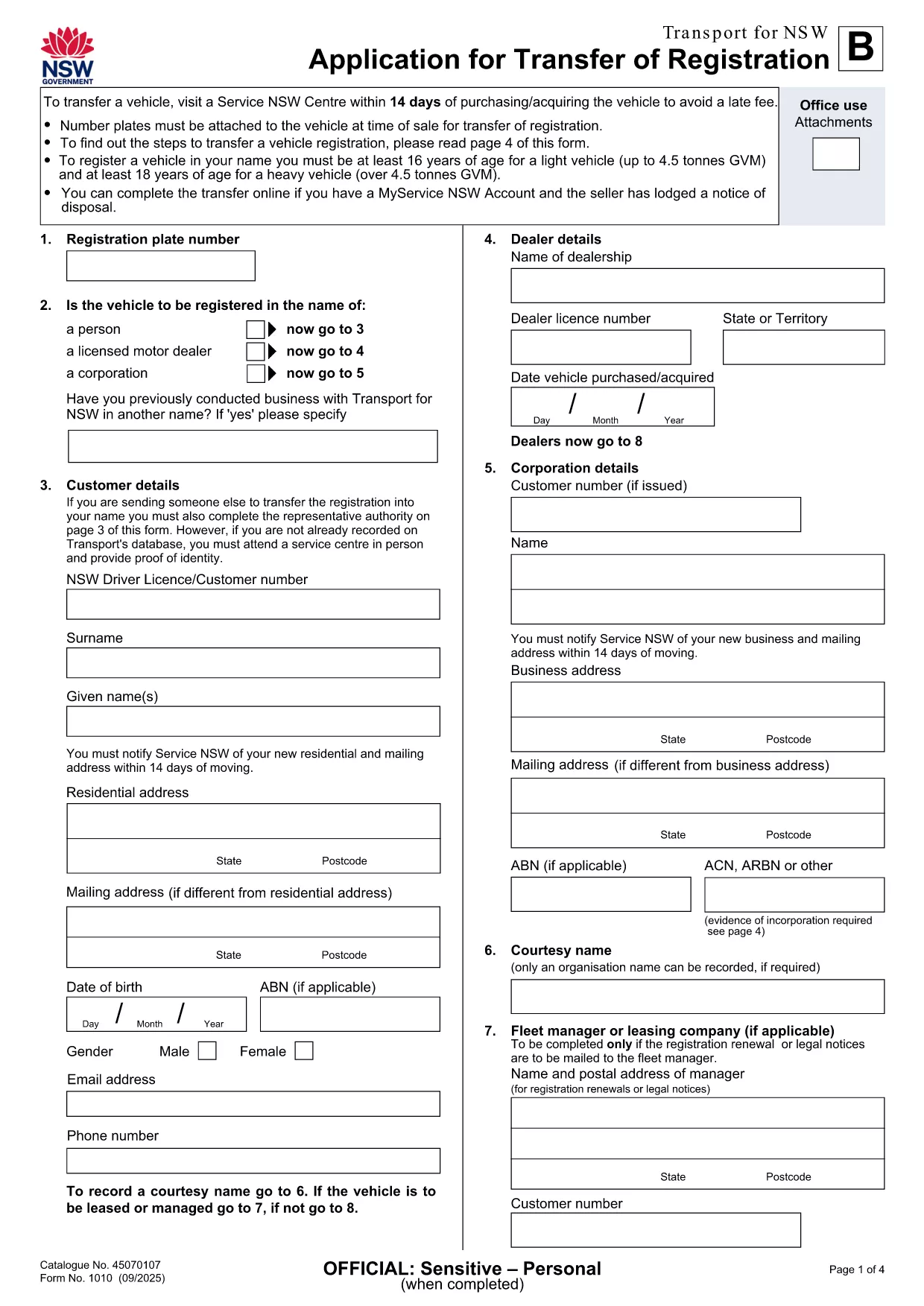
The RDMV135 Transfer of Registration form is the official document required by Transport for NSW when a vehicle changes ownership. Instead of printing, printing‑and‑scanning, you can complete this form instantly with Formize’s fillable PDF tool.

What Is the RDMV135 Form?

Form RDMV135 – also known as the “Application for Transfer of Registration” – captures essential details about the buyer, seller, and the vehicle. It must be submitted within 14 days of purchase to avoid late‑transfer penalties.

How to Complete the RDMV135 Online

Follow these simple steps to fill out the form directly in your browser:

  1. Click the "Fill out this form" button on this page.
  2. Wait a few seconds while the Formize PDF Filler app loads.
  3. Enter the requested information in each field – the tool guides you with validation prompts.
  4. When all sections are complete, click Save & Download to get a filled PDF copy.
  5. Print the completed form (if required) and submit it to a Service NSW centre or upload it via MyServiceNSW.

Common Mistakes to Avoid

  • Missing signatures: Both buyer and seller must sign the back of the form.
  • Incorrect VIN: Double‑check the Vehicle Identification Number matches the registration certificate.
  • Wrong purchase price: Use the higher of the actual sale price or the market value.
  • Expired notice of disposal: Ensure the seller has lodged a Notice of Disposal before you submit.

Download the Official PDF

If you prefer the original document, you can download the official RDMV135 PDF below. The file is hosted by Transport for NSW and matches the fillable version used by Formize.

Download RDMV135 – Application for Transfer of Registration (PDF)

Frequently Asked Questions

Answers to the most common queries about the RDMV135 form are listed in the FAQ section below.

सामान्य प्रश्न
  • Do I need to print the RDMV135 form after filling it online?

    Printing is only required if you submit the form in person at a Service NSW centre. For online submission, the saved PDF can be uploaded directly.

  • What identification is needed to complete the form?

    Both buyer and seller must provide a valid driver’s licence or passport number. The form also asks for contact details and address.

  • Can I edit the form after I have saved it?

    Yes. Open the saved PDF in the Formize filler again, make the necessary changes, and re‑save.

  • How long do I have to submit the RDMV135 after buying a vehicle?

    You must lodge the transfer within 14 days of the purchase date to avoid a late‑transfer fee.

  • Is there a fee for using the Formize filler?

    Formize’s basic fillable PDF service is free. Any government fees for the registration transfer are paid directly to Transport for NSW.

  • What if I make a mistake on the form?

    You can correct errors by reopening the saved PDF in the filler, updating the fields, and saving a new version before submission.

कैसे करें

RDMV135 को मुफ़्त में, ऑनलाइन 5 आसान स्टेप्स में कैसे भरें:

  1. 1
    Click the Fill Out Button
    Press the “Fill out this form” button on the page to launch the Formize PDF Filler.
  2. 2
    Wait for the Filler to Load
    A few seconds later the interactive fillable PDF will appear in your browser.
  3. 3
    Enter Your Information
    Complete each field – the tool validates entries and highlights required sections.
  4. 4
    Save or Download
    When finished, click “Save & Download” to get a copy of the completed RDMV135 form.
  5. 5
    Submit to Transport for NSW
    Print the filled PDF (if required) and submit it at a Service NSW centre or upload it via MyServiceNSW.
पीडीएफ फिलर एप तैयार करें
के बारे में

वाहन पंजीकरण प्रपत्र

यदि आप एक मोटर वाहन, ट्रेलर या नाव के मालिक हैं या पट्टे पर हैं, तो आपको अपने वाहन को कानूनी रूप से पंजीकृत और सुरक्षित रखने के लिए कुछ दायित्वों को पूरा करना होगा।

RDMV135 वाहन पंजीकरण प्रपत्रों में से एक है जो ऐसे दस्तावेज़ हैं जिनका उपयोग प्रासंगिक राज्य या प्रांतीय प्राधिकरण के साथ मोटर वाहन को पंजीकृत करने के लिए किया जाता है। ये फॉर्म आमतौर पर तब आवश्यक होते हैं जब कोई व्यक्ति नया या इस्तेमाल किया हुआ वाहन खरीदता है या जब वे वाहन के साथ किसी नए राज्य या प्रांत में जाते हैं।

वाहन पंजीकरण के लिए आवश्यक सटीक आवश्यकताएं और फॉर्म स्थान के अनुसार भिन्न हो सकते हैं, लेकिन आम तौर पर, प्रक्रिया में वाहन, मालिक और वाहन पर किसी भी ग्रहणाधिकार के बारे में जानकारी प्रदान करना शामिल होता है।

पंजीकरण फॉर्म और शुल्क जमा करने के बाद, राज्य या प्रांतीय प्राधिकरण वाहन के मालिक को पंजीकरण प्रमाणपत्र या लाइसेंस प्लेट जारी करेगा। यह पंजीकरण वाहन को सार्वजनिक सड़कों और राजमार्गों पर कानूनी रूप से संचालित करने की अनुमति देता है।

विशेषताएं

पीडीएफ भराव

पीडीएफ फॉर्म ऑनलाइन भरने का सबसे आसान तरीका

  • जल्दी से RDMV135 भरें
    RDMV135 को जल्दी से ऑनलाइन भरने का कोई तरीका खोज रहे हैं? हमारे ऑनलाइन नि:शुल्क पीडीएफ फॉर्म फिलर के साथ, आप एक मिनट से भी कम समय में इस पीडीएफ दस्तावेज़ को संपादित करने और भरने का तरीका जानेंगे।
  • ऑनलाइन पीडीएफ संपादक का उपयोग करना आसान है
    पीडीएफ फाइलों को प्रिंट करने से तंग आ गए हैं ताकि आप उन्हें फिर से स्कैन करने और उन्हें वापस भेजने से पहले संपादित कर सकें? PDF दस्तावेज़ों को निःशुल्क ऑनलाइन संपादित करें। समय और कागज बचाने के लिए हमारे ऑनलाइन पीडीएफ संपादक का प्रयोग करें।
  • महान उपकरण, सभी प्लेटफार्म
    आश्चर्य है कि मैक पर RDMV135 कैसे भरें, या शायद पीडीएफ फिलर का मुफ्त में उपयोग कैसे करें? हमारे ऑनलाइन पीडीएफ टूल सभी प्लेटफॉर्म पर काम करते हैं।
  • सुरक्षित फ़ाइल भंडारण
    पूर्ण की गई "RDMV135" फ़ाइलें Amazon क्लाउड होस्टिंग द्वारा प्रबंधित एक सुरक्षित डेटाबेस में संग्रहीत की जाती हैं। आप कभी भी अपनी फाइलों को हमारे सिस्टम से हटा सकते हैं। किसी भी स्थिति में, ये फ़ाइलें 24 घंटे के बाद स्वतः हटा दी जाती हैं।
  • {कीवर्ड} से चैट करें
    Chatize पर "RDMV135" के साथ चैट करें, जो एक निःशुल्क पीडीएफ रीडर सहायक है। प्रश्न पूछें और "RDMV135" से उत्तर प्राप्त करें। बस ऊपर दस्तावेज़ के साथ चैट करें बटन पर क्लिक करें।

फ़िलिंग सत्र मिटाएँ

चयनित फ़िलिंग सत्र को मिटाएँ? इस स्थिति में, फ़ॉर्म को पूरा करने में आपकी प्रगति खो जाएगी।

संपादन सत्र हटाएँ

चयनित संपादन सत्र हटाएँ? इस स्थिति में, फ़ॉर्म बनाने और संपादित करने में आपकी प्रगति नष्ट हो जाएगी।