hamburger-menu icon
भाषा का चयन करें

Transport NSW Licence Application Form – Requirements & How to Fill

  1. देश ऑस्ट्रेलिया
  2. भाषा अंग्रेज़ी
  3. गतिविधि Driver Licensing
  4. विभाग Transport NSW
फार्म को भरो
Transport NSW Licence Application Form – Requirements & How to Fill

Looking for a clear guide on the application form requirements for a NSW driver licence? You’ve come to the right place. Below you’ll find everything you need to know about the Transport NSW licence application, the documents you must attach, and a step‑by‑step method to fill it out instantly using Formize’s fillable PDF tool.

What is the Licence Application Form?

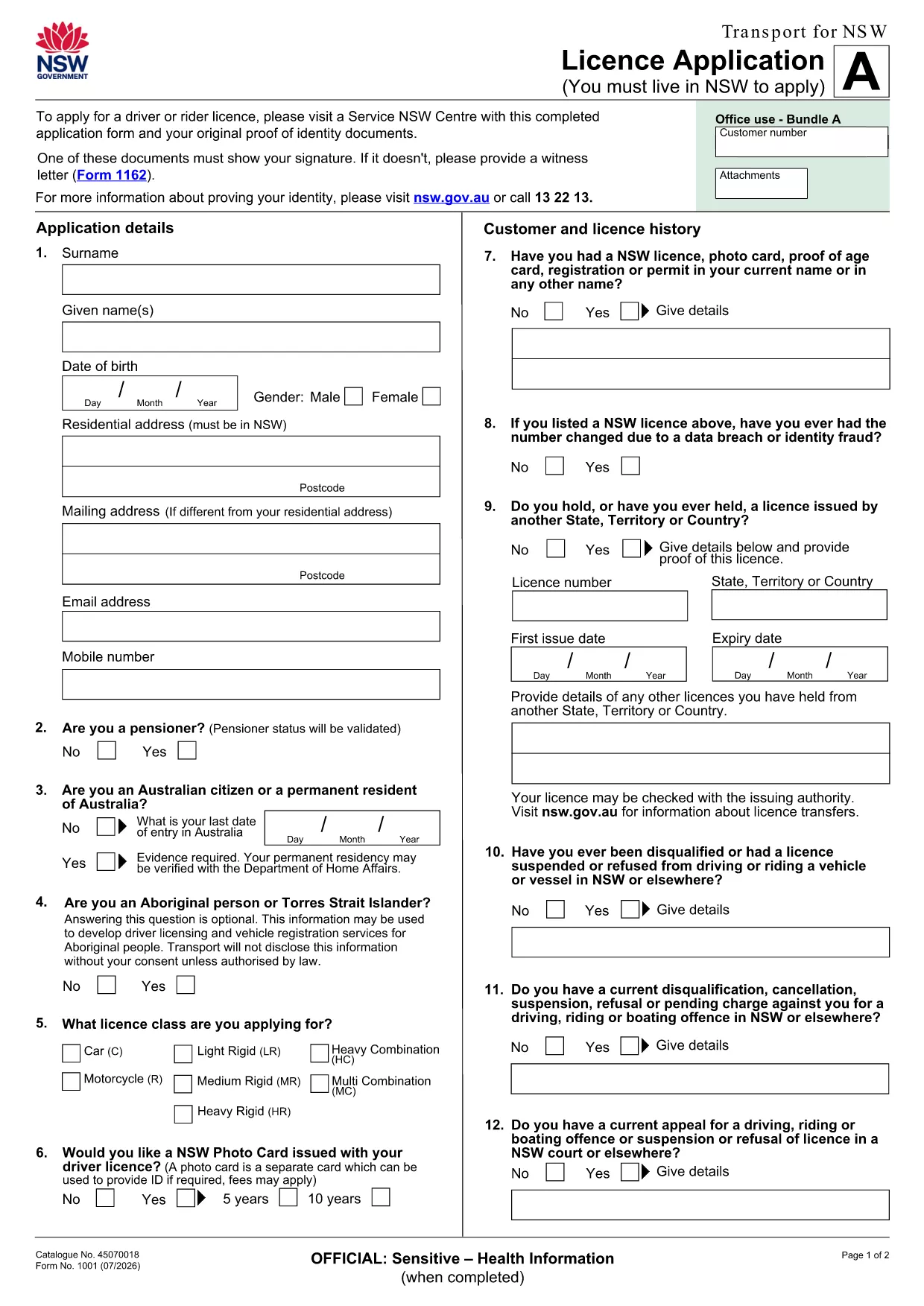
The licence application PDF is an official fillable document provided by Transport NSW. It captures personal details, residency proof, identity verification, and driver‑history information required to issue or renew a driver licence in New South Wales.

Key Requirements & Supporting Documents

  • Proof of identity (passport, birth certificate, or driver licence with a signature).
  • Proof of NSW residency (utility bill, rental agreement, or rates notice).
  • Current medical declaration if applicable.
  • Signature on the form – if your ID does not show a signature, provide a witness letter (Form 1162).

Having these documents ready before you start will speed up the process and prevent re‑submission.

How to Complete the Form Online with Formize

Instead of downloading the PDF and editing it in a separate program, simply click the “Fill out this form” button on this page. The Formize PDF Filler app loads instantly, letting you type directly into each field, attach supporting files, and validate entries in real time.

Common Mistakes to Avoid

  • Leaving any required field blank – the filler will highlight missing information.
  • Uploading blurry or unreadable scans of IDs.
  • Forgetting to sign the form or provide a witness letter when needed.
  • Using an outdated version of the form – always use the latest PDF linked below.

Download, Print, and Submit Options

If you prefer a hard copy, you can still download the PDF, print it, and hand‑write your answers. After completing the form, submit it in person at a Service NSW centre or mail it to the address indicated on the form.

Ready to start? Click the button, fill the form, and submit with confidence.

सामान्य प्रश्न
  • What documents are considered valid proof of identity?

    A passport, birth certificate, or an existing driver licence that shows your signature are accepted. If the ID does not display a signature, you must attach a witness letter (Form 1162).

  • Can I save my progress and finish the form later?

    Yes. The Formize filler lets you save a draft to your device. Simply reload the saved file to continue where you left off.

  • Is there a fee for using the online Formize filler?

    No. The Formize PDF filler is free for all users; you only pay any government fees that Transport NSW charges for processing the licence.

  • How long does processing take after I submit the form?

    Processing times vary, but most applications are reviewed within 10‑14 business days once all required documents are received.

  • What should I do if I make a mistake after submitting?

    Contact Transport NSW as soon as possible. In many cases they will allow a corrected version to be uploaded, or you may need to submit a new application.

  • Do I need to print the form after filling it online?

    Printing is optional. If you prefer a paper record, you can download and print the completed PDF. Otherwise, the digital submission is sufficient.

  • Is the form compatible with mobile devices?

    Yes. The Formize filler works on modern smartphones and tablets, letting you complete the application on the go.

कैसे करें

application form requirements को मुफ़्त में, ऑनलाइन 5 आसान स्टेप्स में कैसे भरें:

  1. 1
    Click the Fill‑out Button
    Press the “Fill out this form” button on the page. The Formize PDF Filler app will open in a new tab.
  2. 2
    Wait for the Filler to Load
    The app loads the licence application PDF and automatically detects all fillable fields.
  3. 3
    Enter Your Information
    Type your personal details, upload required documents, and use the built‑in validation to ensure every field is completed correctly.
  4. 4
    Review & Sign
    Check each section for accuracy, add your digital signature, and attach a witness letter if your ID lacks a signature.
  5. 5
    Submit or Download
    When you’re satisfied, click “Submit” to send the form to Transport NSW, or download a copy for your records.
पीडीएफ फिलर एप तैयार करें
के बारे में

application form requirements टेम्पलेट

एक पीडीएफ दस्तावेज़ को देखने और भरने के लिए सुविधाओं के पारंपरिक सेट के साथ, एक वेब एप्लिकेशन और उत्तरदायी लेआउट के लाभों के साथ, आप application form requirements को मिनटों में पूरा कर सकते हैं।

विशेषताएं

पीडीएफ भराव

पीडीएफ फॉर्म ऑनलाइन भरने का सबसे आसान तरीका

  • जल्दी से application form requirements भरें
    application form requirements को जल्दी से ऑनलाइन भरने का कोई तरीका खोज रहे हैं? हमारे ऑनलाइन नि:शुल्क पीडीएफ फॉर्म फिलर के साथ, आप एक मिनट से भी कम समय में इस पीडीएफ दस्तावेज़ को संपादित करने और भरने का तरीका जानेंगे।
  • ऑनलाइन पीडीएफ संपादक का उपयोग करना आसान है
    पीडीएफ फाइलों को प्रिंट करने से तंग आ गए हैं ताकि आप उन्हें फिर से स्कैन करने और उन्हें वापस भेजने से पहले संपादित कर सकें? PDF दस्तावेज़ों को निःशुल्क ऑनलाइन संपादित करें। समय और कागज बचाने के लिए हमारे ऑनलाइन पीडीएफ संपादक का प्रयोग करें।
  • महान उपकरण, सभी प्लेटफार्म
    आश्चर्य है कि मैक पर application form requirements कैसे भरें, या शायद पीडीएफ फिलर का मुफ्त में उपयोग कैसे करें? हमारे ऑनलाइन पीडीएफ टूल सभी प्लेटफॉर्म पर काम करते हैं।
  • सुरक्षित फ़ाइल भंडारण
    पूर्ण की गई "application form requirements" फ़ाइलें Amazon क्लाउड होस्टिंग द्वारा प्रबंधित एक सुरक्षित डेटाबेस में संग्रहीत की जाती हैं। आप कभी भी अपनी फाइलों को हमारे सिस्टम से हटा सकते हैं। किसी भी स्थिति में, ये फ़ाइलें 24 घंटे के बाद स्वतः हटा दी जाती हैं।
  • {कीवर्ड} से चैट करें
    Chatize पर "application form requirements" के साथ चैट करें, जो एक निःशुल्क पीडीएफ रीडर सहायक है। प्रश्न पूछें और "application form requirements" से उत्तर प्राप्त करें। बस ऊपर दस्तावेज़ के साथ चैट करें बटन पर क्लिक करें।

फ़िलिंग सत्र मिटाएँ

चयनित फ़िलिंग सत्र को मिटाएँ? इस स्थिति में, फ़ॉर्म को पूरा करने में आपकी प्रगति खो जाएगी।

संपादन सत्र हटाएँ

चयनित संपादन सत्र हटाएँ? इस स्थिति में, फ़ॉर्म बनाने और संपादित करने में आपकी प्रगति नष्ट हो जाएगी।