hamburger-menu icon
भाषा का चयन करें

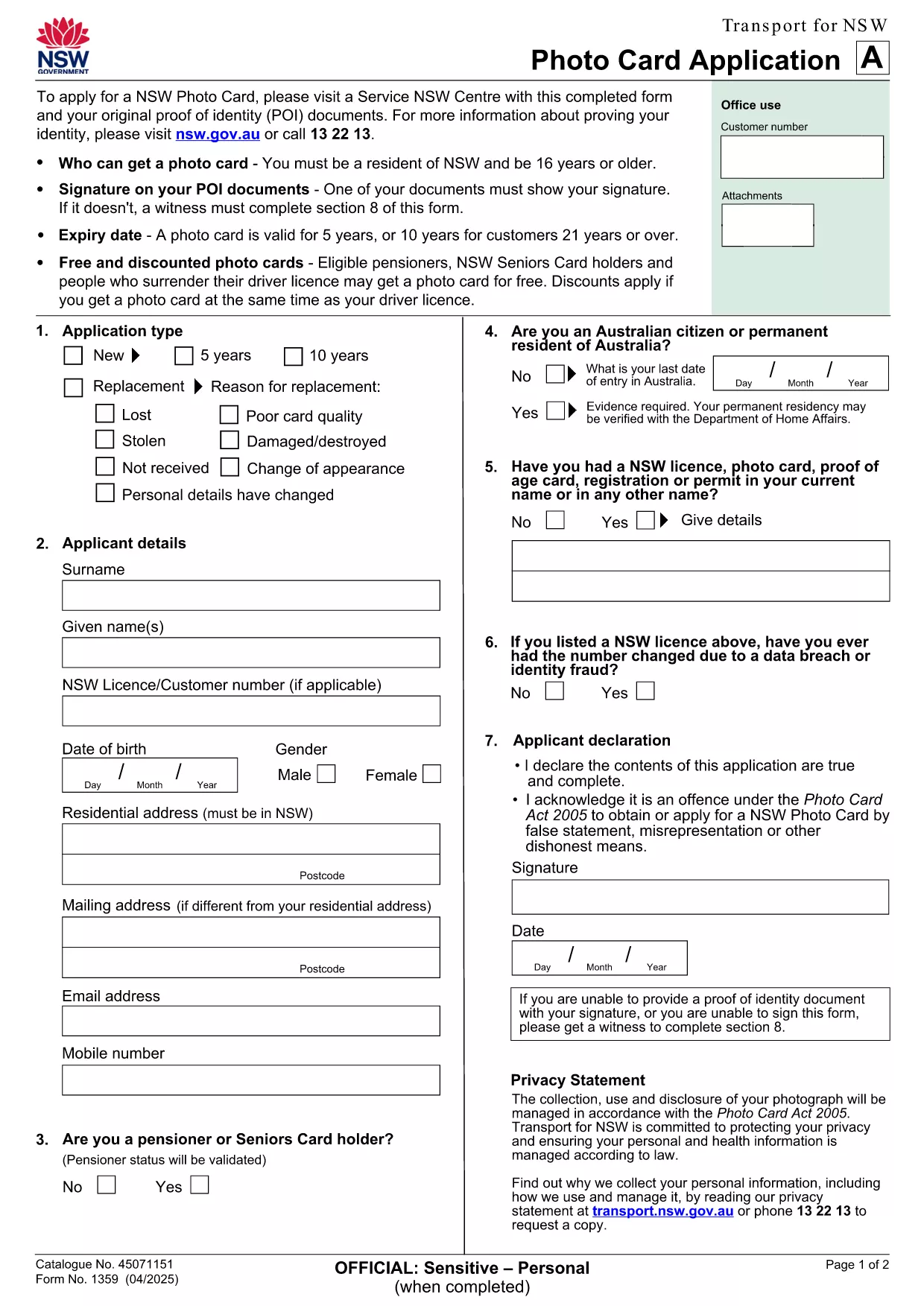
NSW Photo Card Application Form (Fillable PDF)

  1. देश ऑस्ट्रेलिया
  2. भाषा अंग्रेज़ी
  3. गतिविधि Identification
  4. विभाग Transport
फार्म को भरो
NSW Photo Card Application Form (Fillable PDF)

Need a new Photo Card in New South Wales? The official NSW Photo Card application form requires a recent photograph of yourself. With Formize, you can download the PDF, attach your picture, and complete the entire form online – no printer or scanner needed.

Why a Photo Card Application Needs a Picture

The Photo Card is a government‑issued ID that verifies your identity. A clear, recent picture helps officers match the card to the holder quickly and reduces fraud.

How to Fill Out the NSW Photo Card Form Online

  1. Click the "Fill out this form" button on this page.
  2. Wait for the Formize PDF Filler app to load (usually a few seconds).
  3. Upload a high‑resolution photo (JPEG or PNG, 2 MB max).
  4. Complete the personal‑details sections – name, address, date of birth, etc.
  5. Review the entered data, then click Save or Print to submit at your nearest Service Centre.

Common Mistakes & Tips

  • Wrong photo size: Use a passport‑style headshot with a plain background.
  • Missing signature: The digital signature field must be filled; you can sign with your mouse or touch screen.
  • Incorrect address format: Follow the example shown on the form to avoid processing delays.

Download & Save Your Completed Form

After you finish, you can download a copy of the completed PDF for your records. Bring the printed form and your original photo to a Service Centre, or submit it digitally if your centre accepts e‑submissions.

Need help? The Service Centre staff can assist with identity verification and photo quality checks.

सामान्य प्रश्न
  • Do I need a passport‑style photo for the NSW Photo Card?

    Yes. The photo must be a clear headshot with a plain background, taken within the last 12 months.

  • Can I submit the form without printing it?

    Most Service Centres require a printed form, but some locations accept a saved PDF on a USB drive. Check with your local centre.

  • What file formats are accepted for the picture?

    JPEG and PNG files are supported, up to 2 MB in size.

  • Is there a fee for the Photo Card?

    A standard Photo Card costs $30. Seniors and pensioners may be eligible for a free card.

  • How long does it take to receive the card after submission?

    The card is mailed to your address within 3 weeks of submitting the completed application.

  • Can I edit the form after I’ve saved it?

    Yes. Open the saved PDF in Formize again, make changes, and re‑save before you submit.

  • What should I do if my photo is rejected?

    You’ll be asked to provide a new picture that meets the requirements. Bring a compliant photo to the Service Centre for a quick replacement.

कैसे करें

NSW photo card application को मुफ़्त में, ऑनलाइन 5 आसान स्टेप्स में कैसे भरें:

  1. 1
    Open the Fillable Form
    Click the "Fill out this form" button on this page. The Formize PDF Filler will open in a new tab.
  2. 2
    Upload Your Photo
    Select the photo field, then choose a recent passport‑style picture (JPEG/PNG, max 2 MB). The image will appear instantly.
  3. 3
    Enter Your Details
    Type in your name, address, date of birth, and any other required information. All fields are searchable and auto‑save.
  4. 4
    Add Your Signature
    Use the signature box to draw your signature with a mouse, trackpad, or touchscreen.
  5. 5
    Review and Save
    Check every field for accuracy, then click "Save PDF" to download the completed form or "Print" to take it to a Service Centre.
पीडीएफ फिलर एप तैयार करें
के बारे में

NSW photo card application टेम्पलेट

एक पीडीएफ दस्तावेज़ को देखने और भरने के लिए सुविधाओं के पारंपरिक सेट के साथ, एक वेब एप्लिकेशन और उत्तरदायी लेआउट के लाभों के साथ, आप NSW photo card application को मिनटों में पूरा कर सकते हैं।

विशेषताएं

पीडीएफ भराव

पीडीएफ फॉर्म ऑनलाइन भरने का सबसे आसान तरीका

  • जल्दी से NSW photo card application भरें
    NSW photo card application को जल्दी से ऑनलाइन भरने का कोई तरीका खोज रहे हैं? हमारे ऑनलाइन नि:शुल्क पीडीएफ फॉर्म फिलर के साथ, आप एक मिनट से भी कम समय में इस पीडीएफ दस्तावेज़ को संपादित करने और भरने का तरीका जानेंगे।
  • ऑनलाइन पीडीएफ संपादक का उपयोग करना आसान है
    पीडीएफ फाइलों को प्रिंट करने से तंग आ गए हैं ताकि आप उन्हें फिर से स्कैन करने और उन्हें वापस भेजने से पहले संपादित कर सकें? PDF दस्तावेज़ों को निःशुल्क ऑनलाइन संपादित करें। समय और कागज बचाने के लिए हमारे ऑनलाइन पीडीएफ संपादक का प्रयोग करें।
  • महान उपकरण, सभी प्लेटफार्म
    आश्चर्य है कि मैक पर NSW photo card application कैसे भरें, या शायद पीडीएफ फिलर का मुफ्त में उपयोग कैसे करें? हमारे ऑनलाइन पीडीएफ टूल सभी प्लेटफॉर्म पर काम करते हैं।
  • सुरक्षित फ़ाइल भंडारण
    पूर्ण की गई "NSW photo card application" फ़ाइलें Amazon क्लाउड होस्टिंग द्वारा प्रबंधित एक सुरक्षित डेटाबेस में संग्रहीत की जाती हैं। आप कभी भी अपनी फाइलों को हमारे सिस्टम से हटा सकते हैं। किसी भी स्थिति में, ये फ़ाइलें 24 घंटे के बाद स्वतः हटा दी जाती हैं।
  • {कीवर्ड} से चैट करें
    Chatize पर "NSW photo card application" के साथ चैट करें, जो एक निःशुल्क पीडीएफ रीडर सहायक है। प्रश्न पूछें और "NSW photo card application" से उत्तर प्राप्त करें। बस ऊपर दस्तावेज़ के साथ चैट करें बटन पर क्लिक करें।

फ़िलिंग सत्र मिटाएँ

चयनित फ़िलिंग सत्र को मिटाएँ? इस स्थिति में, फ़ॉर्म को पूरा करने में आपकी प्रगति खो जाएगी।

संपादन सत्र हटाएँ

चयनित संपादन सत्र हटाएँ? इस स्थिति में, फ़ॉर्म बनाने और संपादित करने में आपकी प्रगति नष्ट हो जाएगी।