
hamburger-menu icon
भाषा का चयन करें

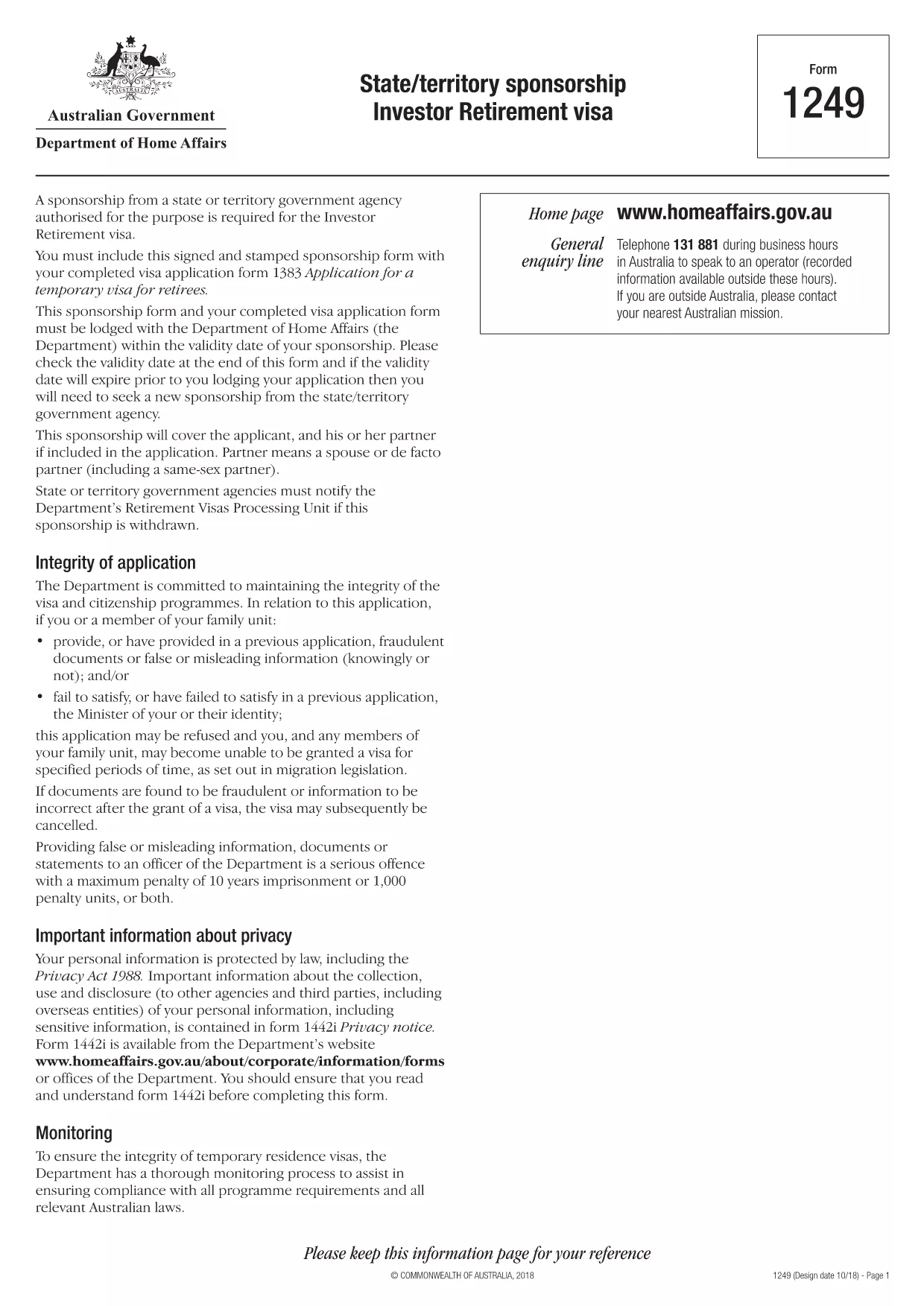
Form 1249 – State/Territory Sponsorship for the Investor Retirement Visa

  1. भाषा अंग्रेज़ी
  2. देश ऑस्ट्रेलिया
  3. गतिविधि वीजा
फार्म को भरो
Form 1249 – State/Territory Sponsorship for the Investor Retirement Visa

Form 1249 is the official State/Territory Sponsorship document required for the Australian Investor Retirement Visa (subclass 188‑IR). The sponsoring state or territory government must approve the applicant’s investment plan before the Department of Home Affairs processes the visa.

This landing page lets you view, fill, and download the fillable PDF directly in your browser – no extra software needed. Just click the “Fill out this form” button and the Formize PDF Filler will load the form for you.

What Is Form 1249 and Who Needs It?

The form captures details about the applicant’s proposed investment, the sponsoring government’s commitment, and the validity period of the sponsorship. It is required for:

  • Applicants of the Investor Retirement visa (subclass 188‑IR)
  • State or territory agencies that are sponsoring the applicant
  • Legal representatives preparing a visa package

How to Complete Form 1249 Online with Formize

Follow these simple steps to fill the form without downloading any software:

  1. Click the “Fill out this form” button on this page.
  2. Wait a few seconds while the Formize PDF Filler loads the fillable PDF.
  3. Enter all required information in the highlighted fields. The filler validates dates and numeric entries automatically.
  4. When you finish, click **Save & Download** to get a completed PDF ready for submission.

Common Mistakes & Tips for a Successful Submission

  • Validity date – Double‑check the sponsorship validity at the bottom of the form. If it expires before you lodge your visa, you’ll need a new sponsorship.
  • Signature fields – Use the built‑in signature tool in Formize or print, sign, and scan the final PDF.
  • Investment details – Provide exact figures and currency; rounding errors cause delays.
  • Supporting documents – Attach the required business plan, proof of funds, and any state‑specific endorsement letters.

Where to Submit the Completed Sponsorship Form

After saving the filled PDF, include it with your visa application package and lodge it through the Department of Home Affairs portal. The sponsoring state/territory must also retain a copy for their records.

Need a printable version? Use the direct download link below.

सामान्य प्रश्न
  • What is the purpose of Form 1249?

    Form 1249 records the sponsorship commitment from an Australian state or territory for an Investor Retirement visa applicant.

  • Can I fill Form 1249 on a mobile device?

    Yes. The Formize PDF Filler works on modern smartphones and tablets as long as the browser supports PDF rendering.

  • Do I need to print the form to sign it?

    You can sign electronically using the Formize signature tool, or print, sign, and scan the final PDF before submission.

  • How long is the sponsorship validity?

    The validity period is printed on the last page of the form. It must remain active until the visa is granted; otherwise a new sponsorship is required.

  • What happens if I make a mistake after downloading?

    Open the saved PDF again with Formize, edit the incorrect fields, and re‑download the corrected version.

  • Is there a fee to use Formize’s filler?

    No, the Formize PDF Filler is free for all users on this page.

  • Where do I send the completed Form 1249?

    Include the completed form with your visa application package and lodge it through the Department of Home Affairs online portal.

  • Do I need a separate form for each state or territory?

    Form 1249 is the same nationwide, but the sponsoring agency (state or territory) must complete the sponsorship section.

कैसे करें

Form 1249 को मुफ़्त में, ऑनलाइन 4 आसान स्टेप्स में कैसे भरें:

  1. 1
    Open the Fillable Form
    Click the “Fill out this form” button on the page. The Formize PDF Filler will open the fillable Form 1249 in your browser.
  2. 2
    Enter Your Information
    Complete each highlighted field. The filler checks dates, numbers and required formats automatically.
  3. 3
    Save and Download
    When all sections are filled, press “Save & Download” to get a completed PDF ready for submission to the Department of Home Affairs.
  4. 4
    Submit with Your Visa Application
    Attach the saved PDF to your Investor Retirement visa (subclass 188‑IR) application through the Home Affairs online portal.
पीडीएफ फिलर एप तैयार करें
के बारे में

वीज़ा फॉर्म

Form 1249 वीज़ा रूपों में से एक है जो ऐसे दस्तावेज़ हैं जिनका उपयोग किसी विदेशी देश में प्रवेश करने के लिए वीज़ा के लिए आवेदन करने के लिए किया जाता है। वीजा एक दस्तावेज है जो एक विदेशी नागरिक को एक निर्दिष्ट अवधि के लिए किसी विदेशी देश में प्रवेश करने, रहने और कभी-कभी काम करने की अनुमति देता है। वीजा प्राप्त करने के लिए सटीक रूप और आवश्यकताएं देश और वीजा के प्रकार के अनुसार भिन्न होती हैं।

वीज़ा फॉर्म में आम तौर पर व्यक्तिगत जानकारी जैसे नाम, जन्म तिथि और पासपोर्ट जानकारी के साथ-साथ यात्रा के उद्देश्य और लंबाई, इच्छित गंतव्य और क्या आवेदक को पहले वीजा देने से मना कर दिया गया है या किसी देश से निर्वासित किया गया है, के बारे में जानकारी की आवश्यकता होती है। प्रपत्रों में पासपोर्ट, फोटोग्राफ और वित्तीय सहायता के प्रमाण जैसे सहायक दस्तावेजों की भी आवश्यकता हो सकती है।

संयुक्त राज्य अमेरिका में, सबसे आम वीज़ा फॉर्म DS-160 और DS-260 फॉर्म हैं। DS-160 फॉर्म का उपयोग गैर-आप्रवासी वीजा के लिए आवेदन करने के लिए किया जाता है, जबकि DS-260 फॉर्म का उपयोग अप्रवासी वीजा के लिए आवेदन करने के लिए किया जाता है। इन रूपों में आवेदक के व्यक्तिगत और यात्रा इतिहास के साथ-साथ पासपोर्ट, यात्रा यात्रा कार्यक्रम और वित्तीय रिकॉर्ड जैसे सहायक दस्तावेज़ों के बारे में विस्तृत जानकारी की आवश्यकता होती है।

अन्य देशों में अलग-अलग वीज़ा फॉर्म और आवश्यकताएं हो सकती हैं, लेकिन मूल प्रक्रिया में आमतौर पर वीज़ा आवेदन पूरा करना, सहायक दस्तावेज प्रदान करना और अमेरिकी दूतावास या वाणिज्य दूतावास में एक कांसुलर अधिकारी के साथ साक्षात्कार में भाग लेना शामिल है। यह ध्यान रखना महत्वपूर्ण है कि वीज़ा आवेदन प्रक्रिया जटिल और समय लेने वाली हो सकती है, और यह अनुशंसा की जाती है कि वीज़ा चाहने वाले व्यक्ति किसी अप्रवास वकील या अन्य योग्य पेशेवर से परामर्श करें ताकि यह सुनिश्चित हो सके कि सभी आवश्यक फॉर्म और आवश्यकताएं पूरी हो गई हैं।

विशेषताएं

पीडीएफ भराव

पीडीएफ फॉर्म ऑनलाइन भरने का सबसे आसान तरीका

  • जल्दी से Form 1249 भरें
    Form 1249 को जल्दी से ऑनलाइन भरने का कोई तरीका खोज रहे हैं? हमारे ऑनलाइन नि:शुल्क पीडीएफ फॉर्म फिलर के साथ, आप एक मिनट से भी कम समय में इस पीडीएफ दस्तावेज़ को संपादित करने और भरने का तरीका जानेंगे।
  • ऑनलाइन पीडीएफ संपादक का उपयोग करना आसान है
    पीडीएफ फाइलों को प्रिंट करने से तंग आ गए हैं ताकि आप उन्हें फिर से स्कैन करने और उन्हें वापस भेजने से पहले संपादित कर सकें? PDF दस्तावेज़ों को निःशुल्क ऑनलाइन संपादित करें। समय और कागज बचाने के लिए हमारे ऑनलाइन पीडीएफ संपादक का प्रयोग करें।
  • महान उपकरण, सभी प्लेटफार्म
    आश्चर्य है कि मैक पर Form 1249 कैसे भरें, या शायद पीडीएफ फिलर का मुफ्त में उपयोग कैसे करें? हमारे ऑनलाइन पीडीएफ टूल सभी प्लेटफॉर्म पर काम करते हैं।
  • सुरक्षित फ़ाइल भंडारण
    पूर्ण की गई "Form 1249" फ़ाइलें Amazon क्लाउड होस्टिंग द्वारा प्रबंधित एक सुरक्षित डेटाबेस में संग्रहीत की जाती हैं। आप कभी भी अपनी फाइलों को हमारे सिस्टम से हटा सकते हैं। किसी भी स्थिति में, ये फ़ाइलें 24 घंटे के बाद स्वतः हटा दी जाती हैं।
  • {कीवर्ड} से चैट करें
    Chatize पर "Form 1249" के साथ चैट करें, जो एक निःशुल्क पीडीएफ रीडर सहायक है। प्रश्न पूछें और "Form 1249" से उत्तर प्राप्त करें। बस ऊपर दस्तावेज़ के साथ चैट करें बटन पर क्लिक करें।

फ़िलिंग सत्र मिटाएँ

चयनित फ़िलिंग सत्र को मिटाएँ? इस स्थिति में, फ़ॉर्म को पूरा करने में आपकी प्रगति खो जाएगी।

संपादन सत्र हटाएँ

चयनित संपादन सत्र हटाएँ? इस स्थिति में, फ़ॉर्म बनाने और संपादित करने में आपकी प्रगति नष्ट हो जाएगी।