
hamburger-menu icon
भाषा का चयन करें

IMM 5476 – Use of a Representative (Canada)

  1. देश कनाडा
  2. भाषा अंग्रेज़ी फ्रेंच
  3. गतिविधि वीजा
फार्म को भरो
IMM 5476 – Use of a Representative (Canada)

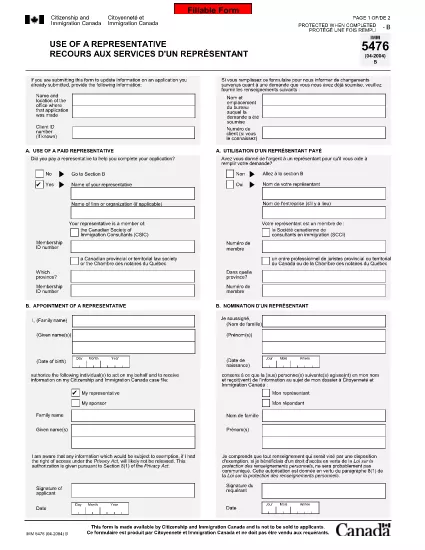
The IMM 5476 – Use of a Representative form allows you to officially appoint an immigration consultant, lawyer, or another authorized person to act on your behalf with Immigration, Refugees and Citizenship Canada (IRCC) and the Canada Border Services Agency (CBSA). This form is required for most permanent‑resident, temporary‑resident, and citizenship applications.

What Is the IMM 5476 Form?

IMM 5476 is a government‑issued PDF that records the details of your chosen representative, their contact information, and the scope of authority you are granting. It is available in both English and French and must be signed by both you (the applicant) and your representative.

How to Fill Out IMM 5476 Online

Instead of downloading the PDF and editing it manually, simply click the "Fill out this form" button on the page. Our Formize PDF Filler app will load the fillable version instantly, letting you complete the form directly in your browser.

Common Mistakes to Avoid

  • Incorrect Representative Details: Double‑check the name, address, and CRA‑issued client number of your representative.
  • Missing Signatures: Both the applicant and the representative must sign; unsigned forms are rejected.
  • Wrong Language Version: Use the official English or French version that matches the rest of your application package.
  • Out‑of‑Date Form: Always use the latest version – the link below always points to the current PDF.

When to Submit the Form

Attach IMM 5476 to the same package as your main application (e.g., Express Entry, Study Permit, Visitor Visa). If you change representatives later, submit a new, signed IMM 5476 with your updated request.

Need More Help?

While Formize does not provide live support, you can find detailed guidance on the IRCC website or consult a licensed immigration professional.

सामान्य प्रश्न
  • Do I need a lawyer to fill out IMM 5476?

    No. You can appoint any authorized representative, such as a licensed immigration consultant, lawyer, or family member, as long as they have a valid client number.

  • Can I change my representative after submitting the form?

    Yes. Submit a new, signed IMM 5476 with the updated representative’s details and include a brief letter explaining the change.

  • Is a digital signature accepted?

    IRCC accepts electronic signatures generated within a fillable PDF application like Formize, provided the signature field is clearly marked.

  • What happens if I forget to sign the form?

    An unsigned IMM 5476 will be considered incomplete and may delay processing of your entire application.

  • Do I need to submit both English and French versions?

    Submit only the language version that matches the rest of your application package. IRCC does not require both versions.

  • Is there a fee to use the Formize PDF Filler?

    No. Formize provides free access to fillable PDFs for government forms like IMM 5476.

  • Can I print the form after filling it online?

    Yes. Once you finish, click "Download PDF" and print a hard copy if your submission requires a physical signature.

  • Where can I find the latest version of IMM 5476?

    The link on this page always points to the most recent version published by Immigration, Refugees and Citizenship Canada.

कैसे करें

IMM 5476 को मुफ़्त में, ऑनलाइन 5 आसान स्टेप्स में कैसे भरें:

  1. 1
    Open the Fillable Form
    Click the "Fill out this form" button on the page. The Formize PDF Filler app will load the IMM 5476 form directly in your browser.
  2. 2
    Enter Applicant Information
    Fill in your full name, client ID, and contact details in the Applicant section. All fields are required.
  3. 3
    Enter Representative Details
    Provide the representative’s name, firm, address, phone, and email. Make sure the CRA client number matches the one on record.
  4. 4
    Add Signatures
    Use the built‑in signature fields to sign electronically. Both you and your representative must sign before saving.
  5. 5
    Download or Submit
    After completing the form, click "Download PDF" to save a copy for your records, then attach it to your immigration application package.
पीडीएफ फिलर एप तैयार करें
के बारे में

वीज़ा फॉर्म

IMM 5476 वीज़ा रूपों में से एक है जो ऐसे दस्तावेज़ हैं जिनका उपयोग किसी विदेशी देश में प्रवेश करने के लिए वीज़ा के लिए आवेदन करने के लिए किया जाता है। वीजा एक दस्तावेज है जो एक विदेशी नागरिक को एक निर्दिष्ट अवधि के लिए किसी विदेशी देश में प्रवेश करने, रहने और कभी-कभी काम करने की अनुमति देता है। वीजा प्राप्त करने के लिए सटीक रूप और आवश्यकताएं देश और वीजा के प्रकार के अनुसार भिन्न होती हैं।

वीज़ा फॉर्म में आम तौर पर व्यक्तिगत जानकारी जैसे नाम, जन्म तिथि और पासपोर्ट जानकारी के साथ-साथ यात्रा के उद्देश्य और लंबाई, इच्छित गंतव्य और क्या आवेदक को पहले वीजा देने से मना कर दिया गया है या किसी देश से निर्वासित किया गया है, के बारे में जानकारी की आवश्यकता होती है। प्रपत्रों में पासपोर्ट, फोटोग्राफ और वित्तीय सहायता के प्रमाण जैसे सहायक दस्तावेजों की भी आवश्यकता हो सकती है।

संयुक्त राज्य अमेरिका में, सबसे आम वीज़ा फॉर्म DS-160 और DS-260 फॉर्म हैं। DS-160 फॉर्म का उपयोग गैर-आप्रवासी वीजा के लिए आवेदन करने के लिए किया जाता है, जबकि DS-260 फॉर्म का उपयोग अप्रवासी वीजा के लिए आवेदन करने के लिए किया जाता है। इन रूपों में आवेदक के व्यक्तिगत और यात्रा इतिहास के साथ-साथ पासपोर्ट, यात्रा यात्रा कार्यक्रम और वित्तीय रिकॉर्ड जैसे सहायक दस्तावेज़ों के बारे में विस्तृत जानकारी की आवश्यकता होती है।

अन्य देशों में अलग-अलग वीज़ा फॉर्म और आवश्यकताएं हो सकती हैं, लेकिन मूल प्रक्रिया में आमतौर पर वीज़ा आवेदन पूरा करना, सहायक दस्तावेज प्रदान करना और अमेरिकी दूतावास या वाणिज्य दूतावास में एक कांसुलर अधिकारी के साथ साक्षात्कार में भाग लेना शामिल है। यह ध्यान रखना महत्वपूर्ण है कि वीज़ा आवेदन प्रक्रिया जटिल और समय लेने वाली हो सकती है, और यह अनुशंसा की जाती है कि वीज़ा चाहने वाले व्यक्ति किसी अप्रवास वकील या अन्य योग्य पेशेवर से परामर्श करें ताकि यह सुनिश्चित हो सके कि सभी आवश्यक फॉर्म और आवश्यकताएं पूरी हो गई हैं।

विशेषताएं

पीडीएफ भराव

पीडीएफ फॉर्म ऑनलाइन भरने का सबसे आसान तरीका

  • जल्दी से IMM 5476 भरें
    IMM 5476 को जल्दी से ऑनलाइन भरने का कोई तरीका खोज रहे हैं? हमारे ऑनलाइन नि:शुल्क पीडीएफ फॉर्म फिलर के साथ, आप एक मिनट से भी कम समय में इस पीडीएफ दस्तावेज़ को संपादित करने और भरने का तरीका जानेंगे।
  • ऑनलाइन पीडीएफ संपादक का उपयोग करना आसान है
    पीडीएफ फाइलों को प्रिंट करने से तंग आ गए हैं ताकि आप उन्हें फिर से स्कैन करने और उन्हें वापस भेजने से पहले संपादित कर सकें? PDF दस्तावेज़ों को निःशुल्क ऑनलाइन संपादित करें। समय और कागज बचाने के लिए हमारे ऑनलाइन पीडीएफ संपादक का प्रयोग करें।
  • महान उपकरण, सभी प्लेटफार्म
    आश्चर्य है कि मैक पर IMM 5476 कैसे भरें, या शायद पीडीएफ फिलर का मुफ्त में उपयोग कैसे करें? हमारे ऑनलाइन पीडीएफ टूल सभी प्लेटफॉर्म पर काम करते हैं।
  • सुरक्षित फ़ाइल भंडारण
    पूर्ण की गई "IMM 5476" फ़ाइलें Amazon क्लाउड होस्टिंग द्वारा प्रबंधित एक सुरक्षित डेटाबेस में संग्रहीत की जाती हैं। आप कभी भी अपनी फाइलों को हमारे सिस्टम से हटा सकते हैं। किसी भी स्थिति में, ये फ़ाइलें 24 घंटे के बाद स्वतः हटा दी जाती हैं।
  • {कीवर्ड} से चैट करें
    Chatize पर "IMM 5476" के साथ चैट करें, जो एक निःशुल्क पीडीएफ रीडर सहायक है। प्रश्न पूछें और "IMM 5476" से उत्तर प्राप्त करें। बस ऊपर दस्तावेज़ के साथ चैट करें बटन पर क्लिक करें।

फ़िलिंग सत्र मिटाएँ

चयनित फ़िलिंग सत्र को मिटाएँ? इस स्थिति में, फ़ॉर्म को पूरा करने में आपकी प्रगति खो जाएगी।

संपादन सत्र हटाएँ

चयनित संपादन सत्र हटाएँ? इस स्थिति में, फ़ॉर्म बनाने और संपादित करने में आपकी प्रगति नष्ट हो जाएगी।