
hamburger-menu icon
भाषा का चयन करें

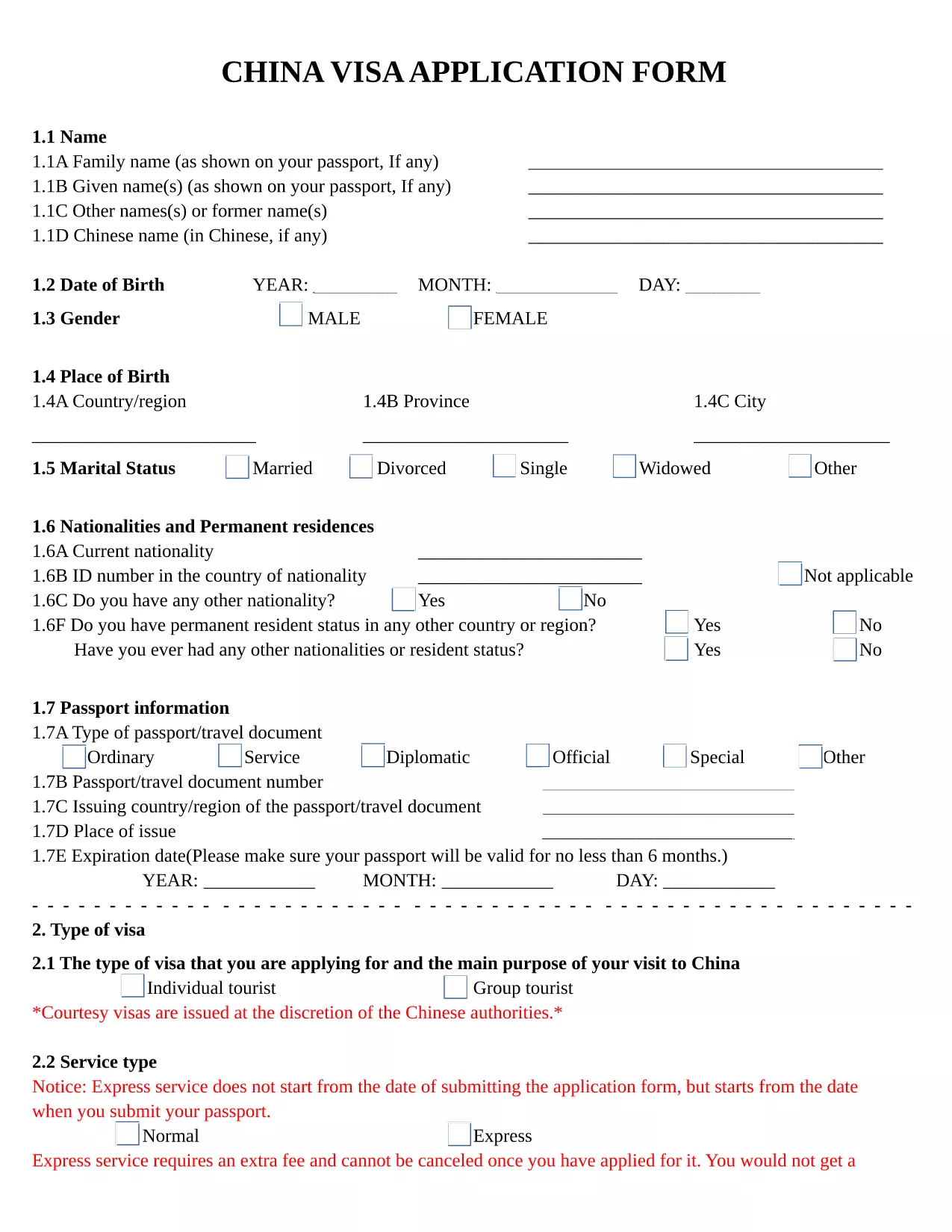
China Visa Application Form – Fillable PDF

  1. भाषा अंग्रेज़ी
  2. देश China
  3. विभाग Consular Services
  4. गतिविधि वीजा
फार्म को भरो
China Visa Application Form – Fillable PDF

Planning a trip to China? The first step is completing the official China Visa Application Form. Our fillable PDF version lets you enter all required details directly in your browser, eliminates the need for printing, and ensures a clean, error‑free submission.

Why Use the Fillable PDF Form?

The fillable version is identical to the paper form used by Chinese consulates, but it offers several advantages:

  • Instant validation of required fields
  • Automatic saving so you can return later
  • Easy export to PDF for upload to the embassy portal
  • No messy handwriting or smudges

How to Complete the China Visa Application Online

Follow these simple steps to fill out the form using the Formize PDF Filler app:

  1. Click the "Fill out this form" button on this page.
  2. Wait a few seconds while the Formize PDF Filler loads the document.
  3. Enter your personal information, passport details, travel itinerary, and any additional notes directly into the fields.
  4. Use the Save button to download a completed PDF or to store it in your browser for later editing.
  5. Print the saved PDF (if required) and attach it to your visa package, or upload it to the embassy’s online portal.

Common Mistakes to Avoid

  • Incorrect passport number: Double‑check each digit; a single typo can delay processing.
  • Leaving mandatory fields blank: The fillable PDF highlights missing information before you can save.
  • Using the wrong date format: Follow the DD/MM/YYYY format as shown in the sample.
  • Submitting an outdated version: This page always hosts the latest official form; always use the link provided here.

Required Supporting Documents

In addition to the completed application, you will need to provide:

  • Valid passport (at least 6 months remaining)
  • Recent passport‑size photo (white background)
  • Invitation letter or travel itinerary
  • Proof of accommodation and round‑trip tickets

What Happens After You Submit?

Once your application package is complete, submit it to the Chinese Visa Application Service Center or the nearest Chinese embassy/consulate. Processing times vary from 4 to 7 business days for standard visas. Track your status online using the reference number provided on the receipt.

सामान्य प्रश्न
  • Do I need to print the fillable PDF after completing it?

    Most Chinese consulates accept a printed version of the completed form. Check the specific requirements of the embassy where you will submit your application.

  • Can I edit the form after I have saved it?

    Yes. Open the saved PDF again with the Formize PDF Filler app, make any changes, and re‑save.

  • Is there a fee to download the fillable China visa form?

    No. The PDF is provided free of charge; visa processing fees are paid directly to the visa center.

  • What passport details are required?

    Enter the passport number exactly as it appears, the date of issue, and the expiration date. Use the DD/MM/YYYY format.

  • How long does a Chinese visa take to process?

    Standard processing usually takes 4‑7 business days. Express or rush services may be available for an additional fee.

  • Can I use the same form for a tourist and business visa?

    The form is the same, but you must select the correct visa type in the "Purpose of Visit" section and provide supporting documents relevant to that purpose.

  • What should I do if I make a mistake on the form?

    If the mistake is discovered before submission, simply edit the field in the Formize PDF Filler and save again. If you have already printed it, cross out the error neatly, write the correction, and initial the change.

  • Is the fillable PDF compatible with mobile devices?

    Yes. The Formize PDF Filler works on most modern browsers, including mobile Chrome and Safari, allowing you to complete the form on a tablet or phone.

कैसे करें

China visa application form को मुफ़्त में, ऑनलाइन 5 आसान स्टेप्स में कैसे भरें:

  1. 1
    Open the Fillable Form
    Click the "Fill out this form" button on the page. The Formize PDF Filler app will open in a new tab.
  2. 2
    Load the PDF
    Wait a few seconds while the PDF loads. All fields become editable automatically.
  3. 3
    Enter Your Information
    Type your personal details, passport number, travel dates, and any additional notes directly into the highlighted fields.
  4. 4
    Save or Download
    When you finish, click the Save button to download the completed PDF or store it in your browser for later editing.
  5. 5
    Submit to the Embassy
    Print the saved PDF (if required) and include it with your supporting documents when you submit your visa application.
पीडीएफ फिलर एप तैयार करें
के बारे में

वीज़ा फॉर्म

China visa application form वीज़ा रूपों में से एक है जो ऐसे दस्तावेज़ हैं जिनका उपयोग किसी विदेशी देश में प्रवेश करने के लिए वीज़ा के लिए आवेदन करने के लिए किया जाता है। वीजा एक दस्तावेज है जो एक विदेशी नागरिक को एक निर्दिष्ट अवधि के लिए किसी विदेशी देश में प्रवेश करने, रहने और कभी-कभी काम करने की अनुमति देता है। वीजा प्राप्त करने के लिए सटीक रूप और आवश्यकताएं देश और वीजा के प्रकार के अनुसार भिन्न होती हैं।

वीज़ा फॉर्म में आम तौर पर व्यक्तिगत जानकारी जैसे नाम, जन्म तिथि और पासपोर्ट जानकारी के साथ-साथ यात्रा के उद्देश्य और लंबाई, इच्छित गंतव्य और क्या आवेदक को पहले वीजा देने से मना कर दिया गया है या किसी देश से निर्वासित किया गया है, के बारे में जानकारी की आवश्यकता होती है। प्रपत्रों में पासपोर्ट, फोटोग्राफ और वित्तीय सहायता के प्रमाण जैसे सहायक दस्तावेजों की भी आवश्यकता हो सकती है।

संयुक्त राज्य अमेरिका में, सबसे आम वीज़ा फॉर्म DS-160 और DS-260 फॉर्म हैं। DS-160 फॉर्म का उपयोग गैर-आप्रवासी वीजा के लिए आवेदन करने के लिए किया जाता है, जबकि DS-260 फॉर्म का उपयोग अप्रवासी वीजा के लिए आवेदन करने के लिए किया जाता है। इन रूपों में आवेदक के व्यक्तिगत और यात्रा इतिहास के साथ-साथ पासपोर्ट, यात्रा यात्रा कार्यक्रम और वित्तीय रिकॉर्ड जैसे सहायक दस्तावेज़ों के बारे में विस्तृत जानकारी की आवश्यकता होती है।

अन्य देशों में अलग-अलग वीज़ा फॉर्म और आवश्यकताएं हो सकती हैं, लेकिन मूल प्रक्रिया में आमतौर पर वीज़ा आवेदन पूरा करना, सहायक दस्तावेज प्रदान करना और अमेरिकी दूतावास या वाणिज्य दूतावास में एक कांसुलर अधिकारी के साथ साक्षात्कार में भाग लेना शामिल है। यह ध्यान रखना महत्वपूर्ण है कि वीज़ा आवेदन प्रक्रिया जटिल और समय लेने वाली हो सकती है, और यह अनुशंसा की जाती है कि वीज़ा चाहने वाले व्यक्ति किसी अप्रवास वकील या अन्य योग्य पेशेवर से परामर्श करें ताकि यह सुनिश्चित हो सके कि सभी आवश्यक फॉर्म और आवश्यकताएं पूरी हो गई हैं।

विशेषताएं

पीडीएफ भराव

पीडीएफ फॉर्म ऑनलाइन भरने का सबसे आसान तरीका

  • जल्दी से China visa application form भरें
    China visa application form को जल्दी से ऑनलाइन भरने का कोई तरीका खोज रहे हैं? हमारे ऑनलाइन नि:शुल्क पीडीएफ फॉर्म फिलर के साथ, आप एक मिनट से भी कम समय में इस पीडीएफ दस्तावेज़ को संपादित करने और भरने का तरीका जानेंगे।
  • ऑनलाइन पीडीएफ संपादक का उपयोग करना आसान है
    पीडीएफ फाइलों को प्रिंट करने से तंग आ गए हैं ताकि आप उन्हें फिर से स्कैन करने और उन्हें वापस भेजने से पहले संपादित कर सकें? PDF दस्तावेज़ों को निःशुल्क ऑनलाइन संपादित करें। समय और कागज बचाने के लिए हमारे ऑनलाइन पीडीएफ संपादक का प्रयोग करें।
  • महान उपकरण, सभी प्लेटफार्म
    आश्चर्य है कि मैक पर China visa application form कैसे भरें, या शायद पीडीएफ फिलर का मुफ्त में उपयोग कैसे करें? हमारे ऑनलाइन पीडीएफ टूल सभी प्लेटफॉर्म पर काम करते हैं।
  • सुरक्षित फ़ाइल भंडारण
    पूर्ण की गई "China visa application form" फ़ाइलें Amazon क्लाउड होस्टिंग द्वारा प्रबंधित एक सुरक्षित डेटाबेस में संग्रहीत की जाती हैं। आप कभी भी अपनी फाइलों को हमारे सिस्टम से हटा सकते हैं। किसी भी स्थिति में, ये फ़ाइलें 24 घंटे के बाद स्वतः हटा दी जाती हैं।
  • {कीवर्ड} से चैट करें
    Chatize पर "China visa application form" के साथ चैट करें, जो एक निःशुल्क पीडीएफ रीडर सहायक है। प्रश्न पूछें और "China visa application form" से उत्तर प्राप्त करें। बस ऊपर दस्तावेज़ के साथ चैट करें बटन पर क्लिक करें।

फ़िलिंग सत्र मिटाएँ

चयनित फ़िलिंग सत्र को मिटाएँ? इस स्थिति में, फ़ॉर्म को पूरा करने में आपकी प्रगति खो जाएगी।

संपादन सत्र हटाएँ

चयनित संपादन सत्र हटाएँ? इस स्थिति में, फ़ॉर्म बनाने और संपादित करने में आपकी प्रगति नष्ट हो जाएगी।