
hamburger-menu icon
भाषा का चयन करें

Punjab Form No. 36 – Fillable PDF for Transport Declaration

  1. भाषा अंग्रेज़ी
  2. देश भारत
  3. गतिविधि करों
  4. विभाग Punjab Revenue Department
फार्म को भरो
Punjab Form No. 36 – Fillable PDF for Transport Declaration

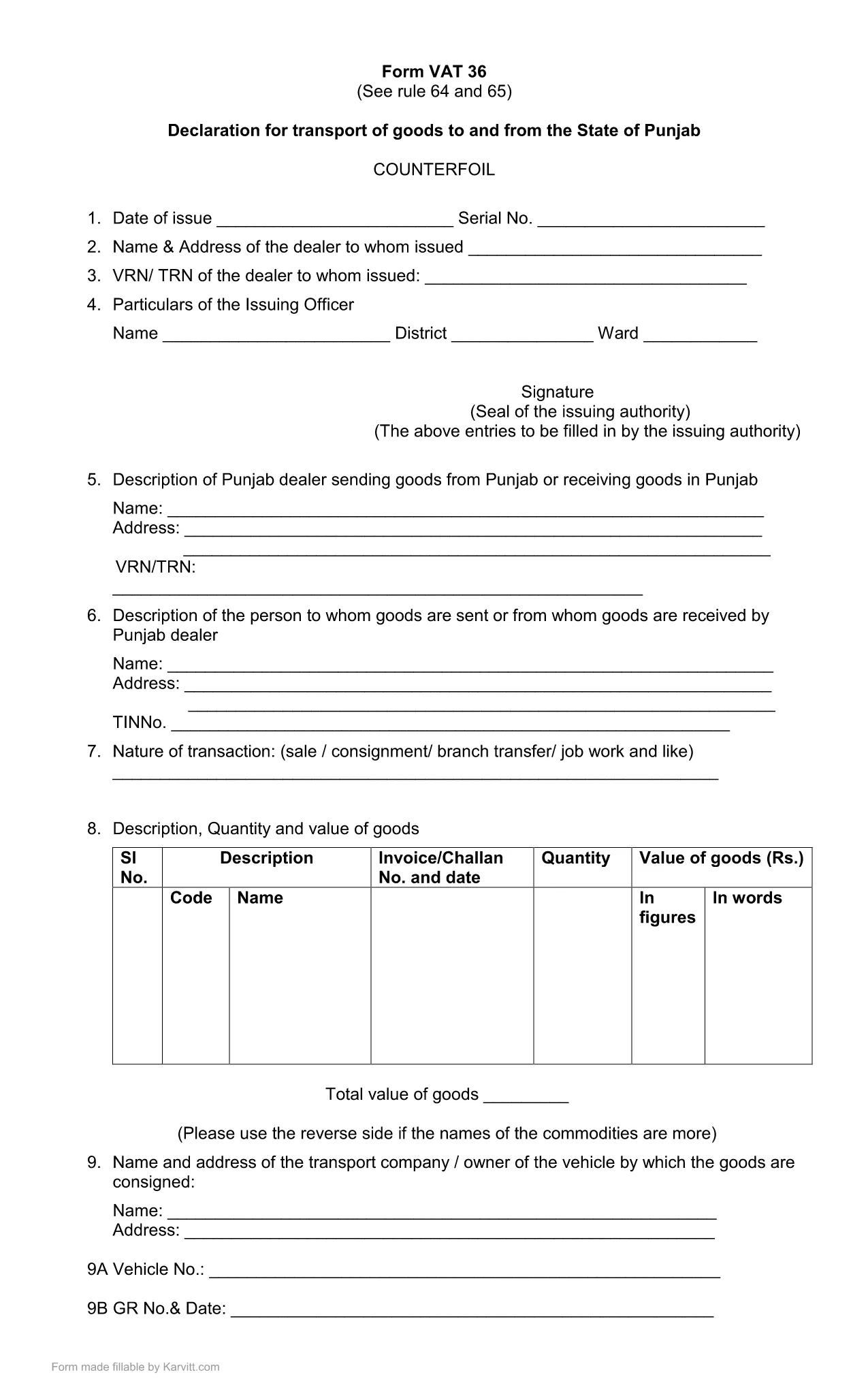
Punjab Form No. 36 is the official declaration required for the transport of goods to and from the State of Punjab. The form is used by traders, logistics companies, and anyone moving taxable goods across state borders. Our fillable PDF keeps the original layout while allowing you to type, select, and calculate directly in the browser.

What Is Punjab Form 36?

The form is part of the Punjab VAT (Value Added Tax) system. It captures details such as the consignor, consignee, vehicle number, goods description, and the tax amount payable for each shipment. Submitting a correctly completed Form 36 helps avoid penalties and ensures smooth clearance of goods.

How to Fill Punjab Form 36 Online

Instead of downloading the PDF and opening a separate editor, simply click the "Fill out this form" button on this page. The Formize PDF Filler app will load in your browser, presenting the same fields you see in the official PDF. Follow the steps below to complete the form:

  1. Click Fill out this form and wait for the Formize PDF Filler to load.
  2. Enter all required information: trader details, vehicle registration, goods description, and tax calculations.
  3. Review the auto‑calculated totals. Adjust any entries if needed.
  4. Click Save & Download to get a completed PDF you can print or email to the Punjab Revenue Department.

Common Mistakes & Tips for Accurate Submission

  • Incorrect GSTIN or PAN: Double‑check the numbers before saving.
  • Vehicle number format: Use the exact format as on the registration certificate.
  • Missing signatures: The form requires the authorized signatory’s signature; you can add a digital signature in the filler.
  • Tax calculation errors: The filler automatically calculates totals—verify the base amount and applicable rate.

By following these guidelines, you can submit Punjab Form 36 quickly, accurately, and without the need for additional software.

सामान्य प्रश्न
  • What is the purpose of Punjab Form No. 36?

    Form 36 is a declaration for the transport of taxable goods to and from Punjab. It records details of the shipment and calculates the applicable VAT.

  • Do I need Adobe Acrobat to fill this form?

    No. With Formize you can fill the form directly in your browser without installing any additional software.

  • Can I submit the form electronically?

    The form must be printed and signed, then submitted to the Punjab Revenue Department as per their guidelines. The filled PDF can be saved for your records.

  • What if I make a mistake after saving?

    Open the saved PDF again in the Formize filler, correct the fields, and re‑save. Ensure the final version is the one you submit.

  • Is there a fee to download Punjab Form 36?

    No, the fillable PDF is provided free of charge for personal and business use.

  • Which version of the form is the latest?

    The PDF linked on this page is the most recent version (updated March 2021). Check the top of the form for the revision date.

  • Do I need a digital signature?

    A digital signature is optional in the filler. The final printed form must be signed by an authorized signatory before submission.

कैसे करें

Punjab Form 36 को मुफ़्त में, ऑनलाइन 4 आसान स्टेप्स में कैसे भरें:

  1. 1
    Open the Formize PDF Filler
    Click the "Fill out this form" button on the page. The Formize PDF Filler loads directly in your browser.
  2. 2
    Enter Required Details
    Fill in trader information, vehicle number, goods description, and tax amounts in the highlighted fields.
  3. 3
    Verify Auto‑Calculations
    The filler automatically totals the tax. Double‑check the numbers before proceeding.
  4. 4
    Save and Download
    When all fields are completed, click "Save & Download" to obtain a printable PDF copy for submission.
पीडीएफ फिलर एप तैयार करें
के बारे में

कर प्रपत्र

Punjab Form 36 कर प्रपत्रों में से एक है, जो प्रासंगिक कर प्राधिकरण को करों से संबंधित जानकारी की रिपोर्ट करने के लिए उपयोग किए जाने वाले दस्तावेज़ हैं। संघीय, राज्य और स्थानीय कर रूपों सहित विभिन्न प्रकार के टैक्स फॉर्म हैं, जो करदाता की परिस्थितियों और स्थान के आधार पर भिन्न हो सकते हैं।

विशेषताएं

पीडीएफ भराव

पीडीएफ फॉर्म ऑनलाइन भरने का सबसे आसान तरीका

  • जल्दी से Punjab Form 36 भरें
    Punjab Form 36 को जल्दी से ऑनलाइन भरने का कोई तरीका खोज रहे हैं? हमारे ऑनलाइन नि:शुल्क पीडीएफ फॉर्म फिलर के साथ, आप एक मिनट से भी कम समय में इस पीडीएफ दस्तावेज़ को संपादित करने और भरने का तरीका जानेंगे।
  • ऑनलाइन पीडीएफ संपादक का उपयोग करना आसान है
    पीडीएफ फाइलों को प्रिंट करने से तंग आ गए हैं ताकि आप उन्हें फिर से स्कैन करने और उन्हें वापस भेजने से पहले संपादित कर सकें? PDF दस्तावेज़ों को निःशुल्क ऑनलाइन संपादित करें। समय और कागज बचाने के लिए हमारे ऑनलाइन पीडीएफ संपादक का प्रयोग करें।
  • महान उपकरण, सभी प्लेटफार्म
    आश्चर्य है कि मैक पर Punjab Form 36 कैसे भरें, या शायद पीडीएफ फिलर का मुफ्त में उपयोग कैसे करें? हमारे ऑनलाइन पीडीएफ टूल सभी प्लेटफॉर्म पर काम करते हैं।
  • सुरक्षित फ़ाइल भंडारण
    पूर्ण की गई "Punjab Form 36" फ़ाइलें Amazon क्लाउड होस्टिंग द्वारा प्रबंधित एक सुरक्षित डेटाबेस में संग्रहीत की जाती हैं। आप कभी भी अपनी फाइलों को हमारे सिस्टम से हटा सकते हैं। किसी भी स्थिति में, ये फ़ाइलें 24 घंटे के बाद स्वतः हटा दी जाती हैं।
  • {कीवर्ड} से चैट करें
    Chatize पर "Punjab Form 36" के साथ चैट करें, जो एक निःशुल्क पीडीएफ रीडर सहायक है। प्रश्न पूछें और "Punjab Form 36" से उत्तर प्राप्त करें। बस ऊपर दस्तावेज़ के साथ चैट करें बटन पर क्लिक करें।

फ़िलिंग सत्र मिटाएँ

चयनित फ़िलिंग सत्र को मिटाएँ? इस स्थिति में, फ़ॉर्म को पूरा करने में आपकी प्रगति खो जाएगी।

संपादन सत्र हटाएँ

चयनित संपादन सत्र हटाएँ? इस स्थिति में, फ़ॉर्म बनाने और संपादित करने में आपकी प्रगति नष्ट हो जाएगी।