
hamburger-menu icon
भाषा का चयन करें

IRS Form 15101 – Provide SSN for Adoptive Child (Fillable PDF)

  1. देश अमेरीका
  2. भाषा अंग्रेज़ी
  3. गतिविधि करों
  4. विभाग आंतरिक राजस्व सेवा
फार्म को भरो
IRS Form 15101 – Provide SSN for Adoptive Child (Fillable PDF)

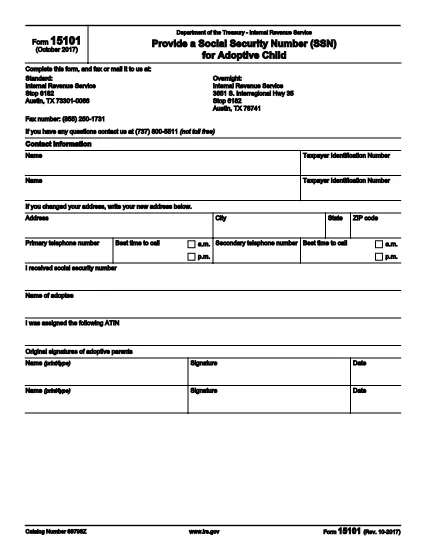
IRS Form 15101, Provide a Social Security Number (SSN) for Adoptive Child, is used by parents who have received an Adoption Taxpayer Identification Number (ATIN) and later obtain the child’s SSN. The form notifies the Internal Revenue Service (IRS) of the new SSN so the ATIN can be retired.

What Is IRS Form 15101?

This one‑page form collects basic contact information for up to two taxpayers, the child’s SSN, the child’s name, and the original ATIN. It is required only after the adoption is final and the child’s SSN is issued.

How to Complete the Form

Follow these steps to fill the form quickly:

  • Enter the name(s) and Social Security Number(s) of the adopting parent(s) at the top.
  • Provide your mailing address, phone numbers, and preferred contact times.
  • Enter the child’s SSN exactly as it appears on the Social Security card.
  • Write the child’s full legal name.
  • Enter the ATIN that was previously assigned.
  • Both parents must sign and date the form.

Common Mistakes to Avoid

  • Leaving the ATIN field blank – the IRS needs this to match the previous filing.
  • Using an outdated address – update your address on Form 8822 if it has changed.
  • Signing only one side when filing jointly – both spouses must sign.
  • Submitting the form before the child’s SSN is officially issued.

Where to Submit the Form

You can mail the completed form to the IRS address printed on the second page, or fax it to (855) 250‑1731. If you received a CP‑561C notice, attach the notice stub before mailing.

Download the Fillable PDF

Click the button below to open the fillable version of Form 15101 directly in the Formize PDF Filler – no extra software needed.

Fill out this form

सामान्य प्रश्न
  • Do I need to file Form 15101 if I already have a Social Security number for my child?

    Yes. Form 15101 is required to inform the IRS that the ATIN should be replaced with the child’s SSN.

  • Can I file Form 15101 electronically?

    The IRS does not accept electronic submissions for Form 15101. You must mail or fax the completed form.

  • What if my child’s SSN is denied by the SSA?

    If the Social Security Administration denies the SSN, you can request an ATIN extension by filing Form 15100 and include the SSA denial letter.

  • How long does it take for the IRS to process Form 15101?

    Processing usually takes 4–6 weeks after the IRS receives the completed form.

  • Do I need to attach a copy of the child’s Social Security card?

    No attachment is required. The SSN entered on the form is sufficient.

  • Can I use the same Form 15101 for multiple children?

    Form 15101 is completed separately for each child who receives a new SSN.

  • Is there a fee to download or use the fillable PDF?

    No. The fillable PDF is provided free of charge via Formize.

कैसे करें

IRS Form 15101 को मुफ़्त में, ऑनलाइन 3 आसान स्टेप्स में कैसे भरें:

  1. 1
    Open the Fillable Form
    Click the “Fill out this form” button above. The Formize PDF Filler app will load the fillable version of IRS Form 15101 in your browser.
  2. 2
    Enter Your Information
    Type directly into each field – taxpayer names, SSNs, address, child’s SSN, ATIN, and signatures. The form saves your entries automatically.
  3. 3
    Review & Submit
    Double‑check all entries for accuracy. When finished, download the completed PDF or print it and mail/fax it to the IRS address shown on page 2.
पीडीएफ फिलर एप तैयार करें
के बारे में

संघीय कर प्रपत्र

IRS Form 15101 संघीय कर प्रपत्रों में से एक है जो संयुक्त राज्य अमेरिका में आंतरिक राजस्व सेवा (आईआरएस) के साथ संघीय आय करों की रिपोर्ट करने और दाखिल करने के लिए उपयोग किए जाने वाले दस्तावेज़ हैं। इन फॉर्मों का उपयोग व्यक्तियों, व्यवसायों और संगठनों द्वारा उनकी संघीय कर देयता की गणना के लिए आवश्यक आय, कटौती और अन्य प्रासंगिक जानकारी की रिपोर्ट करने के लिए किया जाता है।

सबसे अधिक इस्तेमाल किया जाने वाला संघीय कर फॉर्म फॉर्म 1040 है, जिसका उपयोग व्यक्तिगत करदाताओं द्वारा अपने व्यक्तिगत आयकर की रिपोर्ट करने के लिए किया जाता है। आमतौर पर उपयोग किए जाने वाले अन्य फॉर्म में साझेदारी के लिए फॉर्म 1065, फॉर्म 1120, और कर-मुक्त संगठनों के लिए फॉर्म 990

संघीय कर फॉर्म में आम तौर पर करदाताओं को आय के विभिन्न स्रोतों, जैसे वेतन, वेतन और टिप्स, साथ ही निवेश, किराये की संपत्तियों और अन्य स्रोतों से आय की रिपोर्ट करने की आवश्यकता होती है। फॉर्म करदाताओं को धर्मार्थ योगदान, बंधक ब्याज और स्वास्थ्य देखभाल व्यय जैसे विभिन्न खर्चों के लिए कटौती और क्रेडिट का दावा करने की अनुमति भी देते हैं।

संघीय कर फॉर्म को सही ढंग से और समय पर दाखिल करना महत्वपूर्ण है, क्योंकि ऐसा करने में विफलता के परिणामस्वरूप आईआरएस से जुर्माना और ब्याज शुल्क लिया जा सकता है।

विशेषताएं

पीडीएफ भराव

पीडीएफ फॉर्म ऑनलाइन भरने का सबसे आसान तरीका

  • जल्दी से IRS Form 15101 भरें
    IRS Form 15101 को जल्दी से ऑनलाइन भरने का कोई तरीका खोज रहे हैं? हमारे ऑनलाइन नि:शुल्क पीडीएफ फॉर्म फिलर के साथ, आप एक मिनट से भी कम समय में इस पीडीएफ दस्तावेज़ को संपादित करने और भरने का तरीका जानेंगे।
  • ऑनलाइन पीडीएफ संपादक का उपयोग करना आसान है
    पीडीएफ फाइलों को प्रिंट करने से तंग आ गए हैं ताकि आप उन्हें फिर से स्कैन करने और उन्हें वापस भेजने से पहले संपादित कर सकें? PDF दस्तावेज़ों को निःशुल्क ऑनलाइन संपादित करें। समय और कागज बचाने के लिए हमारे ऑनलाइन पीडीएफ संपादक का प्रयोग करें।
  • महान उपकरण, सभी प्लेटफार्म
    आश्चर्य है कि मैक पर IRS Form 15101 कैसे भरें, या शायद पीडीएफ फिलर का मुफ्त में उपयोग कैसे करें? हमारे ऑनलाइन पीडीएफ टूल सभी प्लेटफॉर्म पर काम करते हैं।
  • सुरक्षित फ़ाइल भंडारण
    पूर्ण की गई "IRS Form 15101" फ़ाइलें Amazon क्लाउड होस्टिंग द्वारा प्रबंधित एक सुरक्षित डेटाबेस में संग्रहीत की जाती हैं। आप कभी भी अपनी फाइलों को हमारे सिस्टम से हटा सकते हैं। किसी भी स्थिति में, ये फ़ाइलें 24 घंटे के बाद स्वतः हटा दी जाती हैं।
  • {कीवर्ड} से चैट करें
    Chatize पर "IRS Form 15101" के साथ चैट करें, जो एक निःशुल्क पीडीएफ रीडर सहायक है। प्रश्न पूछें और "IRS Form 15101" से उत्तर प्राप्त करें। बस ऊपर दस्तावेज़ के साथ चैट करें बटन पर क्लिक करें।

फ़िलिंग सत्र मिटाएँ

चयनित फ़िलिंग सत्र को मिटाएँ? इस स्थिति में, फ़ॉर्म को पूरा करने में आपकी प्रगति खो जाएगी।

संपादन सत्र हटाएँ

चयनित संपादन सत्र हटाएँ? इस स्थिति में, फ़ॉर्म बनाने और संपादित करने में आपकी प्रगति नष्ट हो जाएगी।