
hamburger-menu icon
भाषा का चयन करें

IRS Form 15230 – Mobility Statement (Fillable PDF)

  1. देश अमेरीका
  2. भाषा अंग्रेज़ी
  3. गतिविधि करों
  4. विभाग आंतरिक राजस्व सेवा
फार्म को भरो
IRS Form 15230 – Mobility Statement (Fillable PDF)

What Is Form 15230?

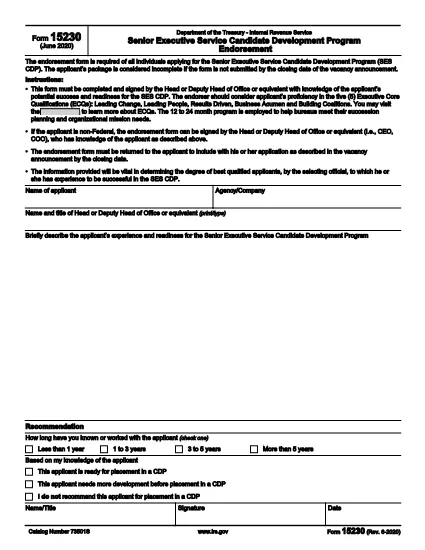
Form 15230, also known as the Mobility Statement for the Senior Executive Service Candidate Development Program (SES CDP), is an official IRS document used to capture a candidate’s willingness and ability to relocate for senior executive positions within the federal government. The form is required during the SES CDP application process and helps selecting officials assess mobility readiness.

How to Fill Out Form 15230 Online

Instead of printing, scanning, or manually editing the PDF, you can complete the form instantly with Formize’s built‑in PDF Filler. Follow these simple steps:

  1. Click the “Fill out this form” button on this page.
  2. Wait a few seconds while the Formize PDF Filler app loads the fillable version of Form 15230.
  3. Enter your personal information, current position, and mobility preferences directly in the browser.
  4. Use the signature field to e‑sign the form with a mouse, touch, or stylus.
  5. Review all entries for accuracy, then click Submit to download the completed PDF or save it to your cloud storage.

Common Mistakes to Avoid

  • Leaving required fields blank – the form will not accept submission if mandatory sections are empty.
  • Mismatching dates and locations – ensure the geographic areas you select match your actual willingness to relocate.
  • Using an outdated version – always start with the latest PDF (Rev. 6‑2020) provided by the IRS.
  • Signing with a scanned image – use the built‑in e‑signature tool for a legally binding signature.

Download the Official PDF

If you prefer to keep a copy of the original document, you can download the official IRS PDF directly from the link below. The file is the same version that Formize loads for online completion.

Download IRS Form 15230 (PDF)

FAQs About Form 15230

Below are answers to the most common questions candidates ask about this mobility statement.

सामान्य प्रश्न
  • What is the purpose of Form 15230?

    Form 15230 records a candidate’s willingness and ability to relocate for senior executive roles in the SES Candidate Development Program.

  • Do I need to print the PDF to fill it out?

    No. With Formize you can fill, sign, and save the form entirely online – no printing required.

  • Can I use a scanned signature?

    A scanned image is not legally binding. Use the e‑signature field in the Formize filler for a valid signature.

  • Which version of the form should I use?

    Always use the latest revision (Rev. 6‑2020). The link on this page points to the current IRS version.

  • What happens after I submit the form?

    You will receive a completed PDF that you can download or store in the cloud. Submit the file to your agency’s HR or SES CDP office as instructed.

  • Is Form 15230 required for all federal job applications?

    It is required only for candidates applying to the Senior Executive Service Candidate Development Program.

  • Where can I get help if I have questions about the form?

    Contact your agency’s human‑resources office or review the IRS instructions included in the PDF.

कैसे करें

Form 15230 को मुफ़्त में, ऑनलाइन 5 आसान स्टेप्स में कैसे भरें:

  1. 1
    Click the Fill‑out Button
    Press the “Fill out this form” button on the page to launch the Formize PDF Filler.
  2. 2
    Wait for the Filler to Load
    The app loads the fillable version of Form 15230 in a few seconds – no download required.
  3. 3
    Enter Your Information
    Complete all required fields: personal details, current position, and mobility preferences.
  4. 4
    Add Your Electronic Signature
    Use the built‑in signature tool to sign with a mouse, finger, or stylus.
  5. 5
    Review and Save
    Check the form for accuracy, then click Submit to download the completed PDF or save it to your cloud storage.
पीडीएफ फिलर एप तैयार करें
के बारे में

कर प्रपत्र

Form 15230 टैक्स फॉर्मों में से एक है जो किसी व्यक्ति या व्यवसाय की आय, कटौती और कर देनदारी के बारे में संबंधित कर प्राधिकरण को जानकारी रिपोर्ट करने के लिए उपयोग किए जाने वाले दस्तावेज़ हैं। कर कानूनों का अनुपालन करने और कर दायित्वों को पूरा करने के लिए ये फॉर्म आवश्यक हैं। कर प्रपत्र देश और वहां की विशिष्ट कर आवश्यकताओं के आधार पर भिन्न-भिन्न होते हैं। यहां कुछ सामान्य प्रकार के कर फ़ॉर्म दिए गए हैं:

व्यक्तिगत कर फॉर्म: इन फॉर्मों का उपयोग व्यक्तिगत करदाताओं द्वारा अपनी व्यक्तिगत आय की रिपोर्ट करने और कटौती, क्रेडिट और छूट का दावा करने के लिए किया जाता है। उदाहरणों में संयुक्त राज्य अमेरिका में 1040 फॉर्म या यूनाइटेड किंगडम में सेल्फ-असेसमेंट टैक्स रिटर्न फॉर्म शामिल हैं।

बिजनेस टैक्स फॉर्म: बिजनेस टैक्स फॉर्म का उपयोग कंपनियों, साझेदारियों या स्व-रोज़गार व्यक्तियों द्वारा अपनी व्यावसायिक आय, व्यय और अन्य कर-संबंधित जानकारी की रिपोर्ट करने के लिए किया जाता है। उदाहरणों में संयुक्त राज्य अमेरिका में शेड्यूल सी फॉर्म (व्यापार से लाभ या हानि) या यूनाइटेड किंगडम में CT600 फॉर्म (कंपनी टैक्स रिटर्न) शामिल हैं।

पेरोल टैक्स फॉर्म: इन फॉर्मों का उपयोग नियोक्ताओं द्वारा अपने कर्मचारियों के वेतन से रोके गए वेतन, वेतन और करों की रिपोर्ट करने के लिए किया जाता है। उदाहरणों में संयुक्त राज्य अमेरिका में W-2 फॉर्म या यूनाइटेड किंगडम में P60 फॉर्म शामिल हैं।

बिक्री कर फॉर्म: बिक्री कर फॉर्म का उपयोग व्यवसायों द्वारा कर योग्य वस्तुओं या सेवाओं पर एकत्रित बिक्री कर की रिपोर्ट करने और जमा करने के लिए किया जाता है। विशिष्ट बिक्री कर फॉर्म क्षेत्राधिकार के अनुसार भिन्न-भिन्न होते हैं।

मूल्य वर्धित कर (वैट) फॉर्म: वैट फॉर्म का उपयोग उन देशों में किया जाता है जो बिक्री पर एकत्रित वैट की रिपोर्ट करने और जमा करने और खरीदारी के लिए वैट क्रेडिट का दावा करने के लिए मूल्य वर्धित कर लगाते हैं। उदाहरणों में कई देशों में उपयोग किए जाने वाले वैट रिटर्न फॉर्म शामिल हैं।

अनुमानित कर फ़ॉर्म: अनुमानित कर फ़ॉर्म का उपयोग उस आय पर अनुमानित करों की रिपोर्ट करने और भुगतान करने के लिए किया जाता है जो रोके जाने के अधीन नहीं हैं, जैसे कि स्व-रोज़गार आय या निवेश आय।

ये मौजूद असंख्य कर रूपों के कुछ उदाहरण मात्र हैं। आवश्यक विशिष्ट प्रपत्र आपके देश या अधिकार क्षेत्र में कर कानूनों और विनियमों पर निर्भर करते हैं। यह निर्धारित करने के लिए कि आपकी स्थिति पर कौन से फॉर्म लागू होते हैं, कर प्राधिकरण के दिशानिर्देशों से परामर्श लेना या पेशेवर सलाह लेना महत्वपूर्ण है।

विशेषताएं

पीडीएफ भराव

पीडीएफ फॉर्म ऑनलाइन भरने का सबसे आसान तरीका

  • जल्दी से Form 15230 भरें
    Form 15230 को जल्दी से ऑनलाइन भरने का कोई तरीका खोज रहे हैं? हमारे ऑनलाइन नि:शुल्क पीडीएफ फॉर्म फिलर के साथ, आप एक मिनट से भी कम समय में इस पीडीएफ दस्तावेज़ को संपादित करने और भरने का तरीका जानेंगे।
  • ऑनलाइन पीडीएफ संपादक का उपयोग करना आसान है
    पीडीएफ फाइलों को प्रिंट करने से तंग आ गए हैं ताकि आप उन्हें फिर से स्कैन करने और उन्हें वापस भेजने से पहले संपादित कर सकें? PDF दस्तावेज़ों को निःशुल्क ऑनलाइन संपादित करें। समय और कागज बचाने के लिए हमारे ऑनलाइन पीडीएफ संपादक का प्रयोग करें।
  • महान उपकरण, सभी प्लेटफार्म
    आश्चर्य है कि मैक पर Form 15230 कैसे भरें, या शायद पीडीएफ फिलर का मुफ्त में उपयोग कैसे करें? हमारे ऑनलाइन पीडीएफ टूल सभी प्लेटफॉर्म पर काम करते हैं।
  • सुरक्षित फ़ाइल भंडारण
    पूर्ण की गई "Form 15230" फ़ाइलें Amazon क्लाउड होस्टिंग द्वारा प्रबंधित एक सुरक्षित डेटाबेस में संग्रहीत की जाती हैं। आप कभी भी अपनी फाइलों को हमारे सिस्टम से हटा सकते हैं। किसी भी स्थिति में, ये फ़ाइलें 24 घंटे के बाद स्वतः हटा दी जाती हैं।
  • {कीवर्ड} से चैट करें
    Chatize पर "Form 15230" के साथ चैट करें, जो एक निःशुल्क पीडीएफ रीडर सहायक है। प्रश्न पूछें और "Form 15230" से उत्तर प्राप्त करें। बस ऊपर दस्तावेज़ के साथ चैट करें बटन पर क्लिक करें।

फ़िलिंग सत्र मिटाएँ

चयनित फ़िलिंग सत्र को मिटाएँ? इस स्थिति में, फ़ॉर्म को पूरा करने में आपकी प्रगति खो जाएगी।

संपादन सत्र हटाएँ

चयनित संपादन सत्र हटाएँ? इस स्थिति में, फ़ॉर्म बनाने और संपादित करने में आपकी प्रगति नष्ट हो जाएगी।