
hamburger-menu icon
भाषा का चयन करें

Form 5498‑ESA Fillable PDF – Coverdell Education Savings Account Reporting

  1. देश अमेरीका
  2. भाषा अंग्रेज़ी
  3. गतिविधि करों
  4. विभाग आंतरिक राजस्व सेवा
फार्म को भरो
Form 5498‑ESA Fillable PDF – Coverdell Education Savings Account Reporting

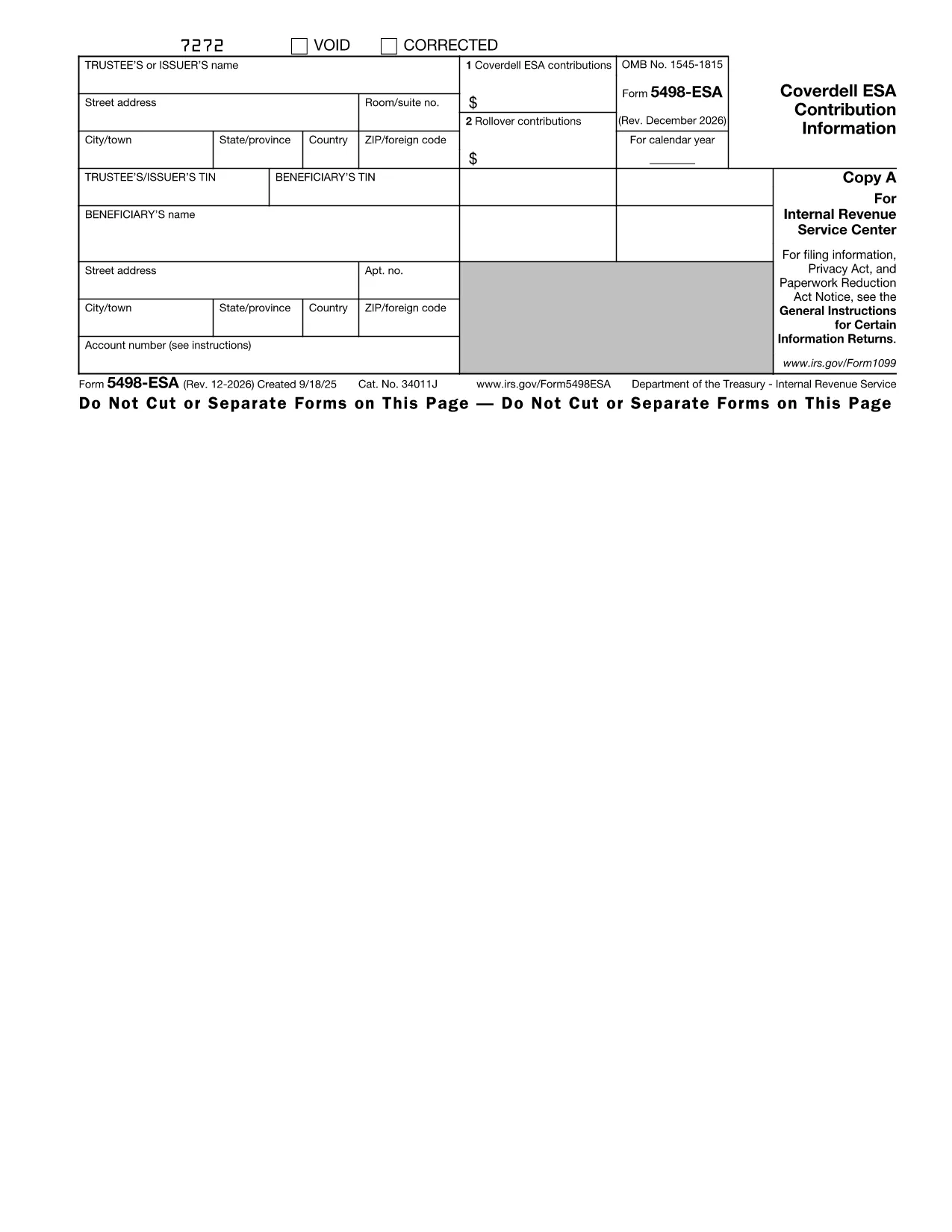
The IRS Form 5498‑ESA (Coverdell Education Savings Account Contribution Information) is the official document trustees or issuers use to report contributions, rollovers, and the year‑end fair market value of a Coverdell ESA. Accurate reporting helps the IRS track education‑savings contributions and ensures beneficiaries stay within the $2,000 annual limit.

What Is Form 5498‑ESA?

Form 5498‑ESA provides a yearly snapshot of all activity in a Coverdell ESA. It includes:

  • Trustee/issuer name, address, and TIN
  • Beneficiary name and TIN
  • Total contributions for the tax year (Box 1)
  • Rollover contributions, if any (Box 2)
  • Fair market value of the account on December 31

How to Fill Out Form 5498‑ESA Online

Instead of printing, downloading, and editing the PDF in a separate editor, simply click the "Fill out this form" button on this page. The Formize PDF Filler app will load instantly, letting you:

  1. Enter trustee and beneficiary details directly into fillable fields.
  2. Upload supporting documents if needed.
  3. Validate the data with built‑in checks that flag common mistakes.
  4. Save a completed copy or export it as a PDF for your records.

Key Deadlines and Common Errors

Deadline: Trustees must provide Copy B of Form 5498‑ESA to the beneficiary by May 31 of the year following the tax year.

Common mistakes to avoid:

  • Entering the wrong beneficiary Social Security number.
  • Reporting contributions that exceed the $2,000 limit.
  • Leaving Box 2 blank when a rollover actually occurred.
  • Failing to include the fair market value as of December 31.

Download the Fillable PDF

If you prefer to work offline, you can download the official fillable PDF directly from the IRS:

Download Form 5498‑ESA (PDF)

Why Use Formize PDF Filler?

Formize provides a secure, browser‑based environment that eliminates the need for separate PDF software. Your data never leaves the encrypted session unless you choose to save or export it. Plus, the built‑in validation helps you submit a clean, error‑free form the first time.

Ready to get started? Click the button below and let Formize guide you through every field.

निर्देश

सामान्य प्रश्न
  • Who must file Form 5498‑ESA?

    The trustee or issuer of the Coverdell ESA files the form. A copy (Copy B) is provided to the beneficiary by May 31 of the following year.

  • Is Form 5498‑ESA deductible on my tax return?

    No. Contributions reported on Form 5498‑ESA are not deductible, but they are important for tracking contribution limits.

  • Can I file Form 5498‑ESA electronically?

    Yes. If you have 250 or more forms, electronic filing is required. For a single form, you can submit a paper copy or use an online filler like Formize.

  • What happens if I exceed the $2,000 contribution limit?

    Excess contributions plus earnings must be withdrawn by June 1 of the following year to avoid a 6% excise tax on the excess amount.

  • Do I need to attach any supporting documents?

    Generally, no supporting documents are attached to Form 5498‑ESA, but you should keep records of contributions and rollovers for your own files.

  • How do I correct an error on a filed Form 5498‑ESA?

    Submit a corrected Form 5498‑ESA with the label "Corrected" at the top of the form. The IRS provides instructions for filing amended information returns.

कैसे करें

Form 5498-ESA को मुफ़्त में, ऑनलाइन 4 आसान स्टेप्स में कैसे भरें:

  1. 1
    Click the Fill‑out Button
    On this page, click the "Fill out this form" button. The Formize PDF Filler will open in a new tab.
  2. 2
    Enter Required Information
    Type the trustee’s name, address, TIN, and the beneficiary’s details into the fillable fields. The form automatically moves you to the next section.
  3. 3
    Review and Validate
    Use the built‑in validation to check for missing or incorrect entries. Fix any highlighted errors before proceeding.
  4. 4
    Save or Export
    When all fields are complete, click "Save" to store a copy in your Formize account or "Export PDF" to download a finished PDF for your records.
पीडीएफ फिलर एप तैयार करें
के बारे में

कर प्रपत्र

Form 5498-ESA टैक्स फॉर्मों में से एक है जो प्रासंगिक कर प्राधिकरण को आय, कटौती और कर देयता की रिपोर्ट करने के लिए उपयोग किए जाने वाले दस्तावेज़ हैं। ये फॉर्म कर दाखिल करने की प्रक्रिया का एक अनिवार्य हिस्सा हैं और इसका उपयोग यह सुनिश्चित करने के लिए किया जाता है कि व्यक्ति और व्यवसाय कर कानूनों का अनुपालन करें और अपने कर दायित्वों की सटीक गणना करें।

आवश्यक विशिष्ट कर फॉर्म किसी व्यक्ति की फाइलिंग स्थिति, आय के स्रोत और देश के कर कानूनों जैसे कारकों के आधार पर भिन्न हो सकते हैं। हालाँकि, यहां कुछ सामान्य प्रकार के टैक्स फॉर्म हैं:

व्यक्तिगत आयकर फॉर्म: ये फॉर्म, जैसे 1040 श्रृंखला, संयुक्त राज्य अमेरिका में उपयोग किए जाते हैं व्यक्तियों द्वारा अपनी आय की रिपोर्ट करने, कटौती और क्रेडिट का दावा करने और अपनी कर देयता की गणना करने के लिए।

व्यापार कर फॉर्म: एकल स्वामित्व, साझेदारी, निगम और स्व-रोज़गार व्यक्तियों सहित व्यवसायों को अपनी आय, व्यय और बकाया करों की रिपोर्ट करने के लिए विभिन्न फॉर्म दाखिल करने पड़ सकते हैं। उदाहरणों में अनुसूची सी (व्यवसाय से लाभ या हानि) और फॉर्म 1120 (यू.एस. निगम आयकर रिटर्न) शामिल हैं।

रोजगार कर फॉर्म: नियोक्ताओं को कर्मचारी वेतन की रिपोर्ट करना और पेरोल करों को रोकना और जमा करना आवश्यक है। इस उद्देश्य के लिए W-2 (वेतन और कर विवरण) और 941 (नियोक्ता का त्रैमासिक संघीय कर रिटर्न) जैसे फॉर्म का उपयोग किया जाता है।

निवेश और सेवानिवृत्ति खाता प्रपत्र: इन प्रपत्रों का उपयोग निवेश आय, पूंजीगत लाभ और हानि, साथ ही सेवानिवृत्ति खातों से योगदान और वितरण की रिपोर्ट करने के लिए किया जाता है। उदाहरणों में फॉर्म 1099-DIV (लाभांश और वितरण) और फॉर्म 5498 (आईआरए योगदान सूचना)।

संपत्ति और उपहार कर फॉर्म: जब किसी व्यक्ति की मृत्यु हो जाती है या महत्वपूर्ण उपहार देता है, तो विशिष्ट फॉर्म जैसे फॉर्म 706 (यूनाइटेड स्टेट्स एस्टेट (और जेनरेशन-स्किपिंग ट्रांसफर) टैक्स रिटर्न) और फॉर्म 709 (यूनाइटेड स्टेट्स गिफ्ट (और जेनरेशन-) स्किपिंग ट्रांसफर) टैक्स रिटर्न) का उपयोग किसी भी लागू संपत्ति या उपहार कर की रिपोर्ट और गणना करने के लिए किया जाता है।

यह ध्यान रखना महत्वपूर्ण है कि कर कानून और फॉर्म समय के साथ बदल सकते हैं, इसलिए व्यक्तियों और व्यवसायों को मौजूदा आवश्यकताओं का अनुपालन सुनिश्चित करने के लिए संबंधित कर प्राधिकरण से परामर्श लेना चाहिए या पेशेवर कर सलाह लेनी चाहिए।

विशेषताएं

पीडीएफ भराव

पीडीएफ फॉर्म ऑनलाइन भरने का सबसे आसान तरीका

  • जल्दी से Form 5498-ESA भरें
    Form 5498-ESA को जल्दी से ऑनलाइन भरने का कोई तरीका खोज रहे हैं? हमारे ऑनलाइन नि:शुल्क पीडीएफ फॉर्म फिलर के साथ, आप एक मिनट से भी कम समय में इस पीडीएफ दस्तावेज़ को संपादित करने और भरने का तरीका जानेंगे।
  • ऑनलाइन पीडीएफ संपादक का उपयोग करना आसान है
    पीडीएफ फाइलों को प्रिंट करने से तंग आ गए हैं ताकि आप उन्हें फिर से स्कैन करने और उन्हें वापस भेजने से पहले संपादित कर सकें? PDF दस्तावेज़ों को निःशुल्क ऑनलाइन संपादित करें। समय और कागज बचाने के लिए हमारे ऑनलाइन पीडीएफ संपादक का प्रयोग करें।
  • महान उपकरण, सभी प्लेटफार्म
    आश्चर्य है कि मैक पर Form 5498-ESA कैसे भरें, या शायद पीडीएफ फिलर का मुफ्त में उपयोग कैसे करें? हमारे ऑनलाइन पीडीएफ टूल सभी प्लेटफॉर्म पर काम करते हैं।
  • सुरक्षित फ़ाइल भंडारण
    पूर्ण की गई "Form 5498-ESA" फ़ाइलें Amazon क्लाउड होस्टिंग द्वारा प्रबंधित एक सुरक्षित डेटाबेस में संग्रहीत की जाती हैं। आप कभी भी अपनी फाइलों को हमारे सिस्टम से हटा सकते हैं। किसी भी स्थिति में, ये फ़ाइलें 24 घंटे के बाद स्वतः हटा दी जाती हैं।
  • {कीवर्ड} से चैट करें
    Chatize पर "Form 5498-ESA" के साथ चैट करें, जो एक निःशुल्क पीडीएफ रीडर सहायक है। प्रश्न पूछें और "Form 5498-ESA" से उत्तर प्राप्त करें। बस ऊपर दस्तावेज़ के साथ चैट करें बटन पर क्लिक करें।

फ़िलिंग सत्र मिटाएँ

चयनित फ़िलिंग सत्र को मिटाएँ? इस स्थिति में, फ़ॉर्म को पूरा करने में आपकी प्रगति खो जाएगी।

संपादन सत्र हटाएँ

चयनित संपादन सत्र हटाएँ? इस स्थिति में, फ़ॉर्म बनाने और संपादित करने में आपकी प्रगति नष्ट हो जाएगी।