
hamburger-menu icon
भाषा का चयन करें

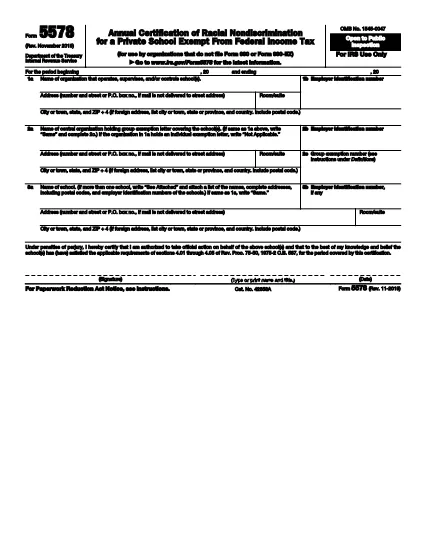
Form 5578 – Annual Certification of Racial Nondiscrimination (Fillable PDF)

  1. देश अमेरीका
  2. भाषा अंग्रेज़ी
  3. गतिविधि करों
  4. विभाग आंतरिक राजस्व सेवा
फार्म को भरो
Form 5578 – Annual Certification of Racial Nondiscrimination (Fillable PDF)

The IRS Form 5578 is the Annual Certification of Racial Nondiscrimination required for tax‑exempt private schools and other qualifying organizations. By filing this form, schools confirm they do not discriminate on the basis of race, color, or national origin, as mandated by Rev. Proc. 75‑50.

What Is Form 5578 and Who Must File?

Form 5578 must be filed by any organization that operates a tax‑exempt private school and does not file Form 990 or Form 990‑EZ. The certification is an annual requirement to maintain exemption status and avoid penalties.

How to Complete Form 5578 Online

Instead of downloading the PDF and editing it manually, simply click the "Fill out this form" button on this page. The Formize PDF Filler app will load the official fillable version, letting you enter data, sign, and save without leaving your browser.

Common Mistakes to Avoid

  • Entering an incorrect Employer Identification Number (EIN).
  • Leaving any required field blank, especially the signature block.
  • Using an outdated PDF version (always use the latest IRS file linked below).
  • Failing to review the form for spelling or address errors before signing.

Download the Official Fillable PDF

For reference or offline completion, you can download the current IRS version of Form 5578 directly from the link below. The file is a fully fillable PDF that works with any standard PDF editor.

Download Form 5578 (PDF)

सामान्य प्रश्न
  • Who is required to file Form 5578?

    Any tax‑exempt private school that does not file Form 990 or Form 990‑EZ must submit Form 5578 each year to certify compliance with racial nondiscrimination rules.

  • Can I file Form 5578 electronically?

    Yes. Using the Formize Fillable PDF, you can complete, sign, and save the form electronically. The IRS still requires a paper copy or electronic submission through your usual filing method.

  • What happens if I miss the filing deadline?

    Late filing may result in a penalty of $50 per day (up to $5,000) and could jeopardize your organization’s tax‑exempt status.

  • Do I need to attach any supporting documents?

    No supporting documents are required with Form 5578. However, keep records of your nondiscrimination policies and enrollment data in case the IRS requests verification.

  • Is the Form 5578 version from 2009 still valid?

    No. Always use the most recent version of the form—currently the PDF linked above—to ensure compliance with current IRS regulations.

  • Can I use a PDF editor like Adobe Acrobat to fill the form?

    You can, but the Formize fillable version eliminates the need for a separate editor and ensures all fields are correctly mapped for electronic signing.

कैसे करें

Form 5578 को मुफ़्त में, ऑनलाइन 5 आसान स्टेप्स में कैसे भरें:

  1. 1
    Open the Fillable Form
    Click the "Fill out this form" button on the page. The Formize PDF Filler app will launch in your browser.
  2. 2
    Enter Organization Details
    Fill in the school name, EIN, address, and any other required fields directly in the online form.
  3. 3
    Review for Accuracy
    Double‑check every entry for typos, correct EIN format, and complete all mandatory sections.
  4. 4
    Add Your Electronic Signature
    Sign the form using the electronic signature field. The signature is legally binding under penalty of perjury.
  5. 5
    Save or Submit
    When finished, either download the completed PDF for your records or submit it electronically according to your IRS filing process.
पीडीएफ फिलर एप तैयार करें
के बारे में

संघीय कर प्रपत्र

Form 5578 संघीय कर प्रपत्रों में से एक है जो संयुक्त राज्य अमेरिका में आंतरिक राजस्व सेवा (आईआरएस) के साथ संघीय आय करों की रिपोर्ट करने और दाखिल करने के लिए उपयोग किए जाने वाले दस्तावेज़ हैं। इन फॉर्मों का उपयोग व्यक्तियों, व्यवसायों और संगठनों द्वारा उनकी संघीय कर देयता की गणना के लिए आवश्यक आय, कटौती और अन्य प्रासंगिक जानकारी की रिपोर्ट करने के लिए किया जाता है।

सबसे अधिक इस्तेमाल किया जाने वाला संघीय कर फॉर्म फॉर्म 1040 है, जिसका उपयोग व्यक्तिगत करदाताओं द्वारा अपने व्यक्तिगत आयकर की रिपोर्ट करने के लिए किया जाता है। आमतौर पर उपयोग किए जाने वाले अन्य फॉर्म में साझेदारी के लिए फॉर्म 1065, फॉर्म 1120, और कर-मुक्त संगठनों के लिए फॉर्म 990

संघीय कर फॉर्म में आम तौर पर करदाताओं को आय के विभिन्न स्रोतों, जैसे वेतन, वेतन और टिप्स, साथ ही निवेश, किराये की संपत्तियों और अन्य स्रोतों से आय की रिपोर्ट करने की आवश्यकता होती है। फॉर्म करदाताओं को धर्मार्थ योगदान, बंधक ब्याज और स्वास्थ्य देखभाल व्यय जैसे विभिन्न खर्चों के लिए कटौती और क्रेडिट का दावा करने की अनुमति भी देते हैं।

संघीय कर फॉर्म को सही ढंग से और समय पर दाखिल करना महत्वपूर्ण है, क्योंकि ऐसा करने में विफलता के परिणामस्वरूप आईआरएस से जुर्माना और ब्याज शुल्क लिया जा सकता है।

विशेषताएं

पीडीएफ भराव

पीडीएफ फॉर्म ऑनलाइन भरने का सबसे आसान तरीका

  • जल्दी से Form 5578 भरें
    Form 5578 को जल्दी से ऑनलाइन भरने का कोई तरीका खोज रहे हैं? हमारे ऑनलाइन नि:शुल्क पीडीएफ फॉर्म फिलर के साथ, आप एक मिनट से भी कम समय में इस पीडीएफ दस्तावेज़ को संपादित करने और भरने का तरीका जानेंगे।
  • ऑनलाइन पीडीएफ संपादक का उपयोग करना आसान है
    पीडीएफ फाइलों को प्रिंट करने से तंग आ गए हैं ताकि आप उन्हें फिर से स्कैन करने और उन्हें वापस भेजने से पहले संपादित कर सकें? PDF दस्तावेज़ों को निःशुल्क ऑनलाइन संपादित करें। समय और कागज बचाने के लिए हमारे ऑनलाइन पीडीएफ संपादक का प्रयोग करें।
  • महान उपकरण, सभी प्लेटफार्म
    आश्चर्य है कि मैक पर Form 5578 कैसे भरें, या शायद पीडीएफ फिलर का मुफ्त में उपयोग कैसे करें? हमारे ऑनलाइन पीडीएफ टूल सभी प्लेटफॉर्म पर काम करते हैं।
  • सुरक्षित फ़ाइल भंडारण
    पूर्ण की गई "Form 5578" फ़ाइलें Amazon क्लाउड होस्टिंग द्वारा प्रबंधित एक सुरक्षित डेटाबेस में संग्रहीत की जाती हैं। आप कभी भी अपनी फाइलों को हमारे सिस्टम से हटा सकते हैं। किसी भी स्थिति में, ये फ़ाइलें 24 घंटे के बाद स्वतः हटा दी जाती हैं।
  • {कीवर्ड} से चैट करें
    Chatize पर "Form 5578" के साथ चैट करें, जो एक निःशुल्क पीडीएफ रीडर सहायक है। प्रश्न पूछें और "Form 5578" से उत्तर प्राप्त करें। बस ऊपर दस्तावेज़ के साथ चैट करें बटन पर क्लिक करें।

फ़िलिंग सत्र मिटाएँ

चयनित फ़िलिंग सत्र को मिटाएँ? इस स्थिति में, फ़ॉर्म को पूरा करने में आपकी प्रगति खो जाएगी।

संपादन सत्र हटाएँ

चयनित संपादन सत्र हटाएँ? इस स्थिति में, फ़ॉर्म बनाने और संपादित करने में आपकी प्रगति नष्ट हो जाएगी।