
hamburger-menu icon
भाषा का चयन करें

Form 720‑CS Fillable PDF – Bulk Transport Excise Tax Return

  1. देश अमेरीका
  2. भाषा अंग्रेज़ी
  3. गतिविधि करों
  4. विभाग आंतरिक राजस्व सेवा
फार्म को भरो
Form 720‑CS Fillable PDF – Bulk Transport Excise Tax Return

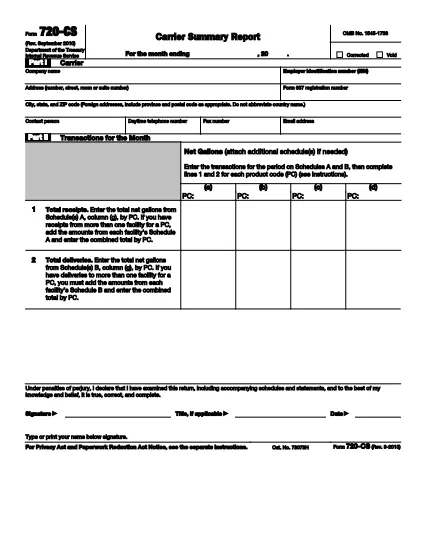
The IRS Form 720‑CS is the official quarterly report used by bulk‑transport carriers, pipelines, and barge owners to disclose receipts and disbursements of liquid products. With Formize’s online PDF filler, you can fill, sign, and save the form without printing a single page.

What Is Form 720‑CS?

Form 720‑CS provides detailed guidance for reporting excise tax obligations on liquid product transportation. It is required for carriers that have designated storage locations and Facility Control Numbers (FCNs). The form must be filed electronically through the Excise Summary Terminal Activity Reporting System (ExSTARS).

How to Complete the Fillable 720‑CS Form

Follow the simple steps below to finish the form online. All fields are interactive, and validation helps you avoid errors.

  • Click the **"Fill out this form"** button on this page.
  • Wait a few seconds while the Formize PDF Filler app loads.
  • Enter the required information in each highlighted field (e.g., EIN, FCN, monthly receipts).
  • Use the built‑in calculator to total your tax liability.
  • Save, download, or e‑sign the form directly within the app.

Common Mistakes to Avoid

  • Hand‑written entries: The form must be typed; handwritten PDFs are rejected.
  • Missing FCN: Verify your Facility Control Number before you start.
  • Incorrect quarter: Double‑check the quarter‑ending date; the IRS rejects mismatched periods.
  • Forgot to sign: Use Formize’s e‑signature feature to make the filing legally binding.

Where to Submit Your Completed Form

After you finish, submit the form through the IRS’s ExSTARS portal. Keep a copy of the confirmation receipt for your records. If you need to mail a paper copy, follow the instructions in the PDF’s “Submission” section.

निर्देश

सामान्य प्रश्न
  • Who must file Form 720‑CS?

    Any bulk‑transport carrier, pipeline, or barge owner that handles liquid products and has a Facility Control Number (FCN) is required to file Form 720‑CS each quarter.

  • Can I file Form 720‑CS on paper?

    Paper filing is allowed only as a backup method. The IRS strongly encourages electronic filing through ExSTARS for faster processing.

  • Is the Formize filler free to use?

    Yes, Formize offers a free online filler for IRS PDFs. You can fill, sign, and download the form at no cost.

  • What happens if I make a mistake on the form?

    Mistakes can delay processing and may result in penalties. Use the validation checks in Formize and review the PDF’s instruction sheet before submitting.

  • How long should I keep a copy of my filed Form 720‑CS?

    Retain the completed form and the electronic receipt for at least three years, as required by IRS record‑keeping rules.

  • Do I need a digital signature for the form?

    Yes. An electronic signature is legally binding for Form 720‑CS when using a certified PDF filler like Formize.

  • Where can I find the official instructions for Form 720‑CS?

    The official instructions are included in the PDF linked below and are also available on the IRS website.

कैसे करें

Form 720‑CS को मुफ़्त में, ऑनलाइन 4 आसान स्टेप्स में कैसे भरें:

  1. 1
    Open the Fillable Form
    Click the **"Fill out this form"** button on the page. The Formize PDF Filler will open in a new window.
  2. 2
    Load the PDF
    Wait a few seconds while the fillable PDF loads. All fields become editable automatically.
  3. 3
    Enter Your Information
    Complete each section—EIN, FCN, quarterly receipts, and tax calculations—using the on‑screen prompts.
  4. 4
    Sign and Save
    Use the built‑in e‑signature tool, then download or save the completed form to your device.
पीडीएफ फिलर एप तैयार करें
के बारे में

कर प्रपत्र

Form 720‑CS कर प्रपत्रों में से एक है, जो प्रासंगिक कर प्राधिकरण को करों से संबंधित जानकारी की रिपोर्ट करने के लिए उपयोग किए जाने वाले दस्तावेज़ हैं। संघीय, राज्य और स्थानीय कर रूपों सहित विभिन्न प्रकार के टैक्स फॉर्म हैं, जो करदाता की परिस्थितियों और स्थान के आधार पर भिन्न हो सकते हैं।

विशेषताएं

पीडीएफ भराव

पीडीएफ फॉर्म ऑनलाइन भरने का सबसे आसान तरीका

  • जल्दी से Form 720‑CS भरें
    Form 720‑CS को जल्दी से ऑनलाइन भरने का कोई तरीका खोज रहे हैं? हमारे ऑनलाइन नि:शुल्क पीडीएफ फॉर्म फिलर के साथ, आप एक मिनट से भी कम समय में इस पीडीएफ दस्तावेज़ को संपादित करने और भरने का तरीका जानेंगे।
  • ऑनलाइन पीडीएफ संपादक का उपयोग करना आसान है
    पीडीएफ फाइलों को प्रिंट करने से तंग आ गए हैं ताकि आप उन्हें फिर से स्कैन करने और उन्हें वापस भेजने से पहले संपादित कर सकें? PDF दस्तावेज़ों को निःशुल्क ऑनलाइन संपादित करें। समय और कागज बचाने के लिए हमारे ऑनलाइन पीडीएफ संपादक का प्रयोग करें।
  • महान उपकरण, सभी प्लेटफार्म
    आश्चर्य है कि मैक पर Form 720‑CS कैसे भरें, या शायद पीडीएफ फिलर का मुफ्त में उपयोग कैसे करें? हमारे ऑनलाइन पीडीएफ टूल सभी प्लेटफॉर्म पर काम करते हैं।
  • सुरक्षित फ़ाइल भंडारण
    पूर्ण की गई "Form 720‑CS" फ़ाइलें Amazon क्लाउड होस्टिंग द्वारा प्रबंधित एक सुरक्षित डेटाबेस में संग्रहीत की जाती हैं। आप कभी भी अपनी फाइलों को हमारे सिस्टम से हटा सकते हैं। किसी भी स्थिति में, ये फ़ाइलें 24 घंटे के बाद स्वतः हटा दी जाती हैं।
  • {कीवर्ड} से चैट करें
    Chatize पर "Form 720‑CS" के साथ चैट करें, जो एक निःशुल्क पीडीएफ रीडर सहायक है। प्रश्न पूछें और "Form 720‑CS" से उत्तर प्राप्त करें। बस ऊपर दस्तावेज़ के साथ चैट करें बटन पर क्लिक करें।

फ़िलिंग सत्र मिटाएँ

चयनित फ़िलिंग सत्र को मिटाएँ? इस स्थिति में, फ़ॉर्म को पूरा करने में आपकी प्रगति खो जाएगी।

संपादन सत्र हटाएँ

चयनित संपादन सत्र हटाएँ? इस स्थिति में, फ़ॉर्म बनाने और संपादित करने में आपकी प्रगति नष्ट हो जाएगी।