
hamburger-menu icon
भाषा का चयन करें

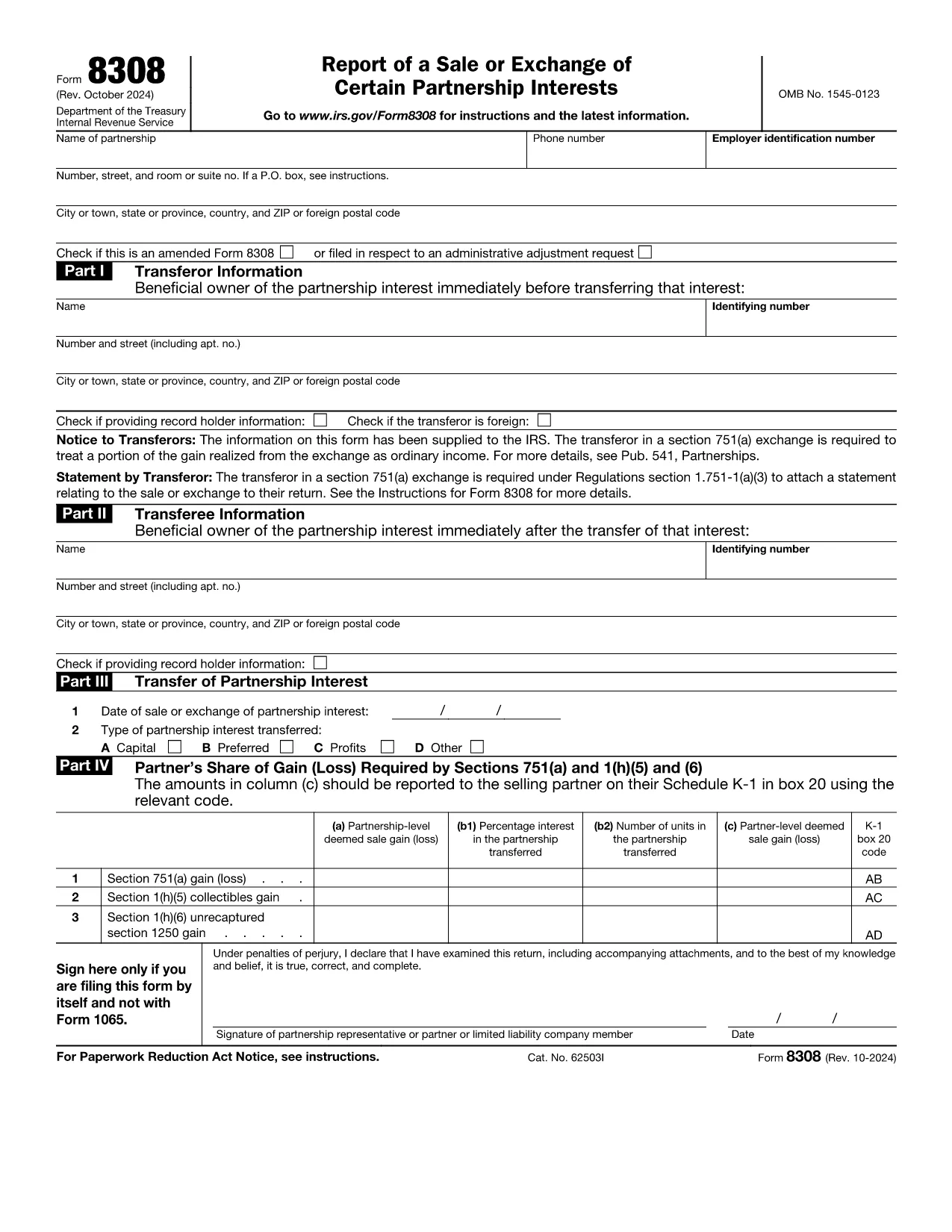
Form 8308 – Report of Sale or Exchange of Partnership Interests

  1. देश अमेरीका
  2. भाषा अंग्रेज़ी
  3. गतिविधि करों
  4. विभाग आंतरिक राजस्व सेवा
फार्म को भरो
Form 8308 – Report of Sale or Exchange of Partnership Interests

The IRS Form 8308, Report of a Sale or Exchange of Certain Partnership Interests, is required when a partnership interest is transferred in a Section 751(a) exchange. This fillable PDF lets you report the transaction accurately and avoid penalties.

Formize provides a seamless online experience: you can open the PDF directly in your browser, fill every field, and save or print the completed form without installing any software.

Key benefits of using the Formize PDF filler:

  • Instant loading of the official IRS PDF.
  • Auto‑save feature prevents data loss.
  • Secure, encrypted connection protects your personal information.

Below you’ll find everything you need to know about when to file, how to complete the form, and tips to ensure a smooth submission.

सामान्य प्रश्न
  • Do I need to file Form 8308 for every partnership interest sale?

    Yes, you must file a separate Form 8308 for each Section 751(a) exchange of a partnership interest, unless a Form 1099‑B is required for the same transaction.

  • Can I file Form 8308 electronically?

    The IRS does not currently accept electronic submissions for Form 8308. You must print the completed PDF and mail it to the IRS address provided in the form’s instructions.

  • What is the filing deadline for Form 8308?

    Form 8308 must be filed by the due date (including extensions) of the partnership’s return (Form 1065) for the tax year in which the exchange occurred.

  • Is there a penalty for late filing?

    Failing to file Form 8308 on time can result in penalties for the partnership and the partners involved. The penalty amount depends on the length of the delay.

  • Can I use the same PDF for multiple exchanges?

    No. Each exchange requires its own completed Form 8308. Use the fillable PDF to create a new document for every transaction.

  • Do I need a tax professional to complete Form 8308?

    While a tax professional can help ensure accuracy, the fillable PDF and step‑by‑step instructions on Formize make it straightforward to complete the form yourself.

  • Where do I mail the completed Form 8308?

    The mailing address is listed in the form’s instructions and varies depending on whether you are filing with a payment or not. Check the latest IRS instructions for the correct address.

  • What if I make a mistake after filing?

    You can file an amended Form 8308 using a new PDF and indicate that it is an amendment in the top margin. Include a brief explanation of the correction.

कैसे करें

Form 8308 को मुफ़्त में, ऑनलाइन 5 आसान स्टेप्स में कैसे भरें:

  1. 1
    Click the Fill‑out Button
    On the Formize page, click the “Fill out this form” button. The official IRS Form 8308 PDF will load directly in the browser.
  2. 2
    Wait for the Formize PDF Filler to Load
    A short loading screen appears while the secure Formize PDF Filler app initializes. No downloads or installations are needed.
  3. 3
    Enter Your Information
    Complete each required field—partner names, EIN, transaction date, amount, and any applicable exemptions. The filler validates entries in real time.
  4. 4
    Review and Save
    After filling the form, use the “Review” button to check for missing data. Then click “Save” to download the completed PDF or store it in your cloud folder.
  5. 5
    Submit to the IRS
    Print the saved PDF and mail it to the address indicated in the instructions, or attach it to your electronic filing if you’re submitting other partnership returns.
पीडीएफ फिलर एप तैयार करें
के बारे में

संघीय कर प्रपत्र

Form 8308 संघीय कर प्रपत्रों में से एक है जो संयुक्त राज्य अमेरिका में आंतरिक राजस्व सेवा (आईआरएस) के साथ संघीय आय करों की रिपोर्ट करने और दाखिल करने के लिए उपयोग किए जाने वाले दस्तावेज़ हैं। इन फॉर्मों का उपयोग व्यक्तियों, व्यवसायों और संगठनों द्वारा उनकी संघीय कर देयता की गणना के लिए आवश्यक आय, कटौती और अन्य प्रासंगिक जानकारी की रिपोर्ट करने के लिए किया जाता है।

सबसे अधिक इस्तेमाल किया जाने वाला संघीय कर फॉर्म फॉर्म 1040 है, जिसका उपयोग व्यक्तिगत करदाताओं द्वारा अपने व्यक्तिगत आयकर की रिपोर्ट करने के लिए किया जाता है। आमतौर पर उपयोग किए जाने वाले अन्य फॉर्म में साझेदारी के लिए फॉर्म 1065, फॉर्म 1120, और कर-मुक्त संगठनों के लिए फॉर्म 990

संघीय कर फॉर्म में आम तौर पर करदाताओं को आय के विभिन्न स्रोतों, जैसे वेतन, वेतन और टिप्स, साथ ही निवेश, किराये की संपत्तियों और अन्य स्रोतों से आय की रिपोर्ट करने की आवश्यकता होती है। फॉर्म करदाताओं को धर्मार्थ योगदान, बंधक ब्याज और स्वास्थ्य देखभाल व्यय जैसे विभिन्न खर्चों के लिए कटौती और क्रेडिट का दावा करने की अनुमति भी देते हैं।

संघीय कर फॉर्म को सही ढंग से और समय पर दाखिल करना महत्वपूर्ण है, क्योंकि ऐसा करने में विफलता के परिणामस्वरूप आईआरएस से जुर्माना और ब्याज शुल्क लिया जा सकता है।

विशेषताएं

पीडीएफ भराव

पीडीएफ फॉर्म ऑनलाइन भरने का सबसे आसान तरीका

  • जल्दी से Form 8308 भरें
    Form 8308 को जल्दी से ऑनलाइन भरने का कोई तरीका खोज रहे हैं? हमारे ऑनलाइन नि:शुल्क पीडीएफ फॉर्म फिलर के साथ, आप एक मिनट से भी कम समय में इस पीडीएफ दस्तावेज़ को संपादित करने और भरने का तरीका जानेंगे।
  • ऑनलाइन पीडीएफ संपादक का उपयोग करना आसान है
    पीडीएफ फाइलों को प्रिंट करने से तंग आ गए हैं ताकि आप उन्हें फिर से स्कैन करने और उन्हें वापस भेजने से पहले संपादित कर सकें? PDF दस्तावेज़ों को निःशुल्क ऑनलाइन संपादित करें। समय और कागज बचाने के लिए हमारे ऑनलाइन पीडीएफ संपादक का प्रयोग करें।
  • महान उपकरण, सभी प्लेटफार्म
    आश्चर्य है कि मैक पर Form 8308 कैसे भरें, या शायद पीडीएफ फिलर का मुफ्त में उपयोग कैसे करें? हमारे ऑनलाइन पीडीएफ टूल सभी प्लेटफॉर्म पर काम करते हैं।
  • सुरक्षित फ़ाइल भंडारण
    पूर्ण की गई "Form 8308" फ़ाइलें Amazon क्लाउड होस्टिंग द्वारा प्रबंधित एक सुरक्षित डेटाबेस में संग्रहीत की जाती हैं। आप कभी भी अपनी फाइलों को हमारे सिस्टम से हटा सकते हैं। किसी भी स्थिति में, ये फ़ाइलें 24 घंटे के बाद स्वतः हटा दी जाती हैं।
  • {कीवर्ड} से चैट करें
    Chatize पर "Form 8308" के साथ चैट करें, जो एक निःशुल्क पीडीएफ रीडर सहायक है। प्रश्न पूछें और "Form 8308" से उत्तर प्राप्त करें। बस ऊपर दस्तावेज़ के साथ चैट करें बटन पर क्लिक करें।

फ़िलिंग सत्र मिटाएँ

चयनित फ़िलिंग सत्र को मिटाएँ? इस स्थिति में, फ़ॉर्म को पूरा करने में आपकी प्रगति खो जाएगी।

संपादन सत्र हटाएँ

चयनित संपादन सत्र हटाएँ? इस स्थिति में, फ़ॉर्म बनाने और संपादित करने में आपकी प्रगति नष्ट हो जाएगी।