
hamburger-menu icon
भाषा का चयन करें

IRS Form 8834 – Fillable PDF for Qualified Electric Vehicle Credit

  1. देश अमेरीका
  2. भाषा अंग्रेज़ी
  3. गतिविधि करों
  4. विभाग आंतरिक राजस्व सेवा
फार्म को भरो
IRS Form 8834 – Fillable PDF for Qualified Electric Vehicle Credit

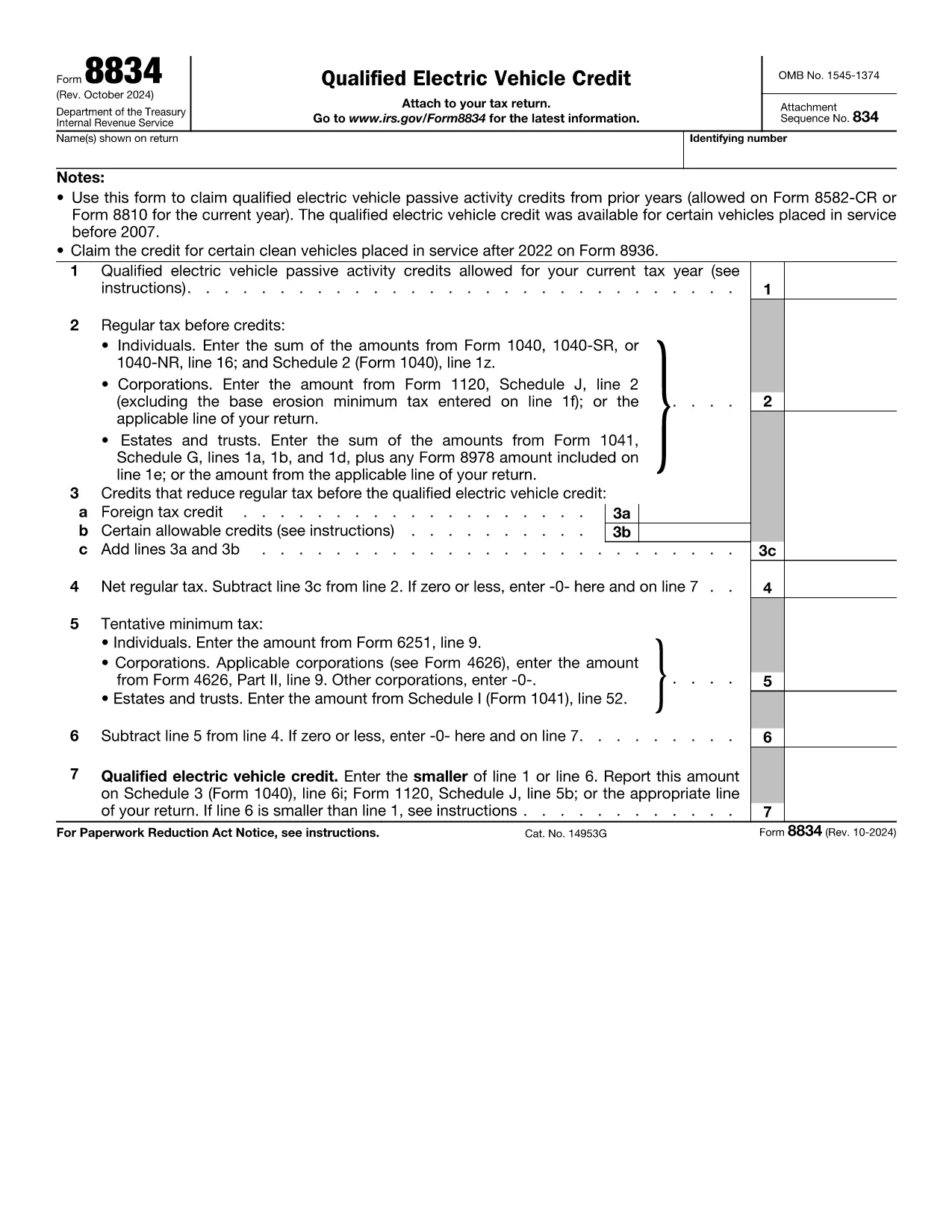
Form 8834, officially titled Qualified Electric Vehicle Credit, is used by taxpayers to claim passive activity credits from qualified electric vehicles placed in service before 2007. Although newer EV credits are reported on Form 8936, many taxpayers still have carry‑forward credits that belong on Form 8834.

What Is Form 8834?

This one‑page IRS form calculates the amount of qualified electric vehicle passive activity credit you can apply to your current tax year. It interacts with other forms such as Form 8582‑CR (individuals) or Form 8810 (corporations) to determine the credit limit.

How to Complete Form 8834 Online

Instead of downloading the PDF and editing it manually, simply click the "Fill out this form" button on this page. The Formize PDF Filler app will load instantly, allowing you to enter data directly in your browser.

  • Enter taxpayer information (name, SSN/EIN) exactly as it appears on your tax return.
  • Provide the credit amount allowed from prior years (Line 1).
  • Input your regular tax before credits (Line 2) and any other credits that reduce your tax (Line 3).
  • Follow the automatic calculations for net regular tax, tentative minimum tax, and the final credit amount.

Common Mistakes to Avoid

  • Using the wrong form: Form 8834 is only for pre‑2007 EV credits. New EV purchases require Form 8936.
  • Incorrect credit limit: Always reference the latest Form 8582‑CR or Form 8810 for the allowable amount.
  • Mismatching tax year: Credits must be claimed in the year you are allowed to use them, not the year the vehicle was purchased.
  • Leaving lines blank: Even a zero value must be entered to avoid IRS processing delays.

Where to Submit the Completed Form

After you finish in Formize, download the completed PDF. Attach it to your federal tax return:

  • Individuals – attach to Schedule 3 (Form 1040), line 6i.
  • Corporations – attach to Form 1120, Schedule J.
  • Estates & Trusts – attach to Form 1041, Schedule G.

Download the Fillable PDF

If you prefer to work offline, you can download the official IRS fillable PDF below. The same file is used by the Formize online filler.

सामान्य प्रश्न
  • Who should use Form 8834?

    Taxpayers who have qualified electric vehicle passive activity credits from vehicles placed in service before 2007 and need to claim any unused credit in the current tax year.

  • Can I use Form 8834 for a 2023 EV purchase?

    No. Vehicles placed in service after 2022 are claimed on Form 8936. Form 8834 only covers pre‑2007 credits.

  • Do I need to attach supporting schedules?

    Yes. Include the relevant credit limitation schedules (Form 8582‑CR for individuals or Form 8810 for corporations) that show the allowable credit amount.

  • What if my regular tax is lower than the credit amount?

    The credit you can claim is the lesser of the allowable credit (Line 1) or your net regular tax after other credits (Line 6). Any excess can be carried forward.

  • Is the Formize filler secure?

    Formize uses SSL encryption and processes data locally in your browser, ensuring your personal information remains private.

  • Can I e‑file Form 8834?

    Most commercial tax software accepts the completed PDF as an attachment. Check your software’s instructions for attaching supplemental forms.

  • What common errors cause IRS rejections?

    Missing SSN/EIN, entering a zero on Line 1 when a credit exists, or failing to include the required supporting schedules.

कैसे करें

Form 8834 को मुफ़्त में, ऑनलाइन 6 आसान स्टेप्स में कैसे भरें:

  1. 1
    Click the Fill‑out Button
    Press the “Fill out this form” button on the page to launch the Formize PDF Filler.
  2. 2
    Wait for the Filler to Load
    The web‑based filler loads in seconds; no download or installation is required.
  3. 3
    Enter Your Information
    Fill in taxpayer name, SSN/EIN, credit amounts, and tax liability fields exactly as shown on your return.
  4. 4
    Review Calculations
    The filler automatically computes net regular tax, tentative minimum tax, and the final credit amount.
  5. 5
    Save or Download
    When finished, click “Save” to store the completed PDF in your browser or “Download” to get a copy for your records.
  6. 6
    Submit with Your Tax Return
    Attach the completed Form 8834 to the appropriate schedule of your federal tax return and file as usual.
पीडीएफ फिलर एप तैयार करें
के बारे में

कर प्रपत्र

Form 8834 टैक्स फॉर्मों में से एक है जो किसी व्यक्ति या व्यवसाय की आय, कटौती और कर देनदारी के बारे में संबंधित कर प्राधिकरण को जानकारी रिपोर्ट करने के लिए उपयोग किए जाने वाले दस्तावेज़ हैं। कर कानूनों का अनुपालन करने और कर दायित्वों को पूरा करने के लिए ये फॉर्म आवश्यक हैं। कर प्रपत्र देश और वहां की विशिष्ट कर आवश्यकताओं के आधार पर भिन्न-भिन्न होते हैं। यहां कुछ सामान्य प्रकार के कर फ़ॉर्म दिए गए हैं:

व्यक्तिगत कर फॉर्म: इन फॉर्मों का उपयोग व्यक्तिगत करदाताओं द्वारा अपनी व्यक्तिगत आय की रिपोर्ट करने और कटौती, क्रेडिट और छूट का दावा करने के लिए किया जाता है। उदाहरणों में संयुक्त राज्य अमेरिका में 1040 फॉर्म या यूनाइटेड किंगडम में सेल्फ-असेसमेंट टैक्स रिटर्न फॉर्म शामिल हैं।

बिजनेस टैक्स फॉर्म: बिजनेस टैक्स फॉर्म का उपयोग कंपनियों, साझेदारियों या स्व-रोज़गार व्यक्तियों द्वारा अपनी व्यावसायिक आय, व्यय और अन्य कर-संबंधित जानकारी की रिपोर्ट करने के लिए किया जाता है। उदाहरणों में संयुक्त राज्य अमेरिका में शेड्यूल सी फॉर्म (व्यापार से लाभ या हानि) या यूनाइटेड किंगडम में CT600 फॉर्म (कंपनी टैक्स रिटर्न) शामिल हैं।

पेरोल टैक्स फॉर्म: इन फॉर्मों का उपयोग नियोक्ताओं द्वारा अपने कर्मचारियों के वेतन से रोके गए वेतन, वेतन और करों की रिपोर्ट करने के लिए किया जाता है। उदाहरणों में संयुक्त राज्य अमेरिका में W-2 फॉर्म या यूनाइटेड किंगडम में P60 फॉर्म शामिल हैं।

बिक्री कर फॉर्म: बिक्री कर फॉर्म का उपयोग व्यवसायों द्वारा कर योग्य वस्तुओं या सेवाओं पर एकत्रित बिक्री कर की रिपोर्ट करने और जमा करने के लिए किया जाता है। विशिष्ट बिक्री कर फॉर्म क्षेत्राधिकार के अनुसार भिन्न-भिन्न होते हैं।

मूल्य वर्धित कर (वैट) फॉर्म: वैट फॉर्म का उपयोग उन देशों में किया जाता है जो बिक्री पर एकत्रित वैट की रिपोर्ट करने और जमा करने और खरीदारी के लिए वैट क्रेडिट का दावा करने के लिए मूल्य वर्धित कर लगाते हैं। उदाहरणों में कई देशों में उपयोग किए जाने वाले वैट रिटर्न फॉर्म शामिल हैं।

अनुमानित कर फ़ॉर्म: अनुमानित कर फ़ॉर्म का उपयोग उस आय पर अनुमानित करों की रिपोर्ट करने और भुगतान करने के लिए किया जाता है जो रोके जाने के अधीन नहीं हैं, जैसे कि स्व-रोज़गार आय या निवेश आय।

ये मौजूद असंख्य कर रूपों के कुछ उदाहरण मात्र हैं। आवश्यक विशिष्ट प्रपत्र आपके देश या अधिकार क्षेत्र में कर कानूनों और विनियमों पर निर्भर करते हैं। यह निर्धारित करने के लिए कि आपकी स्थिति पर कौन से फॉर्म लागू होते हैं, कर प्राधिकरण के दिशानिर्देशों से परामर्श लेना या पेशेवर सलाह लेना महत्वपूर्ण है।

विशेषताएं

पीडीएफ भराव

पीडीएफ फॉर्म ऑनलाइन भरने का सबसे आसान तरीका

  • जल्दी से Form 8834 भरें
    Form 8834 को जल्दी से ऑनलाइन भरने का कोई तरीका खोज रहे हैं? हमारे ऑनलाइन नि:शुल्क पीडीएफ फॉर्म फिलर के साथ, आप एक मिनट से भी कम समय में इस पीडीएफ दस्तावेज़ को संपादित करने और भरने का तरीका जानेंगे।
  • ऑनलाइन पीडीएफ संपादक का उपयोग करना आसान है
    पीडीएफ फाइलों को प्रिंट करने से तंग आ गए हैं ताकि आप उन्हें फिर से स्कैन करने और उन्हें वापस भेजने से पहले संपादित कर सकें? PDF दस्तावेज़ों को निःशुल्क ऑनलाइन संपादित करें। समय और कागज बचाने के लिए हमारे ऑनलाइन पीडीएफ संपादक का प्रयोग करें।
  • महान उपकरण, सभी प्लेटफार्म
    आश्चर्य है कि मैक पर Form 8834 कैसे भरें, या शायद पीडीएफ फिलर का मुफ्त में उपयोग कैसे करें? हमारे ऑनलाइन पीडीएफ टूल सभी प्लेटफॉर्म पर काम करते हैं।
  • सुरक्षित फ़ाइल भंडारण
    पूर्ण की गई "Form 8834" फ़ाइलें Amazon क्लाउड होस्टिंग द्वारा प्रबंधित एक सुरक्षित डेटाबेस में संग्रहीत की जाती हैं। आप कभी भी अपनी फाइलों को हमारे सिस्टम से हटा सकते हैं। किसी भी स्थिति में, ये फ़ाइलें 24 घंटे के बाद स्वतः हटा दी जाती हैं।
  • {कीवर्ड} से चैट करें
    Chatize पर "Form 8834" के साथ चैट करें, जो एक निःशुल्क पीडीएफ रीडर सहायक है। प्रश्न पूछें और "Form 8834" से उत्तर प्राप्त करें। बस ऊपर दस्तावेज़ के साथ चैट करें बटन पर क्लिक करें।

फ़िलिंग सत्र मिटाएँ

चयनित फ़िलिंग सत्र को मिटाएँ? इस स्थिति में, फ़ॉर्म को पूरा करने में आपकी प्रगति खो जाएगी।

संपादन सत्र हटाएँ

चयनित संपादन सत्र हटाएँ? इस स्थिति में, फ़ॉर्म बनाने और संपादित करने में आपकी प्रगति नष्ट हो जाएगी।