
hamburger-menu icon
भाषा का चयन करें

Fillable IRS Form 8925 – Report Employer‑Owned Life Insurance Contracts

  1. देश अमेरीका
  2. भाषा अंग्रेज़ी
  3. गतिविधि करों
  4. विभाग आंतरिक राजस्व सेवा
फार्म को भरो
Fillable IRS Form 8925 – Report Employer‑Owned Life Insurance Contracts

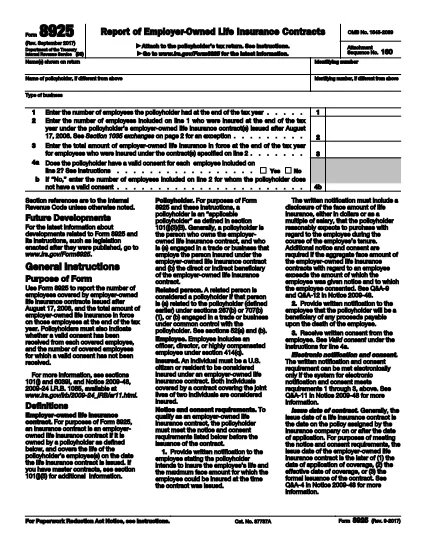
Form 8925, Report of Employer‑Owned Life Insurance Contracts, is required for any policyholder that owns one or more employer‑owned life insurance contracts issued after August 17, 2006. The form captures the number of employees covered, the total amount of insurance in force, and whether valid employee consents were obtained.

Using Formize’s cloud‑based PDF filler, you can complete the form directly in your browser – no Adobe Acrobat or other editor needed. Just click the “Fill out this form” button, wait for the Formize app to load, and start entering your data.

What Is Form 8925 and Who Needs It?

This IRS form is attached to the policyholder’s tax return. It applies to:

  • Businesses that own life‑insurance contracts on employees.
  • Contracts issued after August 17, 2006.
  • Any tax year where the contracts are still in force.

How to Complete Form 8925 Online with Formize

Follow these simple steps to fill out the form without downloading any software:

  • Click the “Fill out this form” button on this page.
  • Wait a few seconds for the Formize PDF Filler to load.
  • Enter the policyholder’s name, identifying number, and type of business.
  • Provide the total number of employees and the number covered by the insurance contracts.
  • Enter the total amount of insurance in force for the covered employees.
  • Answer the consent questions (Yes/No) and specify any employees without valid consent.
  • Review the completed form, then save, download, or submit it directly to the IRS portal.

Common Mistakes to Avoid When Filing Form 8925

  • Missing consent information: The IRS checks that each employee has a valid written consent. Incomplete answers can trigger an audit.
  • Incorrect employee counts: Double‑check the total employees versus those covered; mismatches cause delays.
  • Using an outdated PDF version: Always use the latest IRS version – the link below points to the current 2023 revision.
  • Failing to attach the form: Form 8925 must be attached to the policyholder’s income tax return (Form 1040, 1120, etc.).

Download the Official Fillable PDF

If you prefer to work offline, you can download the official IRS PDF directly. The file is fully fillable and compatible with Formize’s online editor.

Download IRS Form 8925 (PDF)

सामान्य प्रश्न
  • Who must file Form 8925?

    Any policyholder that owns employer‑owned life insurance contracts issued after August 17, 2006 must attach Form 8925 to their tax return for each year the contracts are in force.

  • Is there a penalty for not filing Form 8925?

    There is no specific monetary penalty, but failure to report can lead to the IRS questioning the validity of employee consents and may result in tax adjustments or an audit.

  • Can I file Form 8925 electronically?

    Yes. Fill the form using Formize’s online PDF filler, save the completed PDF, and attach it when you e‑file your tax return.

  • What is considered a valid employee consent?

    A written, signed consent that meets IRS requirements – typically a separate consent form signed by each employee covered under the policy.

  • Do I need a separate Form 8925 for each insurance contract?

    No. One Form 8925 covers all employer‑owned life insurance contracts owned by the policyholder for the tax year.

  • Where can I find the latest version of Form 8925?

    The most recent version is available from the IRS website. Use the download link provided on this page.

कैसे करें

Form 8925 को मुफ़्त में, ऑनलाइन 5 आसान स्टेप्स में कैसे भरें:

  1. 1
    Open the Fillable Form
    Click the “Fill out this form” button on the page. The Formize PDF Filler will open in a new tab.
  2. 2
    Enter Policyholder Information
    Type the name, identifying number, and business type exactly as they appear on the tax return.
  3. 3
    Provide Employee & Insurance Details
    Enter total employees, number covered, and total amount of insurance in force for the covered employees.
  4. 4
    Answer Consent Questions
    Select “Yes” or “No” for each consent question and specify any employees lacking valid consent.
  5. 5
    Review, Save, and Submit
    Double‑check all entries, then save the completed PDF or download it to attach to your tax return.
पीडीएफ फिलर एप तैयार करें
के बारे में

कर प्रपत्र

Form 8925 कर प्रपत्रों में से एक है, जो प्रासंगिक कर प्राधिकरण को करों से संबंधित जानकारी की रिपोर्ट करने के लिए उपयोग किए जाने वाले दस्तावेज़ हैं। संघीय, राज्य और स्थानीय कर रूपों सहित विभिन्न प्रकार के टैक्स फॉर्म हैं, जो करदाता की परिस्थितियों और स्थान के आधार पर भिन्न हो सकते हैं।

विशेषताएं

पीडीएफ भराव

पीडीएफ फॉर्म ऑनलाइन भरने का सबसे आसान तरीका

  • जल्दी से Form 8925 भरें
    Form 8925 को जल्दी से ऑनलाइन भरने का कोई तरीका खोज रहे हैं? हमारे ऑनलाइन नि:शुल्क पीडीएफ फॉर्म फिलर के साथ, आप एक मिनट से भी कम समय में इस पीडीएफ दस्तावेज़ को संपादित करने और भरने का तरीका जानेंगे।
  • ऑनलाइन पीडीएफ संपादक का उपयोग करना आसान है
    पीडीएफ फाइलों को प्रिंट करने से तंग आ गए हैं ताकि आप उन्हें फिर से स्कैन करने और उन्हें वापस भेजने से पहले संपादित कर सकें? PDF दस्तावेज़ों को निःशुल्क ऑनलाइन संपादित करें। समय और कागज बचाने के लिए हमारे ऑनलाइन पीडीएफ संपादक का प्रयोग करें।
  • महान उपकरण, सभी प्लेटफार्म
    आश्चर्य है कि मैक पर Form 8925 कैसे भरें, या शायद पीडीएफ फिलर का मुफ्त में उपयोग कैसे करें? हमारे ऑनलाइन पीडीएफ टूल सभी प्लेटफॉर्म पर काम करते हैं।
  • सुरक्षित फ़ाइल भंडारण
    पूर्ण की गई "Form 8925" फ़ाइलें Amazon क्लाउड होस्टिंग द्वारा प्रबंधित एक सुरक्षित डेटाबेस में संग्रहीत की जाती हैं। आप कभी भी अपनी फाइलों को हमारे सिस्टम से हटा सकते हैं। किसी भी स्थिति में, ये फ़ाइलें 24 घंटे के बाद स्वतः हटा दी जाती हैं।
  • {कीवर्ड} से चैट करें
    Chatize पर "Form 8925" के साथ चैट करें, जो एक निःशुल्क पीडीएफ रीडर सहायक है। प्रश्न पूछें और "Form 8925" से उत्तर प्राप्त करें। बस ऊपर दस्तावेज़ के साथ चैट करें बटन पर क्लिक करें।

फ़िलिंग सत्र मिटाएँ

चयनित फ़िलिंग सत्र को मिटाएँ? इस स्थिति में, फ़ॉर्म को पूरा करने में आपकी प्रगति खो जाएगी।

संपादन सत्र हटाएँ

चयनित संपादन सत्र हटाएँ? इस स्थिति में, फ़ॉर्म बनाने और संपादित करने में आपकी प्रगति नष्ट हो जाएगी।