
hamburger-menu icon
भाषा का चयन करें

Form T (Timber) – Fillable PDF for IRS Reporting

  1. देश अमेरीका
  2. भाषा अंग्रेज़ी
  3. गतिविधि करों
  4. विभाग आंतरिक राजस्व सेवा
फार्म को भरो
Form T (Timber) – Fillable PDF for IRS Reporting

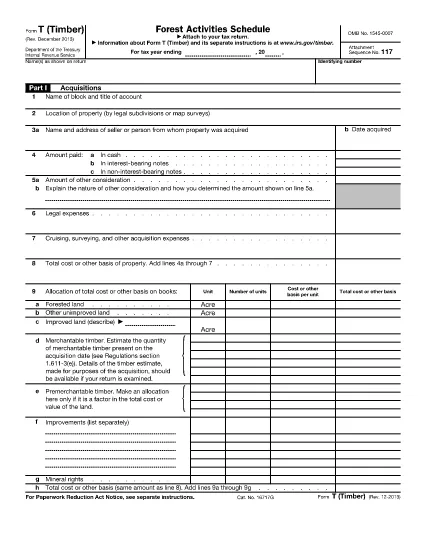
Form T (Timber) is the IRS‑required schedule used to report timber acquisitions, depletion, sales, and reforestation activities. Whether you own a forested property, manage timber contracts, or simply need to document occasional timber sales, this fillable PDF helps you stay compliant.

What Is Form T (Timber)?

The form is part of the federal income‑tax return and captures detailed information about timber assets, including:

  • Acquisitions and exchanges of timber or forest land (Part I)
  • Timber depletion calculations (Part II)
  • Profit or loss from timber sales (Part III)
  • Reforestation and stand‑management expenses (Part IV)
  • Changes in land ownership (Part V)

Key Sections of Form T

Each part must be completed accurately to avoid IRS penalties. The most common areas where taxpayers err are:

  • Not separating reforestation projects in Part IV.
  • Incorrectly calculating depletion using the wrong unit of measure.
  • Failing to maintain a separate schedule for each timber stand.

How to Fill Out Form T Online

Our Formize fillable PDF eliminates the need for a separate editor. Follow the simple steps below to complete the form directly in your browser.

Common Mistakes to Avoid

  • Leaving Part IV blank when you incurred any reforestation expense.
  • Using outdated basis figures for timber that has been fully amortized.
  • Submitting the form without attaching supporting documentation for large timber sales.

Download the Official PDF

Click the button below to load the official IRS Form T (Timber) PDF into Formize’s secure filler. The document is the same version published by the IRS in 2013.

निर्देश

सामान्य प्रश्न
  • Do I need to file Form T if I only sell timber occasionally?

    No. The IRS does not require filing Form T for occasional sales (e.g., one or two sales every 3‑4 years), but you must keep adequate records of those transactions.

  • What is the purpose of Part IV on Form T?

    Part IV reports reforestation and timber‑stand activities. It is required whenever you incur expenses for planting, thinning, burning, or other silvicultural practices.

  • Can I fill out Form T on a mobile device?

    Yes. The Formize PDF filler works on modern smartphones and tablets, allowing you to complete the form anywhere with an internet connection.

  • How do I calculate timber depletion for the year?

    Use the depletion method prescribed in the IRS instructions (cost‑or‑value method). Enter the quantity of timber cut and the depletion rate in Part II.

  • What supporting documents should I keep with Form T?

    Maintain purchase agreements, harvest receipts, reforestation invoices, and any appraisal reports. These documents substantiate the amounts reported on the form.

  • Is the PDF provided by Formize the official IRS version?

    Yes. The download link points to the official IRS Form T (Timber) PDF published in 2013, ensuring you are using the correct form.

कैसे करें

Form T timber को मुफ़्त में, ऑनलाइन 3 आसान स्टेप्स में कैसे भरें:

  1. 1
    Click the Fill‑out Button
    Press the “Fill out this form” button on the page. The PDF will open instantly in Formize’s online filler.
  2. 2
    Wait for the Filler to Load
    The Formize PDF Filler app loads the form in a secure window. No download or installation is required.
  3. 3
    Complete and Save
    Enter your information in each field, then click “Save” to download the completed PDF or email it directly to your accountant.
पीडीएफ फिलर एप तैयार करें
के बारे में

कर प्रपत्र

Form T timber कर प्रपत्रों में से एक है, जो प्रासंगिक कर प्राधिकरण को करों से संबंधित जानकारी की रिपोर्ट करने के लिए उपयोग किए जाने वाले दस्तावेज़ हैं। संघीय, राज्य और स्थानीय कर रूपों सहित विभिन्न प्रकार के टैक्स फॉर्म हैं, जो करदाता की परिस्थितियों और स्थान के आधार पर भिन्न हो सकते हैं।

विशेषताएं

पीडीएफ भराव

पीडीएफ फॉर्म ऑनलाइन भरने का सबसे आसान तरीका

  • जल्दी से Form T timber भरें
    Form T timber को जल्दी से ऑनलाइन भरने का कोई तरीका खोज रहे हैं? हमारे ऑनलाइन नि:शुल्क पीडीएफ फॉर्म फिलर के साथ, आप एक मिनट से भी कम समय में इस पीडीएफ दस्तावेज़ को संपादित करने और भरने का तरीका जानेंगे।
  • ऑनलाइन पीडीएफ संपादक का उपयोग करना आसान है
    पीडीएफ फाइलों को प्रिंट करने से तंग आ गए हैं ताकि आप उन्हें फिर से स्कैन करने और उन्हें वापस भेजने से पहले संपादित कर सकें? PDF दस्तावेज़ों को निःशुल्क ऑनलाइन संपादित करें। समय और कागज बचाने के लिए हमारे ऑनलाइन पीडीएफ संपादक का प्रयोग करें।
  • महान उपकरण, सभी प्लेटफार्म
    आश्चर्य है कि मैक पर Form T timber कैसे भरें, या शायद पीडीएफ फिलर का मुफ्त में उपयोग कैसे करें? हमारे ऑनलाइन पीडीएफ टूल सभी प्लेटफॉर्म पर काम करते हैं।
  • सुरक्षित फ़ाइल भंडारण
    पूर्ण की गई "Form T timber" फ़ाइलें Amazon क्लाउड होस्टिंग द्वारा प्रबंधित एक सुरक्षित डेटाबेस में संग्रहीत की जाती हैं। आप कभी भी अपनी फाइलों को हमारे सिस्टम से हटा सकते हैं। किसी भी स्थिति में, ये फ़ाइलें 24 घंटे के बाद स्वतः हटा दी जाती हैं।
  • {कीवर्ड} से चैट करें
    Chatize पर "Form T timber" के साथ चैट करें, जो एक निःशुल्क पीडीएफ रीडर सहायक है। प्रश्न पूछें और "Form T timber" से उत्तर प्राप्त करें। बस ऊपर दस्तावेज़ के साथ चैट करें बटन पर क्लिक करें।

फ़िलिंग सत्र मिटाएँ

चयनित फ़िलिंग सत्र को मिटाएँ? इस स्थिति में, फ़ॉर्म को पूरा करने में आपकी प्रगति खो जाएगी।

संपादन सत्र हटाएँ

चयनित संपादन सत्र हटाएँ? इस स्थिति में, फ़ॉर्म बनाने और संपादित करने में आपकी प्रगति नष्ट हो जाएगी।