
hamburger-menu icon
भाषा का चयन करें

Fillable Form W‑7 – Application for IRS ITIN

  1. देश अमेरीका
  2. भाषा अंग्रेज़ी
  3. गतिविधि करों
  4. विभाग आंतरिक राजस्व सेवा
फार्म को भरो
Fillable Form W‑7 – Application for IRS ITIN

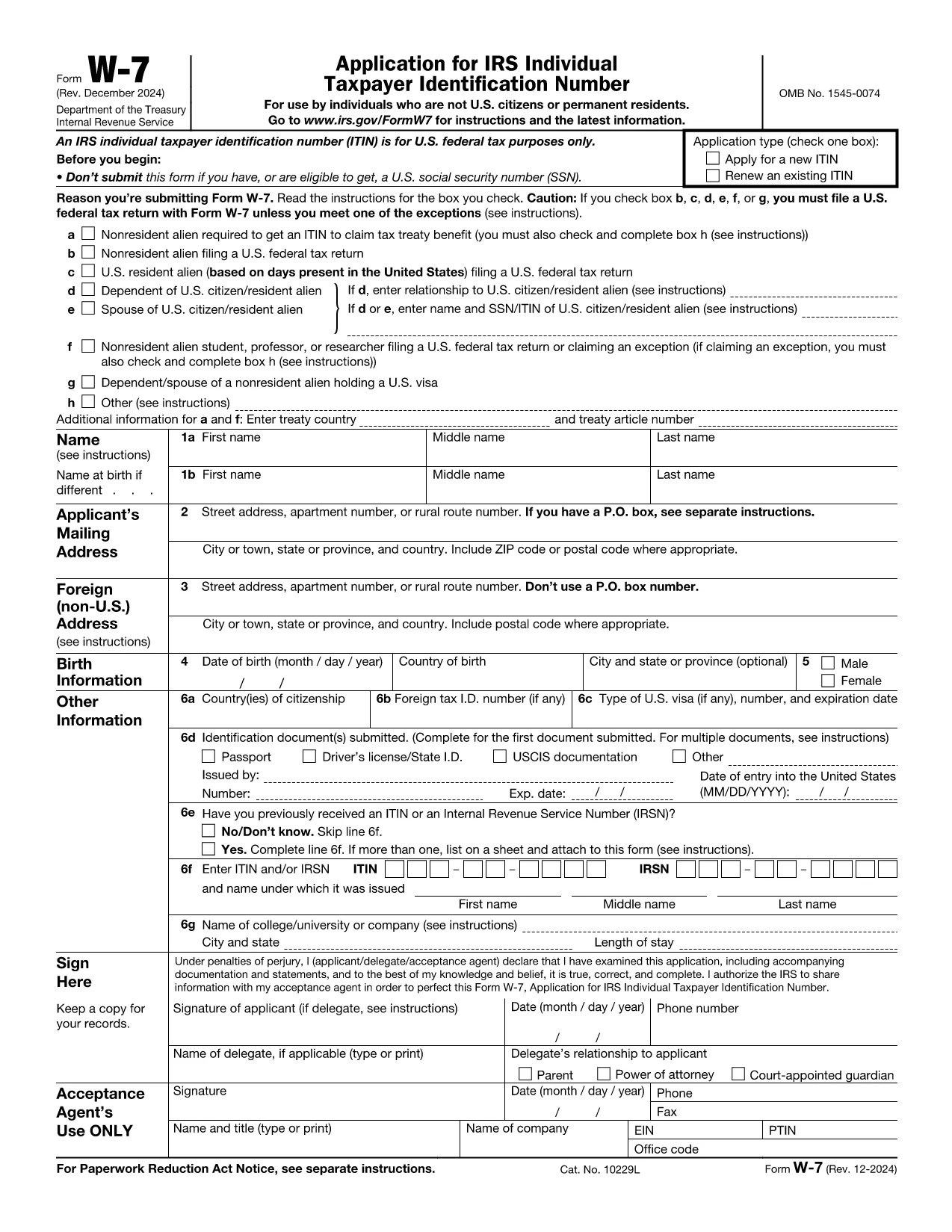
Form W‑7 is the IRS application used to obtain an Individual Taxpayer Identification Number (ITIN) for individuals who are not eligible for a Social Security Number. With Formize you can fill out the official IRS PDF online, save time, and avoid printing errors.

What is Form W‑7?

The Form W‑7 (Application for IRS Individual Taxpayer Identification Number) allows non‑resident aliens, foreign students, dependents, and spouses of U.S. taxpayers to comply with U.S. tax reporting requirements.

Key Requirements & Documents

  • Valid passport (or other accepted ID)
  • Proof of foreign status (visa, birth certificate, etc.)
  • A federal income tax return, unless you qualify for an exception
  • Completed Form W‑7 attached to your return

How to Complete the Form Online

Instead of downloading the PDF, simply click the Fill out this form button on this page. The Formize PDF Filler loads instantly, letting you type directly into each field.

Common Mistakes to Avoid

  • Leaving the “SSN” box checked when you do not have a Social Security Number.
  • Submitting an incomplete list of supporting documents.
  • Using an outdated version of the form (always use the latest PDF from the IRS).
  • Failing to sign and date the form.

Where to Submit Your Application

After you finish the online form, download the completed PDF and mail it with your supporting documents to:

IRS ITIN Operations
P.O. Box 149342
Austin, TX 78714‑9342
United States

You may also use an IRS‑approved Certified Acceptance Agent.

निर्देश

  • फॉर्म W-7 निर्देश - फॉर्म W-7 के लिए निर्देश, IRS व्यक्तिगत करदाता पहचान संख्या के लिए आवेदन (फॉर्म W-7 के अगस्त 2019 संशोधन के साथ उपयोग करें)
सामान्य प्रश्न
  • Who needs to file Form W‑7?

    Anyone who is not eligible for a Social Security Number but must file a U.S. federal tax return, claim a tax treaty benefit, or be listed as a dependent/spouse on a U.S. return.

  • Can I submit Form W‑7 electronically?

    The IRS currently accepts only mailed paper submissions, but you can complete the form online with Formize and then print or email the final PDF for mailing.

  • What identification documents are accepted?

    A valid passport is the most common document. Other accepted IDs include national ID cards, foreign driver’s licenses, or a combination of birth certificate and government photo ID.

  • Do I need to attach a tax return with Form W‑7?

    Yes, in most cases you must attach the federal tax return you are filing. Exceptions exist for treaty benefits and certain students; see the form instructions for details.

  • How long does it take to receive an ITIN?

    The IRS typically processes ITIN applications within 7 weeks. If you are applying from a foreign address, allow up to 9 weeks.

  • Is there a fee to file Form W‑7?

    There is no filing fee for the form itself, but you may incur costs for certified copies of documents or for using a Certified Acceptance Agent.

कैसे करें

Form W‑7 को मुफ़्त में, ऑनलाइन 5 आसान स्टेप्स में कैसे भरें:

  1. 1
    Click the Fill out this form button
    On the Formize page, press the blue “Fill out this form” button to launch the PDF filler.
  2. 2
    Wait for the Formize PDF Filler to load
    The web app loads the official IRS Form W‑7 in a secure viewer. No software download is required.
  3. 3
    Enter your information
    Type directly into each field, using the instructions provided on the form. Use the tab key to move quickly between fields.
  4. 4
    Review and sign
    Double‑check every entry, then add your electronic signature using the built‑in signature tool.
  5. 5
    Save or email the completed form
    When you’re done, click “Download PDF” or “Email to me” and attach the file to your ITIN submission package.
पीडीएफ फिलर एप तैयार करें
के बारे में

संघीय कर प्रपत्र

Form W‑7 संघीय कर प्रपत्रों में से एक है जो संयुक्त राज्य अमेरिका में आंतरिक राजस्व सेवा (आईआरएस) के साथ संघीय आय करों की रिपोर्ट करने और दाखिल करने के लिए उपयोग किए जाने वाले दस्तावेज़ हैं। इन फॉर्मों का उपयोग व्यक्तियों, व्यवसायों और संगठनों द्वारा उनकी संघीय कर देयता की गणना के लिए आवश्यक आय, कटौती और अन्य प्रासंगिक जानकारी की रिपोर्ट करने के लिए किया जाता है।

सबसे अधिक इस्तेमाल किया जाने वाला संघीय कर फॉर्म फॉर्म 1040 है, जिसका उपयोग व्यक्तिगत करदाताओं द्वारा अपने व्यक्तिगत आयकर की रिपोर्ट करने के लिए किया जाता है। आमतौर पर उपयोग किए जाने वाले अन्य फॉर्म में साझेदारी के लिए फॉर्म 1065, फॉर्म 1120, और कर-मुक्त संगठनों के लिए फॉर्म 990

संघीय कर फॉर्म में आम तौर पर करदाताओं को आय के विभिन्न स्रोतों, जैसे वेतन, वेतन और टिप्स, साथ ही निवेश, किराये की संपत्तियों और अन्य स्रोतों से आय की रिपोर्ट करने की आवश्यकता होती है। फॉर्म करदाताओं को धर्मार्थ योगदान, बंधक ब्याज और स्वास्थ्य देखभाल व्यय जैसे विभिन्न खर्चों के लिए कटौती और क्रेडिट का दावा करने की अनुमति भी देते हैं।

संघीय कर फॉर्म को सही ढंग से और समय पर दाखिल करना महत्वपूर्ण है, क्योंकि ऐसा करने में विफलता के परिणामस्वरूप आईआरएस से जुर्माना और ब्याज शुल्क लिया जा सकता है।

विशेषताएं

पीडीएफ भराव

पीडीएफ फॉर्म ऑनलाइन भरने का सबसे आसान तरीका

  • जल्दी से Form W‑7 भरें
    Form W‑7 को जल्दी से ऑनलाइन भरने का कोई तरीका खोज रहे हैं? हमारे ऑनलाइन नि:शुल्क पीडीएफ फॉर्म फिलर के साथ, आप एक मिनट से भी कम समय में इस पीडीएफ दस्तावेज़ को संपादित करने और भरने का तरीका जानेंगे।
  • ऑनलाइन पीडीएफ संपादक का उपयोग करना आसान है
    पीडीएफ फाइलों को प्रिंट करने से तंग आ गए हैं ताकि आप उन्हें फिर से स्कैन करने और उन्हें वापस भेजने से पहले संपादित कर सकें? PDF दस्तावेज़ों को निःशुल्क ऑनलाइन संपादित करें। समय और कागज बचाने के लिए हमारे ऑनलाइन पीडीएफ संपादक का प्रयोग करें।
  • महान उपकरण, सभी प्लेटफार्म
    आश्चर्य है कि मैक पर Form W‑7 कैसे भरें, या शायद पीडीएफ फिलर का मुफ्त में उपयोग कैसे करें? हमारे ऑनलाइन पीडीएफ टूल सभी प्लेटफॉर्म पर काम करते हैं।
  • सुरक्षित फ़ाइल भंडारण
    पूर्ण की गई "Form W‑7" फ़ाइलें Amazon क्लाउड होस्टिंग द्वारा प्रबंधित एक सुरक्षित डेटाबेस में संग्रहीत की जाती हैं। आप कभी भी अपनी फाइलों को हमारे सिस्टम से हटा सकते हैं। किसी भी स्थिति में, ये फ़ाइलें 24 घंटे के बाद स्वतः हटा दी जाती हैं।
  • {कीवर्ड} से चैट करें
    Chatize पर "Form W‑7" के साथ चैट करें, जो एक निःशुल्क पीडीएफ रीडर सहायक है। प्रश्न पूछें और "Form W‑7" से उत्तर प्राप्त करें। बस ऊपर दस्तावेज़ के साथ चैट करें बटन पर क्लिक करें।

फ़िलिंग सत्र मिटाएँ

चयनित फ़िलिंग सत्र को मिटाएँ? इस स्थिति में, फ़ॉर्म को पूरा करने में आपकी प्रगति खो जाएगी।

संपादन सत्र हटाएँ

चयनित संपादन सत्र हटाएँ? इस स्थिति में, फ़ॉर्म बनाने और संपादित करने में आपकी प्रगति नष्ट हो जाएगी।