
hamburger-menu icon
भाषा का चयन करें

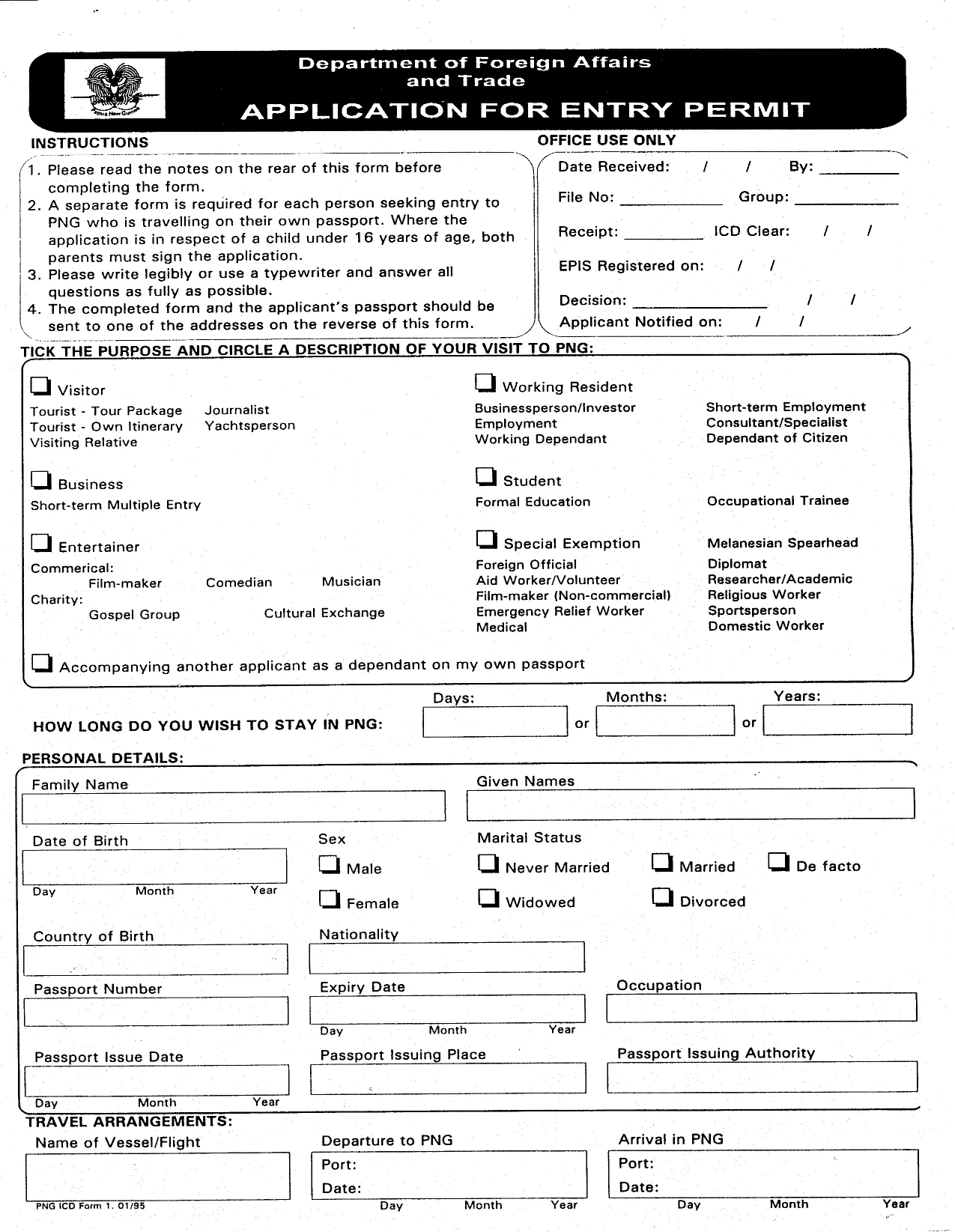
Papua New Guinea Entry Permit Application Form (Fillable PDF)

  1. भाषा अंग्रेज़ी
  2. देश पापुआ न्यू गिनी
  3. गतिविधि वीजा
फार्म को भरो
Papua New Guinea Entry Permit Application Form (Fillable PDF)

Traveling to Papua New Guinea for work, study, or tourism? You’ll need an official Entry Permit before you land. Our page gives you instant access to the official fillable PDF, a clear step‑by‑step guide, and answers to the most common questions.

Why choose the online Formize PDF Filler? It eliminates the need for a separate PDF editor, saves your progress automatically, and lets you submit a clean, printable version straight from your browser.

  • Instant download of the government‑approved form.
  • All fields are interactive – just click, type, and move on.
  • Guided instructions appear beside each section.
  • Export to PDF or print when you’re done.

Below you’ll find everything you need to know before you start filling the form.

सामान्य प्रश्न
  • Do I need a separate PDF editor to complete the form?

    No. The Formize PDF Filler works directly in your browser, so you can fill, save, and print without any extra software.

  • Is the PDF version on this page the official government form?

    Yes. The file is the exact PDF used by the Papua New Guinea Immigration & Citizenship Service Authority.

  • Can I save my progress and return later?

    Absolutely. Use the “Save” button in the Formize app to download a draft copy, then reload it later to continue.

  • What supporting documents must I attach with the completed form?

    Typical documents include a passport copy, a recent passport‑size photo, proof of employment or invitation, a medical certificate, and proof of onward travel.

  • How long does it take to process an entry permit after submission?

    Processing times vary by visa type, but most tourist or short‑term business permits are reviewed within 7‑14 business days.

  • Is there a fee to download the PDF?

    Downloading the fillable PDF is completely free. Any government processing fees are paid directly to the PNG immigration office.

  • Can I submit the form electronically?

    The PNG authorities currently require a printed, signed copy. After filling the form online, print, sign, and mail or hand‑deliver it as instructed.

  • What should I do if I make a mistake after printing?

    Cross out the error neatly, initial it, and write the correct information. For major errors, it’s best to redo the form using the online filler and print a fresh copy.

कैसे करें

PNG entry permit को मुफ़्त में, ऑनलाइन 5 आसान स्टेप्स में कैसे भरें:

  1. 1
    Click the Fill‑out Button
    On this page, click the bright “Fill out this form” button. The Formize PDF Filler will open in a new tab.
  2. 2
    Wait for the Formize App to Load
    The filler loads in seconds. You’ll see the PNG Entry Permit form with editable fields.
  3. 3
    Enter Your Information
    Complete each section—personal details, travel purpose, sponsor information, and health declarations. Use the drop‑down menus where provided.
  4. 4
    Review and Validate
    After filling, click the “Validate” button to check for missing or incorrectly formatted data.
  5. 5
    Save, Print, or Submit
    When everything looks correct, download the completed PDF, print it for your records, or follow the instructions on the last page to submit it to PNG immigration authorities.
पीडीएफ फिलर एप तैयार करें
के बारे में

वीज़ा फॉर्म

PNG entry permit वीज़ा रूपों में से एक है जो ऐसे दस्तावेज़ हैं जिनका उपयोग किसी विदेशी देश में प्रवेश करने के लिए वीज़ा के लिए आवेदन करने के लिए किया जाता है। वीजा एक दस्तावेज है जो एक विदेशी नागरिक को एक निर्दिष्ट अवधि के लिए किसी विदेशी देश में प्रवेश करने, रहने और कभी-कभी काम करने की अनुमति देता है। वीजा प्राप्त करने के लिए सटीक रूप और आवश्यकताएं देश और वीजा के प्रकार के अनुसार भिन्न होती हैं।

वीज़ा फॉर्म में आम तौर पर व्यक्तिगत जानकारी जैसे नाम, जन्म तिथि और पासपोर्ट जानकारी के साथ-साथ यात्रा के उद्देश्य और लंबाई, इच्छित गंतव्य और क्या आवेदक को पहले वीजा देने से मना कर दिया गया है या किसी देश से निर्वासित किया गया है, के बारे में जानकारी की आवश्यकता होती है। प्रपत्रों में पासपोर्ट, फोटोग्राफ और वित्तीय सहायता के प्रमाण जैसे सहायक दस्तावेजों की भी आवश्यकता हो सकती है।

संयुक्त राज्य अमेरिका में, सबसे आम वीज़ा फॉर्म DS-160 और DS-260 फॉर्म हैं। DS-160 फॉर्म का उपयोग गैर-आप्रवासी वीजा के लिए आवेदन करने के लिए किया जाता है, जबकि DS-260 फॉर्म का उपयोग अप्रवासी वीजा के लिए आवेदन करने के लिए किया जाता है। इन रूपों में आवेदक के व्यक्तिगत और यात्रा इतिहास के साथ-साथ पासपोर्ट, यात्रा यात्रा कार्यक्रम और वित्तीय रिकॉर्ड जैसे सहायक दस्तावेज़ों के बारे में विस्तृत जानकारी की आवश्यकता होती है।

अन्य देशों में अलग-अलग वीज़ा फॉर्म और आवश्यकताएं हो सकती हैं, लेकिन मूल प्रक्रिया में आमतौर पर वीज़ा आवेदन पूरा करना, सहायक दस्तावेज प्रदान करना और अमेरिकी दूतावास या वाणिज्य दूतावास में एक कांसुलर अधिकारी के साथ साक्षात्कार में भाग लेना शामिल है। यह ध्यान रखना महत्वपूर्ण है कि वीज़ा आवेदन प्रक्रिया जटिल और समय लेने वाली हो सकती है, और यह अनुशंसा की जाती है कि वीज़ा चाहने वाले व्यक्ति किसी अप्रवास वकील या अन्य योग्य पेशेवर से परामर्श करें ताकि यह सुनिश्चित हो सके कि सभी आवश्यक फॉर्म और आवश्यकताएं पूरी हो गई हैं।

विशेषताएं

पीडीएफ भराव

पीडीएफ फॉर्म ऑनलाइन भरने का सबसे आसान तरीका

  • जल्दी से PNG entry permit भरें
    PNG entry permit को जल्दी से ऑनलाइन भरने का कोई तरीका खोज रहे हैं? हमारे ऑनलाइन नि:शुल्क पीडीएफ फॉर्म फिलर के साथ, आप एक मिनट से भी कम समय में इस पीडीएफ दस्तावेज़ को संपादित करने और भरने का तरीका जानेंगे।
  • ऑनलाइन पीडीएफ संपादक का उपयोग करना आसान है
    पीडीएफ फाइलों को प्रिंट करने से तंग आ गए हैं ताकि आप उन्हें फिर से स्कैन करने और उन्हें वापस भेजने से पहले संपादित कर सकें? PDF दस्तावेज़ों को निःशुल्क ऑनलाइन संपादित करें। समय और कागज बचाने के लिए हमारे ऑनलाइन पीडीएफ संपादक का प्रयोग करें।
  • महान उपकरण, सभी प्लेटफार्म
    आश्चर्य है कि मैक पर PNG entry permit कैसे भरें, या शायद पीडीएफ फिलर का मुफ्त में उपयोग कैसे करें? हमारे ऑनलाइन पीडीएफ टूल सभी प्लेटफॉर्म पर काम करते हैं।
  • सुरक्षित फ़ाइल भंडारण
    पूर्ण की गई "PNG entry permit" फ़ाइलें Amazon क्लाउड होस्टिंग द्वारा प्रबंधित एक सुरक्षित डेटाबेस में संग्रहीत की जाती हैं। आप कभी भी अपनी फाइलों को हमारे सिस्टम से हटा सकते हैं। किसी भी स्थिति में, ये फ़ाइलें 24 घंटे के बाद स्वतः हटा दी जाती हैं।
  • {कीवर्ड} से चैट करें
    Chatize पर "PNG entry permit" के साथ चैट करें, जो एक निःशुल्क पीडीएफ रीडर सहायक है। प्रश्न पूछें और "PNG entry permit" से उत्तर प्राप्त करें। बस ऊपर दस्तावेज़ के साथ चैट करें बटन पर क्लिक करें।

फ़िलिंग सत्र मिटाएँ

चयनित फ़िलिंग सत्र को मिटाएँ? इस स्थिति में, फ़ॉर्म को पूरा करने में आपकी प्रगति खो जाएगी।

संपादन सत्र हटाएँ

चयनित संपादन सत्र हटाएँ? इस स्थिति में, फ़ॉर्म बनाने और संपादित करने में आपकी प्रगति नष्ट हो जाएगी।