
hamburger-menu icon
भाषा का चयन करें

Portugal Schengen Visa Extension Form (Fillable PDF)

  1. भाषा अंग्रेज़ी
  2. देश पुर्तगाल
  3. विभाग Consulate
  4. गतिविधि वीजा
फार्म को भरो
Portugal Schengen Visa Extension Form (Fillable PDF)

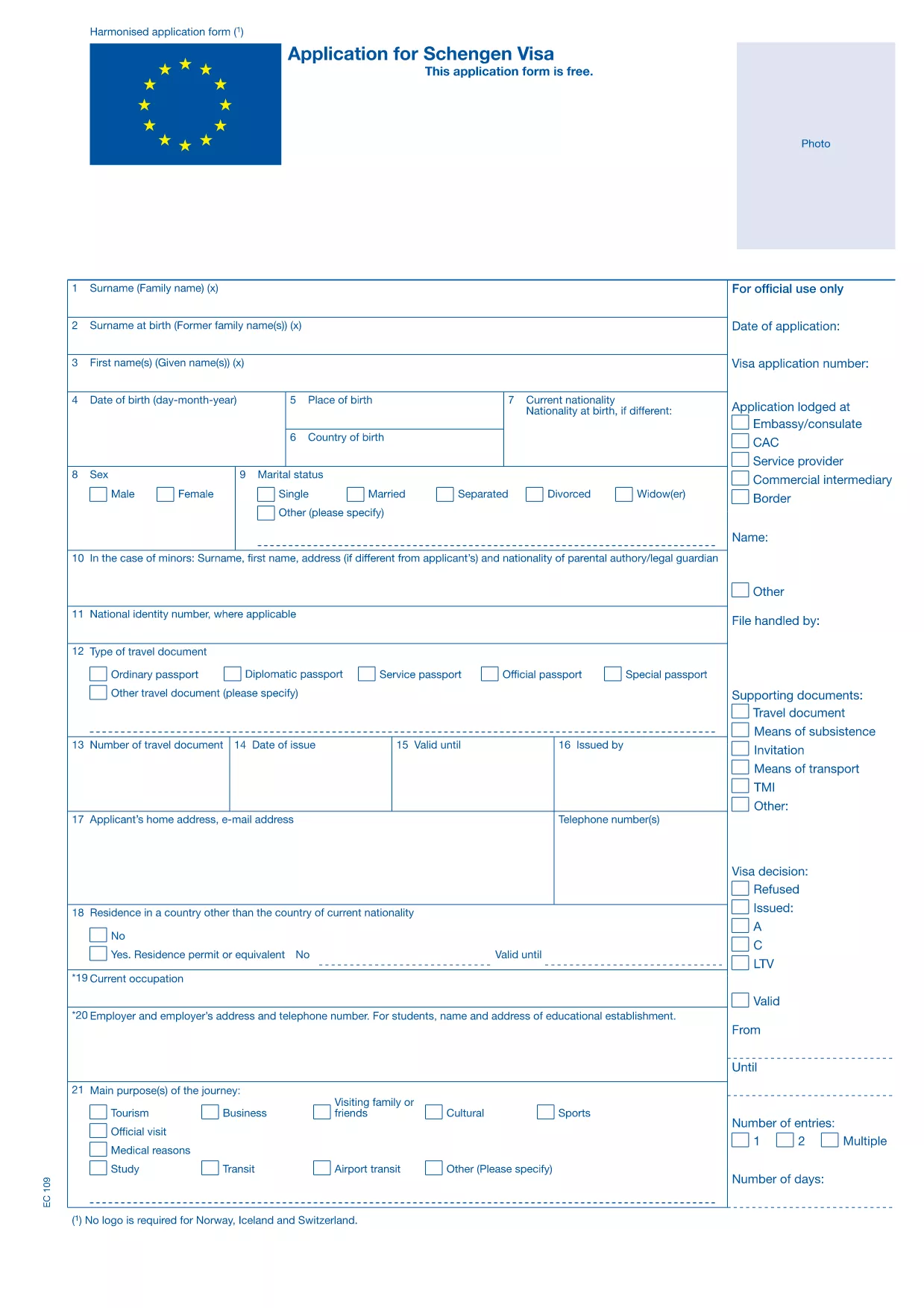
Planning to stay longer in the Schengen Area while visiting Portugal? You’ll need to submit a Schengen visa extension request. Our fillable PDF version of the Portugal Schengen visa extension form lets you complete the application quickly, securely, and without any extra software.

Why Use the Fillable PDF Form?

The fillable PDF is fully compatible with the official Schengen visa extension template used by Portuguese consulates. It provides:

  • Clickable fields that prevent transcription errors
  • Automatic saving so you never lose your progress
  • Instant validation of required fields
  • A clean, printable version ready for submission

How to Complete the Extension Form Online

Instead of downloading the PDF and opening it in a separate editor, simply click the "Fill out this form" button on this page. The Formize PDF Filler app will load in your browser, and you can start typing right away.

All sections—personal data, current visa details, reason for extension, and supporting documents—are clearly labeled. Follow the on‑screen prompts, and the app will highlight any missing information before you finish.

Common Mistakes to Avoid

  • Leaving required fields blank: The form will not submit if any mandatory field is empty.
  • Using the wrong passport number: Double‑check the number exactly as it appears on your passport.
  • Submitting an outdated photo: The photo must be recent (within the last six months) and meet Schengen specifications.
  • Forgetting to sign: The electronic signature field is required; otherwise the application is rejected.

Submission Guidelines & Processing Times

After completing the form, download the finished PDF and attach it to your email or upload it through the Portuguese consulate’s online portal, together with required supporting documents (flight itinerary, proof of accommodation, financial means, etc.). Processing typically takes 7‑10 business days, but it can vary during peak travel seasons.

Frequently Asked Questions

Find quick answers to the most common queries about the Portugal Schengen visa extension form below.

सामान्य प्रश्न
  • Can I extend my Schengen visa after it has already expired?

    No. Extensions must be requested before the current visa expires. Late requests are usually denied.

  • Do I need to provide a new passport photo for the extension?

    Yes. The photo must meet the same Schengen specifications as the original application and be taken within the last six months.

  • Is there a fee for the visa extension?

    Portugal charges a processing fee for extensions, which varies depending on the length of the requested stay. Check the consulate’s website for current rates.

  • How long can I stay in the Schengen Area after an approved extension?

    An approved extension can grant you up to an additional 90 days, but the total stay must not exceed 180 days within any 360‑day period.

  • What supporting documents are required?

    You’ll need proof of continued travel purpose (e.g., flight change confirmation), proof of sufficient funds, accommodation proof, and travel insurance covering the extended stay.

  • Can I submit the form in paper format instead of online?

    Yes, you can print the completed PDF and submit it in person, but the online submission is faster and reduces the chance of missing information.

  • How can I track the status of my extension request?

    After submission, the consulate will send you a reference number. Use this number on the consulate’s portal to check the processing status.

कैसे करें

Portugal Schengen visa extension को मुफ़्त में, ऑनलाइन 5 आसान स्टेप्स में कैसे भरें:

  1. 1
    Click the Fill‑out Button
    On this page, press the “Fill out this form” button. The Formize PDF Filler app will launch directly in your browser.
  2. 2
    Wait for the Filler to Load
    A few seconds may pass while the app initializes. Once the form appears, you’re ready to start entering data.
  3. 3
    Enter Your Information
    Complete each field—personal details, current visa info, reason for extension, and supporting documents. Required fields are marked with an asterisk.
  4. 4
    Review, Sign, and Save
    After filling the form, review every entry, add your electronic signature, and click “Save”. The completed PDF will download to your computer.
  5. 5
    Submit to the Portuguese Consulate
    Attach the saved PDF to your email or upload it through the consulate’s online portal along with the required supporting documents.
पीडीएफ फिलर एप तैयार करें
के बारे में

वीज़ा फॉर्म

Portugal Schengen visa extension वीज़ा रूपों में से एक है जो ऐसे दस्तावेज़ हैं जिनका उपयोग किसी विदेशी देश में प्रवेश करने के लिए वीज़ा के लिए आवेदन करने के लिए किया जाता है। वीजा एक दस्तावेज है जो एक विदेशी नागरिक को एक निर्दिष्ट अवधि के लिए किसी विदेशी देश में प्रवेश करने, रहने और कभी-कभी काम करने की अनुमति देता है। वीजा प्राप्त करने के लिए सटीक रूप और आवश्यकताएं देश और वीजा के प्रकार के अनुसार भिन्न होती हैं।

वीज़ा फॉर्म में आम तौर पर व्यक्तिगत जानकारी जैसे नाम, जन्म तिथि और पासपोर्ट जानकारी के साथ-साथ यात्रा के उद्देश्य और लंबाई, इच्छित गंतव्य और क्या आवेदक को पहले वीजा देने से मना कर दिया गया है या किसी देश से निर्वासित किया गया है, के बारे में जानकारी की आवश्यकता होती है। प्रपत्रों में पासपोर्ट, फोटोग्राफ और वित्तीय सहायता के प्रमाण जैसे सहायक दस्तावेजों की भी आवश्यकता हो सकती है।

संयुक्त राज्य अमेरिका में, सबसे आम वीज़ा फॉर्म DS-160 और DS-260 फॉर्म हैं। DS-160 फॉर्म का उपयोग गैर-आप्रवासी वीजा के लिए आवेदन करने के लिए किया जाता है, जबकि DS-260 फॉर्म का उपयोग अप्रवासी वीजा के लिए आवेदन करने के लिए किया जाता है। इन रूपों में आवेदक के व्यक्तिगत और यात्रा इतिहास के साथ-साथ पासपोर्ट, यात्रा यात्रा कार्यक्रम और वित्तीय रिकॉर्ड जैसे सहायक दस्तावेज़ों के बारे में विस्तृत जानकारी की आवश्यकता होती है।

अन्य देशों में अलग-अलग वीज़ा फॉर्म और आवश्यकताएं हो सकती हैं, लेकिन मूल प्रक्रिया में आमतौर पर वीज़ा आवेदन पूरा करना, सहायक दस्तावेज प्रदान करना और अमेरिकी दूतावास या वाणिज्य दूतावास में एक कांसुलर अधिकारी के साथ साक्षात्कार में भाग लेना शामिल है। यह ध्यान रखना महत्वपूर्ण है कि वीज़ा आवेदन प्रक्रिया जटिल और समय लेने वाली हो सकती है, और यह अनुशंसा की जाती है कि वीज़ा चाहने वाले व्यक्ति किसी अप्रवास वकील या अन्य योग्य पेशेवर से परामर्श करें ताकि यह सुनिश्चित हो सके कि सभी आवश्यक फॉर्म और आवश्यकताएं पूरी हो गई हैं।

विशेषताएं

पीडीएफ भराव

पीडीएफ फॉर्म ऑनलाइन भरने का सबसे आसान तरीका

  • जल्दी से Portugal Schengen visa extension भरें
    Portugal Schengen visa extension को जल्दी से ऑनलाइन भरने का कोई तरीका खोज रहे हैं? हमारे ऑनलाइन नि:शुल्क पीडीएफ फॉर्म फिलर के साथ, आप एक मिनट से भी कम समय में इस पीडीएफ दस्तावेज़ को संपादित करने और भरने का तरीका जानेंगे।
  • ऑनलाइन पीडीएफ संपादक का उपयोग करना आसान है
    पीडीएफ फाइलों को प्रिंट करने से तंग आ गए हैं ताकि आप उन्हें फिर से स्कैन करने और उन्हें वापस भेजने से पहले संपादित कर सकें? PDF दस्तावेज़ों को निःशुल्क ऑनलाइन संपादित करें। समय और कागज बचाने के लिए हमारे ऑनलाइन पीडीएफ संपादक का प्रयोग करें।
  • महान उपकरण, सभी प्लेटफार्म
    आश्चर्य है कि मैक पर Portugal Schengen visa extension कैसे भरें, या शायद पीडीएफ फिलर का मुफ्त में उपयोग कैसे करें? हमारे ऑनलाइन पीडीएफ टूल सभी प्लेटफॉर्म पर काम करते हैं।
  • सुरक्षित फ़ाइल भंडारण
    पूर्ण की गई "Portugal Schengen visa extension" फ़ाइलें Amazon क्लाउड होस्टिंग द्वारा प्रबंधित एक सुरक्षित डेटाबेस में संग्रहीत की जाती हैं। आप कभी भी अपनी फाइलों को हमारे सिस्टम से हटा सकते हैं। किसी भी स्थिति में, ये फ़ाइलें 24 घंटे के बाद स्वतः हटा दी जाती हैं।
  • {कीवर्ड} से चैट करें
    Chatize पर "Portugal Schengen visa extension" के साथ चैट करें, जो एक निःशुल्क पीडीएफ रीडर सहायक है। प्रश्न पूछें और "Portugal Schengen visa extension" से उत्तर प्राप्त करें। बस ऊपर दस्तावेज़ के साथ चैट करें बटन पर क्लिक करें।

फ़िलिंग सत्र मिटाएँ

चयनित फ़िलिंग सत्र को मिटाएँ? इस स्थिति में, फ़ॉर्म को पूरा करने में आपकी प्रगति खो जाएगी।

संपादन सत्र हटाएँ

चयनित संपादन सत्र हटाएँ? इस स्थिति में, फ़ॉर्म बनाने और संपादित करने में आपकी प्रगति नष्ट हो जाएगी।