
hamburger-menu icon
भाषा का चयन करें

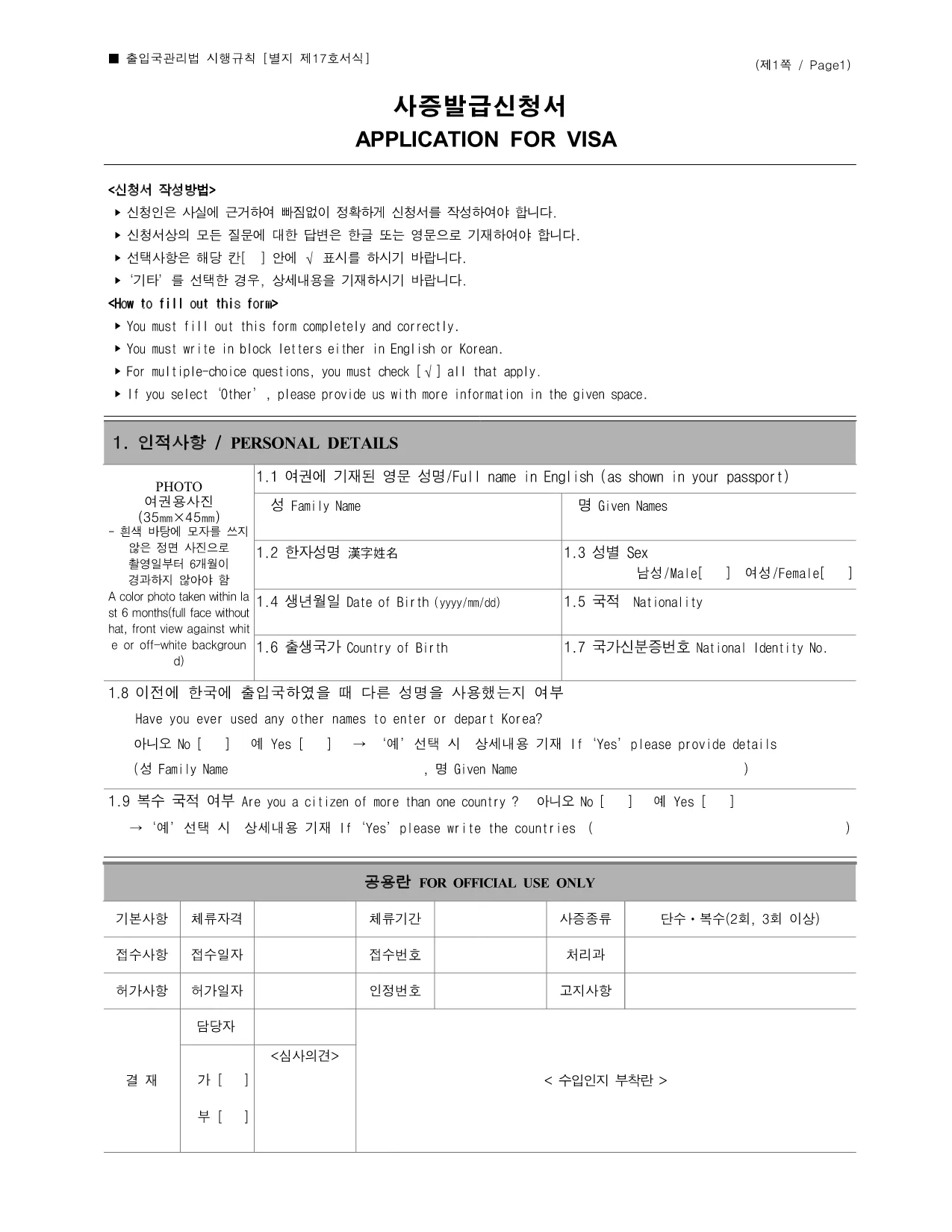
South Korea Visa Application Form (Fillable PDF)

  1. देश South Korea
  2. भाषा अंग्रेज़ी
  3. गतिविधि वीजा
  4. विभाग Immigration Office
फार्म को भरो
South Korea Visa Application Form (Fillable PDF)

Planning a trip, study program, or work assignment in the Republic of Korea? The first official step is to complete the South Korea Visa Application Form. This government‑issued form is now available as a fillable PDF, letting you enter data directly in your browser without printing or scanning.

Our page provides a direct link to the PDF, a simple online filling experience powered by Formize, and everything you need to know about each section of the form. Follow the guide below to avoid delays and increase the chance of approval.

Why use the fillable PDF? The fillable version preserves the exact layout required by Korean immigration, eliminates handwriting errors, and automatically validates many fields (e.g., date formats, passport numbers). Once completed, you can download a clean, printable copy ready for submission.

Below you’ll find a concise walkthrough of the form’s major parts, a checklist of supporting documents, and tips for a mistake‑free submission.

सामान्य प्रश्न
  • Is the fillable PDF the official version accepted by Korean immigration?

    Yes. The PDF hosted at the government link is the exact form used by the Korean Immigration Office. The fillable version keeps the original layout, so it is fully compliant.

  • Can I submit the PDF electronically, or do I need a printed copy?

    Most Korean consulates require a printed, signed copy. After filling it out online, print the final PDF, sign where indicated, and include it with your supporting documents.

  • What documents should I attach with the visa application?

    Typical attachments include a valid passport, recent passport‑size photo, flight itinerary, proof of accommodation, invitation letter (if applicable), and financial statements. Check the specific visa category for exact requirements.

  • Do I need to pay a visa fee before submitting the form?

    The visa fee is paid at the consulate or visa‑application center, not on the PDF. Bring cash, credit card, or the accepted payment method as indicated by the Korean mission handling your application.

  • How long does it take to process a South Korea visa?

    Processing times vary by visa type—tourist visas usually take 5‑10 business days, while work or student visas may require 2‑4 weeks. Submit well in advance of your travel date.

  • Can I edit the form after I have downloaded it?

    Yes. The fillable PDF remains editable until you sign it. Once signed, any further changes will require a new form to be completed.

  • What should I do if I make a mistake on the printed form?

    If you notice an error after printing, cross out the mistake with a single line, initial it, and write the correct information. For major errors, it’s best to start a new form to avoid confusion.

कैसे करें

South Korea visa application को मुफ़्त में, ऑनलाइन 5 आसान स्टेप्स में कैसे भरें:

  1. 1
    Click the Fill‑Out Button
    On this page, click the bright “Fill out this form” button. The Formize PDF Filler app will open in a new tab.
  2. 2
    Wait for the Formize Loader
    The app loads the official Korean visa PDF and prepares all fillable fields. This usually takes a few seconds.
  3. 3
    Enter Your Information
    Type directly into each field—passport number, travel dates, purpose of visit, etc. Required fields are highlighted, and invalid entries are flagged instantly.
  4. 4
    Review and Validate
    Use the “Validate” button to let Formize check for missing or incorrectly formatted data. Correct any warnings before proceeding.
  5. 5
    Save or Download
    When everything looks good, click “Save & Download”. You’ll receive a clean PDF you can print, email, or submit to the Korean consulate.
पीडीएफ फिलर एप तैयार करें
के बारे में

वीज़ा फॉर्म

South Korea visa application वीज़ा रूपों में से एक है जो ऐसे दस्तावेज़ हैं जिनका उपयोग किसी विदेशी देश में प्रवेश करने के लिए वीज़ा के लिए आवेदन करने के लिए किया जाता है। वीजा एक दस्तावेज है जो एक विदेशी नागरिक को एक निर्दिष्ट अवधि के लिए किसी विदेशी देश में प्रवेश करने, रहने और कभी-कभी काम करने की अनुमति देता है। वीजा प्राप्त करने के लिए सटीक रूप और आवश्यकताएं देश और वीजा के प्रकार के अनुसार भिन्न होती हैं।

वीज़ा फॉर्म में आम तौर पर व्यक्तिगत जानकारी जैसे नाम, जन्म तिथि और पासपोर्ट जानकारी के साथ-साथ यात्रा के उद्देश्य और लंबाई, इच्छित गंतव्य और क्या आवेदक को पहले वीजा देने से मना कर दिया गया है या किसी देश से निर्वासित किया गया है, के बारे में जानकारी की आवश्यकता होती है। प्रपत्रों में पासपोर्ट, फोटोग्राफ और वित्तीय सहायता के प्रमाण जैसे सहायक दस्तावेजों की भी आवश्यकता हो सकती है।

संयुक्त राज्य अमेरिका में, सबसे आम वीज़ा फॉर्म DS-160 और DS-260 फॉर्म हैं। DS-160 फॉर्म का उपयोग गैर-आप्रवासी वीजा के लिए आवेदन करने के लिए किया जाता है, जबकि DS-260 फॉर्म का उपयोग अप्रवासी वीजा के लिए आवेदन करने के लिए किया जाता है। इन रूपों में आवेदक के व्यक्तिगत और यात्रा इतिहास के साथ-साथ पासपोर्ट, यात्रा यात्रा कार्यक्रम और वित्तीय रिकॉर्ड जैसे सहायक दस्तावेज़ों के बारे में विस्तृत जानकारी की आवश्यकता होती है।

अन्य देशों में अलग-अलग वीज़ा फॉर्म और आवश्यकताएं हो सकती हैं, लेकिन मूल प्रक्रिया में आमतौर पर वीज़ा आवेदन पूरा करना, सहायक दस्तावेज प्रदान करना और अमेरिकी दूतावास या वाणिज्य दूतावास में एक कांसुलर अधिकारी के साथ साक्षात्कार में भाग लेना शामिल है। यह ध्यान रखना महत्वपूर्ण है कि वीज़ा आवेदन प्रक्रिया जटिल और समय लेने वाली हो सकती है, और यह अनुशंसा की जाती है कि वीज़ा चाहने वाले व्यक्ति किसी अप्रवास वकील या अन्य योग्य पेशेवर से परामर्श करें ताकि यह सुनिश्चित हो सके कि सभी आवश्यक फॉर्म और आवश्यकताएं पूरी हो गई हैं।

विशेषताएं

पीडीएफ भराव

पीडीएफ फॉर्म ऑनलाइन भरने का सबसे आसान तरीका

  • जल्दी से South Korea visa application भरें
    South Korea visa application को जल्दी से ऑनलाइन भरने का कोई तरीका खोज रहे हैं? हमारे ऑनलाइन नि:शुल्क पीडीएफ फॉर्म फिलर के साथ, आप एक मिनट से भी कम समय में इस पीडीएफ दस्तावेज़ को संपादित करने और भरने का तरीका जानेंगे।
  • ऑनलाइन पीडीएफ संपादक का उपयोग करना आसान है
    पीडीएफ फाइलों को प्रिंट करने से तंग आ गए हैं ताकि आप उन्हें फिर से स्कैन करने और उन्हें वापस भेजने से पहले संपादित कर सकें? PDF दस्तावेज़ों को निःशुल्क ऑनलाइन संपादित करें। समय और कागज बचाने के लिए हमारे ऑनलाइन पीडीएफ संपादक का प्रयोग करें।
  • महान उपकरण, सभी प्लेटफार्म
    आश्चर्य है कि मैक पर South Korea visa application कैसे भरें, या शायद पीडीएफ फिलर का मुफ्त में उपयोग कैसे करें? हमारे ऑनलाइन पीडीएफ टूल सभी प्लेटफॉर्म पर काम करते हैं।
  • सुरक्षित फ़ाइल भंडारण
    पूर्ण की गई "South Korea visa application" फ़ाइलें Amazon क्लाउड होस्टिंग द्वारा प्रबंधित एक सुरक्षित डेटाबेस में संग्रहीत की जाती हैं। आप कभी भी अपनी फाइलों को हमारे सिस्टम से हटा सकते हैं। किसी भी स्थिति में, ये फ़ाइलें 24 घंटे के बाद स्वतः हटा दी जाती हैं।
  • {कीवर्ड} से चैट करें
    Chatize पर "South Korea visa application" के साथ चैट करें, जो एक निःशुल्क पीडीएफ रीडर सहायक है। प्रश्न पूछें और "South Korea visa application" से उत्तर प्राप्त करें। बस ऊपर दस्तावेज़ के साथ चैट करें बटन पर क्लिक करें।

फ़िलिंग सत्र मिटाएँ

चयनित फ़िलिंग सत्र को मिटाएँ? इस स्थिति में, फ़ॉर्म को पूरा करने में आपकी प्रगति खो जाएगी।

संपादन सत्र हटाएँ

चयनित संपादन सत्र हटाएँ? इस स्थिति में, फ़ॉर्म बनाने और संपादित करने में आपकी प्रगति नष्ट हो जाएगी।