
hamburger-menu icon
भाषा का चयन करें

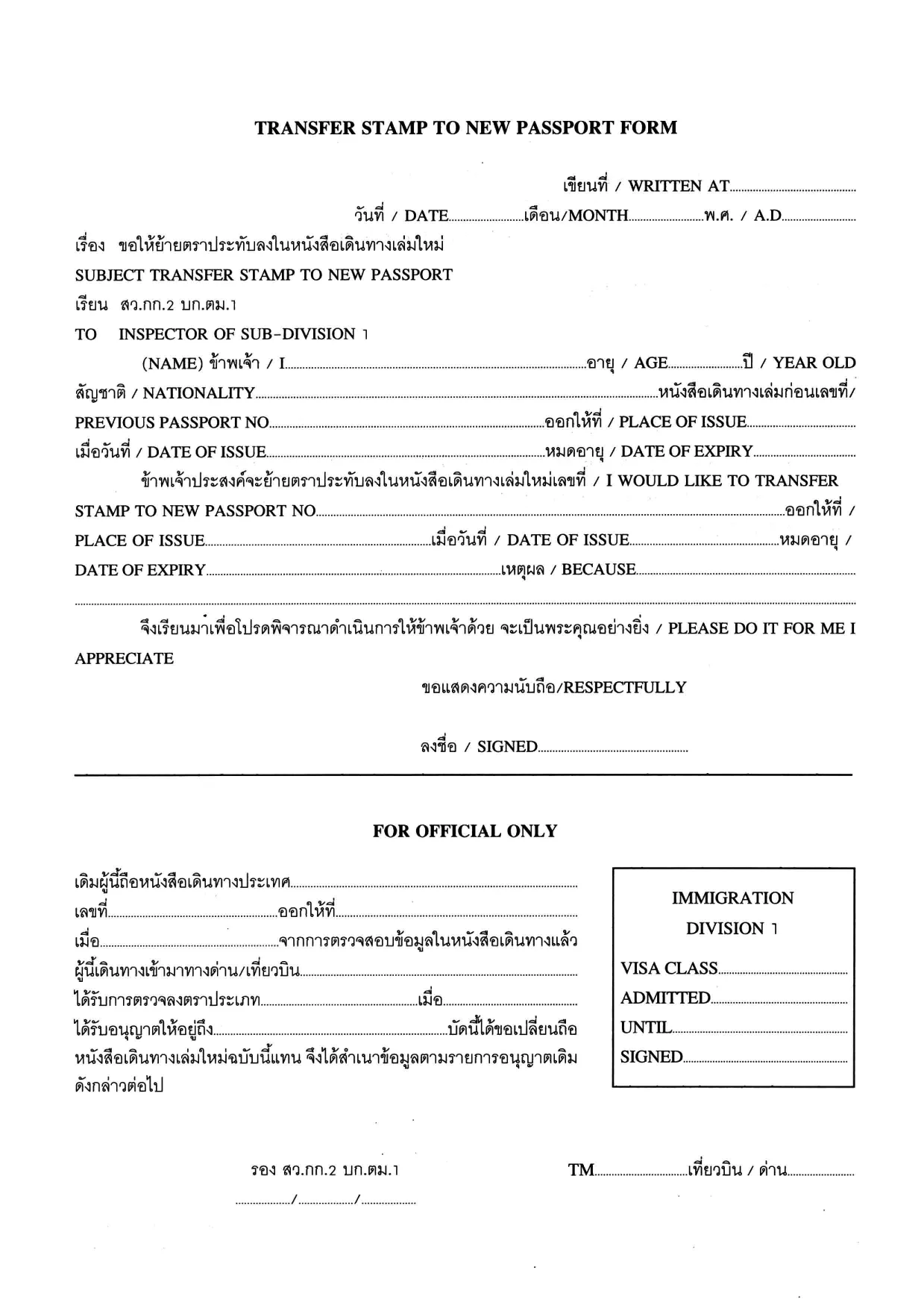
Transfer Stamp to New Passport Form (Fillable PDF)

  1. भाषा अंग्रेज़ी थाई
  2. देश थाईलैंड
  3. गतिविधि वीजा
फार्म को भरो
Transfer Stamp to New Passport Form (Fillable PDF)

When you receive a new passport, you must transfer any valid visa or entry stamp from your old passport to the new one. The Transfer Stamp to New Passport Form is the official document used by many embassies and consulates to record this transfer.

Our fillable PDF lets you complete the form quickly, without printing, scanning, or hand‑writing. Simply click the button below, let the Formize PDF Filler load, and start typing. The form saves your progress automatically, so you can return later if needed.

Why You Need This Form

Without a transferred stamp, your existing visa may be considered invalid, which can lead to denied entry, delays at the border, or the need to re‑apply for a new visa. The transfer form ensures that immigration authorities recognize the continuity of your visa status.

How to Fill the Transfer Stamp Form Online

Follow the step‑by‑step guide in the How To section below. The online Formize filler mirrors the original PDF layout, so you’ll know exactly where each piece of information belongs.

Required Documents and Common Mistakes

  • Old passport – copy of the page with the original stamp.
  • New passport – copy of the biographic page.
  • Embassy or consular letter (if required).

Common errors include misspelling names, entering an incorrect passport number, or forgetting to sign the form. Double‑check each field before saving.

Download & Start Filling Instantly

Click the button below to open the fillable PDF in the Formize PDF Filler app. No additional software is needed – everything runs securely in your browser.

Fill out this form

सामान्य प्रश्न
  • Who must use the Transfer Stamp to New Passport Form?

    Anyone who has a valid visa or entry stamp in an old passport that is being replaced with a new passport must complete this form to keep the visa active.

  • Can I fill out the form on a mobile device?

    Yes. The Formize PDF Filler works on all modern browsers, including smartphones and tablets.

  • Do I need to print the form after filling it online?

    Most embassies accept a digitally signed PDF, but check the specific instructions of the consulate you are dealing with.

  • What documents should I attach with the completed form?

    Attach a clear copy of the page containing the original stamp from the old passport, a copy of the biographic page of the new passport, and any embassy letter if required.

  • Is the information I enter secure?

    Formize runs over HTTPS, encrypting all data between your browser and our servers. The PDF is stored only on your device unless you choose to upload it.

  • Can I edit the form after I have downloaded it?

    Yes, you can reopen the saved PDF in Formize to make additional changes before final submission.

  • What should I do if I make a mistake?

    Simply correct the field in the filler and re‑save. If you have already submitted the form, contact the embassy for guidance on re‑issuing the document.

  • Is there a fee for using the Transfer Stamp form?

    The form itself is free to download. Any processing or visa transfer fees are set by the embassy or consulate.

कैसे करें

transfer stamp new passport को मुफ़्त में, ऑनलाइन 5 आसान स्टेप्स में कैसे भरें:

  1. 1
    Click the Fill‑out Button
    Press the “Fill out this form” button on the page. The Formize PDF Filler will open in a new browser tab.
  2. 2
    Wait for the Formizer to Load
    The fillable PDF loads automatically. A loading indicator shows when the app is ready.
  3. 3
    Enter Your Information
    Type directly into each field – name, passport numbers, visa details, and dates. Use the tab key to move quickly between fields.
  4. 4
    Save Your Progress
    The filler saves your entries in real time. You can close the tab and return later without losing data.
  5. 5
    Download or Submit
    When finished, click “Download PDF” to save the completed form, or follow your embassy’s instructions to submit it electronically.
पीडीएफ फिलर एप तैयार करें
के बारे में

वीज़ा फॉर्म

transfer stamp new passport वीज़ा रूपों में से एक है जो ऐसे दस्तावेज़ हैं जिनका उपयोग किसी विदेशी देश में प्रवेश करने के लिए वीज़ा के लिए आवेदन करने के लिए किया जाता है। वीजा एक दस्तावेज है जो एक विदेशी नागरिक को एक निर्दिष्ट अवधि के लिए किसी विदेशी देश में प्रवेश करने, रहने और कभी-कभी काम करने की अनुमति देता है। वीजा प्राप्त करने के लिए सटीक रूप और आवश्यकताएं देश और वीजा के प्रकार के अनुसार भिन्न होती हैं।

वीज़ा फॉर्म में आम तौर पर व्यक्तिगत जानकारी जैसे नाम, जन्म तिथि और पासपोर्ट जानकारी के साथ-साथ यात्रा के उद्देश्य और लंबाई, इच्छित गंतव्य और क्या आवेदक को पहले वीजा देने से मना कर दिया गया है या किसी देश से निर्वासित किया गया है, के बारे में जानकारी की आवश्यकता होती है। प्रपत्रों में पासपोर्ट, फोटोग्राफ और वित्तीय सहायता के प्रमाण जैसे सहायक दस्तावेजों की भी आवश्यकता हो सकती है।

संयुक्त राज्य अमेरिका में, सबसे आम वीज़ा फॉर्म DS-160 और DS-260 फॉर्म हैं। DS-160 फॉर्म का उपयोग गैर-आप्रवासी वीजा के लिए आवेदन करने के लिए किया जाता है, जबकि DS-260 फॉर्म का उपयोग अप्रवासी वीजा के लिए आवेदन करने के लिए किया जाता है। इन रूपों में आवेदक के व्यक्तिगत और यात्रा इतिहास के साथ-साथ पासपोर्ट, यात्रा यात्रा कार्यक्रम और वित्तीय रिकॉर्ड जैसे सहायक दस्तावेज़ों के बारे में विस्तृत जानकारी की आवश्यकता होती है।

अन्य देशों में अलग-अलग वीज़ा फॉर्म और आवश्यकताएं हो सकती हैं, लेकिन मूल प्रक्रिया में आमतौर पर वीज़ा आवेदन पूरा करना, सहायक दस्तावेज प्रदान करना और अमेरिकी दूतावास या वाणिज्य दूतावास में एक कांसुलर अधिकारी के साथ साक्षात्कार में भाग लेना शामिल है। यह ध्यान रखना महत्वपूर्ण है कि वीज़ा आवेदन प्रक्रिया जटिल और समय लेने वाली हो सकती है, और यह अनुशंसा की जाती है कि वीज़ा चाहने वाले व्यक्ति किसी अप्रवास वकील या अन्य योग्य पेशेवर से परामर्श करें ताकि यह सुनिश्चित हो सके कि सभी आवश्यक फॉर्म और आवश्यकताएं पूरी हो गई हैं।

विशेषताएं

पीडीएफ भराव

पीडीएफ फॉर्म ऑनलाइन भरने का सबसे आसान तरीका

  • जल्दी से transfer stamp new passport भरें
    transfer stamp new passport को जल्दी से ऑनलाइन भरने का कोई तरीका खोज रहे हैं? हमारे ऑनलाइन नि:शुल्क पीडीएफ फॉर्म फिलर के साथ, आप एक मिनट से भी कम समय में इस पीडीएफ दस्तावेज़ को संपादित करने और भरने का तरीका जानेंगे।
  • ऑनलाइन पीडीएफ संपादक का उपयोग करना आसान है
    पीडीएफ फाइलों को प्रिंट करने से तंग आ गए हैं ताकि आप उन्हें फिर से स्कैन करने और उन्हें वापस भेजने से पहले संपादित कर सकें? PDF दस्तावेज़ों को निःशुल्क ऑनलाइन संपादित करें। समय और कागज बचाने के लिए हमारे ऑनलाइन पीडीएफ संपादक का प्रयोग करें।
  • महान उपकरण, सभी प्लेटफार्म
    आश्चर्य है कि मैक पर transfer stamp new passport कैसे भरें, या शायद पीडीएफ फिलर का मुफ्त में उपयोग कैसे करें? हमारे ऑनलाइन पीडीएफ टूल सभी प्लेटफॉर्म पर काम करते हैं।
  • सुरक्षित फ़ाइल भंडारण
    पूर्ण की गई "transfer stamp new passport" फ़ाइलें Amazon क्लाउड होस्टिंग द्वारा प्रबंधित एक सुरक्षित डेटाबेस में संग्रहीत की जाती हैं। आप कभी भी अपनी फाइलों को हमारे सिस्टम से हटा सकते हैं। किसी भी स्थिति में, ये फ़ाइलें 24 घंटे के बाद स्वतः हटा दी जाती हैं।
  • {कीवर्ड} से चैट करें
    Chatize पर "transfer stamp new passport" के साथ चैट करें, जो एक निःशुल्क पीडीएफ रीडर सहायक है। प्रश्न पूछें और "transfer stamp new passport" से उत्तर प्राप्त करें। बस ऊपर दस्तावेज़ के साथ चैट करें बटन पर क्लिक करें।

फ़िलिंग सत्र मिटाएँ

चयनित फ़िलिंग सत्र को मिटाएँ? इस स्थिति में, फ़ॉर्म को पूरा करने में आपकी प्रगति खो जाएगी।

संपादन सत्र हटाएँ

चयनित संपादन सत्र हटाएँ? इस स्थिति में, फ़ॉर्म बनाने और संपादित करने में आपकी प्रगति नष्ट हो जाएगी।