
hamburger-menu icon
भाषा का चयन करें

BMV 4523 Fillable PDF Form – Download & Complete Online

  1. भाषा अंग्रेज़ी
  2. देश अमेरीका
  3. गतिविधि वाहन पंजीकरण
  4. विभाग Bureau of Motor Vehicles
फार्म को भरो
BMV 4523 Fillable PDF Form – Download & Complete Online

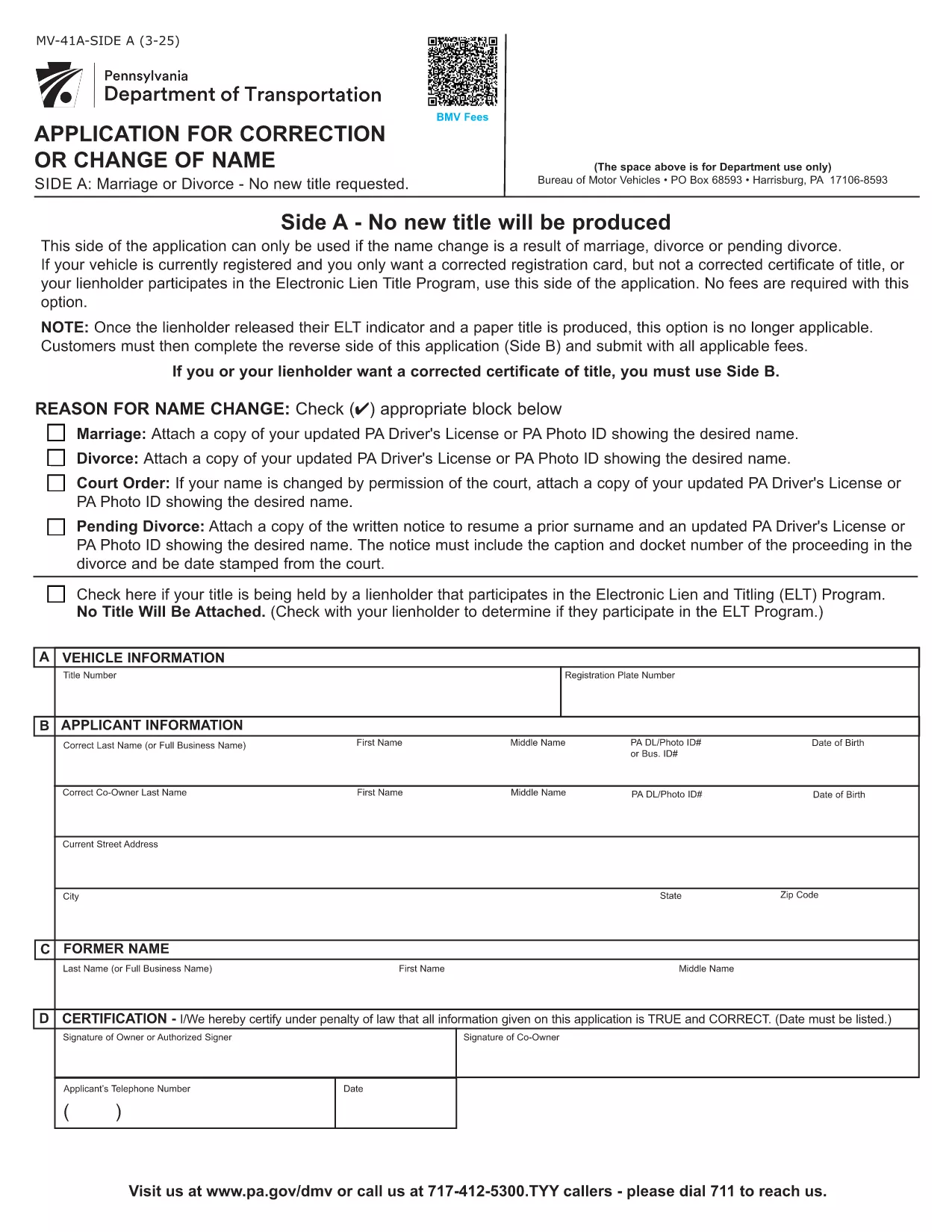
The BMV 4523 is the Pennsylvania Bureau of Motor Vehicles' official form used to request a correction or change of name on a vehicle title, or to update registration details after a marriage, divorce, or other legal name change. This fillable PDF lets you complete the form quickly, securely, and without printing.

Our integrated Formize PDF Filler loads the document directly in your browser, so you can type, sign, and save the completed form in minutes. No extra software required.

Key Features of the BMV 4523 Fillable PDF

  • Editable fields for personal information, vehicle details, and lienholder data.
  • Built‑in validation to ensure required fields are completed.
  • Electronic signature support – print only if a wet signature is required.
  • Direct download of the original PDF from the Pennsylvania BMV website.

Why Use an Online Fillable Form?

Filling out BMV 4523 on paper can lead to errors, illegible handwriting, and delays. With the online fillable version you get:

  • Instant error checking.
  • Ability to save a draft and return later.
  • One‑click PDF download for submission.

Follow the simple steps below to complete your BMV 4523 form and avoid common pitfalls.

सामान्य प्रश्न
  • What is the purpose of BMV Form 4523?

    BMV 4523 is used to request a correction or change of name on a vehicle title or registration when the change results from marriage, divorce, or a legal name change.

  • Do I need a notary for this form?

    A notary is not required for BMV 4523, but you must provide a certified copy of the legal name‑change document (marriage certificate, divorce decree, etc.).

  • Can I submit the form electronically?

    Pennsylvania BMV currently accepts only printed and signed copies. Use the fillable PDF to avoid errors, then print and mail it.

  • How long does processing take?

    Processing typically takes 7‑10 business days after the BMV receives the completed form and supporting documents.

  • What if I make a mistake after submitting?

    Contact your local BMV office immediately. Minor errors can often be corrected with a supplemental statement; major errors may require a new form.

  • Is there a fee for filing BMV 4523?

    Yes, a standard processing fee applies. Check the latest fee schedule on the Pennsylvania BMV website.

  • Can I use this form for a vehicle that is still financed?

    Yes, but you must include the lienholder’s information and obtain their signature if required.

  • What supporting documents are needed?

    A certified copy of the legal name‑change document, current vehicle title, and any lienholder authorization if applicable.

कैसे करें

BMV 4523 को मुफ़्त में, ऑनलाइन 5 आसान स्टेप्स में कैसे भरें:

  1. 1
    Open the Fillable Form
    Click the "Fill out this form" button on this page. The Formize PDF Filler app will load the BMV 4523 PDF directly in your browser.
  2. 2
    Enter Your Information
    Type into each highlighted field – personal details, vehicle information, and any name‑change documentation. The app validates required fields in real time.
  3. 3
    Add Your Signature
    Use the built‑in electronic signature tool to sign the form. If a wet signature is required, print the completed PDF after saving.
  4. 4
    Save or Download
    When all fields are complete, click "Save" to store a copy in your device or click "Download" to get the final PDF ready for submission to the BMV.
  5. 5
    Submit to the BMV
    Mail or deliver the printed PDF to your local Pennsylvania BMV office, or follow any electronic submission instructions provided by the agency.
पीडीएफ फिलर एप तैयार करें
के बारे में

वाहन पंजीकरण प्रपत्र

यदि आप एक मोटर वाहन, ट्रेलर या नाव के मालिक हैं या पट्टे पर हैं, तो आपको अपने वाहन को कानूनी रूप से पंजीकृत और सुरक्षित रखने के लिए कुछ दायित्वों को पूरा करना होगा।

BMV 4523 वाहन पंजीकरण प्रपत्रों में से एक है जो ऐसे दस्तावेज़ हैं जिनका उपयोग प्रासंगिक राज्य या प्रांतीय प्राधिकरण के साथ मोटर वाहन को पंजीकृत करने के लिए किया जाता है। ये फॉर्म आमतौर पर तब आवश्यक होते हैं जब कोई व्यक्ति नया या इस्तेमाल किया हुआ वाहन खरीदता है या जब वे वाहन के साथ किसी नए राज्य या प्रांत में जाते हैं।

वाहन पंजीकरण के लिए आवश्यक सटीक आवश्यकताएं और फॉर्म स्थान के अनुसार भिन्न हो सकते हैं, लेकिन आम तौर पर, प्रक्रिया में वाहन, मालिक और वाहन पर किसी भी ग्रहणाधिकार के बारे में जानकारी प्रदान करना शामिल होता है।

पंजीकरण फॉर्म और शुल्क जमा करने के बाद, राज्य या प्रांतीय प्राधिकरण वाहन के मालिक को पंजीकरण प्रमाणपत्र या लाइसेंस प्लेट जारी करेगा। यह पंजीकरण वाहन को सार्वजनिक सड़कों और राजमार्गों पर कानूनी रूप से संचालित करने की अनुमति देता है।

विशेषताएं

पीडीएफ भराव

पीडीएफ फॉर्म ऑनलाइन भरने का सबसे आसान तरीका

  • जल्दी से BMV 4523 भरें
    BMV 4523 को जल्दी से ऑनलाइन भरने का कोई तरीका खोज रहे हैं? हमारे ऑनलाइन नि:शुल्क पीडीएफ फॉर्म फिलर के साथ, आप एक मिनट से भी कम समय में इस पीडीएफ दस्तावेज़ को संपादित करने और भरने का तरीका जानेंगे।
  • ऑनलाइन पीडीएफ संपादक का उपयोग करना आसान है
    पीडीएफ फाइलों को प्रिंट करने से तंग आ गए हैं ताकि आप उन्हें फिर से स्कैन करने और उन्हें वापस भेजने से पहले संपादित कर सकें? PDF दस्तावेज़ों को निःशुल्क ऑनलाइन संपादित करें। समय और कागज बचाने के लिए हमारे ऑनलाइन पीडीएफ संपादक का प्रयोग करें।
  • महान उपकरण, सभी प्लेटफार्म
    आश्चर्य है कि मैक पर BMV 4523 कैसे भरें, या शायद पीडीएफ फिलर का मुफ्त में उपयोग कैसे करें? हमारे ऑनलाइन पीडीएफ टूल सभी प्लेटफॉर्म पर काम करते हैं।
  • सुरक्षित फ़ाइल भंडारण
    पूर्ण की गई "BMV 4523" फ़ाइलें Amazon क्लाउड होस्टिंग द्वारा प्रबंधित एक सुरक्षित डेटाबेस में संग्रहीत की जाती हैं। आप कभी भी अपनी फाइलों को हमारे सिस्टम से हटा सकते हैं। किसी भी स्थिति में, ये फ़ाइलें 24 घंटे के बाद स्वतः हटा दी जाती हैं।
  • {कीवर्ड} से चैट करें
    Chatize पर "BMV 4523" के साथ चैट करें, जो एक निःशुल्क पीडीएफ रीडर सहायक है। प्रश्न पूछें और "BMV 4523" से उत्तर प्राप्त करें। बस ऊपर दस्तावेज़ के साथ चैट करें बटन पर क्लिक करें।

फ़िलिंग सत्र मिटाएँ

चयनित फ़िलिंग सत्र को मिटाएँ? इस स्थिति में, फ़ॉर्म को पूरा करने में आपकी प्रगति खो जाएगी।

संपादन सत्र हटाएँ

चयनित संपादन सत्र हटाएँ? इस स्थिति में, फ़ॉर्म बनाने और संपादित करने में आपकी प्रगति नष्ट हो जाएगी।