
hamburger-menu icon
भाषा का चयन करें

DL 520 – Employer Testing Program Application (California DMV)

  1. भाषा अंग्रेज़ी
  2. देश अमेरीका
  3. गतिविधि वाहन पंजीकरण
  4. विभाग California DMV
फार्म को भरो
DL 520 – Employer Testing Program Application (California DMV)

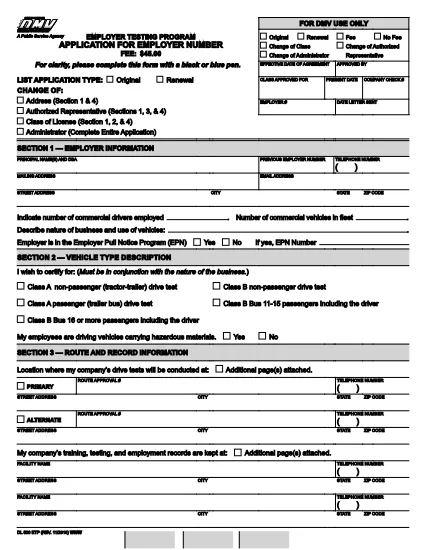
The DL 520 is the California Department of Motor Vehicles (DMV) application used by employers to obtain an employer number for the Employer Testing Program (ETP). This program allows qualified organizations to issue Certificates of Driving Skill (DL 170 ETP) to employees who operate motor vehicles in safety‑sensitive positions.

What is the DL 520 Form?

The DL 520 form collects essential information about your business, the types of testing you will conduct, and your compliance with California Vehicle Code sections related to employer‑run testing programs. Once approved, you receive an employer number that authorizes you to manage driver‑skill testing under the ETP.

Who Must Complete the DL 520?

  • Employers in California who need to test employees for driving‑skill certification (e.g., transportation, construction, utilities).
  • Companies that wish to issue DL 170 ETP certificates to qualified drivers.
  • Any organization that conducts mandatory drug, alcohol, or skills testing required by state law.

How to Fill Out the DL 520 Online with Formize

Instead of downloading, printing, and scanning, you can complete the form directly on our site:

  1. Click the “Fill out this form” button on the page.
  2. Wait a few seconds while the Formize PDF Filler app loads the fillable DL 520 PDF.
  3. Enter your employer information, testing procedures, and contact details in the highlighted fields.
  4. Review each section for accuracy; required fields are marked with an asterisk (*).
  5. When finished, click Save & Download to get a completed PDF you can email or print for submission.

The fillable PDF retains the official DMV layout, so the California DMV will accept it without any modifications.

Common Mistakes to Avoid

  • Leaving required fields blank – the DMV will reject the application.
  • Using an outdated version of the form – always use the latest PDF (linked above).
  • Incorrect employer number format – double‑check the 8‑digit number if you already have one.
  • Missing signatures – both the employer representative and the DMV inspector must sign.
  • Submitting a scanned image of a handwritten form – the fillable PDF ensures legibility.

Where to Submit the Completed Form

After saving your completed DL 520 PDF, mail or fax it to the address listed on the form’s last page. You may also deliver a printed copy to your local DMV office. Keep a copy for your records.

Need help? Review the FAQs below or contact your nearest California DMV office.

सामान्य प्रश्न
  • Do I need to print the DL 520 after filling it online?

    The California DMV accepts a printable PDF. You can either submit the electronic file by fax or print a hard copy for mailing.

  • How long does it take to get an employer number after submitting DL 520?

    Processing typically takes 7‑10 business days once the DMV receives a complete and correctly signed application.

  • Can I use the DL 520 for multiple locations?

    Yes. The employer number applies to all locations under the same legal entity, but each site must follow the same testing procedures.

  • What if I make a mistake after downloading the completed PDF?

    You must correct the error on a new copy of the form. The DMV does not accept handwritten alterations on a submitted PDF.

  • Is there a filing fee for the DL 520 application?

    There is no fee to submit the DL 520 itself, but the DMV may charge fees for issuing the employer number and subsequent certificates.

  • Do I need a separate DL 520 for each type of test (drug, alcohol, skill)?

    A single DL 520 authorizes all testing types covered under the Employer Testing Program, provided they are described in the application.

कैसे करें

DL 520 को मुफ़्त में, ऑनलाइन 4 आसान स्टेप्स में कैसे भरें:

  1. 1
    Open the Fillable Form
    Click the “Fill out this form” button on the page. The Formize PDF Filler will load the DL 520 PDF automatically.
  2. 2
    Enter Your Information
    Type your employer name, address, testing procedures, and other required details into the highlighted fields.
  3. 3
    Review and Save
    Check every section for completeness, then click “Save & Download” to obtain a completed PDF ready for submission.
  4. 4
    Submit to the DMV
    Print the saved PDF (if required) and mail, fax, or deliver it to your local California DMV office as instructed on the form.
पीडीएफ फिलर एप तैयार करें
के बारे में

वाहन पंजीकरण प्रपत्र

DL 520 डीएमवी फॉर्मों में से एक है, जिसे मोटर वाहन विभाग फॉर्म के रूप में भी जाना जाता है, जो मोटर वाहनों से संबंधित विभिन्न लेनदेन और प्रक्रियाओं में उपयोग किए जाने वाले दस्तावेज हैं। DMV एक सरकारी एजेंसी है जो ड्राइवर लाइसेंसिंग, वाहन पंजीकरण और मोटर वाहन कानूनों को लागू करने के लिए जिम्मेदार है। उपलब्ध विशिष्ट DMV फॉर्म क्षेत्राधिकार के अनुसार भिन्न हो सकते हैं, लेकिन यहां कुछ सामान्य उदाहरण दिए गए हैं:

ड्राइवर लाइसेंस फॉर्म: इन फॉर्म का उपयोग ड्राइवर के लाइसेंस के लिए आवेदन करने या परिवर्तन या नवीनीकरण का अनुरोध करने के लिए किया जाता है। उन्हें आम तौर पर व्यक्तिगत जानकारी, पहचान के प्रमाण की आवश्यकता होती है, और इसमें चिकित्सा जानकारी या ड्राइविंग इतिहास के अनुभाग शामिल हो सकते हैं।

वाहन पंजीकरण फॉर्म: इन फॉर्मों का उपयोग डीएमवी के साथ मोटर वाहन को पंजीकृत करने के लिए किया जाता है। उन्हें वाहन की जानकारी, स्वामित्व विवरण और बीमा के प्रमाण की आवश्यकता होती है।

टाइटल ट्रांसफर फॉर्म: वाहन खरीदते या बेचते समय, इन फॉर्मों का उपयोग एक पक्ष से दूसरे पक्ष को स्वामित्व हस्तांतरित करने के लिए किया जाता है। उन्हें खरीदार, विक्रेता, वाहन विवरण के बारे में जानकारी की आवश्यकता होती है और इसमें बिक्री का बिल भी शामिल हो सकता है।

वाहन दायित्व प्रपत्र जारी करना: किसी वाहन के स्वामित्व को बेचते या स्थानांतरित करते समय, ये प्रपत्र डीएमवी को सूचित करते हैं कि विक्रेता अब वाहन के लिए जिम्मेदार नहीं है। यह विक्रेता को बिक्री के बाद वाहन से जुड़ी दुर्घटनाओं या घटनाओं के लिए दायित्व से बचाने में मदद करता है।

लाइसेंस प्लेट और पंजीकरण नवीनीकरण फॉर्म: इन फॉर्मों का उपयोग वाहन पंजीकरण को नवीनीकृत करने या नए लाइसेंस प्लेटों का अनुरोध करने के लिए किया जाता है। उन्हें आम तौर पर पंजीकृत मालिक, वर्तमान पंजीकरण विवरण और लागू शुल्क के भुगतान के बारे में जानकारी की आवश्यकता होती है।

ड्राइविंग रिकॉर्ड अनुरोध फॉर्म: ये फॉर्म व्यक्तियों को डीएमवी से अपने ड्राइविंग रिकॉर्ड का अनुरोध करने की अनुमति देते हैं, जो ड्राइविंग उल्लंघन, लाइसेंस स्थिति और अन्य प्रासंगिक विवरणों के बारे में जानकारी प्रदान करते हैं।

विशेषता या वैयक्तिकृत लाइसेंस प्लेट फॉर्म: इन फॉर्मों का उपयोग वैयक्तिकृत या विशिष्ट लाइसेंस प्लेटों के लिए आवेदन करने के लिए किया जाता है, जो व्यक्तियों को विशिष्ट पात्रों या डिज़ाइन के साथ अपनी लाइसेंस प्लेट को अनुकूलित करने की अनुमति देते हैं।

ये उन अनेक प्रपत्रों के कुछ उदाहरण हैं जो DMV के माध्यम से उपलब्ध हो सकते हैं। विशिष्ट फॉर्म और आवश्यकताएं क्षेत्राधिकार के अनुसार अलग-अलग हो सकती हैं, इसलिए अपनी विशेष जरूरतों के लिए सही फॉर्म प्राप्त करने के लिए स्थानीय डीएमवी वेबसाइट से परामर्श करना या डीएमवी कार्यालय में जाना महत्वपूर्ण है।

विशेषताएं

पीडीएफ भराव

पीडीएफ फॉर्म ऑनलाइन भरने का सबसे आसान तरीका

  • जल्दी से DL 520 भरें
    DL 520 को जल्दी से ऑनलाइन भरने का कोई तरीका खोज रहे हैं? हमारे ऑनलाइन नि:शुल्क पीडीएफ फॉर्म फिलर के साथ, आप एक मिनट से भी कम समय में इस पीडीएफ दस्तावेज़ को संपादित करने और भरने का तरीका जानेंगे।
  • ऑनलाइन पीडीएफ संपादक का उपयोग करना आसान है
    पीडीएफ फाइलों को प्रिंट करने से तंग आ गए हैं ताकि आप उन्हें फिर से स्कैन करने और उन्हें वापस भेजने से पहले संपादित कर सकें? PDF दस्तावेज़ों को निःशुल्क ऑनलाइन संपादित करें। समय और कागज बचाने के लिए हमारे ऑनलाइन पीडीएफ संपादक का प्रयोग करें।
  • महान उपकरण, सभी प्लेटफार्म
    आश्चर्य है कि मैक पर DL 520 कैसे भरें, या शायद पीडीएफ फिलर का मुफ्त में उपयोग कैसे करें? हमारे ऑनलाइन पीडीएफ टूल सभी प्लेटफॉर्म पर काम करते हैं।
  • सुरक्षित फ़ाइल भंडारण
    पूर्ण की गई "DL 520" फ़ाइलें Amazon क्लाउड होस्टिंग द्वारा प्रबंधित एक सुरक्षित डेटाबेस में संग्रहीत की जाती हैं। आप कभी भी अपनी फाइलों को हमारे सिस्टम से हटा सकते हैं। किसी भी स्थिति में, ये फ़ाइलें 24 घंटे के बाद स्वतः हटा दी जाती हैं।
  • {कीवर्ड} से चैट करें
    Chatize पर "DL 520" के साथ चैट करें, जो एक निःशुल्क पीडीएफ रीडर सहायक है। प्रश्न पूछें और "DL 520" से उत्तर प्राप्त करें। बस ऊपर दस्तावेज़ के साथ चैट करें बटन पर क्लिक करें।

फ़िलिंग सत्र मिटाएँ

चयनित फ़िलिंग सत्र को मिटाएँ? इस स्थिति में, फ़ॉर्म को पूरा करने में आपकी प्रगति खो जाएगी।

संपादन सत्र हटाएँ

चयनित संपादन सत्र हटाएँ? इस स्थिति में, फ़ॉर्म बनाने और संपादित करने में आपकी प्रगति नष्ट हो जाएगी।