
hamburger-menu icon
भाषा का चयन करें

Pending or Threatened Litigation Form (Fillable PDF)

  1. भाषा अंग्रेज़ी
  2. देश अमेरीका
  3. विभाग न्याय विभाग
  4. एजेंसी सिविल डिवीजन
फार्म को भरो
Pending or Threatened Litigation Form (Fillable PDF)

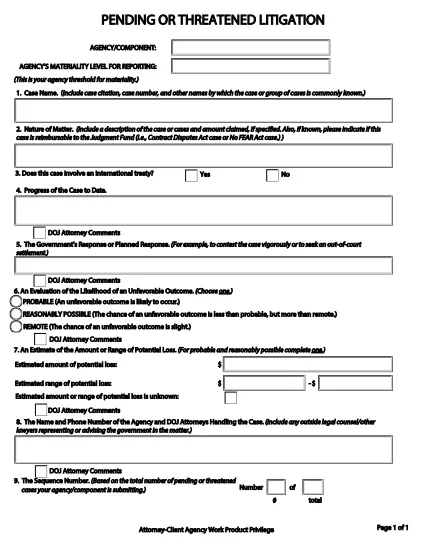
The Pending or Threatened Litigation Form is a required reporting document for federal agencies that need to disclose pending or threatened legal actions. Historically the form is provided as a static PDF, but with Formize you can complete it directly in your browser—no Adobe Acrobat or other editor needed.

This page gives you everything you need to know: what the form covers, step‑by‑step instructions for filling it out, common pitfalls to avoid, and a direct link to the official PDF supplied by the U.S. Department of Justice.

When you click the Fill out this form button below, Formize’s PDF Filler app loads the official document, transforms it into a fillable web form, and saves your entries securely.

Key sections of the form include:

  • Case identification and docket numbers
  • Agency or component submitting the report
  • Attorney‑client privilege and work‑product claims
  • Brief description of the litigation or threat

Accurate completion helps your agency stay compliant with DOJ reporting requirements and ensures transparency for congressional oversight.

सामान्य प्रश्न
  • Do I need Adobe Acrobat to fill out this form?

    No. Formize converts the PDF into a web‑based fillable form, so any modern browser is sufficient.

  • Is the information I enter saved securely?

    Yes. All data is stored temporarily in your browser session and never shared with third parties unless you choose to download or submit it.

  • Can I edit the form after I’ve saved it?

    Absolutely. Use the **Save** button to create a draft, then return to the same URL to continue editing.

  • What if I make a mistake in a field?

    Formize highlights validation errors instantly. You can correct the entry before saving or downloading the final PDF.

  • Is this the official DOJ form?

    Yes. The PDF linked below is the exact version provided by the U.S. Department of Justice (Civil Division).

  • Can I print a hard copy after filling it out?

    After completing the form, click **Download** to get a filled PDF, then print it like any standard document.

  • Do I need an account to use Formize?

    No account is required for one‑time use. Simply click the button, fill the form, and download or submit as needed.

कैसे करें

pending litigation form को मुफ़्त में, ऑनलाइन 4 आसान स्टेप्स में कैसे भरें:

  1. 1
    Open the Fillable Form
    Click the **Fill out this form** button on this page. Formize will load the official DOJ PDF directly in your browser.
  2. 2
    Enter Required Information
    Type into each field—case numbers, agency name, privilege claims, and a concise case description. The interface validates required fields in real time.
  3. 3
    Save & Review
    Use the **Save** button to store a draft. Review all entries for accuracy; Formize highlights any missing or incorrectly formatted data.
  4. 4
    Submit or Print
    When finished, you can either download a completed PDF for internal filing or submit the form electronically if your agency’s workflow allows it.
पीडीएफ फिलर एप तैयार करें
के बारे में

न्याय विभाग (डीओजे) प्रपत्र

pending litigation form आधिकारिक रूपों में से एक है जिसका उपयोग संयुक्त राज्य अमेरिका के न्याय विभाग और उसके विभिन्न प्रभागों, एजेंसियों और घटकों द्वारा किया जाता है। डीओजे एक संघीय कार्यकारी विभाग है जो संघीय कानूनों को लागू करने, कानूनी मामलों में संयुक्त राज्य के हितों की रक्षा करने और न्याय प्रशासन करने के लिए जिम्मेदार है।

यहां न्याय विभाग के प्रपत्रों के कुछ उदाहरण दिए गए हैं:

संघीय सहायता के लिए आवेदन (एसएफ-424): इस फॉर्म का उपयोग संघीय अनुदान या डीओजे या उसके घटकों द्वारा प्रशासित वित्तीय सहायता के लिए आवेदन करने वाले संगठनों द्वारा किया जाता है। यह संगठन, प्रस्तावित परियोजना और बजट के बारे में जानकारी एकत्र करता है।

नागरिक अधिकार शिकायत फॉर्म: इस फॉर्म का उपयोग नस्ल, लिंग, विकलांगता या राष्ट्रीय मूल के आधार पर भेदभाव जैसे नागरिक अधिकार कानूनों के कथित उल्लंघन के संबंध में डीओजे के नागरिक अधिकार प्रभाग के साथ शिकायत दर्ज करने के लिए किया जाता है।

पीड़ित अधिसूचना अनुरोध फॉर्म: इस फॉर्म का उपयोग अपराध पीड़ितों द्वारा अपराध पीड़ितों को जानकारी और सहायता प्रदान करने के डीओजे के प्रयासों के हिस्से के रूप में संघीय आपराधिक मामले की स्थिति और कार्यवाही के बारे में अधिसूचना का अनुरोध करने के लिए किया जाता है।

आव्रजन फॉर्म: डीओजे का आप्रवासन समीक्षा कार्यकारी कार्यालय (ईओआईआर) आप्रवासन अदालतों और आप्रवासन संबंधी कार्यवाहियों का प्रबंधन करता है। आप्रवासन अदालती कार्यवाही में विभिन्न प्रपत्रों का उपयोग किया जाता है, जैसे निष्कासन से राहत के लिए आवेदन के लिए फॉर्म ईओआईआर-42बी या अपील के लिए फॉर्म ईओआईआर-28।

एटीएफ फॉर्म: डीओजे के एक घटक अल्कोहल, तंबाकू, आग्नेयास्त्र और विस्फोटक ब्यूरो (एटीएफ) के पास विभिन्न उद्देश्यों के लिए फॉर्म का अपना सेट है, जैसा कि पिछली प्रतिक्रिया में बताया गया है।

ड्रग एन्फोर्समेंट एडमिनिस्ट्रेशन (डीईए) फॉर्म: डीईए, डीओजे का एक अन्य घटक, नियंत्रित पदार्थों से संबंधित मामलों के लिए अपने स्वयं के फॉर्म का उपयोग करता है, जिसमें पंजीकरण, रिपोर्टिंग और रिकॉर्ड-रखने की आवश्यकताओं के लिए आवेदन शामिल हैं।

ये उदाहरण डीओजे फॉर्म की कुछ श्रेणियों पर प्रकाश डालते हैं, लेकिन न्याय विभाग द्वारा उपयोग किए जाने वाले विशिष्ट फॉर्म इसमें शामिल प्रभाग, एजेंसी या घटक और सेवाओं या कार्यवाही की प्रकृति के आधार पर भिन्न हो सकते हैं। यह सलाह दी जाती है कि अपनी स्थिति के लिए प्रासंगिक विशिष्ट डीओजे फॉर्म के संबंध में सटीक और अद्यतन जानकारी प्राप्त करने के लिए डीओजे के भीतर विशिष्ट प्रभाग या एजेंसी की आधिकारिक वेबसाइट से परामर्श लें या कानूनी सलाह लें।

विशेषताएं

पीडीएफ भराव

पीडीएफ फॉर्म ऑनलाइन भरने का सबसे आसान तरीका

  • जल्दी से pending litigation form भरें
    pending litigation form को जल्दी से ऑनलाइन भरने का कोई तरीका खोज रहे हैं? हमारे ऑनलाइन नि:शुल्क पीडीएफ फॉर्म फिलर के साथ, आप एक मिनट से भी कम समय में इस पीडीएफ दस्तावेज़ को संपादित करने और भरने का तरीका जानेंगे।
  • ऑनलाइन पीडीएफ संपादक का उपयोग करना आसान है
    पीडीएफ फाइलों को प्रिंट करने से तंग आ गए हैं ताकि आप उन्हें फिर से स्कैन करने और उन्हें वापस भेजने से पहले संपादित कर सकें? PDF दस्तावेज़ों को निःशुल्क ऑनलाइन संपादित करें। समय और कागज बचाने के लिए हमारे ऑनलाइन पीडीएफ संपादक का प्रयोग करें।
  • महान उपकरण, सभी प्लेटफार्म
    आश्चर्य है कि मैक पर pending litigation form कैसे भरें, या शायद पीडीएफ फिलर का मुफ्त में उपयोग कैसे करें? हमारे ऑनलाइन पीडीएफ टूल सभी प्लेटफॉर्म पर काम करते हैं।
  • सुरक्षित फ़ाइल भंडारण
    पूर्ण की गई "pending litigation form" फ़ाइलें Amazon क्लाउड होस्टिंग द्वारा प्रबंधित एक सुरक्षित डेटाबेस में संग्रहीत की जाती हैं। आप कभी भी अपनी फाइलों को हमारे सिस्टम से हटा सकते हैं। किसी भी स्थिति में, ये फ़ाइलें 24 घंटे के बाद स्वतः हटा दी जाती हैं।
  • {कीवर्ड} से चैट करें
    Chatize पर "pending litigation form" के साथ चैट करें, जो एक निःशुल्क पीडीएफ रीडर सहायक है। प्रश्न पूछें और "pending litigation form" से उत्तर प्राप्त करें। बस ऊपर दस्तावेज़ के साथ चैट करें बटन पर क्लिक करें।

फ़िलिंग सत्र मिटाएँ

चयनित फ़िलिंग सत्र को मिटाएँ? इस स्थिति में, फ़ॉर्म को पूरा करने में आपकी प्रगति खो जाएगी।

संपादन सत्र हटाएँ

चयनित संपादन सत्र हटाएँ? इस स्थिति में, फ़ॉर्म बनाने और संपादित करने में आपकी प्रगति नष्ट हो जाएगी।