
hamburger-menu icon
भाषा का चयन करें

CM-936 Authorization for Release of Medical Records – Fillable PDF

  1. भाषा अंग्रेज़ी
  2. देश अमेरीका
  3. विभाग श्रम विभाग
  4. एजेंसी कर्मचारियों के मुआवजा कार्यक्रम का कार्यालय
फार्म को भरो
CM-936 Authorization for Release of Medical Records – Fillable PDF

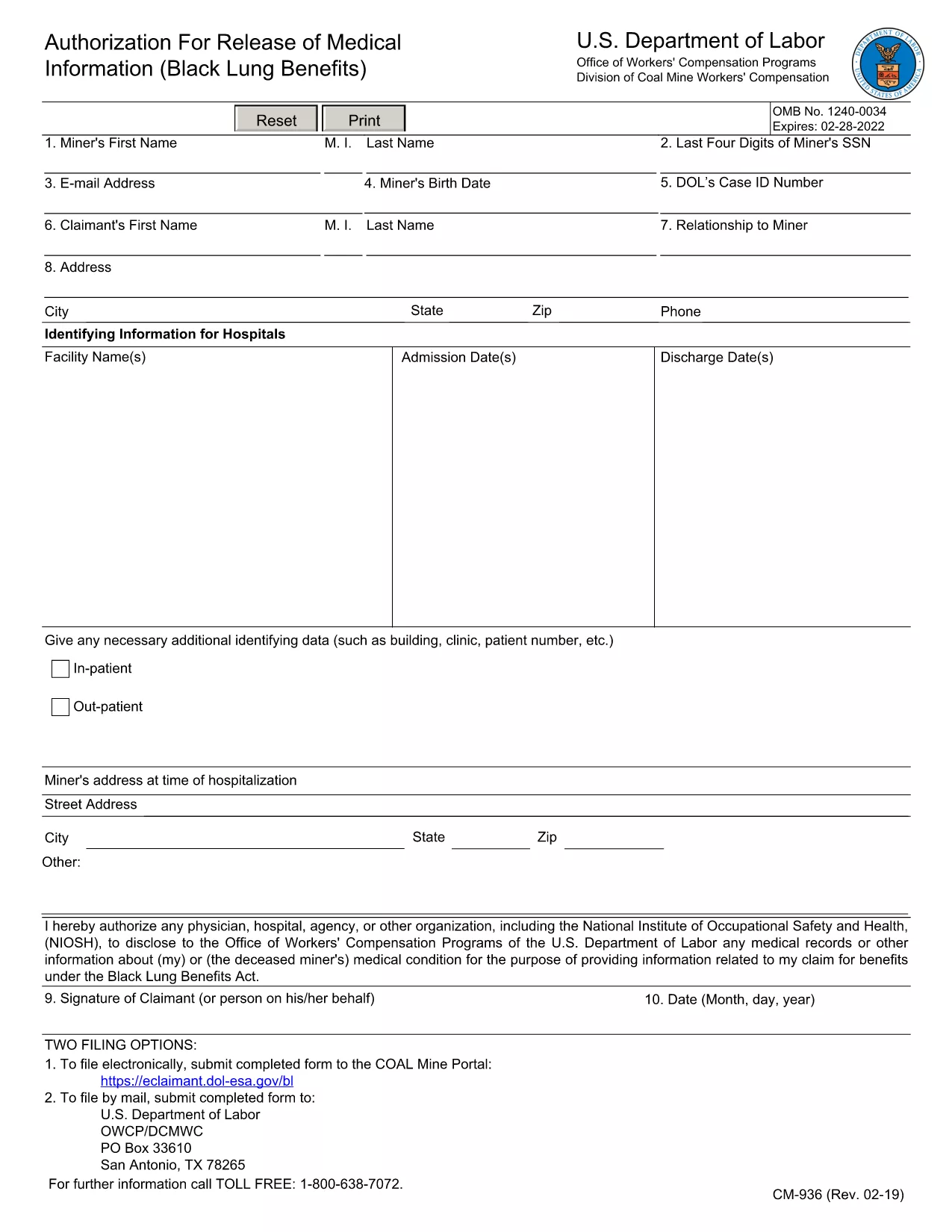
The CM-936 is the official Authorization for Release of Medical Records used by the U.S. Department of Labor’s Office of Workers' Compensation Programs. It allows the agency to obtain medical information needed to process workers‑compensation claims.

What Is the CM-936 Form?

This form grants permission for physicians, hospitals, or other health providers to share a claimant’s medical records with the Department of Labor. It is required for both active claimants and the estates of deceased miners.

How to Complete the CM-936 Online with Formize

Instead of downloading the PDF and editing it in a separate program, you can fill the form directly on our site using the Formize PDF Filler app. Follow the simple steps below:

  • Step 1: Click the "Fill out this form" button on this page.
  • Step 2: Wait a few seconds while the Formize PDF Filler loads the CM-936 document.
  • Step 3: Enter the requested information in each fillable field. The interface highlights required fields.
  • Step 4: Review your entries for accuracy.
  • Step 5: Click Submit to download a completed PDF or print it for mailing.

Common Mistakes to Avoid

Even a small error can delay your workers‑compensation claim. Keep these tips in mind:

  • Do not leave required fields blank – the form will not validate.
  • Use the exact legal name as it appears on the claimant’s identification.
  • Provide a current address and a reliable phone number for follow‑up.
  • Sign the form in the designated signature box; an electronic signature is accepted when using Formize.
  • Check the date format (MM/DD/YYYY) before submitting.

Where to Submit the Completed Form

After you have saved the completed CM-936 PDF, mail it to the Office of Workers' Compensation Programs at the address listed on the form, or upload it through the Department of Labor’s online portal if you have an account.

Need help? Review the FAQs below or contact your local workers’ compensation office for additional guidance.

सामान्य प्रश्न
  • Who needs to fill out the CM-936 form?

    Any claimant or the estate of a deceased miner who needs the Department of Labor to obtain medical records for a workers‑compensation claim.

  • Can I sign the CM-936 electronically?

    Yes. The Formize PDF Filler accepts electronic signatures that are legally valid for this form.

  • What if I make a mistake after submitting?

    Download a fresh copy of the CM-936, correct the error, and resend the revised PDF to the Office of Workers' Compensation Programs.

  • Is there a filing fee for the CM-936?

    No. The authorization form is free of charge; however, there may be fees for obtaining medical records from providers.

  • How long does it take for the Department of Labor to process the form?

    Processing time varies, but once the completed CM-936 is received, the agency typically reviews it within 10‑15 business days.

  • Can I submit the CM-936 by email?

    The Department of Labor prefers a mailed hard copy, but some regional offices accept a scanned PDF via secure email. Check the address on the form for details.

  • Do I need a notary for the CM-936?

    No notarization is required; a valid signature (handwritten or electronic) is sufficient.

कैसे करें

CM-936 form को मुफ़्त में, ऑनलाइन 5 आसान स्टेप्स में कैसे भरें:

  1. 1
    Click the Fill Out Button
    Press the "Fill out this form" button on the page to launch the Formize PDF Filler.
  2. 2
    Wait for the Form to Load
    The CM-936 document will appear in the browser within a few seconds.
  3. 3
    Enter Your Information
    Complete each highlighted field with accurate data. Required fields are marked with an asterisk.
  4. 4
    Review and Sign
    Double‑check all entries, then add your electronic signature in the signature box.
  5. 5
    Download or Print
    Click "Submit" to download the finished PDF or print it for mailing to the Department of Labor.
पीडीएफ फिलर एप तैयार करें
के बारे में

श्रम विभाग (डीओएल) प्रपत्र

CM-936 form आधिकारिक रूपों में से एक है जिसका उपयोग संयुक्त राज्य अमेरिका के श्रम विभाग और इसकी विभिन्न एजेंसियों द्वारा जानकारी एकत्र करने, कार्यक्रमों को संचालित करने और श्रम-संबंधित कानूनों और विनियमों को लागू करने के लिए किया जाता है। श्रम विभाग एक संघीय कार्यकारी विभाग है जो श्रमिकों के कल्याण को बढ़ावा देने और उनकी रक्षा करने, निष्पक्ष रोजगार प्रथाओं को सुनिश्चित करने और संयुक्त राज्य अमेरिका में श्रम और रोजगार के विभिन्न पहलुओं की देखरेख के लिए जिम्मेदार है।

यहां श्रम विभाग के प्रपत्रों के कुछ उदाहरण दिए गए हैं:

रोजगार पात्रता सत्यापन (फॉर्म I-9): जबकि अमेरिकी नागरिकता और आव्रजन सेवा (USCIS) द्वारा प्रशासित किया जाता है, फॉर्म I-9 अक्सर श्रम विभाग से जुड़ा होता है। इसका उपयोग नियोक्ताओं द्वारा संयुक्त राज्य अमेरिका में रोजगार के लिए नियुक्त व्यक्तियों की पहचान और रोजगार पात्रता को सत्यापित करने के लिए किया जाता है।

परिवार और चिकित्सा अवकाश अधिनियम (एफएमएलए) फॉर्म: डीओएल का वेतन और घंटा प्रभाग एफएमएलए का प्रबंधन करता है, और स्वास्थ्य देखभाल के प्रमाणन सहित इस संघीय कानून के प्रावधानों को लागू करने और उनका अनुपालन करने के लिए विभिन्न रूपों का उपयोग किया जाता है। प्रदाता प्रपत्र और एफएमएलए पात्रता और अधिकार एवं उत्तरदायित्वों की सूचना प्रपत्र।

व्यावसायिक सुरक्षा और स्वास्थ्य प्रशासन (ओएसएचए) फॉर्म: ओएसएचए, डीओएल का एक प्रभाग, कुछ नियोक्ताओं को ओएसएचए फॉर्म 300, ओएसएचए फॉर्म 300ए, और ओएसएचए जैसे फॉर्म का उपयोग करके कार्यस्थल की चोटों और बीमारियों के रिकॉर्ड बनाए रखने की आवश्यकता होती है। फॉर्म 301.

बेरोजगारी बीमा फॉर्म: डीओएल का रोजगार और प्रशिक्षण प्रशासन बेरोजगारी बीमा (यूआई) कार्यक्रम की देखरेख करता है, और यूआई लाभ दावों को प्रशासित और संसाधित करने के लिए राज्य कार्यबल एजेंसियों द्वारा विभिन्न रूपों का उपयोग किया जाता है।

वेतन और घंटा अनुपालन प्रपत्र: डीओएल का वेतन और घंटा प्रभाग विभिन्न श्रम कानूनों को लागू करता है, जिसमें निष्पक्ष श्रम मानक अधिनियम (एफएलएसए) और परिवार और चिकित्सा अवकाश अधिनियम (एफएमएलए) शामिल हैं। नियोक्ताओं को इन कानूनों का अनुपालन बनाए रखने के लिए विशिष्ट प्रपत्रों का उपयोग करने की आवश्यकता हो सकती है, जैसे काम के घंटों का रिकॉर्ड, वेतन दरें और अन्य संबंधित जानकारी।

ये उदाहरण श्रम विभाग के प्रपत्रों की कुछ सामान्य श्रेणियों का प्रतिनिधित्व करते हैं, लेकिन डीओएल और इसकी विभिन्न एजेंसियों द्वारा श्रम और रोजगार से संबंधित अपनी जिम्मेदारियों को पूरा करने के लिए कई अन्य रूपों का उपयोग किया जाता है। आवश्यक विशिष्ट प्रपत्र कार्यक्रम, विनियमन, या प्रवर्तन कार्रवाई के आधार पर भिन्न हो सकते हैं। यह सलाह दी जाती है कि अमेरिकी श्रम विभाग की आधिकारिक वेबसाइट (www.dol.gov) पर जाएं या सटीक और अद्यतन जानकारी प्राप्त करने के लिए संबंधित डीओएल एजेंसियों या कानूनी पेशेवरों से परामर्श लें। आपकी श्रम-संबंधी आवश्यकताओं या अनुपालन आवश्यकताओं के लिए प्रासंगिक विशिष्ट डीओएल फॉर्म के संबंध में तारीख की जानकारी।

विशेषताएं

पीडीएफ भराव

पीडीएफ फॉर्म ऑनलाइन भरने का सबसे आसान तरीका

  • जल्दी से CM-936 form भरें
    CM-936 form को जल्दी से ऑनलाइन भरने का कोई तरीका खोज रहे हैं? हमारे ऑनलाइन नि:शुल्क पीडीएफ फॉर्म फिलर के साथ, आप एक मिनट से भी कम समय में इस पीडीएफ दस्तावेज़ को संपादित करने और भरने का तरीका जानेंगे।
  • ऑनलाइन पीडीएफ संपादक का उपयोग करना आसान है
    पीडीएफ फाइलों को प्रिंट करने से तंग आ गए हैं ताकि आप उन्हें फिर से स्कैन करने और उन्हें वापस भेजने से पहले संपादित कर सकें? PDF दस्तावेज़ों को निःशुल्क ऑनलाइन संपादित करें। समय और कागज बचाने के लिए हमारे ऑनलाइन पीडीएफ संपादक का प्रयोग करें।
  • महान उपकरण, सभी प्लेटफार्म
    आश्चर्य है कि मैक पर CM-936 form कैसे भरें, या शायद पीडीएफ फिलर का मुफ्त में उपयोग कैसे करें? हमारे ऑनलाइन पीडीएफ टूल सभी प्लेटफॉर्म पर काम करते हैं।
  • सुरक्षित फ़ाइल भंडारण
    पूर्ण की गई "CM-936 form" फ़ाइलें Amazon क्लाउड होस्टिंग द्वारा प्रबंधित एक सुरक्षित डेटाबेस में संग्रहीत की जाती हैं। आप कभी भी अपनी फाइलों को हमारे सिस्टम से हटा सकते हैं। किसी भी स्थिति में, ये फ़ाइलें 24 घंटे के बाद स्वतः हटा दी जाती हैं।
  • {कीवर्ड} से चैट करें
    Chatize पर "CM-936 form" के साथ चैट करें, जो एक निःशुल्क पीडीएफ रीडर सहायक है। प्रश्न पूछें और "CM-936 form" से उत्तर प्राप्त करें। बस ऊपर दस्तावेज़ के साथ चैट करें बटन पर क्लिक करें।

फ़िलिंग सत्र मिटाएँ

चयनित फ़िलिंग सत्र को मिटाएँ? इस स्थिति में, फ़ॉर्म को पूरा करने में आपकी प्रगति खो जाएगी।

संपादन सत्र हटाएँ

चयनित संपादन सत्र हटाएँ? इस स्थिति में, फ़ॉर्म बनाने और संपादित करने में आपकी प्रगति नष्ट हो जाएगी।