
hamburger-menu icon
भाषा का चयन करें

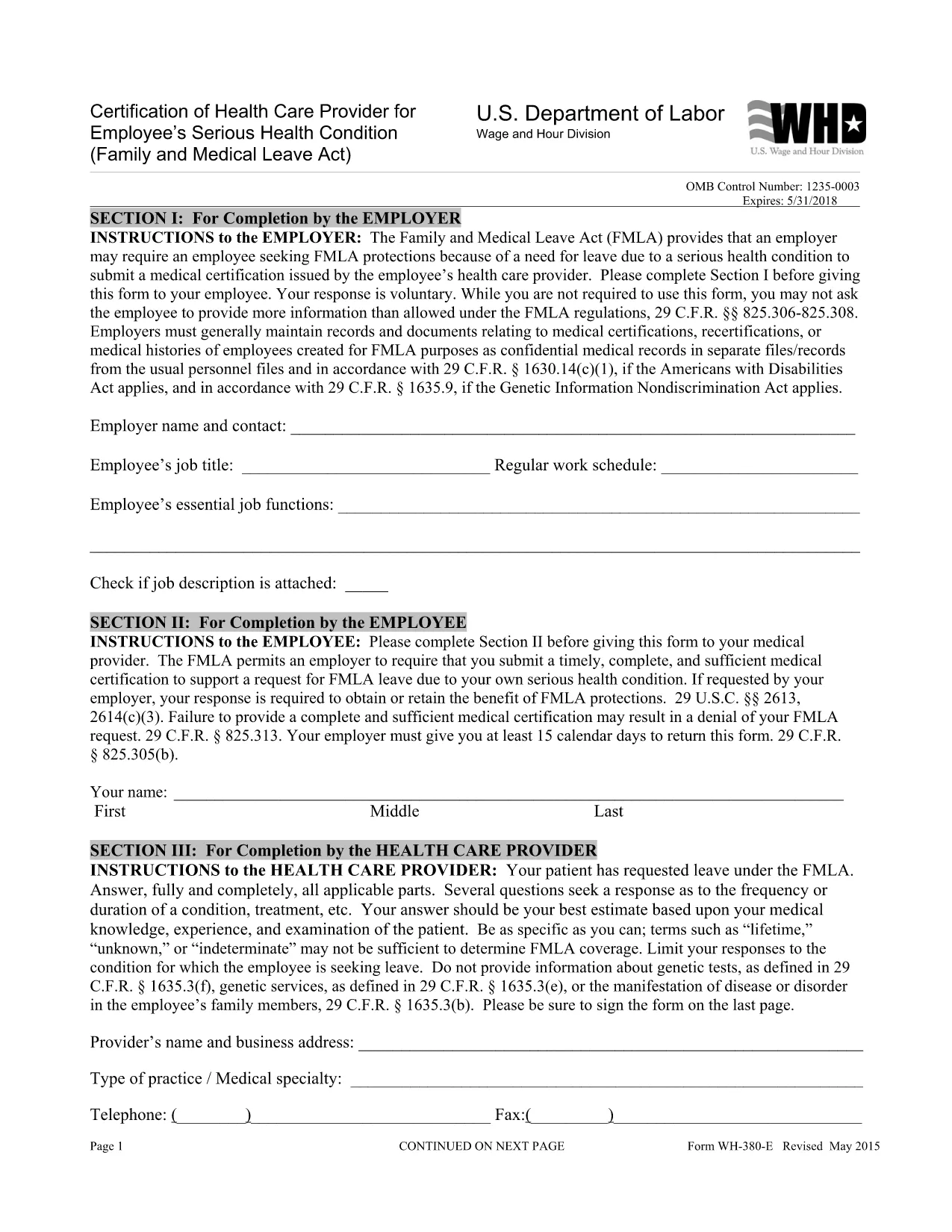
WH‑380‑E Fillable PDF – Family & Medical Leave Act Medical Certification

  1. भाषा अंग्रेज़ी
  2. देश अमेरीका
  3. विभाग श्रम विभाग
  4. एजेंसी वेतन और घंटे का विभाजन
फार्म को भरो
WH‑380‑E Fillable PDF – Family & Medical Leave Act Medical Certification

The WH‑380‑E is the official certification of a health care provider required under the Family and Medical Leave Act (FMLA). Employers use this form to verify an employee’s serious health condition, a newborn or newly‑adopted child, or a need for caretaker leave.

What Is the WH‑380‑E Form?

This government‑issued PDF collects detailed medical information, including diagnosis, treatment dates, and the provider’s certification that the condition qualifies for FMLA leave. It is used by federal, state, and private employers across the United States.

How to Complete the WH‑380‑E Online

Instead of downloading and editing the PDF in a separate editor, simply click the “Fill out this form” button on this page. The Formize PDF Filler app will load the fillable version instantly. Follow these steps:

  • Step 1: Click the “Fill out this form” button.
  • Step 2: The Formize filler loads – the document becomes interactive.
  • Step 3: Enter the employee’s information, health‑care provider details, and medical certification data.
  • Step 4: Review for completeness and accuracy.
  • Step 5: Click “Save & Download” to obtain a completed PDF you can print or email to HR.

Common Mistakes to Avoid

  • Leaving any required field blank – every asterisk (*) field must be completed.
  • Providing a diagnosis when the form states it is optional (unless your employer requests it).
  • Using illegible handwriting – the online filler ensures clear, typed text.
  • Submitting the form without the provider’s signature and date.

Where to Submit the Certified Form

After saving the completed WH‑380‑E, send it to your employer’s Human Resources or Benefits department according to your company’s leave‑request policy. Federal employees may also submit it to the agency’s HR office.

Download the Fillable WH‑380‑E PDF

If you prefer to keep a copy of the original document, you can download the official WH‑380‑E PDF from the West Virginia Legislature site. Our online filler uses the same version, guaranteeing compliance.

सामान्य प्रश्न
  • What is the purpose of the WH‑380‑E form?

    The WH‑380‑E certifies that an employee’s serious health condition (or a family member’s condition) meets the eligibility criteria for FMLA leave.

  • Can I fill out WH‑380‑E on a mobile device?

    Yes. The Formize PDF Filler works on smartphones and tablets, allowing you to complete the form on any modern browser.

  • Do I need to include a diagnosis on the form?

    A diagnosis is optional unless your employer specifically requests it. The form’s instructions note that the provider may omit the diagnosis while still meeting FMLA requirements.

  • How many copies of the completed WH‑380‑E do I need?

    Typically one completed, signed copy is submitted to HR. Keep a personal copy for your records.

  • Is the WH‑380‑E required for all FMLA leave types?

    The form is required for serious health conditions of the employee or an immediate family member. Separate certification forms exist for newborn or adopted child care.

  • What if I make a mistake after submitting the form?

    Contact your HR department immediately. You can submit a corrected WH‑380‑E with a note explaining the changes.

  • Is the WH‑380‑E a federal or state form?

    It is a federal form issued under the Family and Medical Leave Act, but many states adopt the same version for their own leave programs.

  • Do I need a notary for the WH‑380‑E?

    No. The health‑care provider’s signature and date satisfy the certification requirements.

कैसे करें

WH-380-E को मुफ़्त में, ऑनलाइन 5 आसान स्टेप्स में कैसे भरें:

  1. 1
    Open the Fillable Form
    Click the “Fill out this form” button on the page. The Formize PDF Filler loads the WH‑380‑E as an interactive document.
  2. 2
    Enter Required Information
    Type the employee’s name, dates of care, and the health‑care provider’s details into the highlighted fields.
  3. 3
    Complete the Medical Certification
    Provide the diagnosis (if required), treatment plan, and any functional limitations. Ensure the provider signs and dates the form.
  4. 4
    Review and Save
    Double‑check all entries for accuracy, then click “Save & Download” to get a completed PDF you can print or email.
  5. 5
    Submit to HR
    Send the saved PDF to your employer’s HR or Benefits department following your organization’s leave‑submission guidelines.
पीडीएफ फिलर एप तैयार करें
के बारे में

श्रम विभाग (डीओएल) प्रपत्र

WH-380-E आधिकारिक रूपों में से एक है जिसका उपयोग संयुक्त राज्य अमेरिका के श्रम विभाग और इसकी विभिन्न एजेंसियों द्वारा जानकारी एकत्र करने, कार्यक्रमों को संचालित करने और श्रम-संबंधित कानूनों और विनियमों को लागू करने के लिए किया जाता है। श्रम विभाग एक संघीय कार्यकारी विभाग है जो श्रमिकों के कल्याण को बढ़ावा देने और उनकी रक्षा करने, निष्पक्ष रोजगार प्रथाओं को सुनिश्चित करने और संयुक्त राज्य अमेरिका में श्रम और रोजगार के विभिन्न पहलुओं की देखरेख के लिए जिम्मेदार है।

यहां श्रम विभाग के प्रपत्रों के कुछ उदाहरण दिए गए हैं:

रोजगार पात्रता सत्यापन (फॉर्म I-9): जबकि अमेरिकी नागरिकता और आव्रजन सेवा (USCIS) द्वारा प्रशासित किया जाता है, फॉर्म I-9 अक्सर श्रम विभाग से जुड़ा होता है। इसका उपयोग नियोक्ताओं द्वारा संयुक्त राज्य अमेरिका में रोजगार के लिए नियुक्त व्यक्तियों की पहचान और रोजगार पात्रता को सत्यापित करने के लिए किया जाता है।

परिवार और चिकित्सा अवकाश अधिनियम (एफएमएलए) फॉर्म: डीओएल का वेतन और घंटा प्रभाग एफएमएलए का प्रबंधन करता है, और स्वास्थ्य देखभाल के प्रमाणन सहित इस संघीय कानून के प्रावधानों को लागू करने और उनका अनुपालन करने के लिए विभिन्न रूपों का उपयोग किया जाता है। प्रदाता प्रपत्र और एफएमएलए पात्रता और अधिकार एवं उत्तरदायित्वों की सूचना प्रपत्र।

व्यावसायिक सुरक्षा और स्वास्थ्य प्रशासन (ओएसएचए) फॉर्म: ओएसएचए, डीओएल का एक प्रभाग, कुछ नियोक्ताओं को ओएसएचए फॉर्म 300, ओएसएचए फॉर्म 300ए, और ओएसएचए जैसे फॉर्म का उपयोग करके कार्यस्थल की चोटों और बीमारियों के रिकॉर्ड बनाए रखने की आवश्यकता होती है। फॉर्म 301.

बेरोजगारी बीमा फॉर्म: डीओएल का रोजगार और प्रशिक्षण प्रशासन बेरोजगारी बीमा (यूआई) कार्यक्रम की देखरेख करता है, और यूआई लाभ दावों को प्रशासित और संसाधित करने के लिए राज्य कार्यबल एजेंसियों द्वारा विभिन्न रूपों का उपयोग किया जाता है।

वेतन और घंटा अनुपालन प्रपत्र: डीओएल का वेतन और घंटा प्रभाग विभिन्न श्रम कानूनों को लागू करता है, जिसमें निष्पक्ष श्रम मानक अधिनियम (एफएलएसए) और परिवार और चिकित्सा अवकाश अधिनियम (एफएमएलए) शामिल हैं। नियोक्ताओं को इन कानूनों का अनुपालन बनाए रखने के लिए विशिष्ट प्रपत्रों का उपयोग करने की आवश्यकता हो सकती है, जैसे काम के घंटों का रिकॉर्ड, वेतन दरें और अन्य संबंधित जानकारी।

ये उदाहरण श्रम विभाग के प्रपत्रों की कुछ सामान्य श्रेणियों का प्रतिनिधित्व करते हैं, लेकिन डीओएल और इसकी विभिन्न एजेंसियों द्वारा श्रम और रोजगार से संबंधित अपनी जिम्मेदारियों को पूरा करने के लिए कई अन्य रूपों का उपयोग किया जाता है। आवश्यक विशिष्ट प्रपत्र कार्यक्रम, विनियमन, या प्रवर्तन कार्रवाई के आधार पर भिन्न हो सकते हैं। यह सलाह दी जाती है कि अमेरिकी श्रम विभाग की आधिकारिक वेबसाइट (www.dol.gov) पर जाएं या सटीक और अद्यतन जानकारी प्राप्त करने के लिए संबंधित डीओएल एजेंसियों या कानूनी पेशेवरों से परामर्श लें। आपकी श्रम-संबंधी आवश्यकताओं या अनुपालन आवश्यकताओं के लिए प्रासंगिक विशिष्ट डीओएल फॉर्म के संबंध में तारीख की जानकारी।

विशेषताएं

पीडीएफ भराव

पीडीएफ फॉर्म ऑनलाइन भरने का सबसे आसान तरीका

  • जल्दी से WH-380-E भरें
    WH-380-E को जल्दी से ऑनलाइन भरने का कोई तरीका खोज रहे हैं? हमारे ऑनलाइन नि:शुल्क पीडीएफ फॉर्म फिलर के साथ, आप एक मिनट से भी कम समय में इस पीडीएफ दस्तावेज़ को संपादित करने और भरने का तरीका जानेंगे।
  • ऑनलाइन पीडीएफ संपादक का उपयोग करना आसान है
    पीडीएफ फाइलों को प्रिंट करने से तंग आ गए हैं ताकि आप उन्हें फिर से स्कैन करने और उन्हें वापस भेजने से पहले संपादित कर सकें? PDF दस्तावेज़ों को निःशुल्क ऑनलाइन संपादित करें। समय और कागज बचाने के लिए हमारे ऑनलाइन पीडीएफ संपादक का प्रयोग करें।
  • महान उपकरण, सभी प्लेटफार्म
    आश्चर्य है कि मैक पर WH-380-E कैसे भरें, या शायद पीडीएफ फिलर का मुफ्त में उपयोग कैसे करें? हमारे ऑनलाइन पीडीएफ टूल सभी प्लेटफॉर्म पर काम करते हैं।
  • सुरक्षित फ़ाइल भंडारण
    पूर्ण की गई "WH-380-E" फ़ाइलें Amazon क्लाउड होस्टिंग द्वारा प्रबंधित एक सुरक्षित डेटाबेस में संग्रहीत की जाती हैं। आप कभी भी अपनी फाइलों को हमारे सिस्टम से हटा सकते हैं। किसी भी स्थिति में, ये फ़ाइलें 24 घंटे के बाद स्वतः हटा दी जाती हैं।
  • {कीवर्ड} से चैट करें
    Chatize पर "WH-380-E" के साथ चैट करें, जो एक निःशुल्क पीडीएफ रीडर सहायक है। प्रश्न पूछें और "WH-380-E" से उत्तर प्राप्त करें। बस ऊपर दस्तावेज़ के साथ चैट करें बटन पर क्लिक करें।

फ़िलिंग सत्र मिटाएँ

चयनित फ़िलिंग सत्र को मिटाएँ? इस स्थिति में, फ़ॉर्म को पूरा करने में आपकी प्रगति खो जाएगी।

संपादन सत्र हटाएँ

चयनित संपादन सत्र हटाएँ? इस स्थिति में, फ़ॉर्म बनाने और संपादित करने में आपकी प्रगति नष्ट हो जाएगी।