
hamburger-menu icon
भाषा का चयन करें

Virginia DSD 7 Form – Fillable PDF for Vehicle Registration

  1. भाषा अंग्रेज़ी
  2. देश अमेरीका
  3. गतिविधि वाहन पंजीकरण
  4. विभाग Department of Motor Vehicles
फार्म को भरो
Virginia DSD 7 Form – Fillable PDF for Vehicle Registration

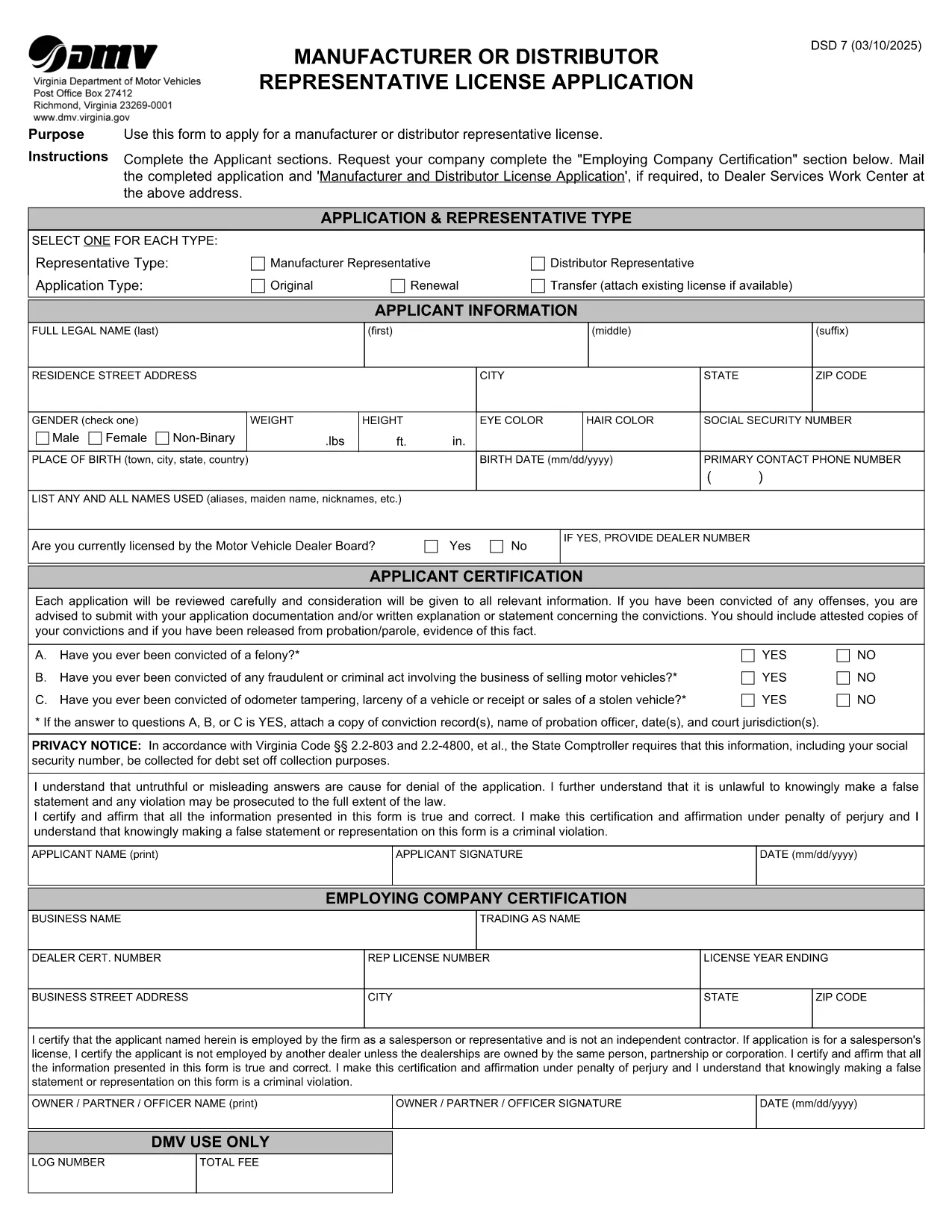
The DSD 7 form is the official Virginia Department of Motor Vehicles (DMV) document used for certain vehicle registration and title transactions. Whether you need to update ownership, correct a title error, or provide supporting information, the DSD 7 must be completed accurately.

What is the DSD 7 Form?

The DSD 7 is a fillable PDF released by the Virginia DMV. It collects details such as the vehicle identification number (VIN), owner information, and the reason for the request. The form is required for:

  • Title corrections
  • Ownership transfers that are not covered by a standard bill of sale
  • Special exemptions or clarifications requested by the DMV

How to Fill Out the DSD 7 Online

Instead of downloading the PDF and opening it in a separate editor, simply click the "Fill out this form" button below. Our Formize PDF Filler app will load the document directly in your browser, letting you type, check boxes, and sign without any software installation.

Common Mistakes to Avoid

  • Leaving required fields blank: The DMV will reject any submission missing mandatory information.
  • Incorrect VIN format: Double‑check the 17‑character VIN for typos.
  • Using the wrong signature style: Use a clear, legible electronic signature that matches your legal signature.
  • Submitting outdated documents: Attach only current supporting paperwork.

Where to Submit the Completed Form

After you finish filling the DSD 7, you can:

  • Print and mail it to the address listed on the form.
  • Upload the completed PDF through the Virginia DMV's online portal (if applicable).

Always keep a copy for your records.

सामान्य प्रश्न
  • What does DSD stand for?

    DSD stands for "Department of State Division" and is a designation used by the Virginia DMV for certain specialized forms.

  • Can I submit the DSD 7 electronically?

    Yes. After completing the form with Formize, you can upload the PDF through the Virginia DMV's online portal where electronic submissions are accepted.

  • Do I need a notary for the DSD 7?

    A notary is not required for the DSD 7 unless the specific transaction you are performing explicitly calls for notarization.

  • How long does it take the DMV to process the DSD 7?

    Processing times vary, but most standard requests are handled within 7‑10 business days after receipt.

  • What should I do if I make a mistake after submitting?

    Contact the Virginia DMV immediately. In many cases you will need to submit a corrected DSD 7 with a note explaining the error.

  • Is there a fee for filing the DSD 7?

    Yes, the DMV charges a processing fee. Check the form instructions or the DMV website for the current amount.

  • Can I save my progress and return later?

    The Formize PDF Filler allows you to download a partially completed PDF, which you can reopen later to finish.

कैसे करें

DSD 7 form को मुफ़्त में, ऑनलाइन 5 आसान स्टेप्स में कैसे भरें:

  1. 1
    Click the Fill Out Button
    Press the "Fill out this form" button on the page to launch the Formize PDF Filler.
  2. 2
    Wait for the Filler to Load
    The browser will open the fillable DSD 7 PDF. A loading spinner indicates the app is preparing the document.
  3. 3
    Complete Each Section
    Enter your information, select checkboxes, and add your electronic signature exactly as required.
  4. 4
    Review and Submit
    Double‑check all entries, then click the "Submit" button to download the completed PDF or print it for mailing.
  5. 5
    Save a Copy
    Store the final PDF on your computer or cloud storage for future reference.
पीडीएफ फिलर एप तैयार करें
के बारे में

वाहन पंजीकरण प्रपत्र

DSD 7 form डीएमवी फॉर्मों में से एक है, जिसे मोटर वाहन विभाग फॉर्म के रूप में भी जाना जाता है, जो मोटर वाहनों से संबंधित विभिन्न लेनदेन और प्रक्रियाओं में उपयोग किए जाने वाले दस्तावेज हैं। DMV एक सरकारी एजेंसी है जो ड्राइवर लाइसेंसिंग, वाहन पंजीकरण और मोटर वाहन कानूनों को लागू करने के लिए जिम्मेदार है। उपलब्ध विशिष्ट DMV फॉर्म क्षेत्राधिकार के अनुसार भिन्न हो सकते हैं, लेकिन यहां कुछ सामान्य उदाहरण दिए गए हैं:

ड्राइवर लाइसेंस फॉर्म: इन फॉर्म का उपयोग ड्राइवर के लाइसेंस के लिए आवेदन करने या परिवर्तन या नवीनीकरण का अनुरोध करने के लिए किया जाता है। उन्हें आम तौर पर व्यक्तिगत जानकारी, पहचान के प्रमाण की आवश्यकता होती है, और इसमें चिकित्सा जानकारी या ड्राइविंग इतिहास के अनुभाग शामिल हो सकते हैं।

वाहन पंजीकरण फॉर्म: इन फॉर्मों का उपयोग डीएमवी के साथ मोटर वाहन को पंजीकृत करने के लिए किया जाता है। उन्हें वाहन की जानकारी, स्वामित्व विवरण और बीमा के प्रमाण की आवश्यकता होती है।

टाइटल ट्रांसफर फॉर्म: वाहन खरीदते या बेचते समय, इन फॉर्मों का उपयोग एक पक्ष से दूसरे पक्ष को स्वामित्व हस्तांतरित करने के लिए किया जाता है। उन्हें खरीदार, विक्रेता, वाहन विवरण के बारे में जानकारी की आवश्यकता होती है और इसमें बिक्री का बिल भी शामिल हो सकता है।

वाहन दायित्व प्रपत्र जारी करना: किसी वाहन के स्वामित्व को बेचते या स्थानांतरित करते समय, ये प्रपत्र डीएमवी को सूचित करते हैं कि विक्रेता अब वाहन के लिए जिम्मेदार नहीं है। यह विक्रेता को बिक्री के बाद वाहन से जुड़ी दुर्घटनाओं या घटनाओं के लिए दायित्व से बचाने में मदद करता है।

लाइसेंस प्लेट और पंजीकरण नवीनीकरण फॉर्म: इन फॉर्मों का उपयोग वाहन पंजीकरण को नवीनीकृत करने या नए लाइसेंस प्लेटों का अनुरोध करने के लिए किया जाता है। उन्हें आम तौर पर पंजीकृत मालिक, वर्तमान पंजीकरण विवरण और लागू शुल्क के भुगतान के बारे में जानकारी की आवश्यकता होती है।

ड्राइविंग रिकॉर्ड अनुरोध फॉर्म: ये फॉर्म व्यक्तियों को डीएमवी से अपने ड्राइविंग रिकॉर्ड का अनुरोध करने की अनुमति देते हैं, जो ड्राइविंग उल्लंघन, लाइसेंस स्थिति और अन्य प्रासंगिक विवरणों के बारे में जानकारी प्रदान करते हैं।

विशेषता या वैयक्तिकृत लाइसेंस प्लेट फॉर्म: इन फॉर्मों का उपयोग वैयक्तिकृत या विशिष्ट लाइसेंस प्लेटों के लिए आवेदन करने के लिए किया जाता है, जो व्यक्तियों को विशिष्ट पात्रों या डिज़ाइन के साथ अपनी लाइसेंस प्लेट को अनुकूलित करने की अनुमति देते हैं।

ये उन अनेक प्रपत्रों के कुछ उदाहरण हैं जो DMV के माध्यम से उपलब्ध हो सकते हैं। विशिष्ट फॉर्म और आवश्यकताएं क्षेत्राधिकार के अनुसार अलग-अलग हो सकती हैं, इसलिए अपनी विशेष जरूरतों के लिए सही फॉर्म प्राप्त करने के लिए स्थानीय डीएमवी वेबसाइट से परामर्श करना या डीएमवी कार्यालय में जाना महत्वपूर्ण है।

विशेषताएं

पीडीएफ भराव

पीडीएफ फॉर्म ऑनलाइन भरने का सबसे आसान तरीका

  • जल्दी से DSD 7 form भरें
    DSD 7 form को जल्दी से ऑनलाइन भरने का कोई तरीका खोज रहे हैं? हमारे ऑनलाइन नि:शुल्क पीडीएफ फॉर्म फिलर के साथ, आप एक मिनट से भी कम समय में इस पीडीएफ दस्तावेज़ को संपादित करने और भरने का तरीका जानेंगे।
  • ऑनलाइन पीडीएफ संपादक का उपयोग करना आसान है
    पीडीएफ फाइलों को प्रिंट करने से तंग आ गए हैं ताकि आप उन्हें फिर से स्कैन करने और उन्हें वापस भेजने से पहले संपादित कर सकें? PDF दस्तावेज़ों को निःशुल्क ऑनलाइन संपादित करें। समय और कागज बचाने के लिए हमारे ऑनलाइन पीडीएफ संपादक का प्रयोग करें।
  • महान उपकरण, सभी प्लेटफार्म
    आश्चर्य है कि मैक पर DSD 7 form कैसे भरें, या शायद पीडीएफ फिलर का मुफ्त में उपयोग कैसे करें? हमारे ऑनलाइन पीडीएफ टूल सभी प्लेटफॉर्म पर काम करते हैं।
  • सुरक्षित फ़ाइल भंडारण
    पूर्ण की गई "DSD 7 form" फ़ाइलें Amazon क्लाउड होस्टिंग द्वारा प्रबंधित एक सुरक्षित डेटाबेस में संग्रहीत की जाती हैं। आप कभी भी अपनी फाइलों को हमारे सिस्टम से हटा सकते हैं। किसी भी स्थिति में, ये फ़ाइलें 24 घंटे के बाद स्वतः हटा दी जाती हैं।
  • {कीवर्ड} से चैट करें
    Chatize पर "DSD 7 form" के साथ चैट करें, जो एक निःशुल्क पीडीएफ रीडर सहायक है। प्रश्न पूछें और "DSD 7 form" से उत्तर प्राप्त करें। बस ऊपर दस्तावेज़ के साथ चैट करें बटन पर क्लिक करें।

फ़िलिंग सत्र मिटाएँ

चयनित फ़िलिंग सत्र को मिटाएँ? इस स्थिति में, फ़ॉर्म को पूरा करने में आपकी प्रगति खो जाएगी।

संपादन सत्र हटाएँ

चयनित संपादन सत्र हटाएँ? इस स्थिति में, फ़ॉर्म बनाने और संपादित करने में आपकी प्रगति नष्ट हो जाएगी।