
hamburger-menu icon
भाषा का चयन करें

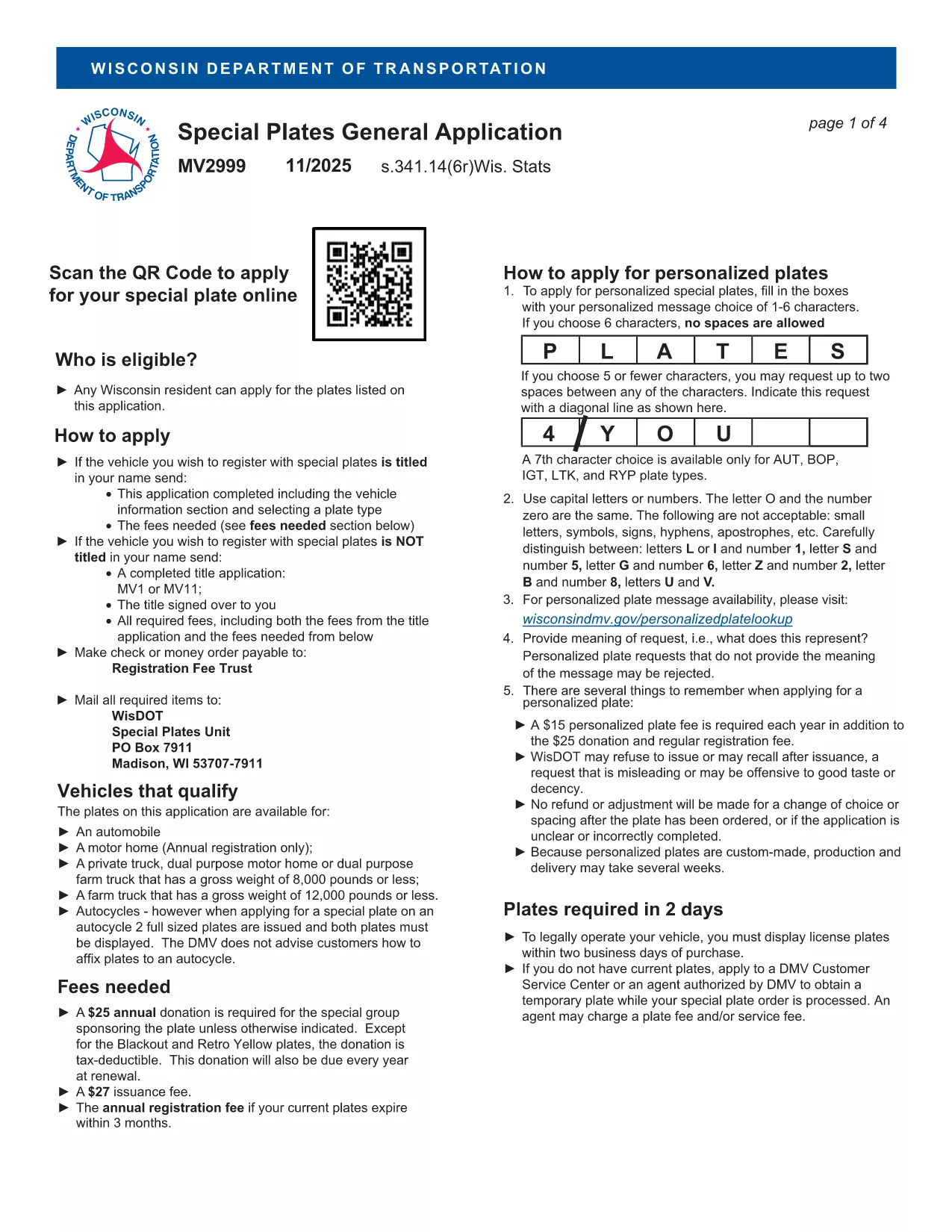
MV2956 Fillable PDF – Wisconsin Vehicle Registration Form

  1. भाषा अंग्रेज़ी
  2. देश अमेरीका
  3. गतिविधि वाहन पंजीकरण
  4. विभाग Department of Motor Vehicles
फार्म को भरो
MV2956 Fillable PDF – Wisconsin Vehicle Registration Form

The MV2956 is the official Wisconsin Department of Motor Vehicles (DMV) form used for vehicle registration changes, special plate applications, and related paperwork. Instead of printing, scanning, and mailing a paper copy, you can now complete the form instantly online with our Fill out this form button powered by the Formize PDF Filler app.

What Is the MV2956 Form?

MV2956 is a fillable PDF that captures essential vehicle information, owner details, and any special requests (e.g., personalized plates). It is required for:

  • Transferring ownership of a vehicle within Wisconsin
  • Updating registration address
  • Applying for specialty or disability plates

How to Fill Out MV2956 Online with Formize

Follow these simple steps to complete the form without leaving your browser:

  • Click the Fill out this form button on this page.
  • The Formize PDF Filler will load in a secure overlay.
  • Enter your information directly into the highlighted fields.
  • Use the built‑in validation to avoid common entry errors.
  • When finished, click Submit to download a completed PDF or Print to send it to the DMV.

Common Mistakes to Avoid

Even with a fillable PDF, a few errors can delay processing:

  • Incorrect VIN: Double‑check the Vehicle Identification Number for typos.
  • Missing signatures: The form requires the owner’s digital signature; use the signature tool in Formize.
  • Outdated address: Ensure the address matches the one on your driver’s license.

Download & Save the PDF

If you prefer a hard copy, you can also download the original MV2999 PDF (the closest available version) and use Formize to fill it out.

Frequently Asked Questions

Below are answers to the most common queries about the MV2956 form.

सामान्य प्रश्न
  • What is the MV2956 form used for?

    It is the Wisconsin DMV’s standard form for vehicle registration changes, ownership transfers, and specialty plate requests.

  • Do I need to print the form after filling it out?

    No. You can download the completed PDF and submit it electronically if the DMV accepts electronic filings, or print it if a hard copy is required.

  • Is there a fee to use the Formize PDF Filler?

    Formize’s basic fillable‑PDF feature is free for users; any DMV filing fees are paid directly to the Wisconsin DMV.

  • Can I save my progress and return later?

    Yes. The Formize app lets you save a draft of the PDF and resume editing at any time.

  • What should I do if I make a mistake?

    Use the “Clear” button to reset a field, or download the PDF, correct it in a PDF editor, and re‑upload.

  • Where do I submit the completed MV2956 form?

    Submit the printed form to your local Wisconsin DMV office or follow any electronic submission instructions provided by the DMV.

  • Is the MV2956 form available in other languages?

    The official form is in English; however, you can use translation tools for assistance while filling it out.

कैसे करें

MV2956 को मुफ़्त में, ऑनलाइन 5 आसान स्टेप्स में कैसे भरें:

  1. 1
    Click the Fill‑out Button
    Press the “Fill out this form” button on the page to launch the Formize PDF Filler.
  2. 2
    Wait for the Filler to Load
    A secure overlay will appear; the fillable PDF loads automatically.
  3. 3
    Enter Your Information
    Complete each highlighted field, using the built‑in validation to ensure accuracy.
  4. 4
    Review and Sign
    Double‑check all entries, add your digital signature, and click “Submit.”
  5. 5
    Download or Print
    Save the completed PDF to your device or print it for submission to the Wisconsin DMV.
पीडीएफ फिलर एप तैयार करें
के बारे में

वाहन पंजीकरण प्रपत्र

MV2956 वाहन पंजीकरण फॉर्मों में से एक है जो संबंधित सरकारी प्राधिकरण, आमतौर पर मोटर वाहन विभाग (डीएमवी) या समकक्ष एजेंसी के साथ मोटर वाहन को पंजीकृत करने के लिए उपयोग किए जाने वाले दस्तावेज हैं। इन फॉर्मों की आवश्यकता तब होती है जब कोई व्यक्ति नया या प्रयुक्त वाहन खरीदता है, वाहन का स्वामित्व स्थानांतरित करता है, या वाहन के साथ नए क्षेत्राधिकार में जाता है।

विशिष्ट वाहन पंजीकरण फॉर्म क्षेत्राधिकार के अनुसार भिन्न हो सकते हैं, लेकिन उन्हें आम तौर पर निम्नलिखित जानकारी की आवश्यकता होती है:

वाहन जानकारी: इसमें वाहन के बारे में विवरण शामिल हैं, जैसे मेक, मॉडल, वर्ष, वाहन पहचान संख्या (वीआईएन), और ओडोमीटर रीडिंग।

मालिक की जानकारी: फॉर्म में वाहन के मालिक के बारे में जानकारी की आवश्यकता होगी, जिसमें उनका नाम, पता, संपर्क जानकारी और ड्राइवर का लाइसेंस नंबर शामिल है।

स्वामित्व का प्रमाण: परिस्थितियों के आधार पर, स्वामित्व के प्रमाण की आवश्यकता हो सकती है, जैसे शीर्षक प्रमाण पत्र, बिक्री का बिल, या निर्माता का मूल प्रमाण पत्र (नए वाहनों के लिए)।

बीमा जानकारी: वैध वाहन बीमा कवरेज का प्रमाण आम तौर पर आवश्यक होता है। इसमें बीमा पॉलिसी नंबर, कवरेज की तारीखें और बीमा कंपनी का विवरण प्रदान करना शामिल हो सकता है।

फीस का भुगतान: वाहन पंजीकरण में विभिन्न शुल्कों का भुगतान शामिल है, जैसे पंजीकरण शुल्क, कर और संभवतः क्षेत्राधिकार के लिए विशिष्ट अन्य शुल्क।

इन बुनियादी आवश्यकताओं के अलावा, कुछ न्यायालयों में अतिरिक्त फॉर्म या दस्तावेज़ीकरण आवश्यकताएँ हो सकती हैं। उदाहरण के लिए, कुछ क्षेत्रों में उत्सर्जन परीक्षण के परिणाम, सुरक्षा निरीक्षण या निवास का प्रमाण आवश्यक हो सकता है।

एक बार वाहन पंजीकरण फॉर्म पूरा हो जाने और जमा हो जाने के बाद, सरकारी प्राधिकरण एक पंजीकरण प्रमाणपत्र, लाइसेंस प्लेट और पंजीकरण स्टिकर जारी करेगा। ये दस्तावेज़ दर्शाते हैं कि वाहन कानूनी रूप से पंजीकृत है और सार्वजनिक सड़कों पर संचालन के लिए अधिकृत है।

यह ध्यान रखना महत्वपूर्ण है कि वाहन पंजीकरण आवश्यकताएँ क्षेत्राधिकार के अनुसार काफी भिन्न हो सकती हैं। इसलिए, आपके स्थान पर लागू विशिष्ट रूपों और प्रक्रियाओं के लिए स्थानीय डीएमवी या समकक्ष एजेंसी से परामर्श करने की अनुशंसा की जाती है।

विशेषताएं

पीडीएफ भराव

पीडीएफ फॉर्म ऑनलाइन भरने का सबसे आसान तरीका

  • जल्दी से MV2956 भरें
    MV2956 को जल्दी से ऑनलाइन भरने का कोई तरीका खोज रहे हैं? हमारे ऑनलाइन नि:शुल्क पीडीएफ फॉर्म फिलर के साथ, आप एक मिनट से भी कम समय में इस पीडीएफ दस्तावेज़ को संपादित करने और भरने का तरीका जानेंगे।
  • ऑनलाइन पीडीएफ संपादक का उपयोग करना आसान है
    पीडीएफ फाइलों को प्रिंट करने से तंग आ गए हैं ताकि आप उन्हें फिर से स्कैन करने और उन्हें वापस भेजने से पहले संपादित कर सकें? PDF दस्तावेज़ों को निःशुल्क ऑनलाइन संपादित करें। समय और कागज बचाने के लिए हमारे ऑनलाइन पीडीएफ संपादक का प्रयोग करें।
  • महान उपकरण, सभी प्लेटफार्म
    आश्चर्य है कि मैक पर MV2956 कैसे भरें, या शायद पीडीएफ फिलर का मुफ्त में उपयोग कैसे करें? हमारे ऑनलाइन पीडीएफ टूल सभी प्लेटफॉर्म पर काम करते हैं।
  • सुरक्षित फ़ाइल भंडारण
    पूर्ण की गई "MV2956" फ़ाइलें Amazon क्लाउड होस्टिंग द्वारा प्रबंधित एक सुरक्षित डेटाबेस में संग्रहीत की जाती हैं। आप कभी भी अपनी फाइलों को हमारे सिस्टम से हटा सकते हैं। किसी भी स्थिति में, ये फ़ाइलें 24 घंटे के बाद स्वतः हटा दी जाती हैं।
  • {कीवर्ड} से चैट करें
    Chatize पर "MV2956" के साथ चैट करें, जो एक निःशुल्क पीडीएफ रीडर सहायक है। प्रश्न पूछें और "MV2956" से उत्तर प्राप्त करें। बस ऊपर दस्तावेज़ के साथ चैट करें बटन पर क्लिक करें।

फ़िलिंग सत्र मिटाएँ

चयनित फ़िलिंग सत्र को मिटाएँ? इस स्थिति में, फ़ॉर्म को पूरा करने में आपकी प्रगति खो जाएगी।

संपादन सत्र हटाएँ

चयनित संपादन सत्र हटाएँ? इस स्थिति में, फ़ॉर्म बनाने और संपादित करने में आपकी प्रगति नष्ट हो जाएगी।